CreateCaseInDB Interface
Introduction
Starting with version 6.2 Compass offers a REST Service that builds a XML Case (also called Input Interface) and writes it into the c40_casedata table. The input for this service is a JSON formatted body of the service. The utility is designed for a Case containing technical data only/mostly.
POST /createCaseInDB
Converts a JSON formatted Case description to a XML Case and writes it to the database.
| Parameter | Description |
|---|---|
caseId |
Id of the case to be created - corresponds to the column rex_CaseId in the c40_casedata table |
subId |
ID of the Subsystem in which the case will be persisted in the database - corresponds to the column rex_SubID in the c40_casedata table |
loggingArea |
Logging-Area of the COMPASS Kernel |
| Type | Description |
|---|---|
CaseDto |
A JSON formatted description of the case. Main purpose of this document is the description of this structure. See JSON Body |
| Path | Type | Description |
|---|---|---|
responseEntity |
ResponseEntity |
the HTTP Response for this operation; a generic format used by many COMPASS REST services. See Output Fields |
CaseDto encapsulates certain information that is being converted into a specific Case. This is typically the technical information of a case (benefit details, basic details about the persons involved), but can also contain further information that typically is considered risk-relevant, like height, weight, sports, etc.
Upon invocation of this service with the parameters mentioned in Table 1, an XML Case will be generated in the c40_casedata table, if the provided input JSON does not contain any errors. The caseId will be mapped to the database table column rex_CaseID and likewise the subId will be mapped to the database table column rex_SubID.
POST /createCaseInDB?caseId=Test0001&subId=TEST |
{
    "cspSetId": "1",
    "pos": true,
    "caseId": "Test0001",
    "locale": "en",
    "complete": false,
    "techSource": {
        "sourceTypeId": 100,
        "complete": true
    },
    "application": {
        ....
    }
}{
"path": "/compass/createCaseInDB",
"status": 0,
"statusText": "OK",
"errorDescriptions": [],
"jsonContent": null,
"byteContent": null,
"textContent": null
}JSON Body
In this section we discuss the format of the JSON Body to be passed to the createCaseInDB service.
Data Semantics
With the passed JSON Body Compass will build a XML Case. This Case consists of the high level XML-elements Benefit, EventPayment, Payment and several CaseObjects, of which we will focus on the following:
Application, Assured person (AP), Policy Holder (PH) and Pre-existing Insurance from Application.
As it is sometimes required when building the technical Case, the CaseObjects Disorder, Occupation and Pursuit are also included.
The newly built Case will also contain one Source-element.
The JSON has a correspondence to these XML-elements:
| XML | JSON | DTO |
|---|---|---|
Case |
top element (not named) |
|
CaseObject Application |
application |
|
Benefit |
These 3 are grouped in one "requestedBenefit". As there can be more than one "requestedBenefit", it became an array called requestedBenefits |
|
CaseObject AP |
These elements are represented by a "person". As there can be more than one, it became an array called persons |
|
CaseObject Pre-existing Insurance from Application |
These elements are represented by a "existingCoverInPortfolio". As there can be more than one, it became an array called existingCoversInPortfolio |
|
CaseObject Occupation |
This element is represented by occupation. As there is no more than one for a person, it didn’t become an array. |
|
CaseObject Pursuit |
These elements are represented by a "pursuit". As there can be more than one, it became an array called pursuits |
|
CaseObject Disorder |
These elements are represented by a "disorder". As there can be more than one, it became an array called disorders |
|
Source |
The SourceType is represented by the top-level attribute techSource |
|
The input data structure consists of nested data structures which looks as in Figure 1
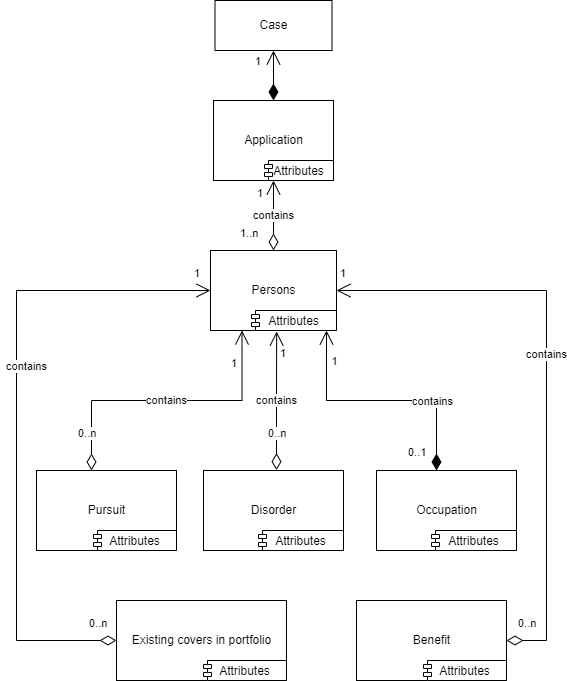
Each Case contains an application and an application contains a list of persons. Each person can be an assured person and/or a policy holder. Each of these persons can then contain an occupation and a list of pursuits, disorders, requestedBenefits and existingCoversInPortfolio.
Each of these elements has a number of possible attributes, like a person has an age, a gender, a name. The permitted attributes for each type are presented in the following chapter.
The elements and their attributes
The relations between the elements has already been presented in figure 1.
Figure 2 presents the attributes for each element type:
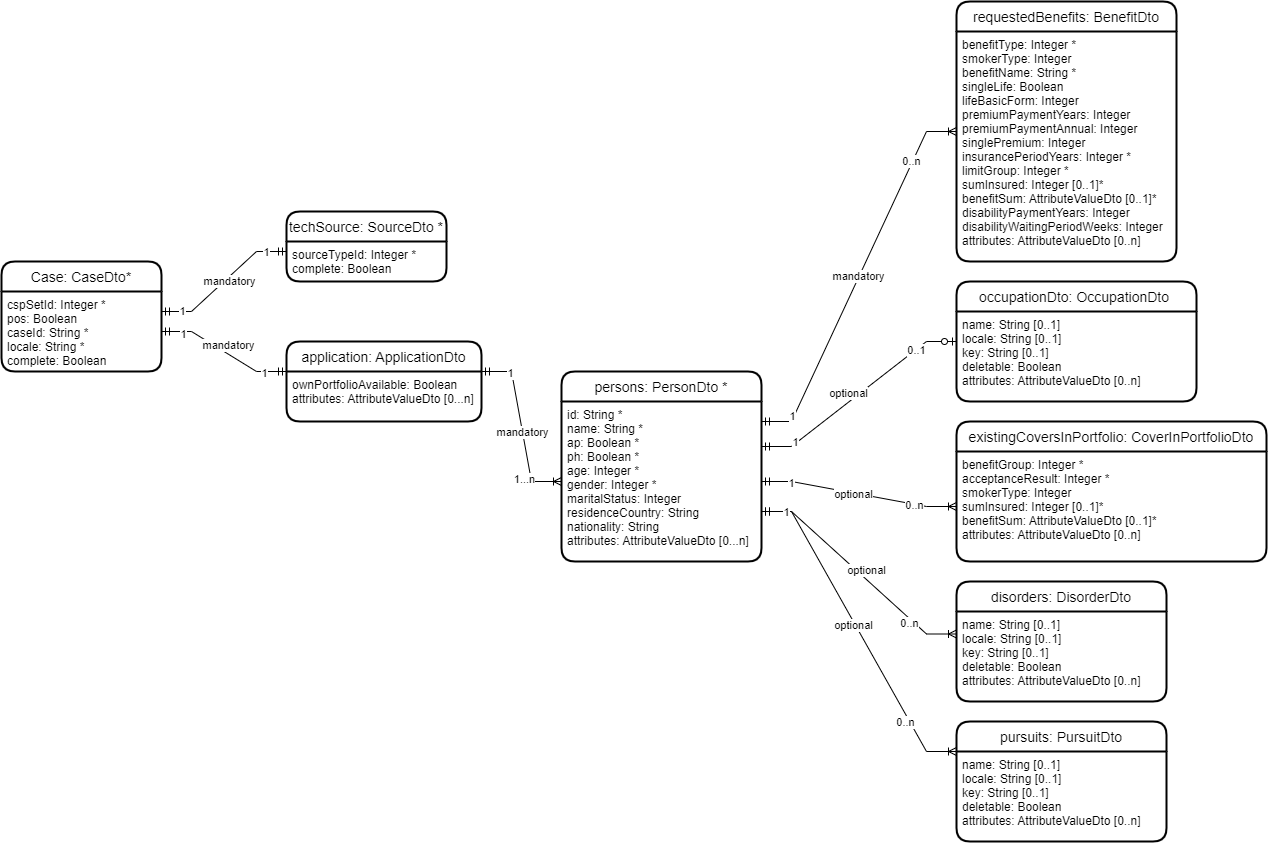
Note that the elements and their corresponding attributes marked with asterisk ("*") are mandatory and the attributes marked with
("[0..1]") are optional.
Moreover there are special logical rules for some of the components and attributes, e.g. whether one or several specific attributes must be provided given that another attribute is provided. These logical rules must be taken into account when providing the attributes for a specific element. Detailed information about these logical rules are provided in the corresponding sections. As a general rule we can state that when mandatory attributes of an element are not provided an error message will be returned.
Top element: Case
As can be seen in figure 2 the top element contains 7 proper attributes:
| attribute name | mandatory | default value | format | comment |
|---|---|---|---|---|
cspSetId |
Yes |
— |
integer |
ID of a CSP-Set |
pos |
No |
false |
false/true |
true: application will be a POS-Case; otherwise a HeadOffice case |
locale |
Yes |
— |
String |
2 or 4 Byte Locale: e.g. "en" or "nlBE" |
complete |
No |
false |
false/true |
sets the complete attribute in the Case-XML element: |
caseId |
Yes |
— |
String |
Name of the application to be created. Should be identical to the service call parameter caseId |
techSource |
Yes |
— |
see techSource-element |
|
application |
Yes |
— |
see application-element |
Example: A call with the following JSON results in a Case with Source and Application-CaseObject Elements
Request:
{
    "cspSetId": "1",
    "pos": true,
    "caseId": "Test0001",
    "locale": "en",
    "complete": true,
    "techSource": {
        "sourceTypeId": 100,
        "complete": true
    },
    "application": {
        "ownPortfolioAvailable": true,
        "persons": [{
          ...
        }],
        ...
}
Created XML Case
<Case Complete="No" CaseMode="POS" CSP="1" Id="Test0001" Locale="en">
	<Source Complete="Yes" TypeId="100" Id="1" RelatedCaseObject="0" TypeIdName="Tech Data" DefaultSource="Yes"/>
	<CaseObject Id="0" TypeId="25" TypeIdName="Application">
		<CaseAttribute TypeId="0" TypeIdName="application-ID">
			<CaseAttributeValue>
				<StringValue Value="Test0001"/>
			</CaseAttributeValue>
		</CaseAttribute>
		<CaseAttribute TypeId="38" TypeIdName="own_prev_assess_present (y/n)">
			<CaseAttributeValue>
				<DBRefValue Name="Yes" Id="1"/>
			</CaseAttributeValue>
		</CaseAttribute>
	</CaseObject>
techSource
The techSource element defines a technical SourceType. It will become a Source in the newly created Case. It contains 2 attributes:
| attribute name | mandatory | default value | format | comment |
|---|---|---|---|---|
complete |
No |
false |
false/true |
sets the complete attribute in the Source-XML element: |
sourceTypeId |
Yes |
— |
integer |
ID of the technical SourceType |
For an example see section Top element: Case
application
The application element defines the top CaseObject Application. It will become the Application-CaseObject in the newly created Case. It contains 2 or 3 attributes:
| attribute name | mandatory | default value | format | comment |
|---|---|---|---|---|
ownPortfolioAvailable |
No |
false |
false/true |
sets the CaseAttribute with typeID 38 in the Application-XML element: |
attributes |
No |
— |
see attributes-element. Allows the setting of further attributes of the Application-CaseObject. |
|
persons |
Yes |
— |
see persons-list-element. List has to contain at least one element. |
For an example see section Top element: Case
persons
The persons list contains one element per person involved in the application. Each person can be an assured person, a policy holder, or both. As such this mandatory list contains at least one element (one person).
Each element contains the following attributes:
| attribute name | mandatory | format | comment |
|---|---|---|---|
id |
Yes |
String |
ID of the current person - to be set by the insurance company |
name |
Yes |
String |
name of the current person |
ap |
Yes |
false/true |
true: current person is an assured person |
ph |
Yes |
false/true |
true: current person is a policy holder |
age |
Yes |
integer |
age in years of the current person |
gender |
Yes |
integer |
2: male |
maritalStatus |
No |
integer |
1: single |
residenceCountry |
No |
String |
Country-Code as defined in the rules (D for Germany) |
nationality |
No |
String |
Country-Code as defined in the rules (D for Germany) |
occupation |
No |
see pursuits, disorders, occupation-section. Allows the definition of an Occupation-CaseObject for the current person. |
|
requestedBenefits |
No |
see requestedBenefits-element. Allows the definition of benefits (in the Case-XML a triple Benefit/EventPayment/Payment) where the current person is the assured life. |
|
existingCoversInPortfolio |
No |
see existingCoversInPortfolio-element. Allows the definition of the AP’s existing benefits with the current insurance company via Pre-existing Insurance Portfolio-CaseObjects. |
|
pursuits |
No |
see pursuits, disorders, occupation-section. Allows the definition of Pursuit-CaseObjects for the current person. |
|
disorders |
No |
see pursuits, disorders, occupation-section. Allows the definition of Disorder-CaseObjects for the current person. |
|
attributes |
No |
see attributes-element. Allows the setting of further attributes of the AP- or PH-CaseObject. |
Example: the following persons list creates an AP-CaseObject
Request:
"persons": [{
       "id": "007",
       "name": "James Bond",
       "ap": true,
       "ph": false,
       "age": 35,
       "gender": 2,
       "maritalStatus": 2,
       "residenceCountry": "D",
       "nationality": "D"
}
…
]
Created AP-CaseObject
…
<CaseObject Id="23" TypeId="27" TypeIdName="AP">
	<CaseAttribute TypeId="307" TypeIdName="id_no (person)">
		<CaseAttributeValue>
			<StringValue Value="007"/>
		</CaseAttributeValue>
	</CaseAttribute>
	<CaseAttribute TypeId="44" TypeIdName="name">
		<CaseAttributeValue>
			<StringValue Value="James Bond"/>
		</CaseAttributeValue>
	</CaseAttribute>
	<CaseAttribute TypeId="21" TypeIdName="age at application">
		<CaseAttributeValue>
			<SingleValue UnitName="Year(s)" Value="35" Unit="16"/>
		</CaseAttributeValue>
	</CaseAttribute>
	<CaseAttribute TypeId="73" TypeIdName="sex">
		<CaseAttributeValue>
			<DBRefValue Name="Male" Id="2"/>
		</CaseAttributeValue>
	</CaseAttribute>
	<CaseAttribute TypeId="78" TypeIdName="marital_status">
		<CaseAttributeValue>
			<DBRefValue Name="Married" Id="2"/>
		</CaseAttributeValue>
	</CaseAttribute>
	<CaseAttribute TypeId="176" TypeIdName="residence (country)">
		<CaseAttributeValue>
			<DBRefValue Name="Germany" Key="D" Locale="en"/>
		</CaseAttributeValue>
	</CaseAttribute>
	<CaseAttribute TypeId="61" TypeIdName="nationality">
		<CaseAttributeValue>
			<DBRefValue Name="Germany" Key="D" Locale="en"/>
		</CaseAttributeValue>
	</CaseAttribute>
…
requestedBenefits
The requestedBenefits list contains one element per benefit/cover the current person is applying for. Each benefit will become a triple Benefit/EventPayment/Payment in the Case-XML. Each Assured Person (AP) will have at least one element (one benefit) in this list.
Each element contains the following attributes:
| attribute name | mandatory | default value | format | comment |
|---|---|---|---|---|
benefitType |
Yes |
— |
integer |
ID of benefit as defined in the rules |
smokerType |
No |
— |
integer |
ID of a smoker-type as defined in the rules. Will be defined in the CaseAttribute with ID 94 |
benefitName |
Yes |
— |
String |
Name of the benefit. Will be defined in CaseAttribute with ID 108 |
singleLife |
No |
— |
false/true |
sets the CaseAttribute with ID 355. true becomes 3, false becomes 1 |
lifeBasicForm |
No |
— |
integer |
Type of life-benefit. Will be defined in CaseAttribute with ID 271 |
premiumPaymentYears |
No |
— |
integer |
Years that the premium will be paid. Will be defined in CaseAttribute with ID 41 |
premiumPaymentAnnual |
No |
1 [currency] |
integer |
Amount paid per year as a premium. Will be defined in CaseAttribute with ID 354 |
singlePremium |
No |
— |
integer |
Amount paid as a single premium. Will be defined in CaseAttribute with ID 15 |
insurancePeriodYears |
Yes |
— |
integer |
Years that the insurance will be valid. Will be defined in CaseAttribute with ID 121 |
limitGroup |
Yes |
— |
integer |
ID of a limit-group/examination-group as defined in the rules. Will be defined in CaseAttribute with ID 333 |
benefitSum |
No |
— |
integer |
Regular amount paid per month. Will be defined in CaseAttribute with ID 222 |
sumInsured |
No |
— |
integer |
Sum insured / lumpsum. Will be defined in CaseAttribute with ID 103 |
disabilityPaymentYears |
No |
— |
integer |
Duration of the disability payment in years. Will be defined in CaseAttribute with ID 105 |
disabilityWaitingPeriodWeeks |
No |
— |
integer |
For disability payments the waiting period in weeks. Will be defined in CaseAttribute with ID 316 |
attributes |
No |
— |
see attributes-element. Allows the setting of further attributes of the Benefit- or EventPayment- or Payment-elements. |
Special rules that apply to the conversion of benefits
-
one of the fields benefitSum or sumInsured must be stated with a value > 0. The service will check if this value corresponds to the benefit-type.
The one CaseAttribute will be created with the passed sum, while the other is created with a sum of 0. -
the created XML-element EventPayment will set its age-attributes (CaseAttributes with IDs 37 and 292) with the value of age from the person.
-
the attributes singleLife and lifeBasicForm are required when it is a life-benefit.
-
the attributes disabilityPaymentYears and disabilityWaitingPeriodWeeks are required for disability benefits.
-
an attribute found in the attributes section will be transferred to the element Benefit, EventPayment or Payment, depending on where it makes sense.
Example: Creating a Life benefit
Details
Request:
"requestedBenefits": [{
      "benefitType": 0,
      "smokerType": 2,
      "benefitName": "Vita",
      "singleLife": false,
      "lifeBasicForm": 3,
      "premiumPaymentYears": 10,
      "premiumPaymentAnnual": 5000,
      "singlePremium": 1500,
      "insurancePeriodYears": 10,
      "sumInsured": 10000,
      "limitGroup": 1001,
      "disabilityPaymentYears": 10,
      "disabilityWaitingPeriodWeeks": 4,
      "attributes": {
         "12": {
             "value": "0.0",
             "unit": 12
         }
      }
  }]
Created Benefit, Payment and EventPayment Elements as a result of provided requestedBenefits
<Benefit Id="78" TypeId="0" TypeIdName="Benefit">
	<CaseAttribute TypeId="355" TypeIdName="life policy-type">
		<CaseAttributeValue>
			<DBRefValue Name="Joint Life 1.Death" Id="1"/>
		</CaseAttributeValue>
	</CaseAttribute>
	<CaseAttribute TypeId="108" TypeIdName="name (benefit)">
		<CaseAttributeValue>
			<StringValue Value="Vita"/>
		</CaseAttributeValue>
	</CaseAttribute>
	<CaseAttribute TypeId="94" TypeIdName="smoker Type">
		<CaseAttributeValue>
			<DBRefValue Name="General Benefit" Id="2"/>
		</CaseAttributeValue>
	</CaseAttribute>
	<CaseAttribute TypeId="271" TypeIdName="life basic_form">
		<CaseAttributeValue>
			<DBRefValue Name="Endowment" Id="3"/>
		</CaseAttributeValue>
	</CaseAttribute>
	<CaseAttribute TypeId="11" TypeIdName="benefit-type">
		<CaseAttributeValue>
			<DBRefValue Name="Life" Id="0"/>
		</CaseAttributeValue>
	</CaseAttribute>
</Benefit>
<Payment Id="4" TypeId="0" TypeIdName="Payment of Contribution">
	<CaseAttribute TypeId="354" TypeIdName="annual_premium">
		<CaseAttributeValue>
			<SingleValue UnitName="£/Year" Value="5000" Unit="1"/>
		</CaseAttributeValue>
	</CaseAttribute>
	<CaseAttribute TypeId="15" TypeIdName="single_premium">
		<CaseAttributeValue>
			<SingleValue UnitName="£" Value="1500" Unit="14"/>
		</CaseAttributeValue>
	</CaseAttribute>
	<CaseAttribute TypeId="41" TypeIdName="premium_payment_period">
		<CaseAttributeValue>
			<SingleValue UnitName="Month(s)" Value="10" Unit="5"/>
		</CaseAttributeValue>
	</CaseAttribute>
</Payment>
<EventPayment Id="21" TypeId="1" TypeIdName="Insurance event payment">
	<CaseAttribute TypeId="222" TypeIdName="benefit sum">
		<CaseAttributeValue>
			<SingleValue UnitName="£/Year" Value="0" Unit="1"/>
		</CaseAttributeValue>
	</CaseAttribute>
	<CaseAttribute TypeId="103" TypeIdName="annuity_sum (sum insured)">
		<CaseAttributeValue>
			<SingleValue UnitName="£/Year" Value="10000" Unit="1"/>
		</CaseAttributeValue>
	</CaseAttribute>
	<CaseAttribute TypeId="105" TypeIdName="benefit_payment_period">
		<CaseAttributeValue>
			<SingleValue UnitName="Month(s)" Value="10" Unit="5"/>
		</CaseAttributeValue>
	</CaseAttribute>
	<CaseAttribute TypeId="316" TypeIdName="waiting_period">
		<CaseAttributeValue>
			<SingleValue UnitName="Month(s)" Value="4" Unit="5"/>
		</CaseAttributeValue>
	</CaseAttribute>
	<CaseAttribute TypeId="333" TypeIdName="examination_group">
		<CaseAttributeValue>
			<DBRefValue Name="NO-Limit-group" Id="1001"/>
		</CaseAttributeValue>
	</CaseAttribute>
	<CaseAttribute TypeId="121" TypeIdName="insurance_period">
		<CaseAttributeValue>
			<SingleValue UnitName="Month(s)" Value="10" Unit="5"/>
		</CaseAttributeValue>
	</CaseAttribute>
	<CaseAttribute TypeId="37" TypeIdName="age at entry (examination limits)">
		<CaseAttributeValue>
			<SingleValue UnitName="Year(s)" Value="52" Unit="16"/>
		</CaseAttributeValue>
	</CaseAttribute>
	<CaseAttribute TypeId="292" TypeIdName="age_for_assessment">
		<CaseAttributeValue>
			<SingleValue UnitName="Year(s)" Value="52" Unit="16"/>
		</CaseAttributeValue>
	</CaseAttribute>
	<CaseAttribute TypeId="161" TypeIdName="Eventtype">
		<CaseAttributeValue>
			<DBRefValue Name="Death" Id="2"/>
		</CaseAttributeValue>
	</CaseAttribute>
	<CaseAttribute TypeId="12" TypeIdName="included_loading percent">
		<CaseAttributeValue>
			<SingleValue UnitName="%" Value="0.0" Unit="12"/>
		</CaseAttributeValue>
	</CaseAttribute>
</EventPayment>
pursuits, disorders, occupation
The XML-CaseObjects of type Occupation, Disorder and Pursuit have a similar structure in the XML, and are therefore handled together in this chapter. The main difference is that a person can have max 1 occupation, while they can have any number of disorders and pursuits. Thus pursuits and disorders are lists of elements, while occupation is exactly one of the following elements.
Each element has the following attributes:
| attribute name | mandatory | default value | format | comment |
|---|---|---|---|---|
name |
No |
— |
String |
Name of the occupation / disorder / pursuit |
key |
No |
— |
String |
Key of the occupation / disorder / pursuit in the rules |
locale |
No |
— |
String |
2 or 4 Byte Locale: e.g. "en" or "nlBE" |
deletable |
No |
true |
false/true |
sets the attribute deletable of the CaseObject |
attributes |
No |
— |
see attributes-element. Allows the setting of further attributes of the Benefit- or EventPayment- or Payment-elements. |
Special rules that apply to the conversion of occupations, disorders and pursuits
All 3 attributes name, key and locale are optional, but the following applies
-
either key or name must exist.
-
when key and name exist, they must refer to the same element in the rules
-
when there is no key, name and locale must exist
Example: A pursuits list with one pursuit
Request:
"pursuits": [{
     "locale": "en",
     "key": "0250",
     "deletable": false
}]
Created Pursuit-CaseObject
<CaseObject Id="14" TypeId="26" TypeIdName="Pursuit" NotDeletable="true">
	<CaseAttribute TypeId="163" TypeIdName="code (pursuit)">
		<CaseAttributeValue>
			<DBRefValue Name="Cave diving" Key="0250" Locale="en"/>
		</CaseAttributeValue>
	</CaseAttribute>
</CaseObject>
Example: An occupation element
Request:
"occupation": {
     "key": "252103",
     "deletable": true
}
Created Occupation-CaseObject
<CaseObject Id="30" TypeId="12" TypeIdName="Occupation" NotDeletable="false">
	<CaseAttribute TypeId="209" TypeIdName="occupation_code">
		<CaseAttributeValue>
			<DBRefValue Name="Actuary" Key="252103" Locale="en"/>
		</CaseAttributeValue>
	</CaseAttribute>
</CaseObject>
Example: A disorders list with one disorder
Request:
"disorders": [{
     "name": "Diabetes",
     "locale": "en",
     "key": "E14.9-005"
}]
Created Disorder-CaseObject
<CaseObject Id="36" TypeId="8" TypeIdName="Disorder" NotDeletable="true">
	<CaseAttribute TypeId="115" TypeIdName="code (disorder)">
		<CaseAttributeValue>
			<DBRefValue Name="Diabetes" Key="E14.9-005" Locale="en"/>
		</CaseAttributeValue>
	</CaseAttribute>
</CaseObject>
existingCoversInPortfolio
The existingCoversInPortfolio-list refers to the existing covers the person has with the current company.
| There is a different behaviour for German or international Compass data. Differences will be marked by the following symbol !. |
! Every element of this list will become a Pre-existing Insurance Portfolio-CaseObject with ID 52 in the Case-XML for an international system.
! Every element of this list will become a Vorversicherungen Bestand-CaseObject with ID 14 in the Case-XML for a German system.
Each element has the following attributes:
| attribute name | mandatory | default value | format | comment |
|---|---|---|---|---|
benefitGroup |
Yes |
— |
integer |
! For an international system the ID of a benefit-group, as defined in the data. Sets the CaseAttribute with ID 770. |
acceptanceResult |
Yes |
— |
integer |
ID of an acceptance-result, as defined in the rules. Sets the CaseAttribute with Type-ID 1. |
smokerType |
No |
— |
integer |
ID of a smoker-type as defined in the rules. Will be defined in the CaseAttribute with ID 94 |
benefitSum |
No |
— |
attribute-value |
Sum to be paid at regular times. Sets two CaseAttributes with IDs 65 and 132. It is a wrapper of an attribute (see attributes) which contains two attributes: value and unit. |
sumInsured |
No |
— |
integer |
Sum insured / lumpsum. Sets two CaseAttributes with IDs 109 and 150. |
attributes |
No |
— |
see attributes-element. Allows the setting of further attributes of the Pre-existing Insurance Portfolio-elements. |
There is a special validation logic regarding the attributes benefitSum and sumInsured: they are mutually exclusive, i.e. exactly one of them is to be provided. The CaseAttributes for the other one will be set to 0.
Example: An existingCoversInPortfolio-list with one element
Details
Request:
"existingCoversInPortfolio": [{
    "benefitGroup": 2,
    "acceptanceResult": 1,
    "smokerType": 2,
    "benefitSum": {
        "value": 1000,
        "unit": 3
    }
}]
...
Created Pre-existing Insurance Portfolio Element
<CaseObject Id="68" TypeId="52" TypeIdName="Pre-existing Insurance Portfolio">
	<CaseAttribute TypeId="94" TypeIdName="smoker Type">
		<CaseAttributeValue>
			<DBRefValue Name="General Benefit" Id="2"/>
		</CaseAttributeValue>
	</CaseAttribute>
	<CaseAttribute TypeId="1" TypeIdName="acceptance_result (Own pre-existing insurances)">
		<CaseAttributeValue>
			<DBRefValue Name="incomplete" Id="1"/>
		</CaseAttributeValue>
	</CaseAttribute>
	<CaseAttribute TypeId="770" TypeIdName="benefit group">
		<CaseAttributeValue>
			<DBRefValue Name="LTC" Id="2"/>
		</CaseAttributeValue>
	</CaseAttribute>
	<CaseAttribute TypeId="150" TypeIdName="sum_assured_f (financial)">
		<CaseAttributeValue>
			<SingleValue UnitName="£" Value="0" Unit="14"/>
		</CaseAttributeValue>
	</CaseAttribute>
    <CaseAttribute TypeId="109" TypeIdName="sum_assured_e (examination Limits)">
		<CaseAttributeValue>
			<SingleValue UnitName="£" Value="0" Unit="14"/>
		</CaseAttributeValue>
	</CaseAttribute>
		<CaseAttribute TypeId="65" TypeIdName="benefit sum financial">
			<CaseAttributeValue>
				<SingleValue UnitName="£/Month" Value="1000" Unit="3"/>
			</CaseAttributeValue>
		</CaseAttribute>
		<CaseAttribute TypeId="132" TypeIdName="benefit sum examination limits">
			<CaseAttributeValue>
				<SingleValue UnitName="£/Month" Value="1000" Unit="3"/>
			</CaseAttributeValue>
		</CaseAttribute>
</CaseObject>
attributes
Via attributes it is possible to set values for additional CaseAttributes of the current object.
attributes is a map of (key,value)-pairs, where the key is the ID of the CaseAttribute, and the value is a structure that allows to define a value for the CaseAttribute.
For each CaseAttribute to be set attributes will contain one element.
Each of these elements has the following attributes:
| attribute name | mandatory | format | comment |
|---|---|---|---|
id |
No |
integer |
ID of a database entry |
value |
No |
String |
value which will be converted depending on the type of CaseAttribute (date, numeric value, text) |
unit |
No |
integer |
ID of a unit, as defined in the rules. Only to be used when the CaseAttribute allows numeric values. |
Example: Sets the occupational status (TypeID 127) and the income (TypeID 135) for an occupation
Details
Request:
...
"occupation": {
     "key": "252103",
     "deletable": true,
     "attributes": {
        "127": {
            "id": 11
        },
        "135": {
            "value": 45000,
            "unit": 1
        }
     }
},
...
Created Occupation Element with provided attributes
<CaseObject Id="30" TypeId="12" TypeIdName="Occupation" NotDeletable="false">
	<CaseAttribute TypeId="209" TypeIdName="occupation_code">
		<CaseAttributeValue>
			<DBRefValue Name="Actuary" Key="252103" Locale="en"/>
		</CaseAttributeValue>
	</CaseAttribute>
	<CaseAttribute TypeId="135" TypeIdName="annual income current year">
		<CaseAttributeValue>
			<SingleValue UnitName="£/Year" Value="45000" Unit="1"/>
		</CaseAttributeValue>
	</CaseAttribute>
	<CaseAttribute TypeId="127" TypeIdName="occupational_status">
		<CaseAttributeValue>
			<DBRefValue Name="Employee" Id="11"/>
		</CaseAttributeValue>
	</CaseAttribute>
</CaseObject>
Not all CaseAttributes can be set via this mechanism: it is restricted to CaseAttributes whose data type allows
-
StringValues (text)
-
SingleValues (numerical values)
-
DBRefValues (reference to a database entry in the rules)
-
DateValues (a date)
For these different value types, different sets of attributes are required. The possible attribute sets are;
-
value (mandatory and numerical)
-
unit (optional)
-
id (mandatory)
-
value (mandatory; see below for restrictions to DateValues)
DateValues
Some CaseAttributes expect a date. The date can miss the day, or it can miss month and day. So the allowed formats are:
-
Years (YYYY)
-
Years and Months (YYYY.MM)
-
Years, Months and Days (YYYY.MM.DD)
Be aware that the delimiter has to be a dot (".").
Example: Setting a date (day, month, year) for a disorder
Request:
"disorders": [
    {
        "name": "Asthma",
        "locale": "en",
        "key": "J45.9-001",
        "deletable": false,
        "attributes": {
            "100001905":{
                "value":"2018.07.30"
            }
        }
    }
]
Created Disorder-CaseObject with the provided DateValue
 <CaseObject Id="81" TypeId="8" TypeIdName="Disorder" NotDeletable="true">
     <CaseAttribute TypeId="115" TypeIdName="code (disorder)">
         <CaseAttributeValue>
             <DBRefValue Name="Asthma" Key="J45.9-001" Locale="en"/>
         </CaseAttributeValue>
     </CaseAttribute>
     <CaseAttribute TypeId="100001905" TypeIdName="Mental medication therapy - start">
         <CaseAttributeValue>
             <DateValue Year="2018" Month="07" Day="30"/>
         </CaseAttributeValue>
     </CaseAttribute>
 </CaseObject>
Example: Setting a year for a disorder
Request:
"disorders": [
     {
         "name": "Asthma",
         "locale": "en",
         "key": "J45.9-001",
         "deletable": false,
         "attributes": {
             "100001905":{
                 "value":"2018"
             }
         }
     }
]
Created Disorder-CaseObject with the year only
<CaseObject Id="44" TypeId="8" TypeIdName="Disorder" NotDeletable="true">
    <CaseAttribute TypeId="115" TypeIdName="code (disorder)">
        <CaseAttributeValue>
            <DBRefValue Name="Asthma" Key="J45.9-001" Locale="en"/>
        </CaseAttributeValue>
    </CaseAttribute>
    <CaseAttribute TypeId="100001905" TypeIdName="Mental medication therapy - start">
        <CaseAttributeValue>
            <DateValue Year="2018"/>
        </CaseAttributeValue>
    </CaseAttribute>
</CaseObject>
Output Fields
When the HTTP status code is 200, the service returns a CompassResponse [1] element. Other HTTP status codes are not described here (typically syntactically incorrect JSON body, or missing or misspelled input parameters). Upon sending an error-free request to the interface, an XML CaseData is created based on the data provided in the request and is persisted into the target database successfully. The response element returned by the interface has the following attributes.
path |
path of the invoked service[2], it will be /[ |
|---|---|
status / statusText |
a integer-text pair with the following 2 value-pairs: |
errorDescriptions |
A list of errors. Each error contains an error code and the corresponding error message describing the error occurred during the process. When no errors occurred an empty list is returned. |
jsonContent |
contains the json formatted content of the response, will always be null |
byteContent |
contains the byte-formatted content of the response, will always be null |
textContent |
contains the textual content of the response, will always be null |
Example
Empty persons list. This leads to an error
Request:
{
    "cspSetId": "1",
    "pos": true,
    "caseId": "Test0001",
    "locale": "en",
    "complete": false,
    "techSource": {
        "sourceTypeId": 100,
        "complete": true
    },
    "application": {
        "ownPortfolioAvailable": true,
        "persons": [

        ]
    }
}
Response:
HTTP-Status: 200 OK
{
    "path": "/compass/createCaseInDB",
    "status": 3,
    "statusText": "FATAL ERROR",
    "errorDescriptions": [
        {
            "errorCode": 542,
            "errorMessage": "The persons list has to contain at least one element."
        }
    ],
    "jsonContent": null,
    "byteContent": null,
    "textContent": null
}
Error handling
Typical Error Scenarios
In the following section typical errors and the cause for the errors are listed. Each possible error scenario is provided with an example input JSON data along with the corresponding response, which contains the corresponding errorCode(s) and errorMessage(s).
View Error Scenarios in Detail
Standard Elements
Non matching CaseIDs
The caseId’s which are found on the HTTP Request and in JSON must match with each other, otherwise an error occurs. The CreateCaseInDB Service has a built in validation logic which checks to see whether these caseIds match with each other. This must be taken into account when creating a request, otherwise it becomes semantically ambiguous which case is to be processed.
Example: An invalid input JSON with non matching CaseId
Request:
http://localhost:8086/CompassService/createCaseInDB?caseId=Test0002&subId=TEST
{
    "cspSetId": "1",
    "pos": true,
    "caseId": "Test0001",
    "locale": "en",
    "complete": false,
    "techSource": {
        "sourceTypeId": 100,
        "complete": true
    }
    ...
}
Response:
Status: 200 OK
{
    "path": "/createCaseInDB",
    "status": 3,
    "statusText": "FATAL ERROR",
    "errorDescriptions": [
        {
            "errorCode": 570,
            "errorMessage": "InvalidArgumentException: The provided caseIds in URL: Test0002 and in input JSON: Test0001 are not identical. Please provide identical caseIds both in URL and in input JSON."
        }
    ],
    "jsonContent": null,
    "byteContent": null,
    "textContent": null
}
CaseId not provided
In the following example, caseId was not provided in the input data.
Example: An invalid input JSON with no caseId
Request:
{
    "cspSetId": "1",
    "pos": true,
    "locale": "en",
    "complete": true,
    "techSource": {
        "sourceTypeId": 100,
        "complete": true
    },
    "application": {
        "ownPortfolioAvailable": true,
        ...
    }
}
Response:
Status: 200 OK
{
    "path": "/compass/createCaseInDB",
    "status": 3,
    "statusText": "FATAL ERROR",
    "errorDescriptions": [
        {
            "errorCode": 531,
            "errorMessage": "Empty or no caseId provided. Please provide a caseId."
        }
    ],
    "jsonContent": null,
    "byteContent": null,
    "textContent": null
}
No techSource provided
If no techSource is provided, then an error will occur.
Example: An invalid input JSON with no techSource
Request:
{
    "cspSetId": "1",
    "pos": true,
    "caseId": "Test001",
    "locale": "en",
    "complete": false,
    "techSource": {

    },
}
Response:
Status: 200 OK
{
    "path": "/compass/createCaseInDB",
    "status": 3,
    "statusText": "FATAL ERROR",
    "errorDescriptions": [
        {
            "errorCode": 537,
            "errorMessage": "No techSource provided. Please check your input data."
        }
    ],
    "jsonContent": null,
    "byteContent": null,
    "textContent": null
}
Another possible scenario is related to the attributes of the techSource. techSource consists of two attributes: sourceTypeId (type Integer) and complete (type Boolean). sourceTypeId is required and it must be provided, otherwise this techSource will be considered as empty and an error will occur, however complete is optional and has a default value false.
Example: An invalid input JSON with an invalid techSource with no sourceTypeId
Request:
{
    "cspSetId": "1",
    "pos": true,
    "caseId": "Test001",
    "locale": "en",
    "complete": false,
    "techSource": {
        "complete": true
    },
}
Response:
Status: 200 OK
{
    "path": "/compass/createCaseInDB",
    "status": 3,
    "statusText": "FATAL ERROR",
    "errorDescriptions": [
        {
            "errorCode": 537,
            "errorMessage": "No techSource provided. Please check your input data."
        }
    ],
    "jsonContent": null,
    "byteContent": null,
    "textContent": null
}
Invalid cspSetId provided
The cspSetId will be checked to see if it is related to a CSPSet from the database. If the provided value is not valid and thus does not return a valid CSPSet object from the database, then an error will occur.
Example: An invalid input JSON with an invalid cspSetId
Request:
{
    "cspSetId": "105",
    "caseId": "Test001",
    "locale": "en",
    "techSource": {
        "sourceTypeId": 100,
        "complete": true
    },
    ...
}
Response:
Status: 200 OK
{
    "path": "/compass/createCaseInDB",
    "status": 3,
    "statusText": "FATAL ERROR",
    "errorDescriptions": [
        {
            "errorCode": 540,
            "errorMessage": "Invalid cspSetId provided. Please check your input data."
        }
    ],
    "jsonContent": null,
    "byteContent": null,
    "textContent": null
}
Unrecognized field provided
It is important to note that the key-value pairs provided in the JSON data are mapped to data transfer objects at runtime. As these data transfer objects have the attribute names identical to the keys in the JSON data, a bad request will occur if an unknown attribute is provided, since this webservice fails to map this attribute to an existing transfer object’s attribute.
In this example, the attribute blabber is an unknown attribute and it will lead to a bad request. An error warning won’t be provided, however a 400 Bad Request will be returned and the thrown error will be logged. The logged error can be found in the CompassService.log file.
Example: An invalid input JSON with an invalid key-value pair
Request:
{
    "occupation": {
        "key": "252103",
        "deletable": false,
        "blabber": "blabla",
        "attributes": {
            "127": {
                "id": 11
            },
            "135": {
                "value": 45000,
                "unit": 1
            }
        }
    }
}
Response:
Status: 400 Bad Request
[DEBUG] o.s.w.s.m.m.a.ExceptionHandlerExceptionResolver:145 -

Resolved

[org.springframework.http.converter.HttpMessageNotReadableException: I/O error while reading input message; nested exception is com.fasterxml.jackson.databind.exc.UnrecognizedPropertyException:

Unrecognized field "blabber"
(class com.cr.compass.rest.dto.service.casejson.OccupationDto), not marked as ignorable (5 known properties: "locale", "name", "deletable", "attributes", "key"])
Persons
Required attribute missing for persons
There is a general rule of thumb applied to every section here. There are two types of attributes; required attributes and optional attributes. If one of the required attributes is missing, then an error will occur, however the optional ones can be omitted and no errors will occur and also no CaseAttributes will be generated for them in the output XML file. It is also important to note that the provided values for attributes, including the optional ones, will be checked to see if they are logical.
In the following request example, name is missing. Since name is one of the required attributes, an error occurred.
Example: An invalid persons element without a required attribute
Request:
{
      "id": "123",
      "ap": true,
      "ph": false,
      "age": 52,
      "gender": 2,
      "maritalStatus": 2,
      "residenceCountry": "D",
      "nationality": "D",
}
Response:
Status: 200 OK
{
    "path": "/compass/createCaseInDB",
    "status": 3,
    "statusText": "FATAL ERROR",
    "errorDescriptions": [
        {
            "errorCode": 512,
            "errorMessage": "Invalid or missing value for attribute(s): name. Please check your input data. Person Name: null, ID: 123."
        }
    ],
    "jsonContent": null,
    "byteContent": null,
    "textContent": null
}
Invalid attribute value provided for persons
If an invalid value is provided for an attribute, an error occurs. In this example, the value of DXB is provided as the residenceCountry and this values matches with none of the available country codes worldwide, thus an error will occur.
Example: An invalid persons element with an invalid attribute value
Request:
{
     "id": "123",
     "name": "Klaus Mustermann",
     "ap": true,
     "ph": false,
     "age": 35,
     "gender": 2,
     "maritalStatus": 2,
     "residenceCountry": "DXB",
     "nationality": "D"
}
Response:
Status: 200 OK
{
    "path": "/compass/createCaseInDB",
    "status": 3,
    "statusText": "FATAL ERROR",
    "errorDescriptions": [
        {
            "errorCode": 512,
            "errorMessage": "Invalid or missing value for attribute(s): residenceCountry. Person Name: Klaus Mustermann, ID: 123. Please check your input data."
        }
    ],
    "jsonContent": null,
    "byteContent": null,
    "textContent": null
}
In the following example, the provided value for maritalStatus, 23, does not return a sensible value from the corresponding database and thus it leads to an error.
Example: An invalid persons element with an invalid attribute value
Request:
{
     "id": "123",
     "name": "Klaus Mustermann",
     "ap": true,
     "ph": false,
     "age": 35,
     "gender": 2,
     "maritalStatus": 23,
     "residenceCountry": "D",
     "nationality": "D"
}
Response:
Status: 200 OK
{
    "path": "/compass/createCaseInDB",
    "status": 3,
    "statusText": "FATAL ERROR",
    "errorDescriptions": [
        {
            "errorCode": 512,
            "errorMessage": "Invalid or missing value for attribute(s): maritalStatus. Person Name: Klaus Mustermann, ID: 123. Please check your input data."
        }
    ],
    "jsonContent": null,
    "byteContent": null,
    "textContent": null
}
Out of range value provided for persons
The service checks if the provided values for some of the attributes are within the logical ranges, this not only applies to the Persons but also to the other elements as well. For example the attribute age is checked to see if it fulfills this logical criteria. In the following example Klaus Mustermann has an age of 160, in this case an error will be thrown.
Example: An invalid persons element with an invalid value that is out of range
Request:
"persons": [{
       "id": "123",
       "name": "Klaus Mustermann",
       "ap": true,
       "ph": false,
       "age": 160,
       "gender": 2,
       "maritalStatus": 5,
       "nationality": "D",
       "residenceCountry": "E",
        ...
}]
Response:
Status: 200 OK
{
    "path": "/compass/createCaseInDB",
    "status": 3,
    "statusText": "FATAL ERROR",
    "errorDescriptions": [
        {
            "errorCode": 543,
            "errorMessage": "The provided value for the attribute is out of the valid range. Attribute: age. Person Name: Klaus Mustermann, ID: 123, given value: 160. Please check your input data."
        }
    ],
    "jsonContent": null,
    "byteContent": null,
    "textContent": null
}
Empty person provided
If an empty person is provided, then an error will occur.
Example: An invalid request with an empty persons list
Request:
{
    "cspSetId": "1",
    "pos": true,
    "caseId": "Test001",
    "locale": "en",
    "complete": false,
    "techSource": {
        "sourceTypeId": 100,
        "complete": true
    },
    "application": {
        "ownPortfolioAvailable": true,
        "persons": [
            { }
...
}
Response:
Status: 200 OK
{
    "path": "/compass/createCaseInDB",
    "status": 3,
    "statusText": "FATAL ERROR",
    "errorDescriptions": [
        {
            "errorCode": 530,
            "errorMessage": "Input contains empty person(s). Please check your input data."
        }
    ],
    "jsonContent": null,
    "byteContent": null,
    "textContent": null
}
No Assured Person No Policy Holder provided
If a provided person is neither an assured person or a policy holder, then an error will occur.
Example: An invalid persons element with no assured person and/or policy holder
Request:
{
       "id": "123",
       "name": "Klaus Mustermann",
       "ap": false,
       "ph": false,
       "age": 35,
       "gender": 2,
        ...
}
Response:
Status: 200 OK
{
    "path": "/compass/createCaseInDB",
    "status": 3,
    "statusText": "FATAL ERROR",
    "errorDescriptions": [
        {
            "errorCode": 516,
            "errorMessage": "The person: Klaus Mustermann is invalid. The person must be either at least Assured Person or Policy Holder or both in order to be added to the CaseData XML Interface."
        }
    ],
    "jsonContent": null,
    "byteContent": null,
    "textContent": null
}
No Assured Persons provided
At least one of the provided persons in the input JSON data, must be an Assured Person otherwise an error will occur.
Example: An invalid request with no assured persons
Request:
"persons": [{
    "id": "123",
    "name": "Klaus Mustermann",
    "ap": false,
    "ph": true,
...
            {
    "id": "456",
    "name": "Eddy Mustermann",
    "ap": false,
    "ph": true,
...
Response:
Status: 200 OK
{
    "path": "/compass/createCaseInDB",
    "status": 3,
    "statusText": "FATAL ERROR",
    "errorDescriptions": [
        {
            "errorCode": 523,
            "errorMessage": "The provided persons are invalid. There must be at least one Assured Person in the input data."
        }
    ],
    "jsonContent": null,
    "byteContent": null,
    "textContent": null
}
RequestedBenefits
Missing requestedBenefits
If the requestedBenefits are missing, an error will occur.
Example: An invalid request with no requestedBenefits elements
Request:
...
"requestedBenefits": [

],
...
Response:
Status: 200 OK
{
    "path": "/compass/createCaseInDB",
    "status": 3,
    "statusText": "FATAL ERROR",
    "errorDescriptions": [
        {
            "errorCode": 518,
            "errorMessage": "The element: requestedBenefits for Person: Klaus Mustermann is missing in the provided JSON for the person. Please check your input data."
        }
    ],
    "jsonContent": null,
    "byteContent": null,
    "textContent": null
}
Incompatible benefitType provided
The benefitType determines whether the attributes singleLife and lifeBasicForm must be existing in the requestedBenefits. If an incompatible benefit type is provided and one or both of the mentioned attributes do not exist in requestedBenefits, then an error will occur.
Example: An invalid requestedBenefits element with invalid benefitType
Request:
"requestedBenefits": [
    {
       "benefitType": 0,
       "smokerType": 2,
       "benefitName": "Klaus Benefits",
       "singleLife": "false",
       "premiumPaymentYears": 10,
       "premiumPaymentAnnual": 5000,
       "singlePremium": 0,
       "insurancePeriodYears": 10,
       "sumInsured": 1000,
       "limitGroup": 1001,
       "disabilityPaymentYears": 10,
       "disabilityWaitingPeriodWeeks": 4,
    }
],
...
Response:
Status: 200 OK
{
    "path": "/compass/createCaseInDB",
    "status": 3,
    "statusText": "FATAL ERROR",
    "errorDescriptions": [
        {
            "errorCode": 512,
            "errorMessage": "Inconsistent JSON Structure. For the provided benefitType: 0, both attributes singleLife and lifeBasicForm must be existing in the requestedBenefits: Klaus Benefits."
        }
    ],
    "jsonContent": null,
    "byteContent": null,
    "textContent": null
}
Empty requestedBenefit provided
If an empty requestedBenefits is provided in the JSON data, then an error will occur.
Example: An invalid request with an empty requestedBenefit
Request:
...
     "requestedBenefits": [
         {   },
         {
             "benefitType": 0,
             "smokerType": 2,
             "benefitName": "Klaus Benefits",
             "singleLife": "true",
             "lifeBasicForm": 3,
             "premiumPaymentYears": 10,
             "premiumPaymentAnnual": 5000,
             "singlePremium": 0,
             "insurancePeriodYears": 10,
             "sumInsured": 0,
             "limitGroup": 1001,
             "disabilityPaymentYears": 10,
             "disabilityWaitingPeriodWeeks": 4,
             "attributes": {
                 "12": {
                     "value": "0.0",
                     "unit": 12
                 },
                 "77": {
                     "value": "0.0",
                     "unit": 9
                 }
             }
         }
     ]
...
Response:
Status: 200 OK
{
    "path": "/compass/createCaseInDB",
    "status": 3,
    "statusText": "FATAL ERROR",
    "errorDescriptions": [
        {
            "errorCode": 532,
            "errorMessage": "Empty RequestedBenefit provided. Please check your input data."
        }
    ],
    "jsonContent": null,
    "byteContent": null,
    "textContent": null
}
Required attribute missing for requestedBenefits
If a required attribute is missing, an error will occur.
Example: An invalid requestedBenefits element without a required attribute
Request:
"requestedBenefits": [{
      "benefitType": 0,
      "smokerType": 2,
      "singleLife": false,
      "lifeBasicForm": 3,
      "premiumPaymentYears": 10,
      "premiumPaymentAnnual": 5000,
      "singlePremium": 1500,
      "insurancePeriodYears": 10,
      "sumInsured": 10000,
      "limitGroup": 1001,
      "disabilityPaymentYears": 10,
      "disabilityWaitingPeriodWeeks": 4,
      "attributes": {
         "12": {
             "value": "0.0",
             "unit": 12
         },
         "77": {
             "value": "0.0",
             "unit": 9
         }
      }
}]
Response:
Status: 200 OK
{
    "path": "/compass/createCaseInDB",
    "status": 3,
    "statusText": "FATAL ERROR",
    "errorDescriptions": [
        {
            "errorCode": 512,
            "errorMessage": "Invalid or missing value for attribute(s): benefitName. Please check your input data."
        }
    ],
    "jsonContent": null,
    "byteContent": null,
    "textContent": null
}
Invalid attribute value provided for requestedBenefits
If an invalid value was provided for an attribute, an error will occur.
Example: An invalid requestedBenefits element with an invalid attribute value
Request:
"requestedBenefits": [{
      "benefitType": 0,
      "smokerType": -23,
      "benefitName": 1,
      "singleLife": false,
      "lifeBasicForm": 3,
      "premiumPaymentYears": 10,
      "premiumPaymentAnnual": 5000,
      "singlePremium": 1500,
      "insurancePeriodYears": 10,
      "sumInsured": 10000,
      "limitGroup": 1001,
      "disabilityPaymentYears": 10,
      "disabilityWaitingPeriodWeeks": 4,
      "attributes": {
         "12": {
             "value": "0.0",
             "unit": 12
         },
         "77": {
             "value": "0.0",
             "unit": 9
         }
      }
}]
Response:
Status: 200 OK
{
    "path": "/compass/createCaseInDB",
    "status": 3,
    "statusText": "FATAL ERROR",
    "errorDescriptions": [
        {
            "errorCode": 541,
            "errorMessage": "Negative values are not allowed for the provided attribute: smokerType. Provided value: -23. Please check your input data."
        }
    ],
    "jsonContent": null,
    "byteContent": null,
    "textContent": null
}
No benefitSum and sumInsured provided for requestedBenefits
In the following example, neither benefitSum, nor sumInsured was provided.
Example: An invalid requestedBenefits element with neither benefitSum, nor sumInsured
Request:
"requestedBenefits": [{
      "benefitType": 0,
      "smokerType": 2,
      "benefitName": "Klaus Benefits",
      "singleLife": false,
      "lifeBasicForm": 3,
      "premiumPaymentYears": 10,
      "premiumPaymentAnnual": 5000,
      "singlePremium": 1500,
      "insurancePeriodYears": 10,
      "limitGroup": 1001,
      "disabilityPaymentYears": 10,
      "disabilityWaitingPeriodWeeks": 4,
      "attributes": {
         "12": {
           "value": "0.0",
           "unit": 12
          },
         "77": {
           "value": "0.0",
           "unit": 9
          }
      }
}]
Response:
Status: 200 OK
{
    "path": "/compass/createCaseInDB",
    "status": 3,
    "statusText": "FATAL ERROR",
    "errorDescriptions": [
        {
            "errorCode": 514,
            "errorMessage": "Either an invalid value or no values provided for one of these variables: benefitSum, sumInsured. A valid value for one of these attributes must be provided at Klaus Benefits."
        }
    ],
    "jsonContent": null,
    "byteContent": null,
    "textContent": null
}
Both benefitSum and sumInsured provided for requestedBenefits
In the following example, both sumInsured and benefitSum are provided.
Example: An invalid requestedBenefits element with both benefitSum and sumInsured
Request:
"requestedBenefits": [{
     "benefitType": 0,
     "smokerType": 2,
     "benefitName": "Klaus Benefits",
     "singleLife": false,
     "sumInsured": 10000,
     "benefitSum": {
           "value": 1500,
           "unit": 1
     },
     "lifeBasicForm": 3,
     "premiumPaymentYears": 10,
     "premiumPaymentAnnual": 5000,
     "singlePremium": 1500,
     "insurancePeriodYears": 10,
     "limitGroup": 1001,
     "disabilityPaymentYears": 10,
     "disabilityWaitingPeriodWeeks": 4,
     "attributes": {
        "12": {
           "value": "0.0",
           "unit": 12
        },
        "77": {
           "value": "0.0",
           "unit": 9
        }
     }
}]
Response:
Status: 200 OK
{
    "path": "/compass/createCaseInDB",
    "status": 3,
    "statusText": "FATAL ERROR",
    "errorDescriptions": [
        {
            "errorCode": 515,
            "errorMessage": "Inconsistent JSON Structure. The attributes: benefitSum, sumInsured can not both exist at the same time at Klaus Benefits. Only one of them should be provided."
        }
    ],
    "jsonContent": null,
    "byteContent": null,
    "textContent": null
}
sumInsured provided instead of benefitSum for requestedBenefits
In the following example, the sumInsured should have been provided instead of the benefitSum.
In addition to the rules above, when benefitSum is provided instead of the sumInsured, value and unit must be provided otherwise an error will occur. Unit is of type currency per time unit (i.e. £/Day or $/Month).
Example: An invalid requestedBenefits element with wrong benefitType
Request:
"requestedBenefits": [{
     "benefitType": 0,
     "smokerType": 2,
     "benefitName": "Klaus Benefits",
     "singleLife": false,
     "benefitSum": {
           "value": 1500,
           "unit": 1
     },
     "lifeBasicForm": 3,
     "premiumPaymentYears": 10,
     "premiumPaymentAnnual": 5000,
     "singlePremium": 1500,
     "insurancePeriodYears": 10,
     "limitGroup": 1001,
     "disabilityPaymentYears": 10,
     "disabilityWaitingPeriodWeeks": 4,
     "attributes": {
        "12": {
          "value": "0.0",
          "unit": 12
        },
        "77": {
          "value": "0.0",
          "unit": 9
        }
      }
}]
Response:
Status: 200 OK
{
    "path": "/compass/createCaseInDB",
    "status": 3,
    "statusText": "FATAL ERROR",
    "errorDescriptions": [
        {
            "errorCode": 513,
            "errorMessage": "Inconsistent JSON Structure. The attribute: benefitSum needs to be replaced with sumInsured at Benefit: Klaus Benefits."
        }
    ],
    "jsonContent": null,
    "byteContent": null,
    "textContent": null
}
Value not provided for benefitSum
if value is not provided for benefitSum, it will be considered as empty and an error will occur.
Example: An invalid requestedBenefits element with an empty benefitSum
Request:
"requestedBenefits": [{
    "benefitType": 14,
    "smokerType": 2,
    "benefitName": "Klaus Benefits",
    "singleLife": "true",
    "lifeBasicForm": 3,
    "premiumPaymentYears": 10,
    "premiumPaymentAnnual": 5000,
    "singlePremium": 3,
    "insurancePeriodYears": 10,
    "benefitSum": {
        "unit": 1
    },
    "limitGroup": 1001,
    "disabilityPaymentYears": 10,
    "disabilityWaitingPeriodWeeks": 12,
}]
Response:
Status: 200 OK
{
    "path": "/compass/createCaseInDB",
    "status": 3,
    "statusText": "FATAL ERROR",
    "errorDescriptions": [
        {
            "errorCode": 514,
            "errorMessage": "Either an invalid value or no values provided for one of these variables: benefitSum, sumInsured. A valid value for one of these attributes must be provided at Klaus Benefits."
        }
    ],
    "jsonContent": null,
    "byteContent": null,
    "textContent": null
}
Negative value provided for benefitSum
If negative value(s) is provided for value or unit for a benefitSum, then an error will occur.
Example: An invalid benefitSum with a negative value
Request:
"requestedBenefits": [{
        "benefitType": 14,
        "benefitName": "Eddy Benefits",
        "singleLife": "true",
        "lifeBasicForm": 3,
        "premiumPaymentYears": 5,
        "premiumPaymentAnnual": 2500,
        "singlePremium": 0,
        "insurancePeriodYears": 5,
        "limitGroup": 1002,
        "benefitSum": {
            "unit": 3,
            "value": -1000
        },
        "disabilityPaymentYears": 10,
        "disabilityWaitingPeriodWeeks": 7
}]
Response:
Status: 200 OK
{
    "path": "/compass/createCaseInDB",
    "status": 3,
    "statusText": "FATAL ERROR",
    "errorDescriptions": [
        {
            "errorCode": 541,
            "errorMessage": "Negative values are not allowed for the provided attribute: benefitSum. Provided value: -1000. Please check your input data."
        }
    ],
    "jsonContent": null,
    "byteContent": null,
    "textContent": null
}
Negative unit provided for benefitSum
Example: An invalid benefitSum with an invalid, negative unit
Request:
"requestedBenefits": [{
        "benefitType": 14,
        "benefitName": "Eddy Benefits",
        "singleLife": "true",
        "lifeBasicForm": 3,
        "premiumPaymentYears": 5,
        "premiumPaymentAnnual": 2500,
        "singlePremium": 0,
        "insurancePeriodYears": 5,
        "limitGroup": 1002,
        "benefitSum": {
            "unit": -10,
            "value": 1000
        },
        "disabilityPaymentYears": 10,
        "disabilityWaitingPeriodWeeks": 7
}]
Response:
Status: 200 OK
{
    "path": "/compass/createCaseInDB",
    "status": 3,
    "statusText": "FATAL ERROR",
    "errorDescriptions": [
        {
            "errorCode": 541,
            "errorMessage": "Negative values are not allowed for the provided attribute: benefitSum. Provided value: -10. Please check your input data."
        }
    ],
    "jsonContent": null,
    "byteContent": null,
    "textContent": null
}
Out of range value provided for benefitSum
In addition to the rule above, if a provided value for a benefitSum is out of range, then an error will occur.
Example: An invalid benefitSum with an out of range value
Request:
"requestedBenefits": [{
        "benefitType": 14,
        "benefitName": "Eddy Benefits",
        "singleLife": "true",
        "lifeBasicForm": 3,
        "premiumPaymentYears": 5,
        "premiumPaymentAnnual": 2500,
        "singlePremium": 0,
        "insurancePeriodYears": 5,
        "limitGroup": 1002,
        "benefitSum": {
            "unit": 3,
            "value": 1000000000
        },
        "disabilityPaymentYears": 10,
        "disabilityWaitingPeriodWeeks": 7
}]
Response:
Status: 200 OK
{
    "path": "/compass/createCaseInDB",
    "status": 3,
    "statusText": "FATAL ERROR",
    "errorDescriptions": [
        {
            "errorCode": 543,
            "errorMessage": "The provided value for the attribute is out of the valid range. Attribute: benefitSum, given value: 1000000000. Please check your input data."
        }
    ],
    "jsonContent": null,
    "byteContent": null,
    "textContent": null
}
Invalid unit provided for benefitSum
The provided unit for a benefitSum must be of currency per time unit, otherwise an error will occur.[3]
Example: An invalid benefitSum element with an invalid unit
Request:
"requestedBenefits": [
    {
        "benefitType": 14,
        "benefitName": "Eddy Benefits",
        "singleLife": "true",
        "lifeBasicForm": 3,
        "premiumPaymentYears": 5,
        "premiumPaymentAnnual": 2500,
        "singlePremium": 0,
        "insurancePeriodYears": 5,
        "limitGroup": 1002,
        "benefitSum": {
            "unit": 4,
            "value": 1000
        },
        "disabilityPaymentYears": 10,
        "disabilityWaitingPeriodWeeks": 7
    }
]
Response:
Status: 200 OK
{
    "path": "/compass/createCaseInDB",
    "status": 3,
    "statusText": "FATAL ERROR",
    "errorDescriptions": [
        {
            "errorCode": 517,
            "errorMessage": "The unit is not found for the attribute(s): benefitSum. Please check your input data."
        }
    ],
    "jsonContent": null,
    "byteContent": null,
    "textContent": null
}
Id provided for benefitSum for requestedBenefits
If an id is provided for a benefitSum, an error will occur. As mentioned above, only unit(s) and value(s) must be provided for the benefitSum(s).[4]
Example: An invalid benefitSum that contains an id
Request:
"requestedBenefits": [{
        "benefitType": 14,
        "smokerType": 2,
        "benefitName": "Eddy Benefits",
        "singleLife": "true",
        "lifeBasicForm": 3,
        "premiumPaymentYears": 5,
        "premiumPaymentAnnual": 2500,
        "singlePremium": 0,
        "insurancePeriodYears": 5,
        "limitGroup": 1002,
        "benefitSum": {
            "id": 12500,
            "unit": 3,
            "value": 100
        },
        "disabilityPaymentYears": 10,
        "disabilityWaitingPeriodWeeks": 7
    }
]
Response:
Status: 200 OK
{
    "path": "/compass/createCaseInDB",
    "status": 3,
    "statusText": "FATAL ERROR",
    "errorDescriptions": [
        {
            "errorCode": 551,
            "errorMessage": "Id: 12500 was provided for benefitSum at requestedBenefits: Eddy Benefits. Only unit and value must be provided for benefitSum(s)."
        }
    ],
    "jsonContent": null,
    "byteContent": null,
    "textContent": null
}
Occupation
This section contains the possible errors regarding the Occupation.
Locale not provided
If key is not provided in the input data, then name and locale must be both provided in the input data, otherwise an error will occur.
Example: An invalid occupation without a locale
Request:
"occupation": {
    "name": "Clock maker"
}
Response:
Status: 200 OK
{
    "path": "/compass/createCaseInDB",
    "status": 3,
    "statusText": "FATAL ERROR",
    "errorDescriptions": [
        {
            "errorCode": 546,
            "errorMessage": "locale is missing at occupation. Both name (=Clock maker) and locale are required when no key is provided. Please check your input data."
        }
    ],
    "jsonContent": null,
    "byteContent": null,
    "textContent": null
}
Empty Occupation provided
If an empty occupation is provided, then an error will occur.
Example: An invalid request with an empty occupation
Request:
"application": {
    "ownPortfolioAvailable": true,
    "persons": [
        {
            "id": "123",
            "name": "Klaus Künzel",
            "ap": true,
            "ph": false,
            "age": 52,
            "gender": 2,
            "maritalStatus": 2,
            "residenceCountry": "D",
            "nationality": "D",
            "occupation": {

            },
            "existingCoversInPortfolio": [{
              ...
            }]
Response:
Status: 200 OK
{
    "path": "/compass/createCaseInDB",
    "status": 3,
    "statusText": "FATAL ERROR",
    "errorDescriptions": [
        {
            "errorCode": 534,
            "errorMessage": "Empty Occupation provided. Please check your input data."
        }
    ],
    "jsonContent": null,
    "byteContent": null,
    "textContent": null
}
No Key No Name-Locale provided for Occupation
In the following example, neither a key nor a name was provided in the occupation, thus an error will occur. An occupation with no keys and names will be considered as empty.
Example: An empty occupation
Request:
...
"occupation": {
    "deletable": false
}
...
Response:
Status: 200 OK
{
    "path": "/compass/createCaseInDB",
    "status": 3,
    "statusText": "FATAL ERROR",
    "errorDescriptions": [
        {
            "errorCode": 534,
            "errorMessage": "Empty occupation provided. Please check your input data."
        }
    ],
    "jsonContent": null,
    "byteContent": null,
    "textContent": null
}
Invalid Occupation with an incompatible Key-Name pair
When an incompatible key and name pair is provided, then an error will occur. The provided key for the occupation does not match with the returned value, therefore either the name or the key must be changed to obtain a match and solve the error.
Example: An invalid occupation with an incompatible key-name pair+ Request:
"occupation": {
     "name": "Software developer",
     "key": "252103"
}
Response:
Status: 200 OK
{
    "path": "/compass/createCaseInDB",
    "status": 3,
    "statusText": "FATAL ERROR",
    "errorDescriptions": [
        {
            "errorCode": 520,
            "errorMessage": "Incompatible key and name pair were provided at occupation. Key: 252103, Name: Software developer. Please check your input data."
        }
    ],
    "jsonContent": null,
    "byteContent": null,
    "textContent": null
}
Invalid Occupation with an unspecified locale
When a locale does not return a defined name from the database for a specific occupation with key-name pair, then an error will occur.
Example: An invalid occupation with an unspecified locale
Request:
"occupation": {
    "key": "252103",
    "locale": "fr",
    "name": "Actuary",
    "deletable": false
}
Response:
Status: 200 OK
{
    "path": "/compass/createCaseInDB",
    "status": 3,
    "statusText": "FATAL ERROR",
    "errorDescriptions": [
        {
            "errorCode": 553,
            "errorMessage": "InvalidArgumentException: Either an invalid key: 252103 or an invalid locale: fr provided at occupation. Please provide a valid key-locale pair."
        }
    ],
    "jsonContent": null,
    "byteContent": null,
    "textContent": null
}
Invalid Key provided for Occupation
When a provided key does not return a defined name from the database for a specific Occupation with key-name pair, then an error will occur.
Example: An invalid Occupation with an unspecified key
Request:
"occupation": {
    "key": "252103s",
    "name": "Actuary",
    "deletable": false
}
Response:
Status: 200 OK
{
    "path": "/compass/createCaseInDB",
    "status": 3,
    "statusText": "FATAL ERROR",
    "errorDescriptions": [
        {
            "errorCode": 552,
            "errorMessage": "InvalidArgumentException: No occupation found for the provided key: 252103s. Please provide a valid key."
        }
    ],
    "jsonContent": null,
    "byteContent": null,
    "textContent": null
}
Pursuit
Locale not provided for Pursuit
In addition to the rule above, if key is not provided in the input data, then name and locale must be both provided in the input data, otherwise an error will occur.
Example: An invalid pursuits element without a locale
Request:
"pursuits": [{
        "name": "Cave diving",
        "deletable": false
}
Response:
Status: 200 OK
{
    "path": "/compass/createCaseInDB",
    "status": 3,
    "statusText": "FATAL ERROR",
    "errorDescriptions": [
        {
            "errorCode": 546,
            "errorMessage": "locale is missing at pursuit. Both name (=Cave diving) and locale are required when no key is provided. Please check your input data."
        }
    ],
    "jsonContent": null,
    "byteContent": null,
    "textContent": null
}
Empty Pursuit provided
If an empty pursuit is provided, then an error will occur.
Example: An invalid request with an empty pursuit
Request:
...
    "pursuits": [
        {

        },
        {
            "name": "Catamaran racing",
            "locale": "en",
            "key": "0239",
            "deletable": false
        }
    ],
...
Response:
Status: 200 OK
{
    "path": "/compass/createCaseInDB",
    "status": 3,
    "statusText": "FATAL ERROR",
    "errorDescriptions": [
        {
            "errorCode": 536,
            "errorMessage": "Empty Pursuit provided. Please check your input data."
        }
    ],
    "jsonContent": null,
    "byteContent": null,
    "textContent": null
}
No Key No Locale provided for Pursuit
In the following example, neither a key nor a name - locale pair was provided in the pursuit element, in this case the pursuit will be considered as empty.
Example: An empty pursuit
Request:
"pursuits": [{
    "deletable": false
      …
}]
Response:
Status: 200 OK
{
    "path": "/compass/createCaseInDB",
    "status": 3,
    "statusText": "FATAL ERROR",
    "errorDescriptions": [
        {
            "errorCode": 536,
            "errorMessage": "Empty pursuit provided. Please check your input data."
        }
    ],
    "jsonContent": null,
    "byteContent": null,
    "textContent": null
}
Invalid Pursuit with an incompatible key-name pair
When an incompatible key-name pair is provided, then an error will occur. Either name or key must be changed here to solve the problem.
Example: An invalid pursuit with an incompatible key-name pair
Request:
"pursuits": [{
      "name": "Bungee jumping",
      "locale": "en",
      "key": "0250",
      "deletable": false
}]
Response:
Status: 200 OK
{
    "path": "/compass/createCaseInDB",
    "status": 3,
    "statusText": "FATAL ERROR",
    "errorDescriptions": [
        {
            "errorCode": 520,
            "errorMessage": "Incompatible key and name pair were provided at pursuit. Key: 0250, Name: Bungee jumping. Please check your input data."
        }
    ],
    "jsonContent": null,
    "byteContent": null,
    "textContent": null
}
Invalid Pursuit with an unspecified locale
When a locale does not return a defined name from the database for a specific pursuit with key-name pair, then an error will occur.
Example: An invalid pursuit with an unspecified locale
Request:
"pursuits": [{
    "name": "chess",
    "key": "0006",
    "locale": "fr",
    "deletable": true
}]
Response:
Status: 200 OK
{
    "path": "/compass/createCaseInDB",
    "status": 3,
    "statusText": "FATAL ERROR",
    "errorDescriptions": [
        {
            "errorCode": 553,
            "errorMessage": "InvalidArgumentException: Either an invalid key: 0006 or an invalid locale: fr provided at pursuit. Please provide a valid key-locale pair."
        }
    ],
    "jsonContent": null,
    "byteContent": null,
    "textContent": null
}
Invalid Key provided for Pursuit
When a provided key does not return a defined name from the database for a specific pursuit with key-name pair, then an error will occur.
Example: An invalid pursuit with an unspecified key
Request:
"pursuits": [{
    "name": "chess",
    "key": "0006s",
    "deletable": true
}],
Response:
Status: 200 OK
{
    "path": "/compass/createCaseInDB",
    "status": 3,
    "statusText": "FATAL ERROR",
    "errorDescriptions": [
        {
            "errorCode": 552,
            "errorMessage": "InvalidArgumentException: No pursuit found for the provided key: 0006s. Please provide a valid key."
        }
    ],
    "jsonContent": null,
    "byteContent": null,
    "textContent": null
}
Disorder
Locale not provided for Disorder
If key is not provided in the input data, then name and locale must be both provided in the input data, otherwise an error will occur.
Example: An invalid disorder without a locale
Request:
"disorders": [{
   "name": "Diabetes"
}
Response:
Status: 200 OK
{
    "path": "/compass/createCaseInDB",
    "status": 3,
    "statusText": "FATAL ERROR",
    "errorDescriptions": [
        {
            "errorCode": 546,
            "errorMessage": "locale is missing at disorder. Both name (=Diabetes) and locale are required when no key is provided. Please check your input data."
        }
    ],
    "jsonContent": null,
    "byteContent": null,
    "textContent": null
}
Empty Disorder provided
If an empty disorder is provided in the JSON data, then an error will occur.
Example: An invalid request with an empty disorder
Request:
...
    "disorders": [
        {

        },
        {
            "name": "abnormal EEG",
            "locale": "en",
            "key": "R94.0-002"
        }
    ],
...
Response:
Status: 200 OK
{
    "path": "/compass/createCaseInDB",
    "status": 3,
    "statusText": "FATAL ERROR",
    "errorDescriptions": [
        {
            "errorCode": 535,
            "errorMessage": "Empty Disorder provided. Please check your input data."
        }
    ],
    "jsonContent": null,
    "byteContent": null,
    "textContent": null
}
No Key No Locale Provided for Disorder
In the following example, neither a key nor a name - locale pair was provided in the disorder element, thus this disorder will be considered as empty and an error will occur.
Example: An empty disorder without a key-name pair
Request:
"disorders": [{
  "deletable": false
 }]
Response:
Status: 200 OK
{
    "path": "/compass/createCaseInDB",
    "status": 3,
    "statusText": "FATAL ERROR",
    "errorDescriptions": [
        {
            "errorCode": 535,
            "errorMessage": "Empty disorder provided. Please check your input data."
        }
    ],
    "jsonContent": null,
    "byteContent": null,
    "textContent": null
}
Invalid Disorder with an incompatible key-name Pair
When an incompatible key and name pair is provided, then an error will occur. The given key R94.0-002 is for the disorder abnormal EEG.[5] .
Example: An invalid disorder with an incompatible key-name pair
Request:
"disorders": [{
     "name": "Diabetes",
     "locale": "en",
     "key": "R94.0-002"
}]
Response:
Status: 200 OK
{
    "path": "/compass/createCaseInDB",
    "status": 3,
    "statusText": "FATAL ERROR",
    "errorDescriptions": [
        {
            "errorCode": 520,
            "errorMessage": "Incompatible key and name pair were provided at disorder. Key: R94.0-002, Name: Diabetes. Please check your input data."
        }
    ],
    "jsonContent": null,
    "byteContent": null,
    "textContent": null
}
Invalid Disorder with an unspecified locale
When a locale does not return a defined name from the database for a specific disorder with key-name pair, then an error will occur.
Example: An invalid disorder with an unspecified locale
Request:
"disorders": [{
    "name": "Asthma",
    "locale": "fr",
    "key": "J45.9-001",
    "deletable": false
}]
Response:
Status: 200 OK
{
    "path": "/compass/createCaseInDB",
    "status": 3,
    "statusText": "FATAL ERROR",
    "errorDescriptions": [
        {
            "errorCode": 553,
            "errorMessage": "InvalidArgumentException: Either an invalid key: J45.9-001 or an invalid locale: fr provided at disorder. Please provide a valid key-locale pair."
        }
    ],
    "jsonContent": null,
    "byteContent": null,
    "textContent": null
}
Invalid Key provided for Disorder
When a provided key does not return a defined name from the database for a specific disorder with key-name pair, then an error will occur.
Example: An invalid disorder with an unspecified key
Request:
"disorders": [{
    "name": "Asthma",
    "key": "J45.9-001",
    "deletable": false
}]
Response:
Status: 200 OK
{
    "path": "/compass/createCaseInDB",
    "status": 3,
    "statusText": "FATAL ERROR",
    "errorDescriptions": [
        {
            "errorCode": 552,
            "errorMessage": "InvalidArgumentException: No disorder found for the provided key: J45.9s-001. Please provide a valid key."
        }
    ],
    "jsonContent": null,
    "byteContent": null,
    "textContent": null
}
existingCoversInPortfolio
Empty existingCoversInPortfolio provided
If an empty CoverinPortfolio is provided, then an error will occur.
Example: An empty existingCoversInPortfolio
Request:
...
"existingCoversInPortfolio": [{

}]
...
Response:
Status: 200 OK
{
    "path": "/compass/createCaseInDB",
    "status": 3,
    "statusText": "FATAL ERROR",
    "errorDescriptions": [
        {
            "errorCode": 533,
            "errorMessage": "Empty CoverInPortfolio provided. Please check your input data."
        }
    ],
    "jsonContent": null,
    "byteContent": null,
    "textContent": null
}
Required attribute missing for existingCoversInPortfolio
If one of the required attributes is missing in the provided JSON, then an error will occur.
Example: An invalid existingCoversInPortfolio without a required attribute
Request:
"existingCoversInPortfolio": [{
    "acceptanceResult": 1,
    "smokerType": 2,
    "sumInsured": 3000
}]
...
Response:
Status: 200 OK
{
    "path": "/compass/createCaseInDB",
    "status": 3,
    "statusText": "FATAL ERROR",
    "errorDescriptions": [
        {
            "errorCode": 512,
            "errorMessage": "Invalid or missing value for attribute(s): benefitGroup. Please check your input data."
        }
    ],
    "jsonContent": null,
    "byteContent": null,
    "textContent": null
}
No benefitSum and no sumInsured provided for existingCoversInPortfolio
When neither benefitSum, nor sumInsured is provided, an error will occur.
Example: An invalid existingCoversInPortfolio with neither benefitSum nor sumInsured
Request:
"existingCoversInPortfolio": [{
     "benefitGroup": 1,
     "acceptanceResult": 1,
     "smokerType": 2
}],
Response:
Status: 200 OK
{
    "path": "/compass/createCaseInDB",
    "status": 3,
    "statusText": "FATAL ERROR",
    "errorDescriptions": [
        {
            "errorCode": 514,
            "errorMessage": "Either an invalid value or no values provided for one of these variables: benefitSum, sumInsured. A valid value for one of these attributes must be provided at one of the existingCoversInPortfolio."
        }
    ],
    "jsonContent": null,
    "byteContent": null,
    "textContent": null
}
Both benefitSum and sumInsured provided for existingCoversInPortfolio
When both benefitSum and sumInsured are both provided, then an error will occur.
Example: An invalid existingCoversInPortfolio with both benefitSum and sumInsured
Request:
"existingCoversInPortfolio": [{
    "benefitGroup": 1,
    "acceptanceResult": 1,
    "smokerType": 2,
    "sumInsured": 5000,
    "benefitSum": {
        "unit": 1,
        "value": "2000"
    }
}]
Response:
Status: 200 OK
{
    "path": "/compass/createCaseInDB",
    "status": 3,
    "statusText": "FATAL ERROR",
    "errorDescriptions": [
        {
            "errorCode": 515,
            "errorMessage": "Inconsistent JSON Structure. The attributes: benefitSum, sumInsured can not both exist at the same time at one of the existingCoversInPortfolio. Only one of them should be provided."
        }
    ],
    "jsonContent": null,
    "byteContent": null,
    "textContent": null
}
Invalid attribute value provided for existingCoversInPortfolio
When an invalid value is provided for an attribute, an error will occur.
Example: An invalid existingCoversInPortfolio with a negative sumInsured
Request:
"existingCoversInPortfolio": [{
    "benefitGroup": 2,
    "acceptanceResult": 1,
    "smokerType": 2,
    "sumInsured": -3000
}]
Response:
Status: 200 OK
{
    "path": "/compass/createCaseInDB",
    "status": 3,
    "statusText": "FATAL ERROR",
    "errorDescriptions": [
        {
            "errorCode": 541,
            "errorMessage": "Negative values are not allowed for the provided attribute: sumInsured. Provided value: -3000. Please check your input data."
        }
    ],
    "jsonContent": null,
    "byteContent": null,
    "textContent": null
}
Value not provided for benefitSum for existingCoversInPortfolio
In addition to the previously mentioned rules, when benefitSum is provided instead of the sumInsured, then both unit and value must be provided, otherwise an error will occur. Unit must be of type currency per time unit (i.e. £/Day or $/Month).
Example: An invalid existingCoversInPortfolio with an invalid benefitSum
Request:
"existingCoversInPortfolio": [{
    "benefitGroup": 1,
    "acceptanceResult": 1,
    "smokerType": 2,
    "benefitSum": {
        "unit": 29
    }
}]
Response:
Status: 200 OK
{
    "path": "/compass/createCaseInDB",
    "status": 3,
    "statusText": "FATAL ERROR",
    "errorDescriptions": [{
        "errorCode": 514,
        "errorMessage": "Either an invalid value or no values provided for one of these variables: benefitSum, sumInsured. A valid value for one of these attributes must be provided at one of the existingCoversInPortfolio."
    }],
    "jsonContent": null,
    "byteContent": null,
    "textContent": null
}
No Unit provided for benefitSum for existingCoversInPortfolio
If no unit is provided for benefitSum, then an error will occur.
Example: An invalid existingCoversInPortfolio with an invalid benefitSum with no unit
Request:
"existingCoversInPortfolio": [{
    "benefitGroup": 1,
    "acceptanceResult": 1,
    "smokerType": 2,
    "benefitSum": {
        "value": 1000
    }
}]
Response:
Status: 200 OK
{
    "path": "/compass/createCaseInDB",
    "status": 3,
    "statusText": "FATAL ERROR",
    "errorDescriptions": [
        {
            "errorCode": 517,
            "errorMessage": "The unit is not found for the attribute(s): benefitSum. Please check your input data."
        }
    ],
    "jsonContent": null,
    "byteContent": null,
    "textContent": null
}
Negative value provided for benefitSum for existingCoversInPortfolio
If a negative value is provided for value or unit for benefitSum or for the sumInsured, then an error will occur.
Example: An invalid benefitSum with a negative value
Request:
"existingCoversInPortfolio": [{
    "benefitGroup": 1,
    "acceptanceResult": 1,
    "smokerType": 2,
    "benefitSum": {
        "value": "-2000",
        "unit": 10
    }
}]
Response:
Status: 200 OK
{
    "path": "/compass/createCaseInDB",
    "status": 3,
    "statusText": "FATAL ERROR",
    "errorDescriptions": [
        {
            "errorCode": 541,
            "errorMessage": "Negative values are not allowed for the provided attribute: benefitSum. Provided value: -2000. Please check your input data."
        }
    ],
    "jsonContent": null,
    "byteContent": null,
    "textContent": null
}
Negative unit provided for benefitSum for existingCoversInPortfolio
Example: An invalid benefitSum with a negative unit
Request:
"existingCoversInPortfolio": [{
    "benefitGroup": 1,
    "acceptanceResult": 1,
    "smokerType": 2,
    "benefitSum": {
        "value": 1000,
        "unit": -3
    }
}]
Response:
Status: 200 OK
{
    "path": "/compass/createCaseInDB",
    "status": 3,
    "statusText": "FATAL ERROR",
    "errorDescriptions": [
        {
            "errorCode": 541,
            "errorMessage": "Negative values are not allowed for the provided attribute: benefitSum. Provided value: -3. Please check your input data."
        }
    ],
    "jsonContent": null,
    "byteContent": null,
    "textContent": null
}
Out of range value provided for benefitSum for existingCoversInPortfolio
if the provided value is out of range, then an error will occur.
Example: An invalid benefitSum with an out of range value
Request:
"existingCoversInPortfolio": [{
    "benefitGroup": 1,
    "acceptanceResult": 1,
    "smokerType": 2,
    "benefitSum": {
        "value": 1000000000,
        "unit": 3
    }
}]
Response:
Status: 200 OK
{
    "path": "/compass/createCaseInDB",
    "status": 3,
    "statusText": "FATAL ERROR",
    "errorDescriptions": [
        {
            "errorCode": 543,
            "errorMessage": "The provided value for the attribute is out of the valid range. Attribute: benefitSum, given value: 1000000000. Please check your input data."
        }
    ],
    "jsonContent": null,
    "byteContent": null,
    "textContent": null
}
Invalid unit provided for benefitSum for existingCoversInPortfolio
If the provided unit is not of type currency per time unit, an error will occur (see attributes).
Example: An invalid benefitSum with an unspecified unit
Request:
"existingCoversInPortfolio": [{
    "benefitGroup": 1,
    "acceptanceResult": 1,
    "smokerType": 2,
    "benefitSum": {
        "value": 10000,
        "unit": 2
    }
}]
Response:
Status: 200 OK
{
    "path": "/compass/createCaseInDB",
    "status": 3,
    "statusText": "FATAL ERROR",
    "errorDescriptions": [
        {
            "errorCode": 517,
            "errorMessage": "The unit is not found for the attribute(s): benefitSum. Please check your input data."
        }
    ],
    "jsonContent": null,
    "byteContent": null,
    "textContent": null
}
Id provided for benefitSum for existingCoversInPortfolio
If an id is provided for a benefitSum, an error will occur. As mentioned above, only unit(s) and value(s) must be provided for the benefitSum(s) (see existingCoversInPortfolio).
Example: An invalid benefitSum with an id
Request:
"existingCoversInPortfolio": [
    {
        "benefitGroup": 1,
        "acceptanceResult": 2,
        "smokerType": 2,
        "benefitSum": {
            "value": 10000,
            "unit": 3,
            "id": "135"
        }
    }
]
Response:
Status: 200 OK
{
    "path": "/compass/createCaseInDB",
    "status": 3,
    "statusText": "FATAL ERROR",
    "errorDescriptions": [
        {
            "errorCode": 551,
            "errorMessage": "Id: 135 was provided for benefitSum at existingCoversInPortfolio. Only unit and value must be provided for benefitSum(s)."
        }
    ],
    "jsonContent": null,
    "byteContent": null,
    "textContent": null
}
Attributes
Unsupported CaseAttribute Type provided
If a CaseAttribute of another type is provided, then an error will occur. In the following example, the attribute with key 371 is not one of the mentioned types above, thus the following error occurs.
Example: An invalid attribute with an unsupported datatype
Request:
"occupation": {
    "key": "252103",
    "deletable": false,
    "attributes": {
        "127": {
            "id": 11
        },
        "135": {
            "value": 45000,
            "unit": 1
        },
        "371": {
            "value": "2"
        }
    }
},
Response:
Status: 200 OK
{
    "path": "/compass/createCaseInDB",
    "status": 3,
    "statusText": "FATAL ERROR",
    "errorDescriptions": [
        {
            "errorCode": 524,
            "errorMessage": "For the provided attribute with typeId: 371, no CaseAttributes will be generated. Only attributes of type SingleValue, DBRefValue, StringValue and DateValue are supported."
        }
    ],
    "jsonContent": null,
    "byteContent": null,
    "textContent": null
}
Unspecified attribute typeId provided
The provided typeId must exist in the database and be attached to a CaseAttribute, otherwise an error will occur.
Example: An invalid attributes set with an unspecified attribute typeId
Request:
...
"attributes": {
    "100000190": {
        "value": "GenRe"
    },
    "214": {
        "value": "banana"
    }
}
...
Response:
Status: 200 OK
{
    "path": "/compass/createCaseInDB",
    "status": 3,
    "statusText": "FATAL ERROR",
    "errorDescriptions": [
        {
            "errorCode": 548,
            "errorMessage": "No attribute with typeId: 214 exists. Please provide a valid attribute key."
        }
    ],
    "jsonContent": null,
    "byteContent": null,
    "textContent": null
}
Invalid attribute value provided
If an invalid value is provided to an attribute, then an error will occur. In the following example an invalid value was given as id.
Example: An invalid attributes set with an invalid id
Request:
...
"occupation": {
     "key": "252103",
     "deletable": false,
     "attributes": {
        "127": {
            "id": -11
        },
        "135": {
            "value": 45000,
            "unit": 1
        }
     }
},
...
Response:
Status: 200 OK
{
    "path": "/compass/createCaseInDB",
    "status": 3,
    "statusText": "FATAL ERROR",
    "errorDescriptions": [
        {
            "errorCode": 541,
            "errorMessage": "Negative values are not allowed for the provided attribute: 127. Provided value: for id: -11. Please check your input data."
        }
    ],
    "jsonContent": null,
    "byteContent": null,
    "textContent": null
}
Unspecified unit provided
The provided units for attributes will be checked if they are existing in the database, if not then an error will occur. In the following example a non-existent unit was provided.
Example: An invalid attributes set with an unspecified unit
Request:
...
"occupation": {
     "key": "252103",
     "deletable": false,
     "attributes": {
        "127": {
            "id": 11
        },
        "135": {
            "value": 45000,
            "unit": 100
        }
     }
},
...
Response:
Status: 200 OK
{
    "path": "/compass/createCaseInDB",
    "status": 3,
    "statusText": "FATAL ERROR",
    "errorDescriptions": [
        {
            "errorCode": 517,
            "errorMessage": "The unit is not found for the attribute(s): attribute with typeId: 135. Please check your input data."
        }
    ],
    "jsonContent": null,
    "byteContent": null,
    "textContent": null
}
Incompatible attribute(s) provided
The provided attributes will be checked to see what kind of CaseObject items they are attached to. If the provided attribute is incompatible with the item it is attached to, then an error will occur. In the following examples, the invalid attribute of 389 and 127 are provided for Application and requestedBenefits.
Example: An invalid attributes set attached to the Application
Request:
{
  "cspSetId": "1",
  "caseId": "Test001",
  "locale": "en",
  "techSource": {
    "sourceTypeId": 100
  },
  "application": {
    "attributes": {
      "389" : {
        "value": "11",
        "unit": "0"
      }
    }
  }
  ...
Response:
Status: 200 OK
{
    "path": "/compass/createCaseInDB",
    "status": 3,
    "statusText": "FATAL ERROR",
    "errorDescriptions": [
        {
            "errorCode": 547,
            "errorMessage": "The attribute with typeId: 389 is incompatible for the application. Please check your input data."
        }
    ],
    "jsonContent": null,
    "byteContent": null,
    "textContent": null
}
Example: An invalid attributes set attached to the requestedBenefits
Request:
"requestedBenefits": [
    {
        "benefitType": 1,
        "smokerType": 2,
        "benefitName": "Klaus Benefits",
        "singleLife": "false",
        "lifeBasicForm": 3,
        "premiumPaymentYears": 10,
        "premiumPaymentAnnual": 5000,
        "singlePremium": 10,
        "insurancePeriodYears": 10,
        "sumInsured": 1000,
        "limitGroup": 1001,
        "disabilityPaymentYears": 10,
        "disabilityWaitingPeriodWeeks": 4,
        "attributes" : {
            "12": {
                "value": 20
            },
            "127": {
                "id": 11
            }
        }
    }
  ...
Response:
Status: 200 OK
{
    "path": "/compass/createCaseInDB",
    "status": 3,
    "statusText": "FATAL ERROR",
    "errorDescriptions": [
        {
            "errorCode": 547,
            "errorMessage": "The attribute with typeId: 127 is incompatible for the requestedBenefits. Please check your input data."
        }
    ],
    "jsonContent": null,
    "byteContent": null,
    "textContent": null
}
A further example can be provided for the person types. In the following example, the attribute 100000190 is applicable only for the assured persons. The person Eduard Mustermann is only a policy holder but not an assured person, therefore an error occurs.
Example: An invalid attributes set attached to the ap
Request:
{
    "id": "456",
    "name": "Eduard Mustermann",
    "ap": false,
    "ph": true,
    "age": 32,
    "gender": 2,
    "maritalStatus": 1,
    "residenceCountry": "D",
    "nationality": "D",
    "attributes": {
        "153": {
            "value": 20000
        },
        "100000190": {
            "value": "GenRe"
        }
}
...
Response:
Status: 200 OK
{
    "path": "/compass/createCaseInDB",
    "status": 3,
    "statusText": "FATAL ERROR",
    "errorDescriptions": [
        {
            "errorCode": 547,
            "errorMessage": "The attribute with typeId: 100000190 is incompatible for the Person: Eduard Mustermann, Id: 456. Please check your input data."
        }
    ],
    "jsonContent": null,
    "byteContent": null,
    "textContent": null
}
Empty attribute provided
If a provided attribute has no id, value and unit, then an error will occur (see attributes).
Example: An empty attribute 127 attached to the occupation
Request:
"occupation": {
    "key": "252103",
    "deletable": false,
    "attributes": {
        "127": {
        },
        "135": {
            "value": 45000,
            "unit": 1
        }
    }
}
...
Response:
Status: 200 OK
{
    "path": "/compass/createCaseInDB",
    "status": 3,
    "statusText": "FATAL ERROR",
    "errorDescriptions": [
        {
            "errorCode": 554,
            "errorMessage": "InvalidArgumentException: Empty attribute with typeId: 127 provided. For StringValues and DateValues a value, for DBRefValues an id and for SingleValues a unit-value pair must be provided."
        }
    ],
    "jsonContent": null,
    "byteContent": null,
    "textContent": null
}
DateValues
Invalid DateValue with unsupported format provided
In the following example, the provided date is not in the supported format. It should have been 2018.12(YYYY.MM) instead of 12.2018(MM.YYYY).
Example: An invalid DateValue with years and months
Request:
"persons": [{
    "id": "123",
    "name": "Klaus Mustermann",
    "ap": true,
    "ph": false,
    "age": 55,
    "gender": 2,
    "maritalStatus": 2,
    "nationality": "D",
    "residenceCountry": "D",
    "attributes": {
        "100000194":  {
            "value": "10.2018"
        }
    },
    ...
}]
Response:
Status: 200 OK
{
    "path": "/compass/createCaseInDB",
    "status": 3,
    "statusText": "FATAL ERROR",
    "errorDescriptions": [
        {
            "errorCode": 526,
            "errorMessage": "Provided date is invalid. Date: 10.2018, TypeId: 100000194. Please check your input JSON and provide a valid date."
        }
    ],
    "jsonContent": null,
    "byteContent": null,
    "textContent": null
}
Invalid DateValue with an invalid month provided
The provided date values will be checked to see if they have valid values; the month value should be not greater than 12 and likewise day value should not be greater than 31.
For example the following date has an invalid month value;
Example: An invalid DateValue with an invalid month
Request:
"disorders": [
     {
         ...
         "attributes": {
            "100000194": {
                "value": "1992.15"
            }
         }
         ...
     }
]
Response:
Status: 200 OK
{
    "path": "/compass/createCaseInDB",
    "status": 3,
    "statusText": "FATAL ERROR",
    "errorDescriptions": [
        {
            "errorCode": 526,
            "errorMessage": "Provided date is invalid. Date: 1992.15, TypeId: 100000194. Please check your input JSON and provide a valid date."
        }
    ],
    "jsonContent": null,
    "byteContent": null,
    "textContent": null
}
Invalid DateValue with an invalid day provided
In accordance with the rule mentioned in Invalid DateValue with an invalid month provided,
the following date has an invalid day value of 32;
Example: An invalid DateValue with an invalid day
Request:
"disorders": [
     {
         ...
         "attributes": {
            "100000194": {
                "value": "2020.12.32"
            }
         }
         ...
     }
]
Response:
Status: 200 OK
{
    "path": "/compass/createCaseInDB",
    "status": 3,
    "statusText": "FATAL ERROR",
    "errorDescriptions": [
        {
            "errorCode": 526,
            "errorMessage": "Provided date is invalid. Date: 2020.12.32, TypeId: 100000194. Please check your input JSON and provide a valid date."
        }
    ],
    "jsonContent": null,
    "byteContent": null,
    "textContent": null
}
Invalid DateValue with unsupported delimiters provided
The below mentioned dates here do not contain dot(s) but unsupported delimiters ("_", "<<"), in this case an error will occur.
Example: An invalid DateValue with an unsupported delimiter
Request:
"disorders": [
     {
         "name": "Asthma",
         "locale": "en",
         "key": "J45.9-001",
         "deletable": false,
         "attributes": {
             "100001905":{
                 "value":"2028_07"
             }
         }
     }
]
Response:
Status: 200 OK
{
    "path": "/compass/createCaseInDB",
    "status": 3,
    "statusText": "FATAL ERROR",
    "errorDescriptions": [
        {
            "errorCode": 526,
            "errorMessage": "Provided date is invalid. Date: 2028_07, TypeId: 100001905. Please check your input JSON and provide a valid date."
        }
    ],
    "jsonContent": null,
    "byteContent": null,
    "textContent": null
}
Example: An invalid DateValue with an unsupported delimiter
Request:
"disorders": [
     {
         "name": "Asthma",
         "locale": "en",
         "key": "J45.9-001",
         "deletable": false,
         "attributes": {
             "100001905":{
                 "value":"2008<<12"
             }
         }
     }
]
Response:
Status: 200 OK
{
    "path": "/compass/createCaseInDB",
    "status": 3,
    "statusText": "FATAL ERROR",
    "errorDescriptions": [
        {
            "errorCode": 526,
            "errorMessage": "Provided date is invalid. Date: 2008<<12, TypeId: 100001905. Please check your input JSON and provide a valid date."
        }
    ],
    "jsonContent": null,
    "byteContent": null,
    "textContent": null
}
Invalid DateValue with invalid field length(s) provided
The following date contains 5-digit date field values, in this case an error will occur.
Example: An invalid DateValue with invalid fields
Request:
"disorders": [
     {
         ...
         "attributes": {
            "100000194": {
                "value": "19991.12221.31"
            }
         }
         ...
     }
]
Response:
Status: 200 OK
{
    "path": "/compass/createCaseInDB",
    "status": 3,
    "statusText": "FATAL ERROR",
    "errorDescriptions": [
        {
            "errorCode": 526,
            "errorMessage": "Provided date is invalid. Date: 19991.12221.31, TypeId: 100000194. Please check your input JSON and provide a valid date."
        }
    ],
    "jsonContent": null,
    "byteContent": null,
    "textContent": null
}
Invalid DateValue with an invalid year provided
The provided date is invalid, it must consist of 4 digits, since only years is provided.
Example: An invalid DateValue with an invalid year
Request:
"disorders": [
     {
         "name": "Asthma",
         "locale": "en",
         "key": "J45.9-001",
         "deletable": false,
         "attributes": {
             "100001905":{
                 "value":"208"
             }
         }
     }
]
Response:
Status: 200 OK
{
    "path": "/compass/createCaseInDB",
    "status": 3,
    "statusText": "FATAL ERROR",
    "errorDescriptions": [
        {
            "errorCode": 526,
            "errorMessage": "Provided date is invalid. Date: 208, TypeId: 100001905. Please check your input JSON and provide a valid date."
        }
    ],
    "jsonContent": null,
    "byteContent": null,
    "textContent": null
}
Error Codes by Category
In this section possible errors are listed per section. To refer to a specific use case, please click on the provided link. All errors return a status 3 and the statusText FATAL ERROR.
Standard Elements
Details
| Error Code | Message | Link |
|---|---|---|
570 |
"InvalidArgumentException: The provided caseIds in URL: Test0002 and in input JSON: Test0001 are not identical. Please provide identical caseIds both in URL and in input JSON." |
|
531 |
"Empty or no caseId provided. Please provide a caseId." |
|
537 |
"No techSource provided. Please check your input data." |
|
540 |
"Invalid cspSetId provided. Please check your input data." |
|
145 |
Unrecognized field "blabber" (class com.cr.compass.rest.dto.service.casejson.OccupationDto), not marked as ignorable (5 known properties: "locale", "name", "deletable", "attributes", "key">>) |
Persons
Details
| Error Code | Message | Link |
|---|---|---|
512 |
"Invalid or missing value for attribute(s): name. Please check your input data. Person Name: null, ID: 123." |
|
512 |
"Invalid or missing value for attribute(s): residenceCountry. Person Name: Klaus Mustermann, ID: 123. Please check your input data." |
|
543 |
"The provided value for the attribute is out of the valid range. Attribute: age. Person Name: Klaus Mustermann, ID: 123, given value: 160. Please check your input data." |
|
530 |
"Input contains empty person(s). Please check your input data." |
|
516 |
"The person: Klaus Mustermann is invalid. The person must be either at least Assured Person or Policy Holder or both in order to be added to the CaseData XML Interface." |
|
523 |
"The provided persons are invalid. There must be at least one Assured Person in the input data." |
RequestedBenefits
Details
| Error Code | Message | Link |
|---|---|---|
518 |
"The element: requestedBenefits for Person: Klaus Mustermann is missing in the provided JSON for the person. Please check your input data." |
|
512 |
"Inconsistent JSON Structure. For the provided benefitType: 0, both attributes singleLife and lifeBasicForm must be existing in the requestedBenefits: Klaus Benefits." |
|
532 |
"Empty RequestedBenefit provided. Please check your input data." |
|
512 |
"Invalid or missing value for attribute(s): benefitName. Please check your input data." |
|
541 |
"Negative values are not allowed for the provided attribute: smokerType. Provided value: -23. Please check your input data." |
|
514 |
"Either an invalid value or no values provided for one of these variables: benefitSum, sumInsured. A valid value for one of these attributes must be provided at Klaus Benefits." |
neither benefitsum nor sumInsured provided for requestedBenefits |
514 |
"Either an invalid value or no values provided for one of these variables: benefitSum, sumInsured. A valid value for one of these attributes must be provided at Klaus Benefits." |
both benefitsum and sumInsured provided for requestedBenefits |
513 |
"Inconsistent JSON Structure. The attribute: benefitSum needs to be replaced with sumInsured at Benefit: Klaus Benefits." |
sumInsured provided instead of benefitSum for requestedBenefits |
513 |
"Inconsistent JSON Structure. The attribute: benefitSum needs to be replaced with sumInsured at Benefit: Klaus Benefits." |
|
543 |
"The provided value for the attribute is out of the valid range. Attribute: benefitSum, given value: 1000000000. Please check your input data." |
|
541 |
"Negative values are not allowed for the provided attribute: benefitSum. Provided value: -1000. Please check your input data." |
|
541 |
"Negative values are not allowed for the provided attribute: benefitSum. Provided value: -10. Please check your input data." |
|
517 |
"The unit is not found for the attribute(s): benefitSum. Please check your input data." |
|
551 |
"Id: 12500 was provided for benefitSum at requestedBenefits: Eddy Benefits. Only unit and value must be provided for benefitSum(s)." |
Occupation
Details
| Error Code | Message | Link |
|---|---|---|
546 |
"locale is missing at occupation. Both name (=Clock maker) and locale are required when no key is provided. Please check your input data." |
|
534 |
"Empty Occupation provided. Please check your input data." |
|
534 |
"Empty occupation provided. Please check your input data." |
|
520 |
"Incompatible key and name pair were provided at occupation. Key: 252103, Name: Software developer. Please check your input data." |
|
553 |
"InvalidArgumentException: Either an invalid key: 252103 or an invalid locale: fr provided at occupation. Please provide a valid key-locale pair." |
|
552 |
"InvalidArgumentException: No occupation found for the provided key: 252103s. Please provide a valid key." |
Pursuit
Details
| Error Code | Message | Link |
|---|---|---|
546 |
"locale is missing at pursuit. Both name (=Cave diving) and locale are required when no key is provided. Please check your input data." |
|
536 |
"Empty pursuit provided. Please check your input data." |
|
536 |
"Empty pursuit provided. Please check your input data." |
|
520 |
"Incompatible key and name pair were provided at pursuit. Key: 0250, Name: Bungee jumping. Please check your input data." |
|
553 |
"InvalidArgumentException: Either an invalid key: 0006 or an invalid locale: fr provided at pursuit. Please provide a valid key-locale pair." |
|
552 |
"InvalidArgumentException: No pursuit found for the provided key: 0006s. Please provide a valid key." |
Disorder
Details
| Error Code | Message | Link |
|---|---|---|
546 |
"locale is missing at disorder. Both name (=Diabetes) and locale are required when no key is provided. Please check your input data." |
|
535 |
"Empty Disorder provided. Please check your input data." |
|
535 |
"Empty disorder provided. Please check your input data." |
|
520 |
"Incompatible key and name pair were provided at disorder. Key: R94.0-002, Name: Diabetes. Please check your input data." |
|
553 |
"InvalidArgumentException: Either an invalid key: J45.9-001 or an invalid locale: fr provided at disorder. Please provide a valid key-locale pair." |
|
552 |
"InvalidArgumentException: No disorder found for the provided key: J45.9s-001. Please provide a valid key." |
existingCoversInPortfolio
Details
| Error Code | Message | Link |
|---|---|---|
533 |
"Empty CoverInPortfolio provided. Please check your input data." |
|
512 |
"Invalid or missing value for attribute(s): benefitGroup. Please check your input data." |
|
514 |
"Either an invalid value or no values provided for one of these variables: benefitSum, sumInsured. A valid value for one of these attributes must be provided at one of the existingCoversInPortfolio." |
No BenefitSum No SumInsured provided for existingCoversInPortfolio |
515 |
"Inconsistent JSON Structure. The attributes: benefitSum, sumInsured can not both exist at the same time at one of the existingCoversInPortfolio. Only one of them should be provided." |
Both BenefitSum and SumInsured provided for existingCoversInPortfolio |
514 |
"Either an invalid value or no values provided for one of these variables: benefitSum, sumInsured. A valid value for one of these attributes must be provided at one of the existingCoversInPortfolio." |
Value not provided for benefitSum for existingCoversInPortfolio |
541 |
"Negative values are not allowed for the provided attribute: sumInsured. Provided value: -3000. Please check your input data." |
Invalid attribute value provided for existingCoversInPortfolio |
517 |
"The unit is not found for the attribute(s): benefitSum. Please check your input data." |
No unit provided for BenefitSum for existingCoversInPortfolio |
541 |
"Negative values are not allowed for the provided attribute: benefitSum. Provided value: -2000. Please check your input data." |
Negative value provided for benefitSum for existingCoversInPortfolio |
541 |
"Negative values are not allowed for the provided attribute: benefitSum. Provided value: -3. Please check your input data." |
Negative unit provided for benefitSum for existingCoversInPortfolio |
517 |
"The unit is not found for the attribute(s): benefitSum. Please check your input data." |
No unit provided for BenefitSum for existingCoversInPortfolio |
551 |
"Id: 135 was provided for benefitSum at existingCoversInPortfolio. Only unit and value must be provided for benefitSum(s)." |
|
543 |
"The provided value for the attribute is out of the valid range. Attribute: benefitSum, given value: 1000000000. Please check your input data." |
Out of range value provided for benefitSum for existingCoversInPortfolio |
Attributes
Details
| Error Code | Message | Link |
|---|---|---|
524 |
"For the provided attribute with typeId: 371, no CaseAttributes will be generated. Only attributes of type SingleValue, DBRefValue, StringValue and DateValue are supported." |
|
548 |
"No attribute with typeId: 214 exists. Please provide a valid attribute key." |
|
541 |
"Negative values are not allowed for the provided attribute: 127. Provided value: for id: -11. Please check your input data." |
|
517 |
"The unit is not found for the attribute(s): attribute with typeId: 135. Please check your input data." |
|
547 |
"The attribute with typeId: 389 is incompatible for the application. Please check your input data." |
|
554 |
"Empty attribute with typeId: 127 provided. For StringValues and DateValues a value, for DBRefValues an id and for SingleValues a unit-value pair must be provided." |
DateValues
Details
| Error Code | Message | Link |
|---|---|---|
526 |
"Provided date is invalid. Date: 10.2018, TypeId: 100000194. Please check your input JSON and provide a valid date." |
|
526 |
"Provided date is invalid. Date: 1992.15, TypeId: 100000194. Please check your input JSON and provide a valid date." |
|
526 |
"Provided date is invalid. Date: 2020.12.32, TypeId: 100000194. Please check your input JSON and provide a valid date." |
|
526 |
"Provided date is invalid. Date: 2008<<12, TypeId: 100001905. Please check your input JSON and provide a valid date." |
|
526 |
"Provided date is invalid. Date: 19991.12221.31, TypeId: 100000194. Please check your input JSON and provide a valid date." |
|
526 |
"Provided date is invalid. Date: 208, TypeId: 100001905. Please check your input JSON and provide a valid date." |