REST API - Security
Introduction
The COMPASS REST Services can be secured via OAuth2 from unauthorised access. Such a sample secure environment is available and can on request be deployed together with the REST Services. This document describes the necessary steps to protect the Compass REST-API via OAuth2 from unauthorised access. Independently from the here presented architecture, the COMPASS customer can choose any other way to secure the COMPASS REST-API.
OAuth2
OAuth2 aims at a secure, reliable and efficient communication between client and server applications, without the need to exchange authorization information (user/password) with every request. For this purpose it relies on the OAuth (Open Authorization)-Technology. OAuth is an open, token-based protocol that enables a standardised and secure API authorization. At the moment there are two versions of this protocol: OAuth 1.0 (RFC 5849) and OAuth 2.0 (RFC 6749). This document focusses on Version 2.0, which is being referred to as OAuth2.
OAuth2 defines the following roles of users and applications:
-
Resource Owner – the entity (sometimes the user) that owns some resource on the resource server. It wants to allow the Client access to these resources
-
Resource Server – the server that hosts the secured resources of the Resource Owner. It checks access privileges by checking received tokens
-
Client – an application that wants to access secured resources. To access them it has to be authorised by the Resource Owner.
-
Authorization Server – the server that performs the authorization of the Resource Owner, and who returns a token to the Client when the authorization was successful.
The general flow follows the numbering in the following diagram:
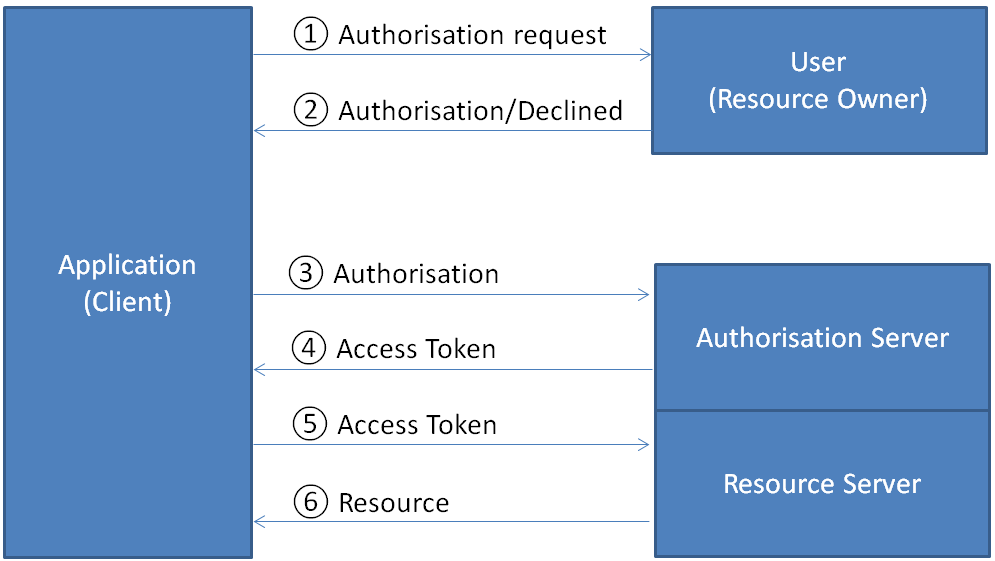
Steps in the abstract OAuth2 protocol flow:
Start: the Client wants access to some resources of the user that are lying in the Resource Server.
-
Authorization request: the Client sends the authorization question to the user
-
Authorization/Refusal: the User allows or refuses access to the Resource Server.
-
Authorization forwarding: the Client sends the access data (its own and the user’s) to the Authorization Server
-
Token-Response: the Authorization Server checks the access data. Generates the access token and returns it to the Client
-
Resource request: the Client uses the access token and sends the request to the Resource Server
-
Resource response: the Resource Server checks the access token on validity and authority. If approved, it generates the requested resource, and sends it back to the Client application
In the centre of the OAuth2 information flow stands the token, which represents important information required for the authentication and authorization mechanism. There are two kinds of tokens:
Access Token – generated by the Authorization Server as a result of a successful authentication, and sent back to the Client application. The access token contains a Scope parameter that is used for restriction of access right. The access token has mostly a restricted validity time.
Refresh Token – also generated by the Authorization Server, it is being used to request a new access token once the old access token has expired. The refresh token also represents the authorization of the Resource Owner, and as such no new authorization is required. The refresh token can also have a restricted validity time. This time out should be longer that the validity of the access token.
The following terms are being used in the next chapters:
-
resource-id – Name or ID of the resource that should be protected from unauthorised access
-
client-id/client-secret – access information for the Client application
-
username/password – access information of the user that allows access to its resources
-
authorized_grant_types – authorization types, i.e. the type of authorization allowed. OAuth2 offers 5 types: authorization_code, client_credentials, password, refresh_token and implicit. In this documentation we will only encounter password and refresh_token
-
scope – the scope of permission for the Client application. This value(s) can be defined freely, but are typically read or write
-
authority – the access permission for the user within the scope. Values can be defined freely
-
access_token_validity – Validity of the access token in seconds
-
refresh_token_validity – Validity of the refresh token in seconds. Should be longer than the value for the access token
OAuth2 used by the COMPASS REST API
The OAuth2-solution for the COMPASS REST API uses only a part of the possibilities described above.
The main issue is that there is only one technical user, and therefore the resources are not user-specific: the Client (in our particular case the CaseViewer) get either access to all resources, or none As such steps ① and ② of the picture in 1.1 are omitted.
Furthermore no AUTHORITY has been defined, and only a default Dummy AUTHORITY is used and required.
Mainly the OAuth2 mechanism of access- and refresh tokens is used in this solution.
As with the CaseViewer steps ① and ② are omitted, the authorization data of the “user” can’t be asked from the user, and is instead read from a property file: config/caseviewer.properties
This leads to a simplified picture in analogy to the one in chapter 1.1:
the Resource Owner is omitted, i.e. the authorization is done implicitly. Only the following 3 roles remain:
-
Resource Server – the server that hosts the secured resources. It checks access privileges by checking received tokens. This is in fact the COMPASS REST Service.
-
Client – an application that wants to access secured resources of the Resource Server. This can be any Client that wants to use the COMPASS REST Service. As an example we have built the COMPASS CaseViewer in such a way, that it can work with a OAuth2-secured COMPASS REST Service.
-
Authorization Server – the server that performs the authorization of the default Resource Owner, and who returns a token to the Client when the authorization was successful.
The particular information flow is depicted in the following diagram:
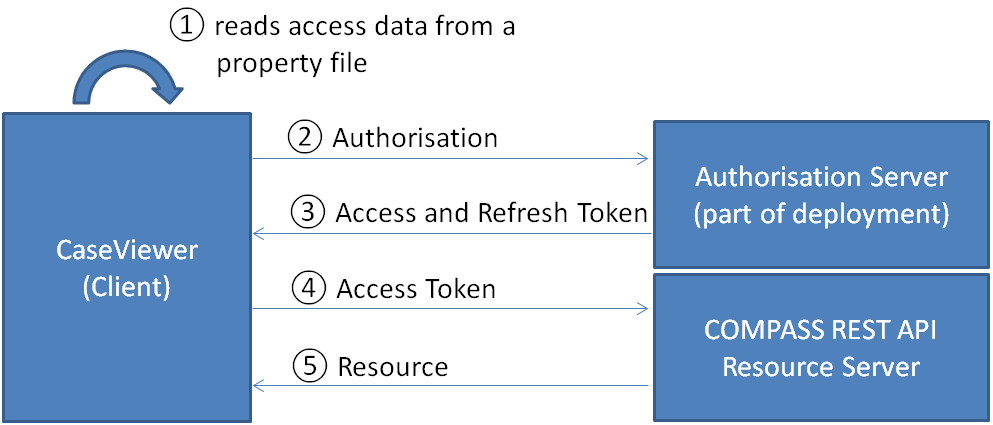
Compass-REST security
To protect the COMPASS REST Service the following model has been designed:
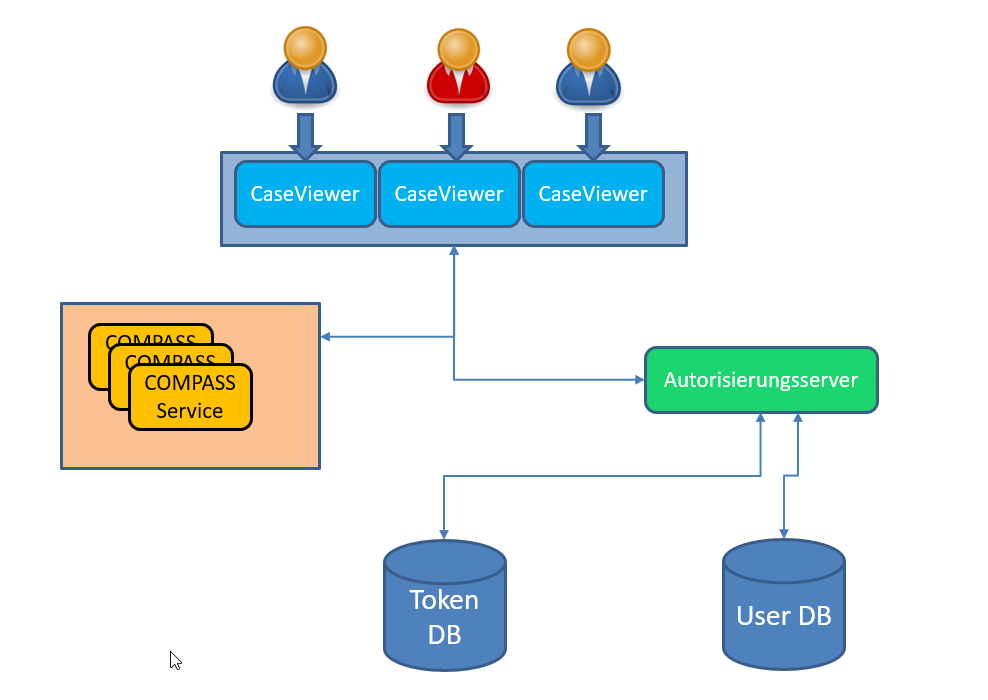
Components: . Each COMPASS user starts a CaseViewer session
-
Internally once for all sessions the Authorization Server is being asked for an access token. This access token is then used by all CaseViewer sessions for the COMPASS Service requests.
-
COMPASS-Service (COMPASS-REST application) – receives the CaseViewer request together with the Token, and generates a response when the token was valid.
-
Authorization Server – receives the authorization requests and generates the tokens that are returned to the Client application CaseViewer.
-
Token-DB – a database for the storage of tokens
-
USER-DB – a database for the user administration
-
In our sample architecture users and tokens are stored in the same database, i.e. the same DataSource is required for the access to either information.
The implementation of the authorization mechanism is based on the Spring-Boot Framework. It makes use of framework libraries like Spring-Boot-Security and Spring- Security-OAuth2.
The following components are part of the possible deployment of COMPASS (compare with diagram above):
-
CompassService.war or CompassService.jar:
-
CompassCaseViewer.war or CompassCaseViewer.jar:
-
AuthorizationServer.war or AuthorizationServer.jar:
The Authorization Server is optional to the standard deployment of COMPASS 6.0. It is started with the batch file bin/startAuthServer.bat
The configuration needed to run all three components with OAuth2 security is explained in chapter 2.2.
The scripts required to create and fill the database tables are explained in chapter 2.1.
Installing the database layer
The authorization mechanism works over the exchange and comparison of data between Authorization Server, Compass Service and CaseViewer. This data can be grouped in three categories: tokens, information about client applications (in this case only the CaseViewer application) and user data. For consistency reasons we suggest storing all this data in one central database. The data is stored in 5 tables:
-
Two tables for the tokens:
-
oauth_access_token -
oauth_refresh_token
-
-
One table for the Client data:
-
oauth_client_details
-
-
Two tables for the user administration:
-
users -
authorities
-
In this chapter the tables are presented one by one. Please consider that the data types for the columns correspond to the MySQL syntax. In subchapters the CREATE statements for these tables in DB2, MySQL and Oracle databases are listed.
-
Table
oauth_access_tokenstores the access tokens, as soon as the user has been authorised by his access data and the client’s access information. One row contains the access token, Client-ID, user name, access rights, scope, as well as a reference to the refresh token. The handling of this table is under OAuth control, i.e. the Authorization Server.
token_id			VARCHAR(255)		NOT NULL,
token				mediumblob		    NOT NULL,
authentication_id 	VARCHAR(255) 		NOT NULL,
user_name 			VARCHAR(255)		NOT NULL,
client_id 			VARCHAR(255)		NOT NULL,
authentication 		mediumblob		    NOT NULL,
refresh_token 		VARCHAR(255)		NOT NULL
-
Table
oauth_refresh_tokenstores the refresh token, which is generated and inserted automatically and in parallel to the access token. One row contains basically the refresh token itself, which is used to generate a new access token, once the previous one has expired. To create a new access token based on the refresh token there is no need to pass again the credentials and user/password combinations of the user. The handling of this table is under OAuth control, i.e. the Authorization Server.
token_id 			VARCHAR(255)	NOT NULL,
token 				mediumblob		NOT NULL,
authentication 		mediumblob		NOT NULL
-
Table
oauth_client_detailscontains the access information for client applications (client-name and corresponding password) in the columns client_id and client_secret. It also contains additional information about the resources, which can be accessed, information about privileges and scopes, type of authentication, optional the redirect-URL, validity of access and refresh tokens, etc. This table is prefilled by the administrator (see chapter 2.2.1):
client_id 			    VARCHAR(256) 		NOT NULL,
client_secret		    VARCHAR(256)		NOT NULL,
resource_ids 		    VARCHAR(256)		NOT NULL,
scope 				    VARCHAR(256)		NULL,
authorized_grant_types 	VARCHAR(256)		NOT NULL,
web_server_redirect_uri VARCHAR(256)		NULL,
authorities 			VARCHAR(256)		NULL,
access_token_validity  	INT(11)		        NULL,
refresh_token_validity 	INT(11)		        NULL,
additional_information 	VARCHAR(4096)		NULL,
autoapprove 			VARCHAR(256)		NULL
-
Table
userscontains user/password access combinations with the flag whether the user is active of not. This table is prefilled by the administrator (see chapter 2.2.1):
username 			VARCHAR(50) 		NOT NULL,
password 			VARCHAR(500) 		NOT NULL,
enabled	     		TINYINT(1) 		    NOT NULL
-
Table
authoritiescontains a reference to a user and the authority within its scope. This table is prefilled by the administrator (see chapter 2.2.1):
username			VARCHAR(50) 		NOT NULL,
authority			VARCHAR(50) 		NOT NULL
SQL-Create for MySQL
CREATE TABLE oauth_access_token (
    token_id VARCHAR(255) NOT NULL,
    token mediumblob NOT NULL,
    authentication_id VARCHAR(255) NOT NULL,
    user_name VARCHAR(255) NOT NULL,
    client_id VARCHAR(255) NOT NULL,
    authentication mediumblob NOT NULL,
    refresh_token VARCHAR(255) NOT NULL,
    PRIMARY KEY (authentication_id)
);
CREATE TABLE oauth_refresh_token (
    token_id VARCHAR(255) NOT NULL,
    token mediumblob NOT NULL,
    authentication mediumblob NOT NULL
);
CREATE TABLE oauth_client_details (
    client_id VARCHAR(256) NOT NULL,
    resource_ids VARCHAR(256) NOT NULL,
    client_secret VARCHAR(256) NOT NULL,
    scope VARCHAR(256) NULL,
    authorized_grant_types VARCHAR(256) NOT NULL,
    web_server_redirect_uri VARCHAR(256) NULL,
    authorities VARCHAR(256) NULL,
    access_token_validity INT NULL,
    refresh_token_validity INT NULL,
    additional_information VARCHAR(4000) NULL,
    autoapprove VARCHAR(256) NULL,
    PRIMARY KEY (client_id)
);
CREATE TABLE users (
    USERNAME VARCHAR(50) NOT NULL,
    PASSWORD VARCHAR(500) NOT NULL,
    ENABLED TINYINT(1) NOT NULL,
    PRIMARY KEY (USERNAME)
);
CREATE TABLE authorities (
    USERNAME VARCHAR(50) NOT NULL,
    AUTHORITY VARCHAR(50) NOT NULL,
    CONSTRAINT USERS_AUTHORITIES FOREIGN KEY (USERNAME) REFERENCES users (USERNAME),
    CONSTRAINT AUTH_USERNAME UNIQUE (USERNAME, AUTHORITY)
);
SQL-Create for Oracle
CREATE TABLE oauth_access_token (
    token_id VARCHAR(255) NOT NULL,
    token blob NOT NULL,
    authentication_id VARCHAR(255) NOT NULL,
    user_name VARCHAR(255) NOT NULL,
    client_id VARCHAR(255) NOT NULL,
    authentication blob NOT NULL,
    refresh_token VARCHAR(255) NOT NULL,
    PRIMARY KEY (authentication_id)
);
CREATE TABLE oauth_refresh_token (
    token_id VARCHAR(255) NOT NULL,
    token blob NOT NULL,
    authentication blob NOT NULL
);
CREATE TABLE oauth_client_details (
    client_id VARCHAR(256) NOT NULL,
    resource_ids VARCHAR(256) NOT NULL,
    client_secret VARCHAR(256) NOT NULL,
    scope VARCHAR(256) NULL,
    authorized_grant_types VARCHAR(256) NOT NULL,
    web_server_redirect_uri VARCHAR(256) NULL,
    authorities VARCHAR(256) NULL,
    access_token_validity INT NULL,
    refresh_token_validity INT NULL,
    additional_information VARCHAR(4000) NULL,
    autoapprove VARCHAR(256) NULL,
    PRIMARY KEY (client_id)
);
CREATE TABLE users (
    USERNAME VARCHAR(50) NOT NULL,
    PASSWORD VARCHAR(500) NOT NULL,
    ENABLED NUMBER(1) NOT NULL,
    PRIMARY KEY (USERNAME)
);
CREATE TABLE authorities (
    USERNAME VARCHAR(50) NOT NULL,
    AUTHORITY VARCHAR(50) NOT NULL,
    CONSTRAINT USERS_AUTHORITIES FOREIGN KEY (USERNAME) REFERENCES users (USERNAME),
    CONSTRAINT AUTH_USERNAME UNIQUE (USERNAME, AUTHORITY)
);
SQL-Create for MS-SQL Server
CREATE TABLE oauth_access_token (
  token_id VARCHAR(255) NOT NULL,
  token varbinary(max) NOT NULL,
  authentication_id VARCHAR(255) NOT NULL,
  user_name VARCHAR(255) NOT NULL,
  client_id VARCHAR(255) NOT NULL,
  authentication varbinary(max) NOT NULL,
  refresh_token VARCHAR(255) NOT NULL,
  PRIMARY KEY (authentication_id)
);
CREATE TABLE oauth_refresh_token (
  token_id VARCHAR(255) NOT NULL,
  token varbinary(max) NOT NULL,
  authentication varbinary(max) NOT NULL
);
CREATE TABLE oauth_client_details (
    client_id VARCHAR(256) NOT NULL,
    resource_ids VARCHAR(256) NOT NULL,
    client_secret VARCHAR(256) NOT NULL,
    scope VARCHAR(256) NULL,
    authorized_grant_types VARCHAR(256) NOT NULL,
    web_server_redirect_uri VARCHAR(256) NULL,
    authorities VARCHAR(256) NULL,
    access_token_validity INT NULL,
    refresh_token_validity INT NULL,
    additional_information VARCHAR(4000) NULL,
    autoapprove VARCHAR(256) NULL,
    PRIMARY KEY (client_id)
);
CREATE TABLE users (
    USERNAME VARCHAR(50) NOT NULL,
    PASSWORD VARCHAR(500) NOT NULL,
    ENABLED BIT NOT NULL,
    PRIMARY KEY (USERNAME)
);
CREATE TABLE authorities (
    USERNAME VARCHAR(50) NOT NULL,
    AUTHORITY VARCHAR(50) NOT NULL,
    CONSTRAINT USERS_AUTHORITIES FOREIGN KEY (USERNAME) REFERENCES users (USERNAME),
    CONSTRAINT AUTH_USERNAME UNIQUE (USERNAME, AUTHORITY)
);
Sample configuration
The configuration of the OAuth2 security authorization is stored in the property-files and in the tables oauth_client_details, users and authorities. For the actual configuration the understanding of the following constants (sample/default values in bold) is essential:
resource_id = compass-service
the value of this parameter can be modified by the customer, but it should identify clearly the resource to be secured. In our case this resource is the COMPASS REST API, and as such we use the default value „compass-service“. This value appears in the oauth_client_details table (column resource_ids) and in the configuration file for the COMPASS Rest Service.
client_id = case-viewer
client_secret = case-viewer-secret
the parameter client_id identifies the client application. Its value can be chosen freely. In this case the client application is the COMPASS CaseViewer, and as such by default we use the value „case-viewer“. The client_id/client_secret combination is used to make sure only a valid client application accesses the Authorization Server. Therefore also the password client_secret is free to be modified in your environment. Default value is „case-viewer-secret“. This pair of values has to be known to the client application, and to the Authorization Server for confirmation. As such they can be found in the property file of the CaseViewer and in the oauth_client_details table (column client_id and BCrypt-encoded in the column client_secret)
username = admin
password = admin-password
the parameter username together with its password password identifies the user. Both values can be freely chosen. They have to be known to the client application (property file of the CaseViewer) and to the Authorization Server (users table, where the password is BCrypt-encoded).
authorized_grant_types = password,refresh_token
the parameter „grant_type" represents the type of authorization. Several types are supported by OAuth, but in our case the authentication should be done either via password, or via refresh token; therefore this parameter should contain the value „password,refresh_token“. This value can be found only in the oauth_client_details table.
scope = read,write
the scope-parameter is currently not used within the COMPASS architecture. It typically contains values like read or write, but it can be chosen freely. We recommend leaving its value at „read,write“. This value is only defined in the oauth_client_details table.
authority = EXECUTE
the parameter „authority" stands for the access-right of a user within the scope. The COMPASS architecture does (currently) not make use of this parameter, and as such the value can be freely chosen. We recommend leaving the value at EXECUTE. The value has to be defined in the authorities table.
access_token_validity = 300
refresh_token_validity = 600
for both types of token a validity should be defined. In our case the validity for the access token has been chosen as 300 seconds (5 minutes) and for the refresh token the double, 600 seconds (10 minutes). These parameters can be set to any other value, and we recommend the validity of the refresh token to be substantially longer. The values appear in the oauth_client_details table.
Authorization data in the database
This chapter deals with the configuration of the database tables. The tables oauth_access_token and oauth_refresh_token are managed by the Authorization Server during authentication. Only the other 3 tables have to be prefilled by an administrator:
-
oauth_client_details
-
users
-
authorities
Before the data of the client application (CaseViewer) and user information can be inserted into the tables, sensitive data like client_secret (Authorization password for the client application) and password (Password of the user) have to be encoded. For this purpose the Spring Security Framework suggests using the BCrypt-Encoder. In the following examples the default values from chapter 2.2 are used. The passwords are all BCrypt-encoded.
SQL-Inserts for MySQL
-
Client-Details:
INSERT INTO oauth_client_details (resource_ids, client_id, client_secret, scope, authorized_grant_types, access_token_validity, refresh_token_validity)
VALUES ('compass-service',
        'case-viewer',
        '$2a$10$dbU2S.ehdNHKQFLjrmOofORpd7NEfjUvXEBubGKCfvDklsHcBIhYy',
        'read,write',
        'password,refresh_token',
        300,
        600);
Remark: the column 'client_secret' accepts the BCrypt-encoded value: „$2a$10$dbU2S.ehdNHKQFLjrmOofORpd7NEfjUvXEBubGKCfvDklsHcBIhYy“ The value has been generated from „case-viewer-secret“.
-
User details:
INSERT INTO users (USERNAME, PASSWORD, ENABLED)
VALUES ('admin',
        '$2a$10$HqXnMW9nm8p9fXVlLalu6OafEXD5i9q79GUw7RfIm2sBflNud2MpO',
        true);
Remark: the column „PASSWORD“ accepts the BCrypt-encoded value: „$2a$10$HqXnMW9nm8p9fXVlLalu6OafEXD5i9q79GUw7RfIm2sBflNud2MpO“ The value has been generated from „admin-password“.
-
User rights:
INSERT INTO authorities (USERNAME, AUTHORITY)
VALUES ('admin',
        'EXECUTE');
Properties
There are three property files related to the security architecture: the ones from the CaseViewer, die the COMPASS Rest Service, and the one from the Authorization Server:
config/caseviewer.properties
config/restserver.properties
config/authserver.properties
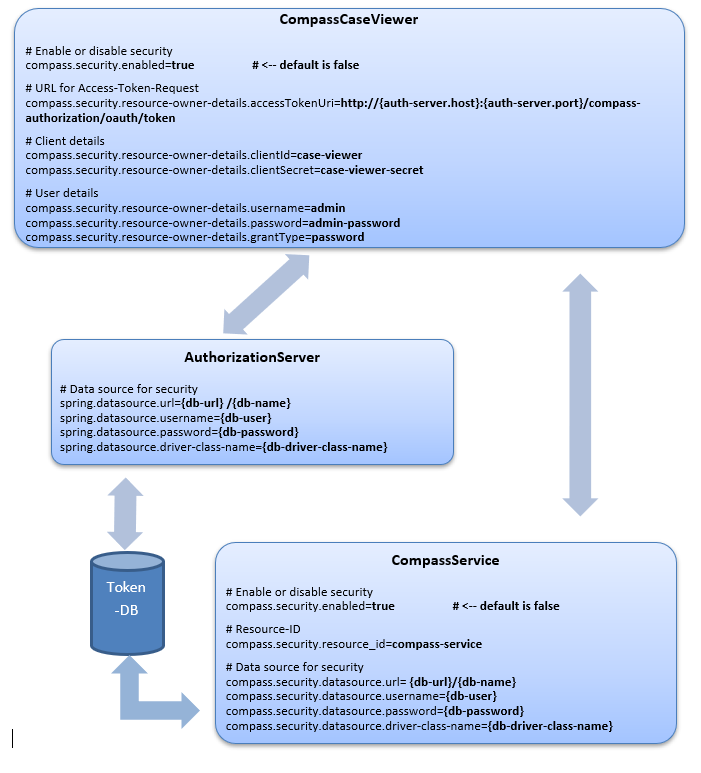
The above shown properties are to be inserted into the corresponding property-files. Replace the place holders accordingly:
{auth-server.host} |
IP address or hostname of the authorization server, e.g. „localhost“ |
{auth-server.port} |
port of the authorization server, e.g. „8080“ |
{db-url} |
URL to the database system. For MySQL something like „jdbc:mysql://localhost:3306“. This value is driver dependant. |
{db-name} |
Name of the database, e.g. „compass_security“ |
{db-user} |
e.g. „root“ |
{db-password} |
e.g. „rootPW“ |
{db-driver-class-name} |
for a MySQL-RDBMS this could be „com.mysql.jdbc.Driver“ |
A sample configuration for a MySQL is part of the deployment. It is recommended to keep all 5 tables reachable via the same DataSource.