Authorization Server Installation (COMPASS 6.3)
Introduction
The REST Services in COMPASS can be secured via OAuth 2.0 against unauthorized access. This document describes the necessary steps to protect the REST-API via OAuth 2.0 against unauthorized access. Please keep in mind that COMPASS can also be secured using alternative mechanisms such as KEYCLOAK or by adapting the Deployment Descriptor (web.xml), which is not part of this document.
COMPASS components that can be secured with COMPASS' implementation of OAuth 2.0 Authorization Server currently is supported by the RuleManagerApp together with RuleManagerService as well as CaseViewerApp together with CompassService. If COMPASS customers want to implement their own Screenbuilder Client, they may also secure access by using OAuth 2.0 wíth COMPASS' Authorization Server.
Important:
The examples below mainly focus on configuring CaseViewerApp / CompassService and RuleManagerApp / RuleManagerService. If you want to implement your own client application which either implements the CaseViewer-API or RuleManager-API, you can also use the Authorization Server for authentication and authorization. In this case, you need to configure the oauth_client_details table with the corresponding client_id and client_secret for your client application and also configure the authorized_grant_type column with credentials_grant,refresh_token instead of authorization_code,refresh_token which uses client_secret to validate the external client application.
OAuth 2.0
OAuth 2.0 provides a secure, reliable and efficient communication between client and server applications without the need to exchange authorization information (user/password) with every request. For this purpose, it relies on the OAuth (Open Authorization) technology. OAuth is an open, token-based protocol that enables a standardised and secure API Authorization. At the moment there are two versions of this protocol: OAuth 1.0 (RFC 5849) and OAuth 2.0 (RFC 6749). This document focuses on Version 2.0.
OAuth 2.0 defines the following roles of users and applications:
-
User – the person who wants to log in to the client.
-
Client Application – an application that wants to access secured resources. To access these resources, it must be authorized by the Authorization Server. Client Applications in COMPASS can include CaseViewerApp and RuleManagerApp. For example, the CaseViewerApp client that wants to access resources from the CompassService, must first be authorized with the Authorization Server. Only after authorization and obtaining token, it can access resources from CompassService.
-
Authorization Server – a server that performs the authorization of the User and returns a token to the Client if authorization is successful.
-
Resource Server – the server that hosts the secured resource. It checks access privileges by checking received tokens. Resource Server in COMPASS can be CompassService and RuleManagerService. For example, CompassService is a Resource server and on each request from the client, it will first validate the token and only if the token is token, it will process the request and send a response. If the token is expired or invalid, it will throw error.
General Flow:
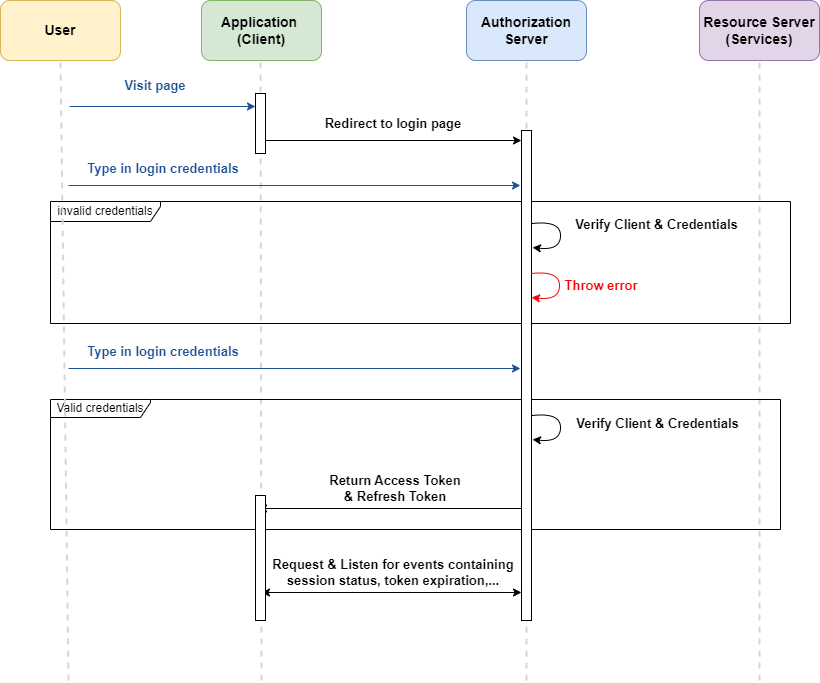
Abstract OAuth 2.0 protocol flow:
Start: the User visits the client application as shown in Figure 1.
-
The Client sends the authorization request to the Authorization Server and the user will be navigated to the Authorization Server login page
-
After the User enters their credentials and logs in, the credentials will be validated with the information in the Database (users table) if the Authorziation Server is started with Database Connectivity (with profile -
database-auth). If the Authorization Server is started with LDAP Connectivity (with profile -ldap-auth), then the Authorization sends the Request to LDAP Server and LDAP Server will validate the authorization.-
If the credentials are not valid, then an error message is shown in the login page.
-
If the credentials are valid, then the Authorization Server sends the access and refresh token back to the client and redirects to the Client application home page. The client will then listen for events from the Authorization Server containing all the necessary information, like the session status and token expiration.
-
-
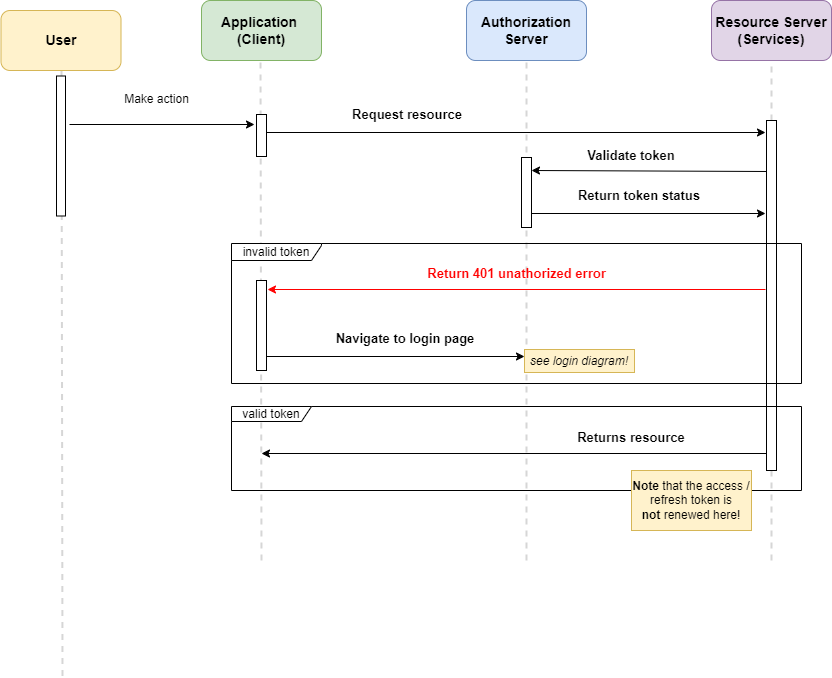
If the user performs an action in the client (e.g. clicks a button/link) as shown in Figure 2, the Client requests the resource from the resource server.
-
The resource server will first validate the token by sending a request to the Authorization Server. The Authorization Server will then check and return the token status.
-
If the token is not valid, the resource server will send the 401 Unauthorized status to the client. the Client application will then navigate to the login page as shown in Figure 1.
-
If the token is valid, the resource server will return the requested resource to the client.
-
In OAuth 2.0, a token contains important information required for the Authentication and Authorization mechanism. There are two kinds of tokens:
Access Token – generated by the Authorization Server as a result of a successful authentication, and sent back to the Client application. The access token contains a scope parameter that is used to restrict / grant access. The access token usually has a limited period of validity.
Refresh Token – also generated by the Authorization Server, is being used to request a new access token once the old access token has expired. The refresh token also represents the authorization of the Resource Owner, and as such no new authorization is required. The refresh token can also have a limited period of validity. Obviously, refresh tokens should time out only after the corresponding access tokens time out.
Installation
Installing the database layer
The authorization mechanism exchanges and compares data between Authorization Server, Compass- or RuleManager-Service and the client program (i.e. RuleManagerApp or CaseViewerApp). This data can be grouped into three categories: Tokens, information about client applications and user data. For consistency reasons, we suggest storing all data in one central database. The data is stored in 2 tables:
-
Table for the tokens:
-
oauth_client_details -
authorization
-
-
Tables for user administration:
-
users -
role
-
In this chapter, the tables are presented one by one. Please consider that all data types for the columns correspond to the MariaDB syntax.
-
Table oauth_client_details: It contains the access information for client applications such as client name, client secret, scopes, authorization grant type, client redirect-URL and the validity of access and refresh tokens. This table is prefilled by the administrator (see Authorization data in the database):
The examples below are for the database of type MariaDB. However, the syntax for the sequences may differ depending on the database system used. You can find the required [sql-script] for different databases here. If it is not available, please contact compasshotline@genre.com.
    client_id VARCHAR(255) NOT NULL,
    client_secret VARCHAR(255) NOT NULL,
    scope VARCHAR(255) NULL,
    authorized_grant_types VARCHAR(255) NOT NULL,
    web_server_redirect_uri VARCHAR(255) NULL,
    access_token_validity INT NULL,
    refresh_token_validity INT NULL,
PRIMARY KEY (client_id)-
Table users: It contains user/password access combinations with the flag whether the user is active of not. This table is not used if the Authorization server is started with LDAP Connectivity because the user information will only be available in LDAP Server. This table is prefilled by the administrator (see Authorization data in the database):
    username VARCHAR(255) NOT NULL,
    password VARCHAR(500) NOT NULL,
    enabled TINYINT(1) NOT NULL,
PRIMARY KEY (username)-
Table role: It contains roles for each user. The roles for the user can be
CASESfor CompassService and/orRULESfor RuleManagerService. This is used to secure the REST API for CompassService and RuleManagerService based on the user role. Role based authentication can be activated or deactivated from the CompassService and RuleManagerService. If activated from the services, user roles will be fetched from this table and only users with certain roles can access the CompassService and RuleManagerService. This table is prefilled by the administrator (see Authorization data in the database):
    id INT NOT NULL,
    name enum('CASES','RULES') NOT NULL,
    username VARCHAR(255),
    PRIMARY KEY (id),
    CONSTRAINT userRole FOREIGN KEY (username) REFERENCES `users` (`username`),
INDEX usernameIndex (username)-
Table authorization: It contains token information for each user. This table is prefilled by the administrator (see Authorization data in the database):
    id VARCHAR(255) NOT NULL,
    access_token_expires_at DATETIME(6),
    access_token_issued_at DATETIME(6),
    access_token_metadata text,
    access_token_scopes text,
    access_token_type VARCHAR(255),
    access_token_value text,
    attributes text,
    authorization_code_expires_at DATETIME(6),
    authorization_code_issued_at DATETIME(6),
    authorization_code_metadata VARCHAR(255),
    authorization_code_value text,
    authorization_grant_type VARCHAR(255),
    authorized_scopes text,
    oidc_id_token_claims text,
    oidc_id_token_expires_at DATETIME(6),
    oidc_id_token_issued_at DATETIME(6),
    oidc_id_token_metadata text,
    oidc_id_token_value text,
    principal_name VARCHAR(255),
    refresh_token_expires_at DATETIME(6),
    refresh_token_issued_at DATETIME(6),
    refresh_token_metadata text,
    refresh_token_value text,
    registered_client_id VARCHAR(255),
    state text,
PRIMARY KEY (id)-
All tables need sequences to generate unique IDs for the primary keys. The sequences are defined as follows:
create sequence oauth_client_details_seq start with 1 increment by 50;
create sequence users_seq start with 1 increment by 50;
create sequence role_seq start with 1 increment by 50;
create sequence authorization_seq start with 1 increment by 50;
Sample configuration
In this example, configuration is explained using CaseViewerApp, CompassService and AuthorizationServer.
The configuration of the OAuth 2.0 security authorization is stored in the property-files and in the tables oauth_client_details and users. For the actual configuration, the understanding of the following constants (sample/default values in bold) is essential:
Configuration constants oauth_client_details and users table
Parameter definitions in the oauth_client_details table:
client_id = caseviewer-client
the value of this parameter can be modified by the customer, but it should identify clearly the client accessing the resource to be secured. If the client_id is modified here, then the corresponding client_id should also be defined in Service properties.
client_secret = caseviewer-client
the parameter client_id identifies the client application. Its value can be chosen freely. In this case the client application is the CaseViewerApp_, and as such by default we use the value „caseviewer-client“. They can be found in the oauth_client_details table (column client_id and BCrypt-encoded in the column client_secret). If CaseViewerApp or RuleManagerApp is used, the client_secret can be left empty since it is a public client and don’t need extra client authentication.
authorized_grant_types = authorization_code,refresh_token,credentials_grant
the parameter grant_type represents the type of authorization. Several types are supported by OAuth 2.0. When using the Gen Re login screen in CaseViewerApp and / or RuleManagerApp. authentication uses authorization_code and refresh token. In this scenario, this parameter must contain the value „authorization_code,refresh_token“.
However, if you implement your own client application, then you need to configure the oauth_client_details table authorized_grant_type column with credentials_grant,refresh_token which uses client_secret to validate the external client application.
| authorized_grant_type | Meaning |
|---|---|
authorization_code |
Use the default login screen in CaseViewerApp / RuleManagerApp . In this case, the grant_type credentials_grant is not required (see below). |
refresh_token |
Should always be set: after expiration of the access token, a new access token along with new refresh token will be generated by using the existing refresh token in background. |
credentials_grant |
If you implement your own client application, then you need to configure the |
scope = openid,profile,email
the parameter grant_type represents the scope of the client. openid is to indicate that the application intends to use OIDC to verify the user’s identity. The scopes should not be changed
webs_server_redirect_uri =CLIENT_URL
the parameter webs_server_redirect_uri represents the redirect url of Client application to which it has to be redirected after successful login.
access_token_validity = TIME_IN_MILLISECONDS
the parameter access_token_validity represents the access token validity time in milliseconds after which the access token expires. We recommend to set the access_token_validity to 15 minutes (900000 ms) and after the expiration, a new access_token along with new refresh_token will be generated by using the existing refresh_token in background.
refresh_token_validity = TIME_IN_MILLISECONDS
the parameter refresh_token_validity represents the refresh token validity time in milliseconds after which the refresh token expires. We recommend to set the refresh_token_validity to 15 minutes (900000 ms) which should have same or higher duration than access_token and upon the expiration of access_token, a new access_token along with new refresh_token will be generated by using the existing refresh_token in background.
username = userone
password = userone
the parameter username together with its password password identifies the user. Both values can freely be chosen. They have to be known to the client application (property file of the CaseViewer) and to the Authorization Server (users table, where the password is BCrypt-encoded).
enabled = true
The user can be enabled or disabled with this parameter
Although the username is limited to 50 character, the size of the username should not exceed 20 characters, since the username in the table COMPASS C40_Author is limited to 20 characters. To Login successfully, the username must exist in both tables. |
|---|
Authorization data in the database
This chapter deals with the configuration of the database tables. The tables have to be prefilled by an administrator:
-
oauth_client_details -
users(if used with LDAP-Server, see chapters User details in a LDAP-Server and Authorization data in the database for the RuleManager) Before the data of the client application (i.e. RuleManagerApp) and user information can be inserted into the tables, sensitive data likepassword(Password of the user) have to be encoded. For this purpose the Spring Security Framework suggests encrypting the string with BCrypt. In the following examples, the default values from chapter 2.2 are used. The passwords are all BCrypt-encoded.
User details in a LDAP-Server
In case a LDAP-Server is used to store the user credentials, the user table is not used. It can be left as empty. The Authorization Server currently supports the following hash methods for passwords:
-
SHA
-
MD5
-
Plaintext
One of the above hash method has to be defined within the user entry in the LDAP-Server (For configuration of the authorization server see LDAP Related Properties).
SQL-Inserts for MariaDB (in case you use a different database system, please contact compasshotline@genre.com)
-
Client-Details:
-- rulemanager client
-- client_id: rulemanager-client
-- client_password: rulemanager-client
INSERT INTO oauth_client_details (client_id, client_secret, scope, authorized_grant_types, access_token_validity, refresh_token_validity, web_server_redirect_uri)
VALUES ('rulemanager-client', '$2y$10$HjUI97VndCpzAvTPEvhjee7fzwyyUo.siMoXHQ4HCOmvqvDZqYsvG', 'openid,profile,email', 'authorization_code,refresh_token', 900000, 900000,'http://localhost:8080/RuleManagerApp/');
Remark: the column 'client_secret' accepts the BCrypt-encoded value: „$2y$10$HjUI97VndCpzAvTPEvhjee7fzwyyUo.siMoXHQ4HCOmvqvDZqYsvG“
The value in the example above has been generated from rulemanager-client.
-
User details:
INSERT INTO users (USERNAME, PASSWORD, ENABLED) VALUES ('admin', '$2a$10$HqXnMW9nm8p9fXVlLalu6OafEXD5i9q79GUw7RfIm2sBflNud2MpO', true);
Remark: the column „PASSWORD“ accepts the BCrypt-encoded value: „$2a$10$HqXnMW9nm8p9fXVlLalu6OafEXD5i9q79GUw7RfIm2sBflNud2MpO“
The value in the example above has been generated from admin-password.
Depending on the used version of DB2, Boolean values are handled differently and might need to be inserted accordingly. The Boolean can also be added as an Integer value: |
-- admin pwd: admin-password
INSERT INTO users (username, password, enabled)
VALUES ('admin', '$2a$10$HqXnMW9nm8p9fXVlLalu6OafEXD5i9q79GUw7RfIm2sBflNud2MpO', true);

-- userone pwd: userone
INSERT INTO users (username, password, enabled)
VALUES ('userone', '$2a$10$7CseykqiGFJT.Ulo9P0VB.8l1.WK.xjKkTU/GsK.Nr.SmdEIsT7eq', true);

-- usertwo pwd: usertwo
INSERT INTO users (username, password, enabled)
VALUES ('usertwo', '$2a$10$.f5cxF5opkEc8Ooj86J2IeZ65aM06LZhEhw3/z262C59AXtkPyQUi', true);-
Role:
INSERT INTO role (name, username, id)
VALUES ('CASES', 'admin', 1);

INSERT INTO role (name, username, id)
VALUES ('RULES', 'admin', 2);

INSERT INTO role (name, username, id)
VALUES ('CASES', 'userone', 3);

INSERT INTO role (name, username, id)
VALUES ('RULES', 'userone', 4);

INSERT INTO role (name, username, id)
VALUES ('CASES', 'usertwo', 5);

INSERT INTO role (name, username, id)
VALUES ('RULES', 'usertwo', 6);
Remark: Roles for users are required only if the roles based authentication from the services are activated. If it is not required, roles for the users can be left empty.
Here you can find the [sql-creation-script] or [sql-migration-script]
Properties
General Properties
There are two property- / yaml-files related to the security architecture: in case of the RuleMnagerApp, these are RuleManagerService.properties and config_authorization.yaml:
Usually, these files can be found in a subdirectory COMPASSconfig: (since the location of the configuration can be changed by the administrator, the location of said files may vary depending on the individual setup of COMPASS).
COMPASSConfig/CompassAuthorization.yaml COMPASSconfig/RuleManagerService.properties
| Property | Explanation |
|---|---|
server:port: |
Port on which Authorization Server is listening |
server:servlet:contextPath |
The context path of the Authorization Server |
logging.level.root |
DEBUG, INFO, WARN, ERROR, TRACE |
logging.level.org.springframework |
DEBUG, INFO, WARN, ERROR, TRACE |
logging.level.com.genre.authorizationserver |
Possible values: ERROR, WARN, INFO, DEBUG, TRACE |
locale |
the language to be used by the Authorization Server for login page and error message. Possible Values: de, en, fr, nl, it, es |
spring:datasource:url |
JDBC-URL to access the datasource |
spring:datasource:username |
database-user |
spring:datasource:password |
password for database-user |
spring.jpa.hibernate.ddl-auto |
Schema of the Database. Value should default to validate. With this value, the Authorization server will only start if the database schema is valid |
spring.security.cors.allowed.origins |
Allowed Cross Origin Urls |
spring.profiles.active |
To activate Database Authorization, database-auth should be configured. To activate LDAP Authorization, ldap-auth should be configured. Possible values: database-auth, ldap-auth |
LDAP Related Properties
| Property | Explanation |
|---|---|
ldap:url |
URL of the LDAP server |
ldap:root:user |
root user |
ldap:root:password |
root password |
ldap:root:user:dnPatterns |
Pattern for distinguished names |
ldap:root:user:searchBase |
LDAP search base |
ldap:root:user:searchFilter |
LDAP search filter |
ldap:group:searchBase |
LDAP search base |
ldap:group:searchFilter |
LDAP search filter |
Example
server.port=8082
server.servlet.contextPath=/AuthorizationServer

logging.level.root=INFO
logging.level.org.springframework=ERROR
logging.level.com.genre.authorizationserver=DEBUG

# Define the local for the login screen and errors. If set to de, then it will be in German. If set to en, then it will be in English
locale=de

spring.datasource.url=jdbc:mariadb://localhost:3306/compass_security
spring.datasource.username=root
spring.datasource.password=aPassword
spring.jpa.hibernate.ddl-auto=validate
# Allowed Cross Origin Urls
spring.security.cors.allowed-origins=http://localhost:8080,http://localhost:8083,http://localhost:8082,http://localhost:4200
# Authorization PROFILE. Check Readme file for more details on profile #
spring.profiles.active=database-auth

ldap.url=ldap://10.130.130.155:389/dc=genre,dc=com
ldap.root.user=cn=ldapadm,dc=genre,dc=com
ldap.root.password=aPassword
ldap.user.dnPatterns=cn={0},ou=People
ldap.user.searchBase=ou=People
ldap.user.searchFilter=cn={0}
ldap.group.searchBase=ou=Group
ldap.group.searchFilter=member={0}
Deployment & Usage
Deployment
The Authorization Server is optional to the standard deployment of COMPASS 6. It may be started as a Spring Boot application, alternatively it can be deployed in any servlet container supporting Servlet API 5.0 or better. Note that this Authorization Server is only compatible from COMPASS 6.3 and not compatible with COMPASS 6.2 or older versions.
Running as Spring Boot application
Authorization Server can be started with the following command:
java -Xmx512M -cp lib\AuthorizationServer.war;[jdbc-driver] \\
org.springframework.boot.loader.launch.WarLauncher \\
--spring.config.location=[location of configuraion-file]| Parameter | Explanation |
|---|---|
[jdbc-driver] |
JDBC-driver incl. paath |
[loation of configuraion-file] |
location of configuraion-file (see Properties) |
java -Xmx512M -cp lib\AuthorizationServer.war;lib\mariadb-java-client-3.4.1.jar \\
org.springframework.boot.loader.launch.WarLauncher \\
--spring.config.location./config/CompassAuthorization.properties
Deployment Within Servlet Container
Since Authorization Server comes as a war-file, it can be deployed in any servlet container: Please refer to the documentation of your servlet container about how to deploy a servlet.
There are multiple ways to configure the location of the configuration file (see Properties). A generic option working in every servlet container is to create a deployment descriptor for Authorization Server and specify the location via an environment entry which is picked up by Spring Boot during startup:
<?xml version="1.0" encoding="UTF-8"?>
<web-app
        xmlns = "https://jakarta.ee/xml/ns/jakartaee"
        xmlns:xsi = "http://www.w3.org/2001/XMLSchema-instance"
        xsi:schemaLocation = "https://jakarta.ee/xml/ns/jakartaee https://jakarta.ee/xml/ns/jakartaee/web-app_5_0.xsd"
        version = "5.0"
        metadata-complete = "false">
    <!-- In web.xml, the location of the configuration file config_authorization.yaml (spring.congig.location)
    can be defined in case you are running JBoss / WildFly or Apache Tomcat.

    Alternatively, spring.config.location can also be passed as Java-property
    -Dspring.config.location=file:///${CATALINA_HOME}/COMPASSConfig/config_authorization.yaml
    or, alternatively, pass it as a JAVA-Property, i.e. via CLI:

    -Dspring.config.location=file:///${jboss.home.dir}/COMPASSConfig/config_authorization.yaml
    -->

    <env-entry>
        <env-entry-name>
            spring.config.location
        </env-entry-name>
        <env-entry-type>
            java.lang.String
        </env-entry-type>
        <env-entry-value>
            file:${jboss.home.dir}/COMPASSConfig/config_authorization.yaml
        </env-entry-value>
    </env-entry>
</web-app>
Usage
After successful deployment, the Authorization Server can be accessed via API:
Below are sample calls to retrieve an access_token and a refresh_token.
Retrieving first access_token and refresh_token:
Usecase: A client application wants to retrieve an access_token and refresh_token from the Authorization Server by providing valid user credentials.
Syntax:
POST http://[host]:[port]/AuthorizationServer/oauth2/token

Content-Type: application/x-www-form-urlencoded

grant_type=credentials_grant&client_id=[client_id]&client_secret=[client-secret]&scope=openid,profile,email&username=[username]&password=[password]
| Parameter | Meaning |
|---|---|
host |
The host AuthorizationServer is running . |
port |
The port the AutgorizationServer is listening on. |
client_id |
The client_id as configured in the table |
client_secret |
The unencrypted password of the client (needs to exist BCrypt-encoded in the table`oauth_client_details`. |
username |
The username (needs to be defined in the table |
password |
The unencrypted password of the user (needs to exist BCrypt-encoded in the table`user`. |
Example Request & Response
Request:
POST http://localhost:8082/AuthorizationServer/oauth2/token

Content-Type: application/x-www-form-urlencoded

grant_type=credentials_grant&client_id=caseviewer-client&client_secret=caseviewer-client&scope=openid,profile,email&username=userone&password=userone
Response:
HTTTP/2 200 OK

access-control-allow-methods: POST, GET, PUT, OPTIONS, DELETE

access-control-max-age: 3600

access-control-allow-headers: x-requested-with, authorization, Content-Type, Authorization, credential, X-XSRF-TOKEN, Pragma, Cache-Control

x-content-type-options: nosniff

x-xss-protection: 0

cache-control: no-cache, no-store, max-age=0, must-revalidate

pragma: no-cache

expires: 0

strict-transport-security: max-age=31536000 ; includeSubDomains

x-frame-options: DENY

content-type: application/json;charset=UTF-8

date: Mon, 02 Feb 2026 12:24:51 GMT

x-http2-stream-id: 3

transfer-encoding: chunked

{

"access_token": "eyJraWQiOiJlZDExNTVlOS0yN2MxLTQ5ODYtYjQzNi0yZWM1MzlhY2EyMjIiLCJhbGciOiJSUzI1NiJ9.eyJzdWIiOiJ1c2Vyb25lIiwiYXVkIjoiY2FzZXZpZXdlci1jbGllbnQiLCJuYmYiOjE3NzAwMzUwOTEsInNjb3BlIjpbIm9wZW5pZCIsInByb2ZpbGUiLCJlbWFpbCJdLCJpc3MiOiJodHRwczovL2F6ZXVub2xndDAyLmdlbnJlLmNvbTo5MzAzL0F1dGhvcml6YXRpb25TZXJ2ZXIiLCJuYW1lIjoidXNlcm9uZSIsInByZWZlcnJlZF91c2VybmFtZSI6InVzZXJvbmUiLCJleHAiOjE3NzAwOTUwOTEsImlhdCI6MTc3MDAzNTA5MSwianRpIjoiYWJjNDlmNDMtYWQyNy00ZThkLTg3ZTMtZjkyYjRjM2U2MDdmIiwiYXV0aG9yaXRpZXMiOlsiUk9MRV9DQVNFUyIsIlJPTEVfUlVMRVMiXX0.7MxvGGXB8SqrOh6skYasBNDTDCWIi_Mi32VE2sfNWYBYaJAd1h0K8_hIKfemyp6W1VwbWPlV7oC-BINY9TK5uSiG_04-BHGM61Wg8BFB8I_kiMIB0d28v7fiv2sH3ycXJdux6I9_gD7cSpSxHjQ3MvpaPoGH9X8AKjjBBfxcHN6HOAU0xDe2OSLWOCGEoXk9SiCca0_Tq3clm80Idt18ah5721IhHdc0GamhifgFkQggOlrYDTFaSzbfMlD2JxjXMSLdGHJly-RPDYIIJBpVMAFYz4gw-J6_vzbLlrMkGc0HF9PcFbE_Zx75_xT9luJ9HibXwTDRpy9sJKiUkpgPGg",

"refresh_token": "Bq4HxHk78zRSpAA3tO0yO-F76zEX9k3xxZgghgNp816v3NlKAGZSvbq13wJszB7dIHUgdoR6UUj1gotRTmvq7XGoOZIxt6hUKLU6Vb7050RqBlKJVP_2l-jNMNLiRF2B",

"id_token": "eyJraWQiOiJlZDExNTVlOS0yN2MxLTQ5ODYtYjQzNi0yZWM1MzlhY2EyMjIiLCJhbGciOiJSUzI1NiJ9.eyJzdWIiOiJ1c2Vyb25lIiwiYXVkIjoiY2FzZXZpZXdlci1jbGllbnQiLCJhenAiOiJjYXNldmlld2VyLWNsaWVudCIsImlzcyI6Imh0dHBzOi8vYXpldW5vbGd0MDIuZ2VucmUuY29tOjkzMDMvQXV0aG9yaXphdGlvblNlcnZlciIsImV4cCI6MTc3MDAzNjg5MSwiaWF0IjoxNzcwMDM1MDkxLCJqdGkiOiJhMjM4Yjk2My1hOWIyLTQ1ZTYtYTJjNi04YTExNzdmODU1YTMifQ.itEb5rVyprqgMPMEnFsPCghLWFD2-AMDlXlHbLtMlmSzvY-YbhEs_wI4GFxctm0aB3HxMeevP_nAufjUc1Vsxm2GtGke9jGevRdN7qQf_5A2x3594VAd2t8QAFqU-Utd6wNn4R87DYA2lGu4X125Y6syDdjHbJk-PC7gT73ADtX2N04DSZzZ16LwEOhhX02hO0lfGsxVhgB-P7ojh_CFTOtn9BIjZaJwbEQkqJJ8yxAwRwaf7uk_zQtKLvwk2b67sV8vvQoJndFCbppZPSCVprFfuyGMyV5DmrV3RGaUHdSFlG73ldZuGeklrtN6NTsT0lT6pu3U2fbu5QZlljXdpg",

"token_type": "Bearer",

"expires_in": 59999

}
Retrieving new access_token and refresh_token:
Usecase: A client application wants to retrieve a new access_token and refresh_token from the Authorization Server by providing a valid refresh_token.
Syntax:
POST http://[host]:[port]/AuthorizationServer/oauth2/token

Content-Type: application/x-www-form-urlencoded

grant_type=refresh_token&client_id=[client_id]&scope=openid profile email&refresh_token=[refresh_token]
| Parameter | Meaning |
|---|---|
host |
The host AuthorizationServer is running . |
port |
The port the AutgorizationServer is listening on. |
client_id |
The client_id as configured in the table |
scope |
The scope as configured in the table |
refresh_token |
The current refresh-token. |
Example Request & Response
Request:
POST http://localhost:8082/AuthorizationServer/oauth2/token

Content-Type: application/x-www-form-urlencoded

grant_type=refresh_token&client_id=caseviewer-client&scope=openid profile email&refresh_token=RzriTSN0fC9DcRPjOQoRF9K1GJBpRdb5RTooRKcGuYrXYVVEHA3OseDs6NByj29PhZyigL1nnkdvv6m2dE5Q30TMLcFIDL8RuDRSG5_LRbM9kmGPdaZWsjjnR2Dnge6x
Response:
HTTP/2 200 OK

access-control-allow-methods: POST, GET, PUT, OPTIONS, DELETE

access-control-max-age: 3600

access-control-allow-headers: x-requested-with, authorization, Content-Type, Authorization, credential, X-XSRF-TOKEN, Pragma, Cache-Control

x-content-type-options: nosniff

x-xss-protection: 0

cache-control: no-cache, no-store, max-age=0, must-revalidate

pragma: no-cache

expires: 0

strict-transport-security: max-age=31536000 ; includeSubDomains

x-frame-options: DENY

content-type: application/json;charset=UTF-8

date: Mon, 02 Feb 2026 13:03:49 GMT

x-http2-stream-id: 3

transfer-encoding: chunked

{
"access_token": "eyJraWQiOiJlZDExNTVlOS0yN2MxLTQ5ODYtYjQzNi0yZWM1MzlhY2EyMjIiLCJhbGciOiJSUzI1NiJ9.eyJzdWIiOiJ1c2Vyb25lIiwiYXVkIjoiY2FzZXZpZXdlci1jbGllbnQiLCJuYmYiOjE3NzAwMzc0MjksInNjb3BlIjpbIm9wZW5pZCIsInByb2ZpbGUiLCJlbWFpbCJdLCJpc3MiOiJodHRwczovL2F6ZXVub2xndDAyLmdlbnJlLmNvbTo5MzAzL0F1dGhvcml6YXRpb25TZXJ2ZXIiLCJuYW1lIjoidXNlcm9uZSIsInByZWZlcnJlZF91c2VybmFtZSI6InVzZXJvbmUiLCJleHAiOjE3NzAwOTc0MjksImlhdCI6MTc3MDAzNzQyOSwianRpIjoiODM5NmNjMGYtM2FkNC00NjAwLWEwNTktYmQ1YzI0Y2ZmNTNkIiwiYXV0aG9yaXRpZXMiOlsiUk9MRV9DQVNFUyIsIlJPTEVfUlVMRVMiXX0.M6NSWUs5gYJFagkpkCwSgAFK4IbwYw864SgvHRo_eb7XMzk94n01veqhbWh-6TwLLBQD0YU8pSc8MiHcfm3dTIRhm9lSb4155dPMVKJ98eGLRMOUIUgKCc62aMEef589v1h5hNQOUffUF9q5pMynn4S4QgKODQCLZIxvBzQUkik_PZ-D2YpfZjR5DuKyO7o53n11IC8fuwgzhEtpVW6_b2J5q3k2FS-FOkMbgMwjCifmnOmk3Z6ltCgZMitBQgLj6pF7ON_vzUa9o52h34ekWdilUhds7_GDihhNdtIXqaJwhlrJs3v-NMGQhsmk8utTfJdiWWMo9FJxbD9bGqI_-A",

"refresh_token": "mZziKom4-yurgIzJyMrheat2yC6jhiYnpWjon2QakSDxcUCqkEcZSK1OE9iJe_3ikE-L_mgyjegfk2K8YVHDWAFLqNao9wC_08LqYi92Q_F4DvYoLi6GItIVf8b8XGSz",

"scope": "openid profile email",

"id_token": "eyJraWQiOiJlZDExNTVlOS0yN2MxLTQ5ODYtYjQzNi0yZWM1MzlhY2EyMjIiLCJhbGciOiJSUzI1NiJ9.eyJzdWIiOiJ1c2Vyb25lIiwiYXVkIjoiY2FzZXZpZXdlci1jbGllbnQiLCJhenAiOiJjYXNldmlld2VyLWNsaWVudCIsImlzcyI6Imh0dHBzOi8vYXpldW5vbGd0MDIuZ2VucmUuY29tOjkzMDMvQXV0aG9yaXphdGlvblNlcnZlciIsImV4cCI6MTc3MDAzOTIyOSwiaWF0IjoxNzcwMDM3NDI5LCJqdGkiOiIwZDRlYTEzZS05MGVhLTQyMWQtOTdkZC01OTVhMDBjMGQ2MzcifQ.zGOA5afqkHTnSTq0F5XV70ty23PhsfAvUi5i_dq3Whxo4D8odosDpCnr3hChAyKK-5TqgfbbMhEkRmkyipQHirAbp_RHa6vI4mvB5VeTj1rIQmmi6xQl8_b72-6o-W5nrumDOqiOr6cwWVGnpfJSvis8ecHf6rCSxHlZ3JI70A80n37XZnxrvndBo8mQXFNo_9R0HTz4bi4DIOO_q5Oq79fhB__1_gdS3F5z95BNk04im2Anl33v1Cl4DxPXLBZhp-5CSUXqG1TN8Sk9LVhJFQDlvqxadIRZQ00B2sAbtJ5iS19oQWGQqhqLlAQ6QuFd8JBqQaz8HVVNisfNi7kdGA",

"token_type": "Bearer",
"expires_in": 59999
}
SQL Scripts Installation / Migration
Click to open
SQL Scripts to configure authorization server for the first time
Please bear in mind, that the scripts below reflect the default configuration for the Authorization Server and may need to be adapted to your individual needs. If you want to use the default configuration with CaseViewerClient and RuleManagerApp, you can directly execute the scripts below in your database.
If you want to use your own client application, you should adapt the scripts below by changing the client_id, client_secret and especially the authorized_grant_types:
Instead of authorization_code,refresh_token,credentials_grant, you need to use credentials_grant,refresh_token. Please note that if you do not want to use the credentials grant type, then the client application will not be able to retrieve an access token by providing user credentials.
-
SQL script for MariaDB
-- create  tables

CREATE TABLE oauth_client_details (
    client_id VARCHAR(255) NOT NULL,
    client_secret VARCHAR(255) NOT NULL,
    scope VARCHAR(255) NULL,
    authorized_grant_types VARCHAR(255) NOT NULL,
    web_server_redirect_uri VARCHAR(255) NULL,
    access_token_validity INT NULL,
    refresh_token_validity INT NULL,
    PRIMARY KEY (client_id)
);

CREATE TABLE users (
    username VARCHAR(255) NOT NULL,
    password VARCHAR(500) NOT NULL,
    enabled TINYINT(1) NOT NULL,
    PRIMARY KEY (username)
);

CREATE TABLE role (
    id INT NOT NULL,
    name enum('CASES','RULES') NOT NULL,
    username VARCHAR(255),
    PRIMARY KEY (id),
    CONSTRAINT userRole FOREIGN KEY (username) REFERENCES `users` (`username`),
    INDEX usernameIndex (username)
);

CREATE TABLE authorization (
    id VARCHAR(255) NOT NULL,
    access_token_expires_at DATETIME(6),
    access_token_issued_at DATETIME(6),
    access_token_metadata text,
    access_token_scopes text,
    access_token_type VARCHAR(255),
    access_token_value text,
    attributes text,
    authorization_code_expires_at DATETIME(6),
    authorization_code_issued_at DATETIME(6),
    authorization_code_metadata VARCHAR(255),
    authorization_code_value text,
    authorization_grant_type VARCHAR(255),
    authorized_scopes text,
    oidc_id_token_claims text,
    oidc_id_token_expires_at DATETIME(6),
    oidc_id_token_issued_at DATETIME(6),
    oidc_id_token_metadata text,
    oidc_id_token_value text,
    principal_name VARCHAR(255),
    refresh_token_expires_at DATETIME(6),
    refresh_token_issued_at DATETIME(6),
    refresh_token_metadata text,
    refresh_token_value text,
    registered_client_id VARCHAR(255),
    state text,
    PRIMARY KEY (id)
);

create sequence oauth_client_details_seq start with 1 increment by 50;
create sequence users_seq start with 1 increment by 50;
create sequence role_seq start with 1 increment by 50;
create sequence authorization_seq start with 1 increment by 50;

-- rulemanager client
-- client_id: rulemanager-client
-- client_password: rulemanager-client
INSERT INTO oauth_client_details (client_id, client_secret, scope, authorized_grant_types, access_token_validity, refresh_token_validity, web_server_redirect_uri)
VALUES ('rulemanager-client', '$2y$10$HjUI97VndCpzAvTPEvhjee7fzwyyUo.siMoXHQ4HCOmvqvDZqYsvG', 'openid,profile,email', 'authorization_code,refresh_token', 900000, 900000,'http://localhost:8080/RuleManagerApp/');

-- case-viewer client
-- client_id: caseviewer-client
-- client_password: caseviewer-client
INSERT INTO oauth_client_details (client_id, client_secret, scope, authorized_grant_types, access_token_validity, refresh_token_validity, web_server_redirect_uri)
VALUES ('caseviewer-client', '$2y$10$eTj84Msn4ZL6dtGd8519A.g2rx9UlyVk5XNYU3pU8EmSi20x61nQS',  'openid,profile,email', 'authorization_code,refresh_token', 900000, 900000,'http://localhost:8080/CaseViewerApp/');

-- admin pwd: admin-password
INSERT INTO users (username, password, enabled)
VALUES ('admin', '$2a$10$HqXnMW9nm8p9fXVlLalu6OafEXD5i9q79GUw7RfIm2sBflNud2MpO', true);

-- userone pwd: userone
INSERT INTO users (username, password, enabled)
VALUES ('userone', '$2a$10$7CseykqiGFJT.Ulo9P0VB.8l1.WK.xjKkTU/GsK.Nr.SmdEIsT7eq', true);

-- usertwo pwd: usertwo
INSERT INTO users (username, password, enabled)
VALUES ('usertwo', '$2a$10$.f5cxF5opkEc8Ooj86J2IeZ65aM06LZhEhw3/z262C59AXtkPyQUi', true);

-- assign roles for your own users. Find below an example for assigning roles for user 'admin', 'userone', 'usertwo'.
-- If role based authentication is not required, then the below scripts can be ignored.

INSERT INTO role (name, username, id)
VALUES ('CASES', 'admin', 1);

INSERT INTO role (name, username, id)
VALUES ('RULES', 'admin', 2);

INSERT INTO role (name, username, id)
VALUES ('CASES', 'userone', 3);

INSERT INTO role (name, username, id)
VALUES ('RULES', 'userone', 4);

INSERT INTO role (name, username, id)
VALUES ('CASES', 'usertwo', 5);

INSERT INTO role (name, username, id)
VALUES ('RULES', 'usertwo', 6);
-
SQL script for OracleDB
CREATE TABLE oauth_client_details (
    client_id varchar2(255 char) not null,
    client_secret varchar2(255 char) not null,
    scope varchar2(255 char),
    authorized_grant_types varchar2(255 char) not null,
    web_server_redirect_uri varchar2(255 char) not null,
    access_token_validity number(10,0),
    refresh_token_validity number(10,0),
    PRIMARY KEY (client_id)
);

CREATE TABLE users (
    username varchar2(255 char) not null,
    password varchar2(255 char) not null,
    enabled number(1,0) not null,
    PRIMARY KEY (username),
    CHECK (enabled IN (0,1))
);

CREATE TABLE ROLE (
    ID NUMBER(10) NOT NULL,
    NAME VARCHAR2(255 CHAR) NOT NULL,
    USERNAME VARCHAR2(255 CHAR),
    PRIMARY KEY (ID),
    CONSTRAINT userRole FOREIGN KEY (USERNAME) REFERENCES "USERS" ("USERNAME"),
    CHECK (name IN ('CASES','RULES'))
);

CREATE TABLE AUTHORIZATION (
    ACCESS_TOKEN_EXPIRES_AT TIMESTAMP(6) WITH TIME ZONE,
    ACCESS_TOKEN_ISSUED_AT TIMESTAMP(6) WITH TIME ZONE,
    AUTHORIZATION_CODE_EXPIRES_AT TIMESTAMP(6) WITH TIME ZONE,
    AUTHORIZATION_CODE_ISSUED_AT TIMESTAMP(6) WITH TIME ZONE,
    OIDC_ID_TOKEN_EXPIRES_AT TIMESTAMP(6) WITH TIME ZONE,
    OIDC_ID_TOKEN_ISSUED_AT TIMESTAMP(6) WITH TIME ZONE,
    REFRESH_TOKEN_EXPIRES_AT TIMESTAMP(6) WITH TIME ZONE,
    REFRESH_TOKEN_ISSUED_AT TIMESTAMP(6) WITH TIME ZONE,
    ACCESS_TOKEN_TYPE VARCHAR2(255 CHAR),
    AUTHORIZATION_CODE_METADATA VARCHAR2(255 CHAR),
    AUTHORIZATION_GRANT_TYPE VARCHAR2(255 CHAR),
    ID VARCHAR2(255 CHAR) NOT NULL,
    PRINCIPAL_NAME VARCHAR2(255 CHAR),
    REGISTERED_CLIENT_ID VARCHAR2(255 CHAR),
    ACCESS_TOKEN_METADATA CLOB,
    ACCESS_TOKEN_SCOPES CLOB,
    ACCESS_TOKEN_VALUE CLOB,
    ATTRIBUTES CLOB,
    AUTHORIZATION_CODE_VALUE CLOB,
    AUTHORIZED_SCOPES CLOB,
    OIDC_ID_TOKEN_CLAIMS CLOB,
    OIDC_ID_TOKEN_METADATA CLOB,
    OIDC_ID_TOKEN_VALUE CLOB,
    REFRESH_TOKEN_METADATA CLOB,
    REFRESH_TOKEN_VALUE CLOB,
    STATE CLOB,
    PRIMARY KEY (ID)
);

create sequence oauth_client_details_seq start with 1 increment by 50;
create sequence users_seq start with 1 increment by 50;
create sequence role_seq start with 1 increment by 50;
create sequence authorization_seq start with 1 increment by 50;

-- rulemanager client
-- client_id: rulemanager-client
-- client_password: rulemanager-client
INSERT INTO oauth_client_details (client_id, client_secret, scope, authorized_grant_types, access_token_validity, refresh_token_validity, web_server_redirect_uri)
VALUES ('rulemanager-client', '$2y$10$HjUI97VndCpzAvTPEvhjee7fzwyyUo.siMoXHQ4HCOmvqvDZqYsvG', 'openid,profile,email', 'authorization_code,refresh_token', 900000, 900000,'http://localhost:8080/RuleManagerApp/');

-- case-viewer client
-- client_id: caseviewer-client
-- client_password: caseviewer-client
INSERT INTO oauth_client_details (client_id, client_secret, scope, authorized_grant_types, access_token_validity, refresh_token_validity, web_server_redirect_uri)
VALUES ('caseviewer-client', '$2y$10$eTj84Msn4ZL6dtGd8519A.g2rx9UlyVk5XNYU3pU8EmSi20x61nQS',  'openid,profile,email', 'authorization_code,refresh_token', 900000, 900000,'http://localhost:8080/CaseViewerApp/');

-- admin pwd: admin-password
INSERT INTO users (username, password, enabled)
VALUES ('admin', '$2a$10$HqXnMW9nm8p9fXVlLalu6OafEXD5i9q79GUw7RfIm2sBflNud2MpO', 1);

-- userone pwd: userone
INSERT INTO users (username, password, enabled)
VALUES ('userone', '$2a$10$7CseykqiGFJT.Ulo9P0VB.8l1.WK.xjKkTU/GsK.Nr.SmdEIsT7eq', 1);

-- usertwo pwd: usertwo
INSERT INTO users (username, password, enabled)
VALUES ('usertwo', '$2a$10$.f5cxF5opkEc8Ooj86J2IeZ65aM06LZhEhw3/z262C59AXtkPyQUi', 1);

-- assign roles for your own users. Find below an example for assigning roles for user 'admin', 'userone', 'usertwo'.
-- If role based authentication is not required, then the below scripts can be ignored.

INSERT INTO role (name, username, id)
VALUES ('CASES', 'admin', 1);

INSERT INTO role (name, username, id)
VALUES ('RULES', 'admin', 2);

INSERT INTO role (name, username, id)
VALUES ('CASES', 'userone', 3);

INSERT INTO role (name, username, id)
VALUES ('RULES', 'userone', 4);

INSERT INTO role (name, username, id)
VALUES ('CASES', 'usertwo', 5);

INSERT INTO role (name, username, id)
VALUES ('RULES', 'usertwo', 6);-
SQL script for DB2 Database
-- create  tables

CREATE TABLE oauth_client_details (
                                      client_id VARCHAR(255) NOT NULL,
                                      client_secret VARCHAR(255) NOT NULL,
                                      scope VARCHAR(255) NULL,
                                      authorized_grant_types VARCHAR(255) NOT NULL,
                                      web_server_redirect_uri VARCHAR(255) NULL,
                                      access_token_validity INT NULL,
                                      refresh_token_validity INT NULL,
                                      PRIMARY KEY (client_id)
);

CREATE TABLE users (
                       username VARCHAR(255) NOT NULL,
                       password VARCHAR(500) NOT NULL,
                       enabled boolean NOT NULL,
                       PRIMARY KEY (username)
);

CREATE TABLE role (
                      id INT NOT NULL,
                      name VARCHAR(10) NOT NULL,
                      username VARCHAR(255),
                      PRIMARY KEY (id),
                      CHECK (name IN ('CASES', 'RULES')),
                      CONSTRAINT userRole FOREIGN KEY (username) REFERENCES users (username)
);
CREATE INDEX usernameIndex on role(username);


CREATE TABLE authorization (
                               id VARCHAR(255) NOT NULL,
                               access_token_expires_at TIMESTAMP,
                               access_token_issued_at TIMESTAMP,
                               access_token_metadata VARCHAR(32600),
                               access_token_scopes VARCHAR(32600),
                               access_token_type VARCHAR(255),
                               access_token_value VARCHAR(32600),
                               attributes VARCHAR(32600),
                               authorization_code_expires_at TIMESTAMP,
                               authorization_code_issued_at TIMESTAMP,
                               authorization_code_metadata VARCHAR(255),
                               authorization_code_value VARCHAR(32600),
                               authorization_grant_type VARCHAR(255),
                               authorized_scopes VARCHAR(32600),
                               oidc_id_token_claims VARCHAR(32600),
                               oidc_id_token_expires_at TIMESTAMP,
                               oidc_id_token_issued_at TIMESTAMP,
                               oidc_id_token_metadata VARCHAR(32600),
                               oidc_id_token_value VARCHAR(32600),
                               principal_name VARCHAR(255),
                               refresh_token_expires_at TIMESTAMP,
                               refresh_token_issued_at TIMESTAMP,
                               refresh_token_metadata VARCHAR(32600),
                               refresh_token_value VARCHAR(32600),
                               registered_client_id VARCHAR(255),
                               state VARCHAR(32600),
                               PRIMARY KEY (id)
);

create sequence oauth_client_details_seq start with 1 increment by 50;
create sequence users_seq start with 1 increment by 50;
create sequence role_seq start with 1 increment by 50;
create sequence authorization_seq start with 1 increment by 50;

-- rulemanager client
-- client_id: rulemanager-client
-- client_password: rulemanager-client
INSERT INTO oauth_client_details (client_id, client_secret, scope, authorized_grant_types, access_token_validity, refresh_token_validity, web_server_redirect_uri)
VALUES ('rulemanager-client', '$2y$10$HjUI97VndCpzAvTPEvhjee7fzwyyUo.siMoXHQ4HCOmvqvDZqYsvG', 'openid,profile,email', 'authorization_code,refresh_token', 900000, 900000,'http://localhost:8080/RuleManagerApp/');

-- case-viewer client
-- client_id: caseviewer-client
-- client_password: caseviewer-client
INSERT INTO oauth_client_details (client_id, client_secret, scope, authorized_grant_types, access_token_validity, refresh_token_validity, web_server_redirect_uri)
VALUES ('caseviewer-client', '$2y$10$eTj84Msn4ZL6dtGd8519A.g2rx9UlyVk5XNYU3pU8EmSi20x61nQS',  'openid,profile,email', 'authorization_code,refresh_token', 900000, 900000,'http://localhost:8080/CaseViewerApp/');

-- admin pwd: admin-password
INSERT INTO users (username, password, enabled)
VALUES ('admin', '$2a$10$HqXnMW9nm8p9fXVlLalu6OafEXD5i9q79GUw7RfIm2sBflNud2MpO', 1);

-- userone pwd: userone
INSERT INTO users (username, password, enabled)
VALUES ('userone', '$2a$10$7CseykqiGFJT.Ulo9P0VB.8l1.WK.xjKkTU/GsK.Nr.SmdEIsT7eq', 1);

-- usertwo pwd: usertwo
INSERT INTO users (username, password, enabled)
VALUES ('usertwo', '$2a$10$.f5cxF5opkEc8Ooj86J2IeZ65aM06LZhEhw3/z262C59AXtkPyQUi', 1);

-- assign roles for your own users. Find below an example for assigning roles for user 'admin', 'userone', 'usertwo'.
-- If role based authentication is not required, then the below scripts can be ignored.

INSERT INTO role (name, username, id)
VALUES ('CASES', 'admin', 1);

INSERT INTO role (name, username, id)
VALUES ('RULES', 'admin', 2);

INSERT INTO role (name, username, id)
VALUES ('CASES', 'userone', 3);

INSERT INTO role (name, username, id)
VALUES ('RULES', 'userone', 4);

INSERT INTO role (name, username, id)
VALUES ('CASES', 'usertwo', 5);

INSERT INTO role (name, username, id)
VALUES ('RULES', 'usertwo', 6);
SQL Scripts to migrate from COMPASS 6.0 / 6.2 Authorization server to 6.3 Authorization server
-
SQL script for MariaDB
DROP TABLE IF EXISTS `oauth_access_token`;
DROP TABLE IF EXISTS `oauth_refresh_token`;
DROP TABLE IF EXISTS `authorities`;

alter table oauth_client_details drop column resource_ids;
alter table oauth_client_details drop column authorities;
alter table oauth_client_details drop column additional_information;
alter table oauth_client_details drop column authorities;

-- rulemanager client
UPDATE oauth_client_details SET client_id='rulemanager-client', scope='openid,profile,email', authorized_grant_types='authorization_code,refresh_token', access_token_validity=900000, refresh_token_validity=900000, web_server_redirect_uri='http://localhost:8080/RuleManagerApp/' where client_id='rm-client';

-- caseviewer client
UPDATE oauth_client_details SET client_id='caseviewer-client', scope='openid,profile,email', authorized_grant_types='authorization_code,refresh_token', access_token_validity=900000, refresh_token_validity=900000, web_server_redirect_uri='http://localhost:8080/CaseViewerApp/' where client_id='case-viewer';

CREATE TABLE role (
  id INT NOT NULL,
  name enum('CASES','RULES') NOT NULL,
  username VARCHAR(255),
  PRIMARY KEY (id),
  CONSTRAINT userRole FOREIGN KEY (username) REFERENCES `users` (`username`),
  INDEX usernameIndex (username)
);

CREATE TABLE authorization (
   id VARCHAR(255) NOT NULL,
   access_token_expires_at DATETIME(6),
   access_token_issued_at DATETIME(6),
   access_token_metadata text,
   access_token_scopes text,
   access_token_type VARCHAR(255),
   access_token_value text,
   attributes text,
   authorization_code_expires_at DATETIME(6),
   authorization_code_issued_at DATETIME(6),
   authorization_code_metadata VARCHAR(255),
   authorization_code_value text,
   authorization_grant_type VARCHAR(255),
   authorized_scopes text,
   oidc_id_token_claims text,
   oidc_id_token_expires_at DATETIME(6),
   oidc_id_token_issued_at DATETIME(6),
   oidc_id_token_metadata text,
   oidc_id_token_value text,
   principal_name VARCHAR(255),
   refresh_token_expires_at DATETIME(6),
   refresh_token_issued_at DATETIME(6),
   refresh_token_metadata text,
   refresh_token_value text,
   registered_client_id VARCHAR(255),
   state text,
   PRIMARY KEY (id)
);

-- if the below sequences are not available please create sequence with the below query
create sequence oauth_client_details_seq start with 1 increment by 50;
create sequence users_seq start with 1 increment by 50;
create sequence role_seq start with 1 increment by 50;
create sequence authorization_seq start with 1 increment by 50;

-- assign roles for your own users. Find below an example for assigning roles for user 'admin', 'userone', 'usertwo'.
-- If role based authentication is not required, then the below scripts can be ignored.

INSERT INTO role (name, username, id)
VALUES ('CASES', 'admin', 1);

INSERT INTO role (name, username, id)
VALUES ('RULES', 'admin', 2);

INSERT INTO role (name, username, id)
VALUES ('CASES', 'userone', 3);

INSERT INTO role (name, username, id)
VALUES ('RULES', 'userone', 4);

INSERT INTO role (name, username, id)
VALUES ('CASES', 'usertwo', 5);

INSERT INTO role (name, username, id)
VALUES ('RULES', 'usertwo', 6);
-
SQL script for OracleDB
DROP TABLE oauth_access_token;
DROP TABLE oauth_refresh_token;
DROP TABLE authorities;

alter table oauth_client_details drop column resource_ids;
alter table oauth_client_details drop column authorities;
alter table oauth_client_details drop column additional_information;
alter table oauth_client_details drop column authorities;

CREATE TABLE ROLE (
  ID NUMBER(10) NOT NULL,
  NAME VARCHAR2(255 CHAR) NOT NULL,
  USERNAME VARCHAR2(255 CHAR),
  PRIMARY KEY (ID),
  CONSTRAINT userRole FOREIGN KEY (USERNAME) REFERENCES "USERS" ("USERNAME"),
  CHECK (name IN ('CASES','RULES'))
);

CREATE TABLE AUTHORIZATION (
   ACCESS_TOKEN_EXPIRES_AT TIMESTAMP(6) WITH TIME ZONE,
   ACCESS_TOKEN_ISSUED_AT TIMESTAMP(6) WITH TIME ZONE,
   AUTHORIZATION_CODE_EXPIRES_AT TIMESTAMP(6) WITH TIME ZONE,
   AUTHORIZATION_CODE_ISSUED_AT TIMESTAMP(6) WITH TIME ZONE,
   OIDC_ID_TOKEN_EXPIRES_AT TIMESTAMP(6) WITH TIME ZONE,
   OIDC_ID_TOKEN_ISSUED_AT TIMESTAMP(6) WITH TIME ZONE,
   REFRESH_TOKEN_EXPIRES_AT TIMESTAMP(6) WITH TIME ZONE,
   REFRESH_TOKEN_ISSUED_AT TIMESTAMP(6) WITH TIME ZONE,
   ACCESS_TOKEN_TYPE VARCHAR2(255 CHAR),
   AUTHORIZATION_CODE_METADATA VARCHAR2(255 CHAR),
   AUTHORIZATION_GRANT_TYPE VARCHAR2(255 CHAR),
   ID VARCHAR2(255 CHAR) NOT NULL,
   PRINCIPAL_NAME VARCHAR2(255 CHAR),
   REGISTERED_CLIENT_ID VARCHAR2(255 CHAR),
   ACCESS_TOKEN_METADATA CLOB,
   ACCESS_TOKEN_SCOPES CLOB,
   ACCESS_TOKEN_VALUE CLOB,
   ATTRIBUTES CLOB,
   AUTHORIZATION_CODE_VALUE CLOB,
   AUTHORIZED_SCOPES CLOB,
   OIDC_ID_TOKEN_CLAIMS CLOB,
   OIDC_ID_TOKEN_METADATA CLOB,
   OIDC_ID_TOKEN_VALUE CLOB,
   REFRESH_TOKEN_METADATA CLOB,
   REFRESH_TOKEN_VALUE CLOB,
   STATE CLOB,
   PRIMARY KEY (ID)
);

-- rulemanager client
UPDATE oauth_client_details SET client_id='rulemanager-client', scope='openid,profile,email', authorized_grant_types='authorization_code,refresh_token', access_token_validity=900000, refresh_token_validity=900000, web_server_redirect_uri='http://localhost:8080/RuleManagerApp/' where client_id='rm-client';

-- caseviewer client
UPDATE oauth_client_details SET client_id='caseviewer-client', scope='openid,profile,email', authorized_grant_types='authorization_code,refresh_token', access_token_validity=900000, refresh_token_validity=900000, web_server_redirect_uri='http://localhost:8080/CaseViewerApp/' where client_id='case-viewer';

-- if the below sequences are not available please create sequence with the below query
create sequence oauth_client_details_seq start with 1 increment by 50;
create sequence users_seq start with 1 increment by 50;
create sequence role_seq start with 1 increment by 50;
create sequence authorization_seq start with 1 increment by 50;

-- assign roles for your own users. Find below an example for assigning roles for user 'admin', 'userone', 'usertwo'.
-- If role based authentication is not required, then the below scripts can be ignored.

INSERT INTO role (name, username, id)
VALUES ('CASES', 'admin', 1);

INSERT INTO role (name, username, id)
VALUES ('RULES', 'admin', 2);

INSERT INTO role (name, username, id)
VALUES ('CASES', 'userone', 3);

INSERT INTO role (name, username, id)
VALUES ('RULES', 'userone', 4);

INSERT INTO role (name, username, id)
VALUES ('CASES', 'usertwo', 5);

INSERT INTO role (name, username, id)
VALUES ('RULES', 'usertwo', 6);
-
SQL script for DB2 Database
DROP TABLE IF EXISTS oauth_access_token;
DROP TABLE IF EXISTS oauth_refresh_token;
DROP TABLE IF EXISTS authorities;

alter table oauth_client_details drop column resource_ids;
alter table oauth_client_details drop column additional_information;
alter table oauth_client_details drop column authorities;

-- CALL SYSPROC.ADMIN_CMD('REORG TABLE schemaName.oauth_client_details');

-- rulemanager client
UPDATE oauth_client_details SET client_id='rulemanager-client', scope='openid,profile,email', authorized_grant_types='authorization_code,refresh_token', access_token_validity=900000, refresh_token_validity=900000, web_server_redirect_uri='http://localhost:8080/RuleManagerApp/' where client_id='rm-client';

-- caseviewer client
UPDATE oauth_client_details SET client_id='caseviewer-client', scope='openid,profile,email', authorized_grant_types='authorization_code,refresh_token', access_token_validity=900000, refresh_token_validity=900000, web_server_redirect_uri='http://localhost:8080/CaseViewerApp/' where client_id='case-viewer';

CREATE TABLE role (
                      id INT NOT NULL,
                      name VARCHAR(10) NOT NULL,
                      username VARCHAR(255),
                      PRIMARY KEY (id),
                      CHECK (name IN ('CASES', 'RULES')),
                      CONSTRAINT userRole FOREIGN KEY (username) REFERENCES users (username)
);
CREATE INDEX usernameIndex on role(username);


CREATE TABLE authorization (
                               id VARCHAR(255) NOT NULL,
                               access_token_expires_at TIMESTAMP,
                               access_token_issued_at TIMESTAMP,
                               access_token_metadata VARCHAR(32600),
                               access_token_scopes VARCHAR(32600),
                               access_token_type VARCHAR(255),
                               access_token_value VARCHAR(32600),
                               attributes VARCHAR(32600),
                               authorization_code_expires_at TIMESTAMP,
                               authorization_code_issued_at TIMESTAMP,
                               authorization_code_metadata VARCHAR(255),
                               authorization_code_value VARCHAR(32600),
                               authorization_grant_type VARCHAR(255),
                               authorized_scopes VARCHAR(32600),
                               oidc_id_token_claims VARCHAR(32600),
                               oidc_id_token_expires_at TIMESTAMP,
                               oidc_id_token_issued_at TIMESTAMP,
                               oidc_id_token_metadata VARCHAR(32600),
                               oidc_id_token_value VARCHAR(32600),
                               principal_name VARCHAR(255),
                               refresh_token_expires_at TIMESTAMP,
                               refresh_token_issued_at TIMESTAMP,
                               refresh_token_metadata VARCHAR(32600),
                               refresh_token_value VARCHAR(32600),
                               registered_client_id VARCHAR(255),
                               state VARCHAR(32600),
                               PRIMARY KEY (id)
);

-- if the below sequences are not available please create sequence with the below query
create sequence oauth_client_details_seq start with 1 increment by 50;
create sequence users_seq start with 1 increment by 50;
create sequence role_seq start with 1 increment by 50;
create sequence authorization_seq start with 1 increment by 50;

-- assign roles for your own users. Find below an example for assigning roles for user 'admin', 'userone', 'usertwo'.
-- If role based authentication is not required, then the below scripts can be ignored.

INSERT INTO role (name, username, id)
VALUES ('CASES', 'admin', 1);

INSERT INTO role (name, username, id)
VALUES ('RULES', 'admin', 2);

INSERT INTO role (name, username, id)
VALUES ('CASES', 'userone', 3);

INSERT INTO role (name, username, id)
VALUES ('RULES', 'userone', 4);

INSERT INTO role (name, username, id)
VALUES ('CASES', 'usertwo', 5);

INSERT INTO role (name, username, id)
VALUES ('RULES', 'usertwo', 6);