COMPASS Version 6.2, 6.3, 6.4 © General Re Corporation 2021 - 2026. All Rights Reserved (created: 2025-05-21 generated: 2026-07-10)
Overview
Flexible Underwriting Systems
Underwriting systems have been a successful part of our services for many years. Close cooperation with our clients and decades of underwriting experience have enabled us to develop systems that have been of considerable influence to the underwriting process over the last few years.
-
COMPASS
An underwriting system to process the majority of policies on the basis of the application form. The system is integrated into a company’s administration system or software and covers all underwriting aspects. It is used at head office, point-of-sale and on the Internet. -
Electronic Underwriting Guide Clue
Our user friendly and fast manual featuring underwriting guidelines for medical and non-medical risks.
The system has been developed in close cooperation with direct offices to ensure that all aspects of day-to-day underwriting were taken into consideration and that the system can smoothly be integrated into an administration environment.
The system can underwrite the whole range of life and health products. All underwriting decisions are stored in databases and can easily be modified to reflect each company’s underwriting rules.
This document contains information about COMPASS only; additional information about all other systems can be obtained on request.
What is COMPASS?
COMPASS underwrites life and income protection benefits and recognises applications which can be accepted immediately as well as those which need to be referred. All applications can be processed automatically by the administration system. Requests for additional evidence or even policy issue can be initiated electronically.
Apart from underwriting features COMPASS also provides a component for recording health data. The recording component is easy to use and comprises intelligent word recognition programs which can recognise even misspelled words, abbreviations and colloquialisms (search program).
Upon completion of the underwriting process, the assessment result is sent back to the administration system via an output interface. The assessment result can be displayed with a visualisation component.
Underwriters can easily customise, adapt and maintain all underwriting rules and health data screens to suit the guidelines and underwriting philosophy of the company through a user-friendly COMPASS RuleManager.
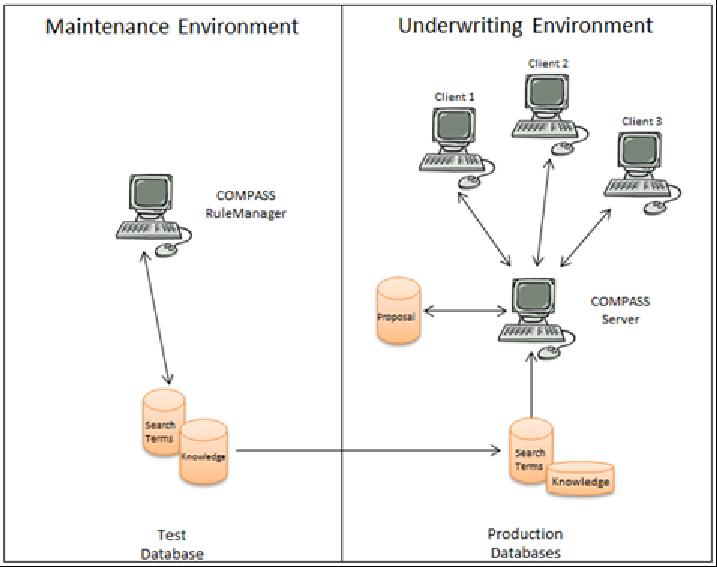
COMPASS consists of an Underwriting and Maintenance environment:
COMPASS Maintenance Environment
The databases containing all the assessment rules can be modified in the maintenance environment. The databases cover the full range of risk factors such as medical disorders, occupations, pursuits and foreign travel.
Gen Re delivers COMPASS with a set of underwriting rules. It includes basic assessments for 25,000 occupations, 15,000 medical disorders, medications, a comprehensive range of pursuits, foreign travel and more. Consequently COMPASS may be used without any major customisation or adaptations. To align the system fully with the underwriting approach and philosophy however, all assessment rules are easily modified using the user-friendly COMPASS RuleManager.
In a typical maintenance environment only a limited number of users – usually only one underwriter – will have access to the COMPASS RuleManager to modify the underwriting rules.
COMPASS Underwriting Environment
Proposals are processed within the underwriting environment. Technical data (e.g. sum insured, duration, age at entry) is transferred via the input interface. The COMPASS data entry component or a data entry component of the company will record the risk data (disorders, general medical questions), COMPASS will do the assessment and the result is displayed by COMPASS or the company’s own program. COMPASS checks the complete proposal taking risk data, legal and technical aspects into account.
This process will be executed in the underwriting environment for multiple users (technically: clients - typically PCs). The clients will request services from the COMPASS server (data-entry, underwriting, display of result, search).
2 separate sets of working environments need to be set up: One complete maintenance and underwriting environment for modifying databases and testing. Another separate set of underwriting environment, without maintenance program, for assessing the applications. For the underwriting environment the data of the maintenance environment is replicated.
Data Storage in COMPASS
Relational databases are used for data storage in COMPASS. A JDBC-interface (Java DataBase Connectivity - driver) is required for the COMPASS database system. It is available for common databases like Oracle, Sybase or DB/2.
COMPASS uses the JDBC interface to access the databases (e.g. underwriting rules for occupations, terms for the result) in the maintenance and in the underwriting environment. The data interfaces (input and output) are implemented with XML.
Versions of COMPASS
Two COMPASS versions are available:
The Head Office Version has been designed for use in the head office or in branch offices. The assessment is based on the information included in a standard application form.
The Point-of-Sale-Version has been designed for use by an agent during a direct conversation with a client, over the counter in a Bank, on the Internet or in a telesales environment. Here the application form is completed using a dynamic dialog tailored to benefit type, sum assured, age, duration and answers to the questions. In addition to the standard application form questions the client may be asked to provide additional information required for the assessment depending on disclosure. The system will prompt for more detailed information, which will be recorded to complete the application process. In this way, the additional queries generated by a simple proposal form can be avoided whenever possible. In most cases the client can be informed of the underwriting decision on the spot.
The dynamic inquiries are described in the Point-of-Sale- Specification.
General Introduction
Scope of Assessment
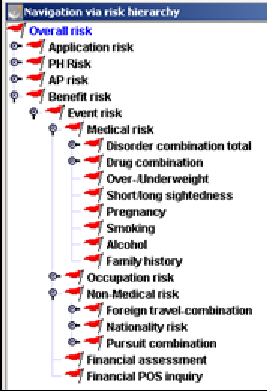
COMPASS takes into account all life application risks:
-
medical risk
-
occupation risk
-
non-medical risks (nationality, foreign travel, pursuits)
-
financial risk
-
other risks (AIDS-risk, completeness of evidence, etc.)
COMPASS does not only look at individual risk factors, but also takes into consideration potential risks arising through combinations, e.g. occupation and disorders. All individual application details are taken into account for the HIV assessment. The HIV rules do not only involve the beneficiary, but also the occupation, nationality, symptoms of disorders and mode of infection and the relation between the different persons involved in a contract.
COMPASS can arrive at the following results:
-
Standard (including ‘borderline standard’ where a small loading is waived)
-
Offer (percent loadings, per mille loadings, exclusion clauses, reduction in benefit, extended deferred period, etc.)
-
Request additional documents (questionnaire, general practitioner report, etc.)
-
Request information from client (e.g. missing answers in proposal form)
-
Refer to underwriter (e.g. to evaluate documents because of a potentially substandard risk)
-
Defer
-
Decline
Where a potentially substandard risk is suspected additional information (e.g. financial questionnaire, General Practitioner Report) is requested. When a case is referred to a senior underwriter, the system will edit comments to draw the underwriter’s attention to potential problems the system has detected.
This document describes the assessments including the benefit and event related specialities.
Product types handled by COMPASS
A company’s products are termed benefits in COMPASS. Each benefit comprises one or more events (e.g. Endowment Benefits: payment in the event of policy maturity or in the event of death). Benefits and events have individual attributes. A benefit can cover more than 1 person (e.g. joint life applications). Persons are related to events.
COMPASS includes the following benefits; other benefits can be added:
-
Life insurance
-
Pension Plan (Pension)
-
Accidental death benefit (ADB)
-
Income Protection (IP own/similar/any/ADL)
-
Waiver of Premium (WOP own/similar/any/ADL)
-
Total Permanent Disability (TPD own/similar/any/ADL)
-
Critical Illness (CI)
-
Long Term Care (LTC)
-
Hospital & Surgery benefits (H&S)
-
Debility – only available in single markets
-
Dismemberment (DMM) – only available in single markets
-
Business Expenses (BE) – only available in single markets
-
Sickness - only available in single markets
The following attributes specify the benefit:
| Attribute | Value |
|---|---|
Type of benefit(ID) |
|
Benefit name |
|
Smoker type |
Smoker |
Non-Smoker |
|
General |
|
Life policy type |
Joint Life 1. Death |
Joint Life 2. Death |
|
Single Life |
|
Unknown |
|
Life basic form |
Term insurance |
Endowment |
|
Unit-linked Life insurance |
|
Whole Life |
|
Backup-benefit-type-1 (free) |
|
Backup-benefit-type-2 (free) |
COMPASS recognises the following events, when the insurance benefit has to be paid:
-
Death
-
Maturity (Life)
-
Accident (Accident)
-
Disability own/similar
-
Disability any/ADL
-
Critical Illness (CI)
-
Medical care/Long Term care (LTC)
-
Hospital admission and surgery (H&S)
-
Sickness
Events are related to a person. The following attributes specify the event:
-
Event type (ID)
-
Sum insured (e.g. for endowments.)
-
Annuity sum (e.g. for IP annual benefit)
-
Benefit payment period
-
Insurance period
-
Bonus level
-
Waiting period
-
Conversion right (y/n)
-
Examination group
-
Age for assessment
-
Age for examination limit
-
Borrowing
-
Lump sum payment (y/n)
-
Special event benefit (y/n)
-
Premium class
-
Annual premium
-
Premium payment period
-
Single premium
-
Included loading per mille
-
Included loading percent
-
Agreed exclusion clause
-
Range of CI conditions
-
Back up event type 1 (free)
-
Back up event type 2 (free)
Some of these attributes are included in relations. Relations have been built to summarise attribute to logical entities (e.g. premium payment) or to define multiple value relations (e.g. related CI cover). Relations are not further described within this document, but included in the technical description.
With these benefits, events and specific attributes all insurance products can be described. The attributes can be used to implement special underwriting guidelines, e.g. waiver or reduction of loadings for unit-linked products.
The following relations have been defined for events and benefits in the current version; others are possible:
| Product | Benefit | Life policy type | Life basic form | Event 1 | Event 2 |
|---|---|---|---|---|---|
Endowment |
Life |
Single Life |
Endowment |
Death |
|
Term insurance |
Life |
Single Life |
Term |
Death |
|
Whole Life |
Life |
Single Life |
Whole Life |
Death |
|
Unit linked life insurance |
Life |
Single Life |
Unit linked life insurance |
Death |
Maturity |
Joint Life |
Life |
Joint life 1. Death |
Open |
Death AP1 |
Death AP2 |
Joint Life |
Life |
Joint life 2. Death |
Open |
Death AP2 |
|
Pension plan |
Pension |
Maturity |
|||
Accidental Death Benefit (ADB) |
Accidental Death Benefit (ADB) |
Accident |
|||
Income Protection own (IP own) |
Income Protection own (IP own) |
Disability own/similar |
|||
Income Protection o/s (IP o/s) |
Income Protection o/s (IP o/s) |
Disability own/similar |
|||
Income Protection any (IP any) |
Income Protection any (IP any) |
Disability any/ADL |
|||
Income Protection ADL (IP ADL) |
Income Protection ADL (IP ADL) |
Disability any/ADL |
|||
Waiver of Premium own (WOP own) |
Waiver of Premium own (WOP own) |
Disability own/similar |
|||
Waiver of Premium o/s (WOP o/s) |
Waiver of Premium o/s (WOP o/s) |
Disability own/similar |
|||
Waiver of Premium any (WOP any) |
Waiver of Premium any (WOP any) |
Disability any/ADL |
|||
Waiver of Premium ADL (WOP ADL) |
Waiver of Premium ADL (WOP ADL) |
Disability any/ADL |
| Product | Benefit | Life policy type | Life basic form | Event 1 | Event 2 |
|---|---|---|---|---|---|
Total Permanent Disability (TPD own) |
Total Permanent Disability (TPD own) |
Disability own/similar |
|||
Total Permanent Disability (TPD o/s) |
Total Permanent Disability (TPD o/s) |
Disability own/similar |
|||
Total Permanent Disability (TPD any) |
Total Permanent Disability (TPD any) |
Disability any/ADL |
|||
Total Permanent Disability (TPD ADL) |
Total Permanent Disability (TPD ADL) |
Disability any/ADL |
|||
Hospital benefit (H&S) |
Hospital&Surgery (H&S) |
Hospitalisation/Surgery |
|||
Business Expenses (BE) |
Business Expenses |
Disability own/similar |
|||
Debility |
Debility |
CI |
|||
Dismemberment |
Dismemberment (DMM) |
Accident |
|||
Medical Care |
Long Term Care (LTC) |
Long Term Care |
|||
Critical Illness |
Critical Illness (CI) |
CI |
|||
Sickness |
Sickness |
Sickness |
For the various benefits, the following special characteristics are taken into account for the risk assessment:
Pension annuity
No overall risk assessment is performed. In the financial assessment, a check is made against the COMPASS assessment limit and a financial information limit. If term assurance is included - generally in the product pension annuity - it has to be transferred as an own basic form.
Unit-linked life insurance
A unit-linked life policy is assessed in the same way as a term policy. The extra premium is obtained by multiplying the required loading by the sum at risk.
IP
Income Protection (IP) is available with waiting periods 4, 13, 26 and 52 weeks and different types of cover (own/similar/any/ADL). A life assured can apply for several IP benefits with different waiting periods. The interface contains two fields for entering the IP duration. The field ‘insurance term period’ is used for the termination age assessment and financial assessment. The field should contain the relevant duration to be underwritten, which is normally identical to the maximum duration. The field ‘benefit payment period’ can be used in the termination age check.
Business Expenses
This cover insures key persons of a company regarding the loss the company suffers from when the life insured is disabled. It is possible to check several business expenses covers with different deferred periods. An assessment with individual fields is possible. For financial aspects only the financial limit check is done, no needs analysis takes place. For the medical check the shortest deferred period is taken into account. The result of each business expenses cover is the same on the tariff level (worst result), the details are depending on the deferred periods.
TPD
Instead of a monthly benefit, a lump sum payment is made in the event of total and permanent disability. The benefits can include different types of cover (own/similar/any/ADL). The benefit is entered with an appropriately calculated pension (capital/duration). While many companies offer TPD cover as part of their Critical Illness benefit, it is being treated as a 'basic form' for systems' purposes.
Waiver of premium
In the event of a claim for disability, the premium is waived for the related covers. Related covers are those who are included in the relation ‘WOP for premium’. WOP is available with different types of cover (own/similar/any/ADL)
Critical Illness
The illnesses covered can be specified in the relation ‘Range of CI conditions’. If there is no entry in the interface field all illnesses are taken into account. In the assessment process, only those illnesses covered in the policy will be taken into account via the entry in the disorder relation ‘Disorder has CI cover’. Alternatively the interface field ‘benefit/event back up’ can be used to mark different CI covers and depend the assessment in any databases on this field.
Hospital and Surgical
Cost for hospital treatment and surgery are covered within this benefit. The assessment does not depend on the daily allowance benefit.
Sickness
After 7 days of sickness the monthly amount is paid up to 2 years.
Single premium
Risk assessment depending on the type of policy applied for. For the overall assessment the sum assured is reduced by the amount of the single premium. As financial assessments, the single premium is checked against COMPASS limits. Single premium can be agreed for all benefits.
Joint lives
Each life is transferred to COMPASS with its own event, according to the Life policy type. The sum assured and Life basic form applied for can be different for each life. Each life assured can take out as many rider benefits as desired. For each event the partial premium must be transferred at the interface.
Index linking
Index linking has no effect on the risk assessment. It is only taken into account to establish the medical limits via special groups in the examination limit database. This has to be done by the companies themselves.
Group Business
Individuals of Group Business can be assessed by the system. The system does not include special logic for Group Business.
IP, TPD and WOP have four types of cover:
-
Own occupation
-
Own and similar occupation
-
Any occupation
-
ADL (Activities of daily living)
These 3 benefits are assessed, depending on their type of cover, to the events Disability own/similar and Disability any/ADL. The following table shows which benefit is assessed according to which Event:
| Event | Benefit |
|---|---|
Disability own/similar |
IP own, IP own/similar |
Disability any/ADL |
IP any, IP any/ADL |
Financial and limits check and risk consolidation are done for these event types, the relevant sums are added together for this purpose.
Risk classification and assessment
Risks are assessed in two ways in COMPASS:
-
Direct assessment
-
Assessment via risk classification and compensation
Direct assessments are used when the amount of data is small and the assessments are not repeated often, e.g. CSP or Limit databases. The assessment via risk classification and compensation is used for large amounts of data when the same assessments are used for similar risk, e.g. disorder or pursuit database.
Risk level and compensation
Risks are classified on an event level (e.g. IP own/similar risk of individual occupations) by determining specific risk levels (e.g. the occupation engineer is a low risk). An assessment is defined for each risk level, e.g. the risk level low triggers the assessment ’standard’ for own/similar IP cover, and all occupations with risk level low are accepted ‘standard‘.
In the maintenance program COMPASS does not use the risk level name low, high, etc., but directly the assessment to produced user-friendly rules, e.g. risk level low is termed standard. These names can be modified with the maintenance program.
The defined assessment is called compensation (direct assessment) of the risk level. It is determined on a benefit level, e.g. for the risk level medium the assessment for IP own can be different to the one for WOP own. For similar benefits the compensation can be the same, e.g. term and endowment insurance.
The following paragraphs describe risk levels and compensations using the foreign travel risk as an example. We recommend to start the maintenance program for further information.
Example foreign travel risk
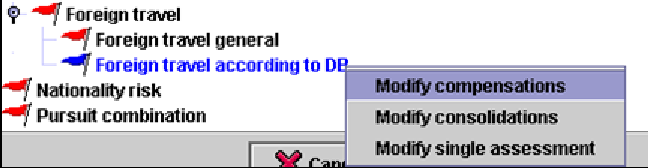
Via the risk hierarchy the level ‘Foreign travel according to DB’ can be accessed. A right-click on this level opens the menu. The option ‘Modify single assessment’ opens the database editor for the country database including the risk levels for foreign travel. The option ’Modify compensations’ opens the compensation editor of the country database including the direct assessments for the risk levels of the foreign travel.
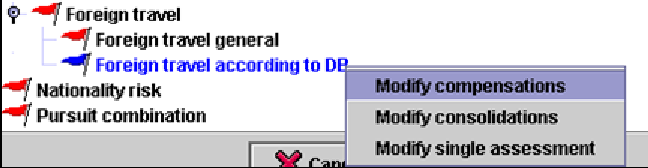
The option ’Modify compensations’ opens the compensation editor of the country database including the direct assessments for the risk levels of the foreign travel
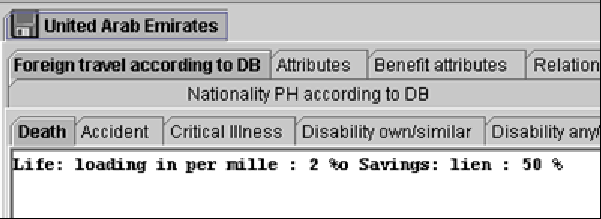
The database editor of the country database includes the event specific risk levels. In this example the risk level name is ’Life: loading in per mille: 2, Savings: lien 50%’ and enables the user to read the direct assessment defined via the compensation editor.
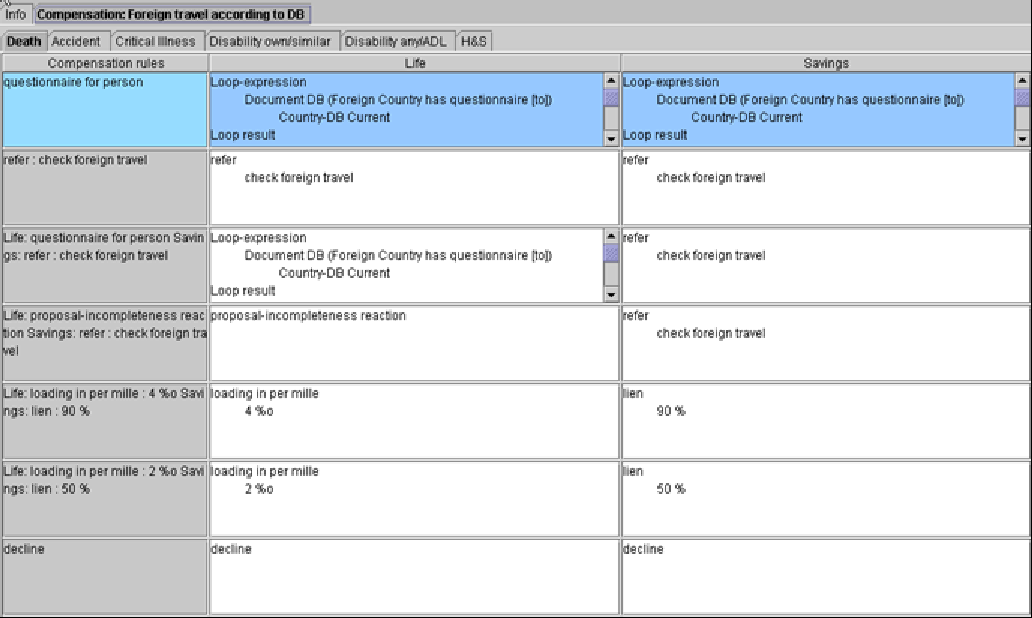
In the compensation editor the direct assessment is defined for every risk level. The left column includes the name of the compensation rule (=risk level), the right columns display the benefit specific assessments. If needed other life products can be defined as separate benefits. The assessments for the available risk levels are done in this editor; it is not necessary to review the complete database.
Conditional assessments
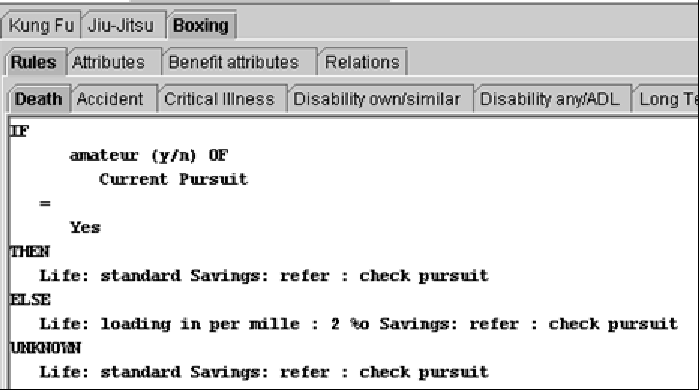
The risk classification can be done directly or with conditions. Every interface field can be used as a condition, e.g. amateur status, age for assessment, elapsed time of a disorder. This type of assessment is called ‘conditional assessment’. It has the structure IF-THEN-ELSE. The conditions can be nested.
Compensations
The following compensations are possible for events, others can be defined with the COMPASS RuleManager:
-
standard
-
hint
-
exclusion clause or restricted definition of disability
-
exclusion of
-
extra mortality
-
loading in percent or per mille
-
age increase
-
reduce annual benefit
-
reduce termination age
-
occupation class shift
-
refer with reason
-
request documents (GPR, questionnaire, …)
-
decline
-
defer
-
too unspecific
-
incomplete
Hint: |
Processing of these results is depending on the companies. For substandard risks the various requests can be made before the application is referred to the underwriter. Depending on the nature of the request, the application need only be referred to the underwriter once the outstanding evidence is received. If desired, the suggested loading, exclusion clause, reduction in annual benefit can be sent directly to the agent or broker, or it can be noted as an addendum to the policy.
Assessment results
Scale of assessment results
In our system the individual results have the following meaning:
Standard
An entirely normal risk.
Borderline standard
A slightly increased risk, which is accepted at standard terms in accordance with company policy (business decision - e.g. a loading or further requirements like a medical attendant’s report are being waived).
Accept with loading
An increased risk, for which loading or exclusion clauses are required. However, these are already captured in the proposal and reflected in the relevant premium (e.g. occupational group in IP). Therefore a policy can be issued and there is no need to make an offer.
Offer
As above, but the loading will result in the payment of an extra premium, or an exclusion clause has to be accepted by the client; consequently the client will be given an offer.
Risk data incomplete
Data relevant to the risk (e.g. occupation) is missing in the application. Therefore not all assessments can be completed.
Substandard
The application must be referred to an underwriter. The system may arrive at this result because
-
it has reached COMPASS limits, for example a sum assured limit has been exceeded.
-
it has identified pointers to an increased risk, such as suspicion of AIDS. The system gives specific instructions.
-
further papers must be requested and evaluated by the underwriter, e.g. a doctor’s report or a questionnaire.
-
it has encountered unfamiliar terms, e.g. an occupation not included in the occupations database.
Decline
The risk should be declined. This result tells the underwriter that the application cannot be accepted in its present form. The underwriter should be able to evaluate alternative offers on the basis of the risk factors identified by the system. Therefore each application is evaluated in all areas, even where the reason for decline (e.g. HIV infection) can easily be identified. The underwriter thus obtains a concise overview of all risk-related aspects.
Display of Assessment
The assessment result can be displayed with COMPASS or with a company’s own screens. The output interface includes all information needed to display the assessment. The result displayed in COMPASS is structured in the following way:
-
Header with information about policy issue, application id and point in time for assessment
-
Overview on all partial results without details (overall result, person result, event and benefit result) using colours (green, yellow, red, …).
-
Details for the overall assessment, including the required documents
-
Details for the person check
-
Details for event and benefit results; only the benefit result is displayed if the benefit includes only one event.
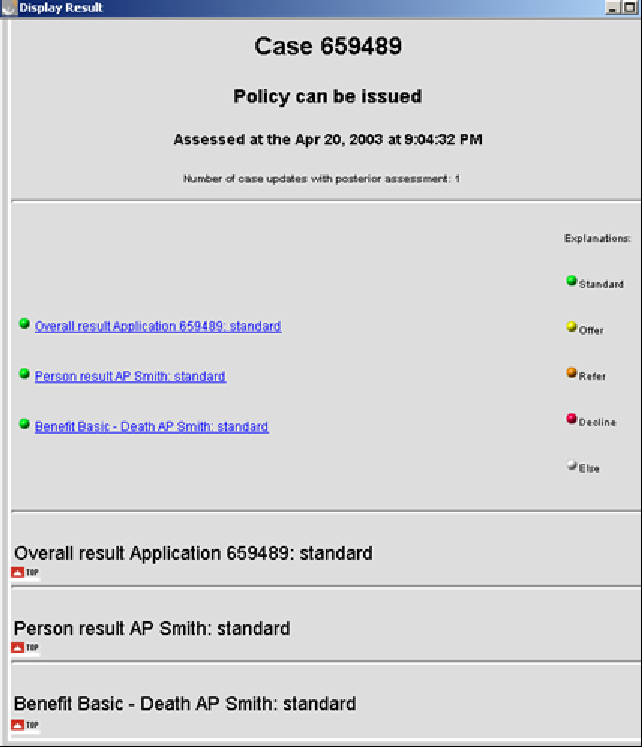
For the COMPASS Point-of-Sale – the output has to be implemented by a company. Each company has to decide, which results shall be displayed.
Description of Assessments
Notation
In this chapter the following fonts and sizes are used in the described meaning:
| Font, Size | Meaning | Example |
|---|---|---|
bold, standard size |
Rule name in the maintenance program; important key notes |
Decline suppresses other results |
italic, standard size |
CSP (company specific parameter) |
Association registry reaction GPR |
italic, bold, standard size |
Derived attributes |
Duration consolidated |
underlined, larger size |
Header for rules belonging together, descriptions |
Checking for Completeness |
Risk Hierarchy
The following chapters are structured according to the risk hierarchy , which enables the user of the maintenance program to access rules and databases.
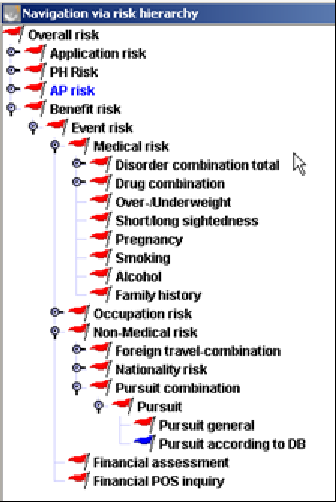
The following assessments are currently implemented by Gen Re. Companies can modify, delete or extend the assessments with the maintenance program. Please note that not every risk is assessed for each event. According to the needs, the following checks are carried out:
| Risk | Death | Dis o/s | Dis any/ADL | Accident | LTC | H&S | CI | Remarks |
|---|---|---|---|---|---|---|---|---|
Foreign travel |
yes |
yes |
yes |
yes |
No |
yes |
yes |
|
Nationality |
yes |
yes |
yes |
yes |
yes |
yes |
yes |
|
Pursuit |
yes |
yes |
yes |
yes |
yes |
yes |
yes |
|
Drinking |
yes |
yes |
yes |
no |
yes |
yes |
yes |
|
Smoking |
yes |
yes |
yes |
no |
yes |
yes |
yes |
|
Family History |
yes |
yes |
yes |
yes |
yes |
yes |
yes |
|
Pregnancy |
yes |
yes |
yes |
no |
No |
yes |
no |
|
Dioptres |
no |
yes |
yes |
no |
No |
no |
no |
only for IP and WOP |
Build |
yes |
yes |
yes |
no |
yes |
yes |
yes |
|
Occupation |
yes |
yes |
yes |
yes |
No |
yes |
yes |
if occupation includes occ. Hazard, the occ. Hazard is checked in addition |
Occ. hazard |
yes |
yes |
yes |
No |
yes |
yes |
yes |
|
Medical limits |
yes |
yes |
yes |
No |
yes |
yes |
yes |
If the risk is not mentioned in this table, it is checked for all events.
Overall risk
Obtaining an assessment based on the whole application. The result is always the "worst" result of all the sub-risks, i.e. result per person, per benefit, per policyholder and per application.
Text of the total result
The text of the total result for screen and report file (‘policy cannot be issued’) in the substandard case can be differentiated to
-
‘refer to underwriter’, if there was any direct refer reaction triggered, i.e. not related to the evaluation of an evidence.
-
‘issue evidence’, if missing evidences were the only reason for the referral.
-
‘policy cannot be issued’, if result is ‘offer’ or ‘decline’.
If the same text is used for all listed entries, no difference will be displayed. COMPASS is delivered with the text ‘policy cannot be issued’ for all of these entries.
Request/suppression of evidences
The sequence of these rules is determined with priorities, which can be set for each rule within the maintenance program. For the reader this means, that the rules are processed as listed below.
Decline suppresses other results
The result ’Decline’ suppresses the request of documents and any other inquiries and offer.
Paramedical (medical person who will visit the assured person to check his health)
Paramedicals can be requested via the medical limit database. The CSP GPR instead of paramedical if substandard controls the request of a paramedical if the medical result is substandard. If the value is ‘y’ then a GPR is requested instead of the paramedical. If the value is ‘n’ then the paramedical is requested.
Independent of the medical result a paramedical is suppressed if this is included in the relations of the document category database (see below).
If a Paramedical is requested, the system checks if the applicant has given his consent. If he has not given his consent for a paramedical, a GPR will be requested.
GPR, medical evidence, medical questionnaire suppresses field related incompleteness reaction (client inquiry, step by step, refer because of incompleteness)
If a GPR, a medical evidence or a medical questionnaire is requested for a disorder and, at the same time, a client inquiry is made for the duration of the disorder, the client inquiry will be suppressed (this can happen. e.g. for a different event).
Medical examination already agreed
Once the medical examination limit has been identified, a check is carried out to see if an examination has already been arranged. The agreed examinations are specified in the interface. The scope of those examinations already arranged for (e.g. ME + ECG) is compared with the evidence required as established by the system. If the agreed medical examination equals or subsumes (see suppression logic on evidences) the evidence required, it is noted that ‘examination already arranged’ and no further action is taken. If medical examinations have already been arranged but are not required, the comment ‘medical examination arranged, although not required’ is given and the result is ‘refer’.
The result of every benefit requiring a medical examination will be commented as follows: 'medical evidence is required'.
Evaluate attached documents
The evidence at hand is checked for completeness. Evidence missing will be requested. Evidences to be processed by the underwriter (the attribute ‘existence sufficient’ is not marked in the document database) will be referred to the underwriters with the comment 'evaluate attached documents’.
Previous medical examination available
The existence of previous evidence is checked with the interface. If previously requested documents are available and the previous evidence equals or subsumes (see suppression logic on evidences) the evidence required, the comment 'medical document is already available’ is given, the result is 'refer' and no further reaction is taken.
Suppression of evidences
If different evidences are requested for the same person, it may happen that one evidence is more or less subsumed by another. For reasons of cost minimisation, companies tend to suppress the request of the subsumed evidence in that case. For example a resting ECG may be suppressed by an exercise ECG, or a GPR may suppress a medical questionnaire.
In COMPASS, company specific suppression rules can be set up in the Document and Document Category database:
One document suppresses another
Simple suppression relations can be specified in the Document DB.
Example:
GPRs suppresses the general medical questionnaire for disorders. A hint on the suppressed questionnaire should be given in the result.
For the entry GPR the relation ‘Document suppresses Document with hint’ is set to general medical questionnaire in the Document DB. If no hint shall be given, the relation ‘Document suppresses Document without hint’ has to be used.
A set of documents suppresses another set of documents
Sometimes suppression rules apply not only for a single document but for a set of documents, for example for all client questionnaires. In this case you don’t have to specify the suppression rule for each document. Document categories can be used instead.
The relevant documents are linked to the document category via the relation ‘Document belongs to suppression category’ in the Document DB. In the Document Category DB the relations ‘Document category suppresses Document category with hint/without hint’ include the document category to be suppressed.
Documents can belong to several document categories.
Example:
A GPR suppresses all medical client questionnaires. To specify that suppression rule in COMPASS, follow the steps listed below.
-
Define a document category ‘medical client questionnaire’
-
Relate the corresponding documents (general disorder questionnaire, epilepsy questionnaire, asthma questionnaire etc.) to relation ‘Document belongs to suppression category’ in the Document DB.
-
Specify the relation type ‘suppresses document category with hint’ of the document category GPR with the document category ‘medical client questionnaire’.
A point to note is that the suppression relation is not transitional, i.e. relational chains have to be defined directly.
Please note that the suppression logic is used for the agreed/previous examinations check as well, i.e. the request of one evidence is waived, if there is an agreed/previous examination suppressing that evidence.
Priorities for request of documents
Medical evidences, General Practitioners Report (GPR) and medical questionnaires are requested simultaneously, unless they are suppressed via the document category database. Questionnaires from non-medical risk and financial risk are asked independently on any other questionnaire.
If several medical reports have to be asked for, the GPR is noted as the doctor to be written to, regardless of whether a specialist’s report is to be requested for a particular illness. If only one medical report is needed, the doctor indicated for the disorder is used, if the address is available. If the address is not available, the private medical attendant is written to. If his address is also lacking, the assessment is based on the value of CSP reaction GPR but no doctor. Results can be ‘request a medical examination’, ‘refer with comment ‘GPR required, address not available’ or no special reaction is done. If two GPs are stated in the application form, a GPR is requested from both doctors.
Attached document unnecessary
If the client has enclosed documents, which have not been requested and these are documents to be processed by an underwriter (the attribute existence sufficient is set to ’no’ in the document database), the application is referred with the comment ‘not needed documents’.
Checking for Completeness
The risk-relevant fields of the interface are checked for completeness. For each field an incompleteness reaction is specified in the user interface database with the attribute ’Unknown reaction’, e.g. ’incomplete’, ‘refer’ with the comment ‘incomplete field’, ’ignore’ or ’step by step’. The incomplete reaction is related to the source type, it can be different for several application forms. In the following this reaction is called proposal incompleteness reaction. Rules have to be defined for the application fields to initiate the incompleteness reaction. These rules can use the proposal incompleteness reaction or other reactions can be defined. The access to the proposal incompleteness reaction enables companies to change the incomplete reaction without changing the rule. There are three basic situations where an incomplete reaction for a field is triggered:
1. Static Incompleteness
If fields are unknown, COMPASS reacts according to the rule. This can be an access to the proposal incompleteness reactions or a direct reaction. The kind of the incompleteness check is depending on the use of the field for assessment rules and has to be defined within the relevant risk, e.g. AP or PH. These rules are gathered in the related sub risk plausibility.
2. Dynamic Incompleteness in assessment rules
If an assessment is depending on conditions and these details are not indicated in the proposal, COMPASS processes the unknown part. For example the amateur field may be required to assess a given pursuit. The unknown part can include any reaction, e.g. questionnaire or the proposal incompleteness reaction. The incompleteness reaction is initiated for every incomplete condition. If the condition includes internal attributes and assumptions have to be made for the assessment, the incompleteness check has to be defined in addition within the static incompleteness rules (e.g. annual income).
If the condition includes internal attributes and no assumptions are made if the data is missing, the unknown part is processed (e.g. duration consolidated).
3. Dynamic Incompleteness for connected fields
If a yes/no question needs details, e.g. sidelines (y/n) and the amount and the details are missing, COMPASS evaluates the unknown part. For health questions it can be checked, whether impairments according to the organ category or time period are indicated. This kind of incompleteness check is included within the risk related rules. These rules are gathered in the related sub risk plausibility.
If fields are not needed, i.e. not included within the proposal, at least the combination rules shall be deleted. If additional fields are prompted, the incompleteness rules have to be enhanced.
Hint: |
Each field has an internal code and a name. The name can be modified by the company and does not have to be the same as within this document.
Application risk
The application risk comprises all application related aspects as opposed to the person and event related checks. It consists of application related plausibility checks, formal and legal aspects.
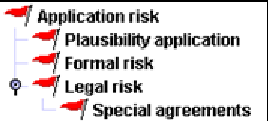
More application data
If the client has provided application details, which cannot be entered, the interface field ‘moreentries’ has the value ‘yes’. In this case the application is referred with the comment 'check un-entered application data'.
Plausibility application
Beneficiary Death
The completeness of the beneficiary is checked. If no beneficiary is indicated, the incomplete reaction for the relevant beneficiary is triggered as for any other incomplete data. If the beneficiary is indicated, it is checked within the AIDS risk (see AIDS risk). Furthermore a check is performed to see whether, in the event of death, a drawing entitlement is indicated for the insured himself. This is the case if the beneficiary is the policyholder, but the policyholder is also the assured person. In this case the application is referred with the comment ‘insured authorizes himself’. Term or whole life benefits are checked as to whether the death beneficiary is indicated. If it is missing COMPASS reacts according the incomplete reaction.
Special agreements
If the question for special agreements is answered ‚yes’ and no special agreements are indicated, a client request is initiated.
Formal risk
Agent check
COMPASS stores the following data on the agent/broker:
-
Name
-
Id no
-
Nationality
-
Agent code
The following checks are processed for the agent:
Agent flag
The agent code is stored in a database with text, which then appears as a comment in the result 'check agent/broker, because'. No further processing is done with this code (e.g. special commission arrangement, new broker).
Agent is premium contributor
If the agent’s / broker’s name is the same as the premium payer’s name and the broker is not the policyholder, the application is referred with the comment 'broker and premium payer are identical'. The agent / broker data is made available to COMPASS via the interface database from the company’s own agent / broker database.
The agent’s nationality is checked within the check for the policyholder.
Relationship between PH and AP
If an AP exists that has specified ‘other’ as relationship to the PH, the application is referred with ‘check relationship between APs and PHs’. This reaction is only executed if the field relationship to PH is used in the input interface. It is executed only once for the application form. See also the chapter ‘special checks for PH’ for other regulations on the relationship between AP and PH.
Legal risk
Missing signatures
If the general question for signatures is answered with ‚no’, the signature is requested from the client.
Missing account holder signature
If the account holder is different as the AP and PH and the answer to the questions for signature of account holder is answered with ‚no’, the signature is requested from the client.
Missing agent signature
If the question for signature of the agent is answered ’no’, the application is referred with a hint on the missing signature.
Deletions
Deletions and amendments in the closing declaration or on the reverse of the application are significant. Applications with deletions are therefore referred with the comment 'deletion/amendment in the closing declaration, or similar.
Telephone Inquiry
If the question regarding telephone enquiry is answered "yes", the result contains the comment 'telephone enquiry - confirm in writing’.
Special agreements
Special agreements are processed with the special agreement database. This database should include those agreements, which can appear quite often in application forms. The database attribute relevant for assessment controls the processing of the special agreements.
Relevant for assessment
If this attribute is set to ‚yes’, the application is referred and the hint ‚check special agreement’ is given.
Policyholder risk
The policyholder risk includes policyholder related checks. These checks are only important for the role as a policyholder. The risk consists of plausibility checks, financial and legal aspects and the nationality check.
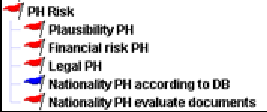
Life different reaction
If the policyholder is a natural person and is not the life to be assured, the questionnaire Life of another form is requested. See also the chapter Formal risk for possible reactions depending on the relationship of AP and PH.
Plausibility Policyholder
This chapter includes policyholder related completeness checks. The checks are only done if the Policyholder (PH) is not an assured person (AP).
Investment income
If the question for investment income (y/n) is answered with ‚yes’ and/or no amount is given, COMPASS reacts according to the incompleteness reaction.
Occupation
If the sex of the policyholder is male or female and the occupation is not given, COMPASS reacts according to the incompleteness reaction.
Occupational status
If the sex of the policyholder is male or female and the occupational status is not given, COMPASS reacts according to the incompleteness reaction.
Branch of industry
If the sex of the policyholder is male or female and the branch of industry is not given, COMPASS reacts according to the incompleteness reaction.
Physical work
If the sex of the policyholder is male or female and the answer to the field physical work (y/n) is not given, COMPASS reacts according to the incompleteness reaction.
Annual income
If the sex of the policyholder is male or female and the amount of the annual income is not given, COMPASS reacts according to the incompleteness reaction.
Financial risk policyholder
The financial assessment for the policyholder is implemented within this risk. The documentation contains the description of these checks in the chapter Financial Assessment.
Legal risk Policyholder
Signatures
The incompleteness check for the policyholder’s signature is processed, if it is needed:
| Age | Signature requested |
|---|---|
Age < CSP signature_age |
signature of legal representative of policyholder |
Age >= CSP signature_age |
signature of policyholder |
A typical value for signature_age might be 18 years. The system will check the age on the day the application form was signed.
Minor Policyholders
In the financial limit database the benefit group ‘Life: Financial Check for PH’ is reserved for financial PH checks. The sum assured that is used for the test, is the sum of the sums of all benefits with event death. In the limit-database several entries can be made in different age ranges. So every company has the flexibility to decide up to which sums minor policyholders are acceptable. Possible explanation texts for referral are: 'policyholder is a minor’ or 'check sum assured for under-aged policyholder'. Additional documents can be requested. The rules required documents and required hints initiate the request.
Nationality PH according to database
The assessment of the nationality risk for the PH is based on the Country Database. The country database includes a code for any synonym term. The relation 'Region belongs to country' connects abbreviations, towns and regions of a country with the country. The assessment of e.g. single regions can be different.
Nationality cannot be captured
Where '?' is entered for nationality, the application is referred with the comment 'nationality cannot be entered'.
Nationality unknown
A check is made to see whether the database contains any entry at all for the specific nationality. If not, the application is referred with the comment 'policyholder’s nationality not found'. If the policyholder’s nationality is unknown, the incompleteness reaction is triggered if the PH is a natural person.
The PH will be assessed on the basis of his nationality and place of residence. The following assessments have been used within the nationality risk for compensation of the risk level:
-
standard
-
exclusion clause
-
refer with the comment 'nationality to be checked'
-
questionnaire
-
decline
Other assessments, e.g. a request of additional documents (work permission, etc), can be implemented.
Risk level may depend on the following conditions:
-
residence
-
length of residence
Residence
The residence check is done with the internal attribute residence ok for PH. For setting of the internal attribute the value of the country db attribute ’Residence’ is used and checked on adherence. The attribute ‘Residence’ has four values:
-
domestic residence or residence in country of nationality
-
residence irrelevant
-
residence in country group required
-
domestic residence required
The relation ’Country belongs to country group’ determines the membership to a country group. The countries of this country group can be assessed analogue, but individual assessment is also possible.
For a referral the comment 'no matching residence' can be given.
Length of Residence
The length of residence can be checked in addition to the residency.
Nationality PH evaluate documents
This risk can contain overall rules for document requirements for nationality. Currently it is empty.
AP risk
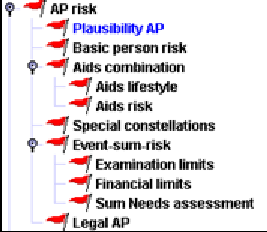
The AP risk includes person related assessment, independent on event and benefit. It consists of plausibility check, basic person check, Aids risk, special constellations, legal risk and event sum risk. The event sum risk is created on this level, because only here overall sums for several benefits/events can be calculated, e.g. for limit checks.
Plausibility AP
For the following application fields it is checked, whether the answer is given and if details have been indicated. This assessment is only done, if the fields are part of the application form. If details are missing, the relevant question and a hint on the missing details is given in the result:
-
occupational status
-
branch of industry
-
manual work
-
annual income (amount)
-
foreign travel (y/n)
-
pursuits (y/n)
-
occupational hazard (y/n)
-
excluded from military service (y/n)
-
critical illness in the family (y/n)
-
height
-
weight
-
pregnancy, only if AP is female
-
month of pregnancy, only if required within pregnancy rules
-
drugs
-
diet for medical reasons
-
reduction in earning capacity (y/n)
-
smoking (y/n)
-
ever smoked (y/n)
-
drinking (y/n)
-
ever drunk (y/n)
-
health questions 1
-
…
-
health question 50
-
IP benefit from other sources (y/n)
-
sidelines (y/n)
-
investment income (y/n)
-
Pre-existing policy (y/n)
-
Pre-existing Disability own/similar policies (y/n)
-
Pre-existing life policies (y/n)
-
Pre-existing LTC policies (y/n)
-
Pre-existing Critical Illness policies (y/n)
-
Pre-existing Accident policies (y/n)
-
Pre-existing Disability any/ADL policies (y/n)
-
Pre-existing TPD policies (y/n)
-
Pre-existing H&S policies (y/n)
Hints to all questions
If a question is not used in a source type, the plausibility rule has to be deleted or the incomplete reactions have to be set to ‘ignore’ to avoid an incompleteness reaction. If questions are depending on conditions (to be defined in the user interface db), the conditions have to be repeated within this risk level. Possible conditions are only for IP, only for very high sums insured.
Hints to the medical questions
Answers to medical questions of the AP can be processed as needed according to plausibility and completeness. Processing is person-related, unless a reaction applies to one particular benefit/event. 50 questions (health question 1 to 50) are available for these medical questions. Plausibilities in regard of questions numbers, periods and organ categories can be included.
Examples:
Category 1
When the question is answered with 'yes' and no disorder is given in response to this question, the incompleteness reaction is triggered.
If the question is answered 'yes' and a disorder is stated, the assessment takes the disorder into account.
-
Have you ever undergone psychiatric treatment?
-
Are you suffering from disorders of any other type?
-
Have you ever suffered from any allergies now or in the past?
-
…any infectious diseases now or in the past ?
-
…any viral diseases now or in the past ?
-
…any sequelae of previous disorders, now or in the past?
Category 2
If the question is answered with 'yes' and no disorder is given in response to the specified organ category, the application is referred with the comment 'no disorder given for organ system' or the result is incomplete.
If the question is answered with 'yes' and a relevant disorder is given, the assessment takes the disorder into account.
-
Have you ever undergone surgery?
COMPASS checks if a disorder is given which is coded with the organ category 'surgery'. -
Have you ever suffered accidents, injuries, poisoning?
COMPASS checks if a disorder is given which is coded with the organ category ‘accident, injuries and poisoning’. -
Have you ever had or do you now have any disorder of the respiratory system?
COMPASS checks if a disorder is given which is coded with the organ category 'respiratory system'.
Category 3
If the question is answered with 'yes' and no disorder is given in response to this question, the incompleteness reaction is triggered.
If the question is answered with 'yes' and a disorder is given, the application is referred with the comment 'check disorder to following question'.
-
Are you receiving or have you ever received disability benefits?
-
Are you expecting to be hospitalised?
-
Has a doctor prescribed a special diet for you?
-
Have you ever had X-rays taken?
-
Have you ever undergone medical investigations with abnormal results?
-
Have you ever been institutionalised for alcohol/drug abuse?
Category 4
If the question is answered with 'yes' in response to this question, the incompleteness reaction is triggered.
If the question is answered with 'yes' and a disorder is given, the assessment takes the disorder into account for Life, Accident, H&S and LTC. IP, CI and TPD applications will be referred in any case with the comment 'check disorder to following questions'.
-
Have you given up smoking for health reasons?
-
Have you changed your occupation on health grounds?
Category 5
If the question is answered with 'yes' and no disorder or dioptres are given in response to this question, the incompleteness reaction is triggered.
If the question is answered with 'yes' and a disorder or dioptres are given, the assessment takes the disorder or visual impairment into account.
-
Are you suffering from any medical disorders?
-
Have you undergone any treatment?
-
Do you have any sequelae to health?
Basic person risk
Assessment of pre-existing policy
For application detail and association registry entries it is checked if the policy is with one’s own company. The company is defined with CSP company.
Association registry
The details are taken from the interface data. A check is made to see whether there is any data available on the life to be assured. Independent on the event/benefit, only entries with result substandard are taken into account. It is checked by which company the entry given.
Association registry own company
If the pre-existing policy is with one’s own company, the application is referred with the comment 'pre-existing policy accepted as substandard risk'.
Association registry other companies
If the pre-existing policy is with another company the CSP association registry reaction GPR will determine whether the application is referred with the comment ‘check association registry’ (066) and additionally a GPR is requested.
Association registry company unknown
If the company cannot be found in the company database, the application is referred with the comment 'entry with unknown company'.
Own Portfolio details
The portfolio details are entered in the interface in cumulative form. For every event in the portfolio the following fields may be provided by the administrative system: sum assured to be considered for the financial assessment, sum assured to be considered for the medical assessment and acceptance result (worst acceptance result of all pre-existing policies). The sum of the field with the extension _f, for example sum_assured_f, is used in the financial assessment. The sum of the field with the extension _e, for example sum_assured_e, is used in the evaluation of examination limits.
Own portfolio policy substandard
If the acceptance result from pre-existing policies is ‘substandard’, the application is referred to the underwriter with the comment 'pre-existing policy with substandard result in portfolio’.
Own portfolio policy declined
If the acceptance result from pre-existing policies is ‘decline, the application is referred to the underwriter with the comment 'pre-existing policy declined in portfolio’.
Own portfolio policy incomplete
If the acceptance result from pre-existing policies is ‘incomplete’, the application is referred to the underwriter with the comment 'pre-existing policy incomplete in portfolio’.
Own portfolio policy claim
If the acceptance result from the pre-existing policies is ‘claim', the application is referred to the underwriter with the comment 'pre-existing policy with claim in portfolio’.
Own portfolio policy longstop
If the longstop limit is exceeded, recognized by the interface field longstop, the application is referred and the comment ‘check longstop limit’ is given. A longstop limit is an internal definition of pre-existing insurances.
Application details
Benefit related substandard previous insurances
Substandard, declined or deferred pre-existing policies, which are declared by the life to be assured in the application form (as an answer to the question related to every type of benefit), are referred to the underwriter with the comment 'client indicates pre-existing substandard policy'. Substandard previous insurances at the own company are processed in the same way.
General substandard previous insurances
Substandard, declined or deferred pre-existing policies, which are declared by the life to be assured in the application form (as an answer to the general field for substandard, declined or deferred pre-existing policies), are referred to the underwriter with the comment 'client indicates pre-existing substandard policy’.
Medical questions with special reactions
Questions included within this paragraph contain the described reactions. They can be used accordingly or the reaction can be modified via the maintenance program:
Incapable of working
Have you been ill for longer than two weeks?
If the question is answered with 'yes' and no disorder is given in response to this question and the AP is not a child, the application is referred with the comment 'no individual health indication'.
If the question is answered with 'yes' and a disorder is given, the assessment takes the disorder into account.
If the question is not answered, an 'incomplete' reaction is given unless the life assured is a child (age under 18), i.e. the age at proposal is less or equal to CSP signature age.
Healthy and able to work
Are you healthy/able to work?
If the answer is ‘no’ and no disorder is given in response to this question and the AP is not a child, the application is referred with the comment 'no individual health indication'
If the question is answered with 'no' and a disorder is given, the assessment takes the disorder into account.
If the question is not answered, an 'incomplete' reaction is given unless the life assured is a child (age under 18), i.e. the age at proposal is less or equal to CSP signature age.
Reduction in earning capacity
Do you suffer from any reduction in your earning capacity?
Independent of the percentage of the reduction of earning capacity, the application is referred to the underwriter for final assessment. The hint ‘reduction on earning capacity’ is given.
If the percentage of the reduction of earning capacity is missing, the incomplete reaction is triggered.
More disorders
Have you stated all disorders?
If the answer is ‘no’, the application is referred with the comment ‘not all disorders specified’.
Positive HIV test
Have you tested positive for HIV/AIDS?
If the answer is 'yes', the AIDS risk probability is set to 1.0 and the application is declined.
Suicide attempt
Have you ever attempted suicide?
If the answer is 'yes', the application is referred with the comment ‘suicide attempt’.
Hypertension
Do you suffer from high blood pressure?
If the answer is 'yes', the medical report blood pressure is requested. If the answer is missing, the incompleteness reaction is triggered.
Cholesterol
Do you suffer from hypercholesterolaemia?
If the answer is 'yes', the medical report for cholesterol is requested. If the answer is missing, the incompleteness reaction is triggered.
Suspicious signature
If the signature is suspicious, the application is always referred with the comment 'suspicious signature', because it may reveal signs of illness, alcohol or drug abuse etc.
Aids combination

The Aids combination risk consists of the evaluation of the lifestyle questions and the aids risk derived from all application data, based on a probability function.
Aids lifestyle
The Lifestyle questionnaire is asked and evaluated, when the lifestyle questions are used within the user interface definition or the Lifestyle questionnaire is selected in the enclosed document menu. The need of a Lifestyle questionnaire is determined from Limit-DB or depending on CSP aids level lifestyle. If a Lifestyle questionnaire is not available, i.e. not in the list of attached documents or not used in the user interface definition, normal probability check for Aids is done.
The evaluation of the lifestyle questions is not hard-coded in COMPASS. Rules can be defined within this risk level, e.g. if any question of the lifestyle questionnaire is answered 'yes', the application might be referred with the comment 'lifestyle question answered yes’.
If after the evaluation of the lifestyle rules the result is still standard and the life insured is older than 30 years, the reaction is according to the CSP lifestyle question reaction with the following possibilities:
-
refer with the comment ‘check AIDS risk’
-
request GPR
Then no probability check is carried out in addition. If the result is still standard or the age is below or equal 30, the AIDS risk is checked by the system as described below.
Aids risk
The AIDS risk is determined by the probability function, the different application statements are assigned probabilities for or against an AIDS risk.
Foreign travel, nationality
The assessment of foreign travel or nationality is based on country database. The highest aids factor of all single risks is chosen.
Age
If the life assureds age at entry is between 20 and 55 inclusive, this factor is weighted by 0.2.
Premium payer
If a person other than the life assured is paying the premium, the names are different and the persons are of the same sex, this factor is weighted by 0.2.
Occupation
The assessment is obtained from the occupation database. If there is no entry, it is not considered an "at-risk" occupation. The AIDS risk is then downgraded by a factor of -0.2.
Marital status
For single lives assured (incl. separated, divorced) a weighting of 0.2 is applied, for married lives assured the risk is downgraded by -0.2.
Joint lives, HIV infection
If one of several lives to be assured is HIV positive and the names or the postal codes are different, it is assumed this is a business partnership and the factor is weighted by 0.5 for the non-infected person. If the postal codes are identical, it is assumed they are married and the factor is weighted by 1.0.
Sex
Male lives assured receive a weighting of 0.2.
HIV infection
If the life to be assured is HIV positive, i.e. the relevant question in the application is answered 'yes', the risk is weighted by 1.0.
Infectious disease
A disease associated with HIV infection exists where the AIDS value in the Disorder-DB has a value and the attribute maximum duration has no value.
Chronic disease
If the duration is relevant for a disease with HIV infection potential, the attribute maximum duration in the disorder database has a value. The duration of the illness is compared with the entry from the maximum duration field. If this duration is exceeded, the assessment is obtained from the AIDS value attribute.
Sum assured
Any pre-existing cover (as indicated in application and/or from previous business) and the sum assured applied for are added together. If this total sum is just under the value of the CSP examination limit life AIDS, i.e. between 96 and 100 percent of the value of examination_limit_life and no examination is arranged, this factor receives a value of 0.1.
Joint lives, male
Two male lives to be assured whose names are different but who live together, i.e. their postal codes are identical, are rated 0.2.
Beneficiary
In the case of a male life to be assured and male, other or unknown beneficiary, a weighting of 0.3 is applied unless the family name is identical, i.e. suggestive of family members. In the case of a male life assured and a female beneficiary, a downgrading of -0.2 is applied.
In the case of a female life assured and unknown or other beneficiary, a weighting of 0.2 is applied. All other beneficiary situations such as female life assured and male beneficiary are downgraded by -0.2.
COMPASS allows several beneficiaries with different percentages. For the AIDS check the worst scenario is taken into consideration.
Postal code
If the life assured lives in the domicile country COMPASS checks whether the city includes a high AIDS risk. The postal code is compared with entries in the postal codes database. Depending on the CSP aids postal equation the postal code is evaluated, e.g. take only the first two digits. If the city is included in the list, the AIDS risk receives an increase weighting of 0.2. If not, the risk is downgraded by 0.1.
Signature
A suspicious signature may indicate an AIDS risk and is therefore rated 0.1.
Relationship of life (lives) assured / policyholders
In the case of two male names, the factor is rated 0.2. If the names are the same or indicating different sex, a downgrading of -0.2 is applied.
The result from the probability function leads to an assessment of AIDS risks in the following groups, the levels and texts being modifiable:
| Probability result | Reaction |
|---|---|
>= aids level3 |
Decline |
>= aids level2 |
'AIDS suspicion very high' and reasons |
>= aids level1 |
'some indication of AIDS risk' and reasons |
> aids level0 |
'little indication of AIDS risk' and reasons |
It is advisable to refer any result between the aids_level0 and aids_level3 to an underwriter. Depending on the value of CSP aids level lifestyle questionnaire the lifestyle questionnaire is requested additionally, if the value exceeds or reaches the CSP value and has not been requested yet. Where aids_level3 is exceeded, it is advisable to decline.
If reactions of the system are only required in the case of very high AIDS suspicion, e.g. stated by a positive aids test, then the aids level0 should be set to 0.99 and all other aids parameters to 1.00. In this case the text 'little indication for AIDS risk' should be set to 'AIDS suspicion very high'.
Incompleteness
The AIDS assessment takes into consideration information from the application form, which is available from the interface and has no incomplete assessment. If these fields are incomplete the AIDS assessment cannot be done properly. However, in order to enable the system to make a decision even if this data is missing, the system includes a CSP to store any decision to be made if the data (e.g. marital status, sex) is not available. The following data comes from the interface:
-
marital status of life assured
-
name of life assured
-
sex of life assured
The CSP aids default may have the following values:
-
best case
-
worst case
-
take available date
-
assessment of GCR
GCR assessment
name of policyholder is not equal to name of life assured (=worst case)
marital status of life assured is unknown
sex of beneficiary is unknown
sex of account holder is unknown
Best case assessment
name of policyholder is equal to name of life assured
marital status of life assured is married
sex of beneficiary is other than sex of life assured
sex of account holder is other than sex of life assured
Worst case assessment
name of policyholder is not equal to name of life assured
marital status of life assured is single
sex of beneficiary is equal to sex of life assured
sex of account holder is equal to sex of life assured
Special constellations
Currently this risk level does not include any check. Possible checks are e.g. healthy person but younger than 60 and already a pensioner.
Event sum risk
This chapter includes assessments considering the sum insured of same events, independent on the benefit.
Examination limits
Companies already conduct technical assessments of parameters, such as minimum or maximum sum assured, termination age and duration at the time of application data entry. Therefore COMPASS does not perform these assessments.
Examination limits
The medical examination limits are stored in the Medical Limit DB and may be modified in a company-specific way. The Medical Limit DB contains an examination category field, which indicates the group in which the benefits is classified. For example, an examination group can be created for benefit, or just one group for the events Death, IP, LTC, TPD own/similar, TPD any/ADL and Critical Illness. For each group there are database entries with age, sex, marital status, sum assured, policy duration and deferred period (IP) to be adhered to. The age, which is critical for this assessment, is taken directly from the interface field age for examination limit. If several ages apply, the oldest one is taken into account. For the marital status the entries ‘married’ and ‘single’ is possible via the Medical Limit DB. In the Marital Status DB it can be defined which marital status is to be treated ‘single’ or ‘married’, e.g. divorced, widowed. If several examination groups for the same event are transferred, one of these examination groups is used for the assessment and the hint ‘several examination groups for the same benefit group’ is given.
When index-linked benefits have separate examination limits, a separate group must be created. The examination limits for this group should be transferred by the company, e.g. if the general GPR limit is 150.001, the GPR limit for indexed policies is 75.001. The assessment is performed for each life assured.
Medical reports, Lifestyle questionnaires or HIV tests, which are to be obtained in view of the age at entry and sum assured, can also be stored in the Medical Limit DB. The requested ME may include different examinations (e.g. HIV-test, ECG®). However, every individual examination / piece of evidence must be explicitly listed for each limit within the database (e.g. ME / ME and ECG ® / ME and ECG ® and HIV; etc.). General GPRs for IP cover with 4 weeks deferred period should also be stored in the Medical Limit DB.
If no check should be executed for a specific benefits type, then the Limit-DB should not contain entries for the examination group of that tariff.
Establishing the examination limits
The sum that is calculated as follows is used for the lookup in the Medical Limit DB to decide whether and which examinations/documents are necessary:
-
sum of all fitting tariffs from current proposal for AP
-
sums from existing insurances at the own company according to CSP own previous covers included for medical limits only for aids
-
sums from existing insurances at other companies according to CSP other pre-existing covers included for medical examination limits
-
bonus (optional – can be changed by Gen Re)
-
sums insured applied for simultaneously (to be recognized at the field ‚acceptance result’ for previous insurances)
If the CSP own pre-existing covers included for medical limits only for aids is set and the requested examinations do not contain HIV then the system adds the correspondent sums to check only if HIV is necessary.
In the case of single-premium policies, the sum is reduced by the amount of the single premium, unless it is not a IP or LTC applied for. Where the IP benefit is to be reduced, determination of the relevant evidence to be obtained according to the medical examination limits will be based on the reduced benefit, if the CSP consolidate reduced is ‘yes’.
Specialities for some events
TPD
Examination limits are checked for TPDown/similar and TPDany/ADL separately.
WOP
Examination limits are checked for all WOPown/similar and WOPany/ADL separately. The sum to be checked is derived from the related premiums.
IP
Examination limits are checked for all IPown/similar and IPany/ADL separately. Where several IP benefits have been applied for simultaneously, the sums assured of those IP with shorter or equal deferred periods are added together.
The same procedure applies for previous insurances, i.e. only those ones are added to the one applied for with a deferred period shorter or equal.
Request of evidences
If various pieces of evidence are required for various events, such as Life and IP, the total evidence will be required.
Requesting evidences as a result from the limit check including previous insurances can be avoided when the current sum applied for is very small. The CSP minimum of annual benefit for requesting evidences / minimum sum for requesting evidences includes the benefit specific limits from which on the evidences should be requested. If the sum assured is below this minimum but the evidences are requested caused by previous insurances, the system will refer with the comment ‘check request of MEs because of small sums’.
Financial limits
All checks for financial limits are processed using the financial limit database. These checks are described in the chapter Benefit specific total sum check.
Sum needs assessment
This chapter includes the IP needs analysis related to the annual benefits for the same event. These checks are described in the chapter IP need assessment.
Legal AP
Signatures
The incompleteness check for the assured person’s signature is processed, if it is needed:
| Age | Signature requested |
|---|---|
Age < CSP signature_age |
signature of legal representative of AP |
Age >= CSP signature_age |
signature of AP |
A typical value for CSP signature age might be 18 years. COMPASS will check the age on the day the application form was signed.
Signature health declaration
The signature for the health declaration is needed, if the age at proposal is less or equals the value of CSP signature age. If the signature is not available it is requested from the client.
Minor assured persons
The benefit group related entries in the financial limit database can be used for age and sum insured related checks of minor assured persons. So every company has the flexibility to decide up to which sums minor assured persons are acceptable. Possible explanation texts for referral are: 'insured is a minor, acceptance guidelines not adhered to’.
Benefit risk
This risk contains assessment rules for benefits, which can contain more than one event. Those benefits are very company specific and therefore only very basic rules are included in the delivery. Special rules for joint lifes benefits with a death risk for each applicant can also be defined on this level.
TPD own/similar and TPD any
If the result of TPD own is not ‘decline’ and an exclusion clause is necessary and the result of TPD any is decline, then the result for TPD any is set to ‘refer’ and the comment ‘check TPD any for possible exclusion clause’ is given. The result for TPD own remains as it is.
Event risk
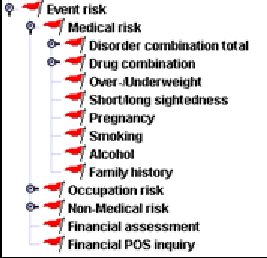
The event risk consists of the medical and non-medical risk, occupational and financial risk. The results of all areas are consolidated in this chapter.
The result is the 'worst' result of all individual risks.
The non-medical ratings are expressed as per mille loading, percent loading or lien in the databases and interface fields. A company has to make sure that the selected variant is retained per event for all databases and input fields. The medical ratings are expressed as extra mortality (in percent), loading (percent), age increase or lien. The value of the medical rating is consolidated in the medical risk chapter.
In general, the sequence for the following rules is given from the document; it can be determined with the priority value (highest value = highest priority) within the rule. Within the sequence all rules are processed!
If the result for an event is 'offer', the company has the possibility to produce an automatic offer to the client without any involvement of an underwriter. There may be scenarios where a company would prefer not to do that, e.g. if the established loading is too high or if there is more than one loading. Some companies may decide not to let the system send out offers automatically at all. Consequently the system checks the values of those CSPs in which a company has defined the acceptable limits for an automatic offer.
Exclusion clause already accepted
When an exclusion clause is already accepted by the client, the result is changed from ‘offer’ to ‘accept with loading’. The comment ‘AP agreed exclusion clause’ is given.
Agreed exclusion clause unnecessary
When an exclusion clause is already accepted by the client, but no exclusion clause is required, the application is referred and the comment ‘AP agreed not needed exclusion clause’ is given.
Maximum number offers
The number of different offers is determined. Possibilities for an offer:
-
Exclusion clause
-
Loading
-
Extra mortality
-
Lien/Debt
-
Age increase
-
Decreased termination age
-
Reduction of annual benefit/Reduction of sum insured
-
Extension of deferred period
The number of different offers is compared with the CSP maximum number offers, in which companies define the maximum number of different offers for an automatic offer to the client. If the number of offers exceeds the value of the CSP, the application is referred with the comment 'too many offers'.
Special definition of disability and loadings
For IP it is checked, whether the Special definition of disability and a loading are offered. If both types are offered, the application is referred with the comment 'Special definition of disability in combination with loading'.
For per mille loadings the following assessments are processed:
The following checks are depending on the value of the CSP consolidate loadings when refer. Consolidation can be performed independently of the assessment result or can be performed only if the assessment result is 'offer'.
Loading per mille from different areas
Three assessment categories are considered for the loading consolidation:
-
Non-medical risk (pursuits, foreign travel)
-
Medical risk (build, disorders, drugs, smoking, alcohol)
-
Occupational risk
Any combination of ratings is checked for compatibility.
If the CSP combination of occupation/medical ratings possible is defined with 'yes', combination of medical and occupational ratings is permissible.
If the CSP combination of medical/non-medical ratings possible is defined with 'yes', combination of medical and non-medical risk ratings is permissible.
If the CSP combination of occupation/non-medical ratings possible is defined with 'yes', combination of occupational and non-medical risk ratings is permissible.
If the value of one of the above CSPs is 'no', the combination is not permissible and the application is referred with the comment 'loadings for different risks’.
Max. number loadings per mille
The number of loadings is compared with the CSP maximum number of loadings. If the number is exceeded, the application is referred with the comment 'too many loadings'.
Add loadings per mille
Loadings from several areas are added together.
Loading per mille multiplied with death percentage at unit-linked life insurance
Loadings on unit-linked life insurance are multiplied by the death_percentage in order to take the low risk in case of death into consideration. This multiplication is only carried out if the death percentage is lower than or equal to CSP unit linked loading in percent.
Maximum loading per mille
The total loading of all loadings added together is compared with the value of the CSP maximum loading per mille, which includes the maximum limit for the total loading. If this limit is exceeded the application is referred with the comment 'total loading too high.
Waiver of loading per mille because of sum
If every limit is adhered to, the system checks if, in view of a very small sum assured, the loading can be waived. If the sum assured is below or equal to the value of the CSP maximum sum for waiver of loading, the reaction is based on the value of CSP waiver loading reaction is refer. If the value is ‘yes’, the application is referred with the comment ‘check possible waiver of loading’. If the value is ‘no’, the result is 'borderline standard' if no other rating exists. The comment 'loading waived' is given in the result.
Waiver of loading at term insurance with conversion right
In the case of a convertible/renewable term insurance where a waiver would be possible, the application is referred with the comment 'check waiver of loading for convertible term insurance'.
If the loading should be offered automatically, i.e. the result is still 'offer', the system checks whether the loading is already included in the premium. The value of the interface field 'accepted loading per mille' (i.e. accepted by the applicant) is checked.
Included loading per mille too high
If the included loading is too high, the result is 'accept with loading' with the comment 'loading in premium too high'.
Included loading per mille exactly needed
If the loading is included for the correct amount, the result is 'accept with loading' (unless other rating exists) with the comment 'loading already included in premium'.
Included loading per mille unnecessary
If no loading is necessary, but a loading has nevertheless been agreed to, the result is 'standard' with the comment 'loading in premium unnecessary'.
If the included loading is too low, an offer will be given with the hint ‘accepted loading too low’.
For percent loadings the following checks are processed:
The following checks are depending on the value of the CSP consolidate loadings when refer. Consolidation can be performed independently of the assessment result or can be performed only if the assessment result is 'offer'.
Loading percent from different areas Three assessment categories are considered for the loading consolidation:
-
Non-medical risk (pursuits, foreign travel)
-
Medical risk (build, disorders, drugs, smoking, alcohol)
-
Occupational risk
Any combination of ratings is checked for compatibility.
If the CSP combination of occupation/health ratings possible is defined with 'yes', a combination of medical and occupational ratings is permissible.
If the CSP combination of health/non-medical ratings possible is defined with 'yes', a combination of medical and non-medical risk ratings is permissible.
If the CSP combination of occupation/non-medical ratings possible is defined with 'yes', a combination of occupational and non-medical risk ratings is permissible.
If the value of one of the above CSPs is 'no', the combination is not permissible and the application is referred with the comment 'loadings for different risks’.
Max. number loadings percent
The number of loadings is compared with the CSP maximum number of loading. If the number is exceeded, the application is referred with the comment 'too many loadings'.
Add loadings percent
Loadings from several areas are added together.
Maximum loading percent
The total loading of all loadings added together is compared with the value of the CSP maximum loading percent, which includes the maximum limit for the total loading. If this limit is exceeded the application is referred with the comment 'total loading too high.
Waiver of loading percent because of sum/annual benefit/waiver of premium
If every limit is adhered to, the system checks if, in view of a very small sum assured/annual benefit/waiver of premium, the loading can be waived. If the sum assured is below or equal to the value of the CSP maximum annual benefit for waiver of loading/ maximum sum for waiver of loading, the reaction is based on the value of CSP waiver loading reaction is refer. If the value is ‘yes’, the application is referred with the comment ‘check possible waiver of loading’. If the value is ‘no’, the result is 'borderline standard' if no other rating exists. The comment 'loading waived' is given in the result.
If several benefits with the same events are applied for, the sums of the same events are added for this check.
If the loading should be offered automatically, i.e. the result is still 'offer', the system checks whether the loading is already included in the premium. The value of the interface field 'accepted loading percent' (i.e. accepted by the applicant) is checked.
Included loading percent too high
If the included loading is too high, the result is 'accept with loading' with the comment 'loading in premium too high'.
Included loading percent exactly needed
If the loading is included for the correct amount, the result is 'accept with loading' (unless other rating exists) with the comment 'loading already included in premium'.
Included loading percent unnecessary
If no loading is necessary, but a loading has nevertheless been agreed to, the result is 'standard' with the comment 'loading in premium unnecessary'.
If the included loading is too low, an offer will be given with the hint ‘accepted loading too low’.
The following check is processed in addition on this level:
Preferred Life
If the life to be assured is applying for a 'Preferred Life' policy (recognised by the interface field preferred_life), the system will establish the applicant’s eligibility for this policy type by checking the following conditions:
-
non-smoker now and in the past
-
no alcohol consumption
-
no family history diabetes/coronary artery disease, the question for critical illnesses in family is answered with ‘no’
-
domicile nationality
-
age between 20 and 70
-
underwriting result: standard
If all conditions are met, the document according to the CSP ME/GPR for preferred life is requested. If one condition is not met, the application is referred with the comment ‘check conditions for Preferred Lives’.
Special event benefit
The meaning of the term ‘special event benefit’ is that in special cases like birth of a child, wedding or buying of a house the sum assured can be increased without any new assessment. If the result is 'refer' or 'offer' for medical reasons and special event benefits have been applied for, they will be excluded with the exclusion clause for special event benefits. If the result is 'refer' or 'offer' for non-medical reasons, the special event benefit will be excluded if the CSP Special event benefit reaction excluded is 'yes'; if it is 'no', special event benefits will be accepted.
CI only percent
For CI benefits the following additional check is done. If the loading is below or equal to the value of CSP CI loading waiver percent and no life insurance (i.e. event death) is applied for, the loading is waived and the result is borderline standard. The comment ‘loading waived’ is given in the result (only if no other rating applies).
Medical risk
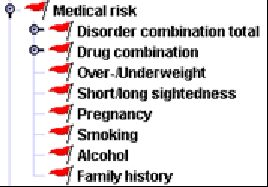
The medical risk consists hierarchically of the disorder assessments, drugs check and the special checks for height/weight, smoking, drinking, etc. The individual results are consolidated within the medical risk as described below.
The result is the 'worst' result of all single impairments.
In general, the sequence for the following rules is given from the document; it can be determined with the priority value (highest value = highest priority) within the rule. Within the sequence all rules are processed.
Maximum number of medical ratings
If the number of ratings resulting from disorders, drugs, build, family history or smoking exceeds the value of the CSP maximum number medical ratings, the application is referred with the comment ‘several ratings for medical risk’.
For extra mortalities:
Extra mortality add
Extra mortalities derived from build, smoking, drinking, drugs, disorders and family history are added, because these are only small values.
Extra mortality combination too high
If the final extra mortality is derived from more than one risk (build, disorder, drug, smoking, drinking, family history), it is checked whether the extra mortality exceeds the value of CSP maximum em from medical combi risk. If the CSP is exceeded the application is referred with the hint ‚extra mortality from combination too high’.
Extra mortality too high
If the total rating derived from one risk is greater than or equal to value of the CSP maximum em from medical risk, the applications is referred with the comment ‘total medical rating too high’.
Hint: |
Waiver of extra mortality
If the extra mortality is below the value of CSP waiver medical rating (percent), the result is ‚borderline standard’ with the comment ‘medical rating waived’.
If the extra mortality is below the CSP limits for referral, it will be converted to per mille, age increase, etc. depending on the value of CSP Conversion extra mortality. The calculation is done for the benefits endowment, term and whole life and for a single life application, i.e. it is not done for joint life. The calculation uses the age for assessment.
For the conversion no difference is made between decreasing or increasing sum insured. If a company desires this, the CSP should be set to ‘no calculation’.
Extra mortality cannot be converted
If the calculation is not possible, e.g. for special benefits, the application is referred with the hint ‘extra mortality cannot be converted’.
Extra mortality conversion
For the conversion the following parameter are determined in a property file:
-
mortality table (EM_table)
-
technical interest (EM_interest)
-
Age of assessment without range (EM_age) – from this age onwards (including)
-
Age of assessment without range (EM_period) – from this age onwards (including until duration 15 years)
The extra mortality calculation is done with an individual mortality table (EM_table) and with an individual technical interest (EM_interest). Age and insurance period are defined in 5 years intervals (e.g. age 26 is in interval 23-27). The per mille calculation is done for the mean value. The calculation is processed from age 18, for term insurances from insurance period 5, for endowments from insurance period 10. For insurance period 5-10 at term insurances no interval is used. No interval is used for ages defined in the parameter EM_age. If this parameter has the value 50, the last interval used is 48-50, the mean value 49 is taken. No interval is used for the age defined in the parameter EM_period up to insurance period 15. If this parameter has the value 50, and the AP is 52 and insurance period is 11, the insurance period 11 is taken.. If the AP is younger, the insurance period 10 of the interval is used.
If the calculation results in a per mille loading, the following checks are processed:
Loading per mille too high
If the per mille loading is equal or exceeds the value of CSP maximum medical loading per mille, the application is referred with the comment ‘loading too high’.
Waiver on loading per mille
If the per mille loading is below the value of CSP waiver medical loading per mille, the result is ‚borderline standard’ with the comment ‚medical rating waived’.
If the calculation results in a age increase, the following checks are processed:
Age increase too high
If the age increase is equal or exceeds the value of CSP maximum medical age increase, the application is referred with the comment ‘age increase too high’.
Waiver on age increase
If the age increase is below the value of CSP waiver medical age increase, the result is ‚borderline standard’ with the comment ‚medical rating waived’.
For percentage loadings:
Add loadings percent
The percent loading from build, drugs, disorders, smoking, alcohol and family history are summed up.
Loading percent too high
If the loading derived from one risk is equal or exceeds the value of CSP maximum medical loading (percent), the application is referred with the comment ‚loading too high’.
Waiver on loading percent
If the loading is below the value of CSP waiver medical loading (percent), the result is ‚borderline standard’ with the comment ’medical rating waived’.
Classification for the disorder db and basis for the assessment
Classification
The disorders are classified according to the ICD10 classification of the World Health Organisation (WHO). ICD 10 has been used selectively as the use of the full ICD10 would have made the database inefficient (more than 50,000 entries) and would have included many entries that will never occur in an application form. All ICD 10 chapters covering terms already used in the previous disorder database have been included in the new database. Of course each company can individually decide to have further terms added at any time. Some of the previous terms have been abbreviated or slightly changed to improve readability and unambiguity. No changes have been made to the structure or keys of the database. Additionally a surgery coding system called OPS310 has been added, so that the database now covers approximately 16,000 entries.
| ICD-10 Key: | |
|---|---|
1st digit |
Letter |
2nd digit |
Number |
3rd digit |
Number |
4th digit |
Separator = dot |
5th digit |
Number (optional) |
6th digit |
Number (optional) |
Synonyms are expressed by adding a separator (= dash) and a 3-digit consecutive number (starting with 001) to the key. 3-digit numbers, which are followed by 5-digit sub groups, cannot have synonyms.
Examples for synonyms:
X99.99-999
X99.9-999
X99-999
B35.9-001 | Appendicitis
B35.9-002 | acute appendicitis
| OPS-310 | |
|---|---|
1st digit |
Number |
2nd digit |
Separator = dash |
3rd digit |
Number |
4th digit |
Number |
5th digit |
Number (optional for 5-digit code) |
6th digit |
Separator = dot |
7th digit |
Alphanumerical (optional for 7-digit code) |
8th digit |
Alphanumerical (optional for 8-digit code) |
Synonyms are expressed by adding a separator (= dash) and a 2-digit consecutive number to the key. X-digit numbers which are followed by x+1-digit sub groups cannot have synonyms.
Example for synonyms:
9-999.XX-99
9-999.X-99
9-999-99
5-445-01 | Bypass stomach
5-393.7-01 | Bypass lower leg
As each individual term has a separate key all terms can be assessed individually.
Basis for the disorder assessments
ICD10 is structured so that most of the assessments are homogenous at the Major Group (MG) level, and quite a lot of the major groups within a Super Group are also homogenous for assessments.
In making the modifications to the Disorder DB, consideration was given to current underwriting guidelines given in the Gen Re CLUE online manual. This gave valuable insights into the risk of a given disorder by benefit and in particular how this risk is evaluated in terms of the recommended underwriting decision.
This decision often requires further information not given in an application form but requiring a GPR or Pathology results which may not be available to the applicant. However, there are many instances where a condition may be accepted at Standard when a given time has elapsed since the complete resolution of a condition and/or the condition was within a specified duration. Also loadings and exclusions are possible.
Any assessment that was not obvious from CLUE was checked against Medical Literature and opinions from various other sources. These included Medical Journal archives and the use of the various Internet search tools.
The writer’s own experience, both as a Registered Medical Practitioner and previous position as Chief Underwriter for a major Direct Life company, was also used extensively in evaluating each assessment. An overriding consideration was to ensure that all assessments were valid and consistent, with as much homogeneity of assessments within subgroups as possible for ease of implementation and maintenance without compromising the validity of these assessments.
In the Disease-Database, questionnaires are required to collect information. Only for malignant and benign tumurs, diseases of the nervous system/psyche and heart diseases, instead of a questionnaire a report from the treating doctor is necessary.
Corresponding to the ICD10, the following chapters are included in the Disease-Database:
-
P00-P96: Certain conditions originating in the perinatal period
-
Q00-Q99: Congenital malformations, deformations and chromosomal abnormalities
-
R00-R99: Symptoms, signs and abnormal clinical and laboratory findings, not elsewhere classified
-
S00-T98: Injury, poisoning and certain other consequences of external causes
-
V01-Y98: External causes of morbidity and mortality
-
Z00-Z99: Factors influencing health status and contact with health services
-
O00-O99: Pregnancy, childbirth and the puerperium
-
N00-N99: Diseases of the genitourinary system
-
M00-M99: Diseases of the musculoskeletal system and connective tissue
-
L00-L99: Diseases of the skin and subcutaneous tissue
-
K00-K93: Diseases of the digestive system
-
J00-J99 : Diseases of the respiratory system
-
I00-I99: Diseases of the circulatory system
-
H60-H95: Diseases of the ear and mastoid process
-
H00-H59: Diseases of the eye and adnexa
-
G00-G99: Diseases of the nervous system
-
F00-F99: Mental and behavioural disorders
-
E00-E90: Endocrine, nutritional and metabolic diseases
-
D50-D89: Diseases of the blood and blood-forming organs and certain disorders involving the immune mechanism
-
00-D48: Neoplasms
-
A00-B99: Certain infectious and parasitic diseases
-
00–99: Surgical
The chapter’s abbreviation, for example “H”, is always to be found in first position on the disease key.
Disorder critical combinations
The combination of disorders is assessed on the basis that the event specific relations disorder has combi-risk IP own/similar, IP any/ADL, TPD own/similar, TPD any/ADL, Life from the disorder database, which includes codes for those organ categories, which are important in the context of a special disorder. In the disorder database an organ category is defined for every disorder.
The values of the relation ‘disorder has combi-risk …’ are compared with the organ category of another disorder indicated in application. If the organ category of another disease is included in the values of the relation and the other way round, the comment 'check combination of disorder' is given and the disorders concerned are indicated. This comparison is made for each disorder. In this case the application is referred to the underwriter.
Hint: |
Example:
Disorder 1 has organ category 'A' and combi-risk 'EGH'
Disorder 2 has organ category 'G' and combi-risk 'AFL'
Disorder 2 has the organ category 'G' of the combi-risk of disorder 1. In addition disorder 1 has the organ category 'A' of the combi-risk of disorder 1. The proposal is referred.
Example: The applicant mentions ‘inflamed radicular ganglions’ and ‘gingivostomatitis’.
Disorder combination of single disorders
The result is the 'worst' result of all single impairments.
In general, the sequence for the following rules is given from the document; it can be determined with the priority value (highest value = highest priority) within the rule. Within the sequence all rules are processed.
Maximum number of disorders/drugs
If the result following the assessments of specific disorders is 'offer' or better, the number of disorders plus assessed drugs is compared with CSP maximum number of disorders. If the value of the CSP is exceeded, the proposal is referred with the comment 'too many disorders/drugs’.
Hint: |
Maximise extramortality/loadings percent
For disorders belonging to the same group (same code at the first 4 digits, e.g. J30.1 allergic rhinitis due to pollen and J30.1-003 allergy to grass pollen the extra mortality/loading is maximised. This value is considered for the following checks as one single extramortality/loading.
Add extramortality/add loadings percent
eExtramortalities/loadings of disorders belonging to different groups are added.
Maximise liens
Liens from several disorders are maximised.
Maximum number extramortality/Maximum number loadings percent/Maximum number liens
If the number of rated disorders exceeds the value of CSP maximum number of disorder/drug ratings, the application will be referred with the comment 'several ratings from disorder/drug'.
Hint: |
Disorder

The assessment for disorders consist on the database related check and a general check. The results are consolidated as described below.
Disorders with the same ID are considered together and can be referenced to in the internal attribute disorder consolidated. The longest duration and the latest cessation are derived.
For all disorders the checks described in the next 2 chapters are processed. Checks for Critical Illness are only processed, if the CI cover defined within the relation Disorder has CI cover are included in the CI benefit applied for (interface field), e.g. blindness is not included in every CI benefit, the CI assessment for … will not be taken into account if blindness is not included within the relation Disorder has CI cover.
Hint for CI cover: |
Disorder general
The assessments for the medical risk are mostly event specific. But the assessment for single disorders includes general checks additionally, which are described within this chapter:
Disorder cannot be entered
Where '?' is entered for disorder, the application is referred with the comment ‘disorder cannot be entered'.
Disorder unknown
A check is made to see whether the database contains any entry at all for the specific disorder. If not, the application is referred with the comment 'disorder not found.
Prenatal check
If the disorder started before the birth of the AP, the application is referred with the hint ‘Disorder before birth’.
Check for gender specific disorders
If the gender of the AP is not the same as the one defined within the relation disorder for gender, the application is referred with the comment ‚Disorder untypical for gender’.
Check on forthcoming treatments
If the start of a treatment/surgery is forthcoming, the proposal is referred with the comment ‘surgery/treatment pending’.
Current disorders, i.e. cessation in actual months/year, are not checked here, because they are referred, if necessary, with not adhered to minimum time elapsed.
In addition to the disorder’s basic assessment described below, the following general checks are performed, but only if the benefits specific result of the basic disorder assessment is standard resp. offer.
Check on hospital admission
If the applicant gives a ‘yes’ in response to the disorder related question ‘stay in hospital’, the reaction is depending on the value of the attribute ‘hospital admission’:
-
no special reaction, because hospital stay is typical for disorder (attribute ‘hospital admission’ includes a ‘yes’)
-
refer with comment ‘untypical stay in hospital’ (attribute ‘hospital admission’ includes a ‘no’)
Repetition-Check
If the applicant gives a ‘yes’ in answer to the question of repeated occurrences of the disorder or a disorder is entered several times with different (and no overlapping) treatment data, the reaction is depending on the value of the attribute ‘repetition’:
-
no special reaction, because recurrence of disorder/treatment has already been taken into consideration in the basic assessment of the disorder (field ‘repetition’ includes a ‘yes’).
-
refer with the comment ‘check repeated occurrence’ (field ‘repetition’ includes a ‘no’).
If a disorder is entered several times, but with overlapping or connected data, the disorder is treated as if it would have been entered only once.
Check on Complications
Complications of a disorder can be taken into account differently. With the attribute consequences flag the procedure can be defined for a disorder:
-
Consequences expected
If consequences to a disorder are indicated by the AP, it is already considered within the assessment and the disorder (e.g. consequences of loss of hair). -
No consequences expected/incomplete
If consequences to a disorder are indicated by the AP, the application is referred with the comment ‚check complications’ (e.g. consequences for a cough). If the answer is not given, an incomplete reaction is triggered. -
No consequences expected/complete
If consequences to a disorder are indicated by the AP, the application is referred with the comment ‚check complications’ (e.g. consequences for a cough). If the answer is not given, no special reaction is triggered.
Hint |
The suppression is implemented with a condition when the source type is implemented.
Disorder according to database
The assessment of the individual disorder is based on the disorder database.
The following assessments have been used within the disorder db for compensation of the risk level:
-
standard
-
extramortality/loading in percent/lien
-
exclusion clause or restricted definition of claim: the system checks if the disorder has affected the left or right side of the body. If only one side is affected, the exclusion clause is limited to that side, if a special exclusion clause for that side exists in the exclusion clause database.
-
refer with the comment 'disorder to be checked', 'refer to company doctor', 'refer to reinsurer', 'defer'
-
request medical questionnaire
-
request GPR
-
decline
-
defer
Hint for extramortality |
Risk levels may depend on conditions. The following conditions are used:
-
elapsed time since cessation of disorder
-
duration of disorder
Other information can be used as condition too, e.g. the sum insured, policy duration.
For referral the following comments can be given:
-
'minimum time elapsed not adhered to'
-
‘possible chronic disorder’
Time elapsed and minimum time elapsed are derived from the onset, end and duration of a disorder given in the application. The internal attributes (duration consolidated, time elapsed consolidated) are used for assessment.
Missing details
If the details for onset, cessation and duration are missing completely or partly, it may happen that duration and time elapsed cannot be derived. In these cases COMPASS reacts depending on the condition.
Examples
-
AND combination, information is missing partly
Duration is known, time in point is missing
IF duration is adhered to and minimum time elapsed is adhered to
THEN standard
ELSE request GPR
UNKNOWN client inquiry
The condition is adhered to, if both parts are true.
If the available duration is adhered to and the time in point is missing, the time elapsed cannot be derived and the result is a client inquiry.
If the available duration is not adhered to already, a GPR is requested, because the missing time elapsed is not relevant any longer.
-
OR combination, information is missing partly
Duration is known, time in point is missing
IF duration is adhered to or minimum time elapsed is adhered to
THEN standard
ELSE request GPR
UNKNOWN client inquiry
The condition is adhered to, if at least one part is true.
It the available duration is adhered to, the result is standard acceptance. The missing time elapsed is not relavant any longer.
If the available duration is not adhered to already, the result is client request, because the missing time elapsed can validate this condition.
-
AND/OR combination, complete data missing
Duration and point in time is missing
IF duration is adhered to and/or minimum time elapsed is adhered to
THEN standard
ELSE request GPR
UNKNOWN client request
The condition cannot become true, because both data is missing, the result is client request.
Hint |
Non-plausible details
If the indicated data for onset, cessation and duration of a disorder does not make sense, COMPASS takes the maximum value of the disorder into account.
Example
Onset 5/1995 Cessation 8/1995 and duration 1 month, COMPASS takes 3 months for duration
General rule for all details
If the minimum time elapsed is more than or equal to 10 years and the duration is not known, COMPASS takes 1 day duration into account to avoid that the reaction for missing data or exceeded duration is triggered for disorders very much in the past. (e.g. refer, request GPR or client request).
Example
Onset 3/1989, Cessation 3/1989, duration is missing, COMPASS takes 1 day for duration
Occupation related assessments
Depending on single occupations or occupation groups the Disability event can be assessed differently. The condition can include a single occupation code or the internal attribute organ category stressed by occupation can be used. This field contains a true/false value depending on the match of organ category of disorder db and organ involvement of branches of industry db, i.e. typical occupation related disorders.
Waiver of GPR
Depending on the sum assured, the policy duration, premium or the age of assessment it may be preferable to waive the request of an GPR. The following texts are included in the hint text database for a waiver:
-
‘company policy to waive GPR‘
-
company policy to waive GPR, request questionnaire instead‘
This policy is not included within the recommendations of Gen Re. If this policy is used the result can be ‘borderline standard’ with one of the hints given above.
Drug combination

From the hierarchy point of view the drug risk consists of the database related drug assessment and the general drug assessment. The results are consolidated as follows.
The result is the “worst“ result of all drugs.
In general, the sequence for the following rules is given from the document, it can be determined with the priority value (highest value = highest priority) within the rule. Within the sequence all rules are processed.
Add extra mortalities / Add loadings percent / Maximise liens
For consolidation of the extra mortalities/loading the extra mortalities/loadings are added. Several liens are maximised.
Maximum number extra mortalities /Maximum number loadings percent / Maximum number of lien
If the number of rated drugs exceeds the value of CSP maximum number of disorders/drugs ratings, the application is referred with the comment ‘Several ratings from different disorder/drug'.
Hint |
Drug general
Drug cannot be entered
Where '?' is entered for drug, the application is referred with the comment ‘drug cannot be entered’.
Drug unknown
A check is made to see whether the database contains any entry at all for the specific drug. If not, the application is referred with the comment 'drug not found’.
Drugs according to database
If drugs are mentioned in the application form, the system assesses the drugs via the drug database. The assessment is based on one of the disorders which are related to that drug (known by the relation ‘drug is for disorder’) and mentioned in the application form. If the disorder in the database is on a high hierarchy level, all disorders below this level are allowed for the assessment. If there is no related disorder mentioned in the application form the assessment is based on the reactions defined in the drug-database.
The following assessments have been used within the drug db for compensation of the risk level:
-
standard
-
extra mortality: can be converted to age increase or loading
-
loading
-
lien
-
refer with the comment 'drug to be checked'
-
request documents (GPR, medical questionnaire etc.).
-
decline
Over-/Underweight
The assessment of height and weight is based on the units kilogram and centimetres. The input when recording the risk data can be made in either metric or imperial measurements. The system will compute from imperial to metric.
Depending on height, weight, age at assessment, race and sex of the life to be assured, the extra mortality is assessed according to the BMI assessment of the Gen Re Clue manual (BMI Calculator). If race is not known, the standard tables are used. In the Race-DB the possible races are included and when the attribute ‘lighter ethnic group’ is marked the build tables for the lighter ethnic groups are used (e.g. races Singapore, Chinese, Malay, Philippines, Indonesian, Tamille, Hong Kong-Chinese, Thailand, Myanmai and Vietnamese).
In COMPASS, the genders "female", "male" and "diverse" are used. The gender "diverse" is used in the default rules (e.g. overweight/underweight, hypertension) analogously to "female".
Alternatively build can be assessed based on the Body Mass Index (BMI). The event specific internal attribute extra mortality/loading from BMI can be used.
The calculator returns specific extra mortalities if specific reactions are requested:
| Extra mortality in % | Reaction | rule |
|---|---|---|
995 |
Decline |
EM decline |
998 or 951 |
GPR |
EM GPR |
997 or 996 |
cannot be assessed |
EM refer |
999 |
Refer |
EM refer |
994 |
defer for 6 months |
EM refer |
If no specific rules as indicated above apply to the extra mortality/loading the result of the calculator is used as the rating for the different benefits.
Further general rules:
Underweight
If the life to be assured is a child (age < 18 years) and the BMI is <17 or the life to be assured is an adult and the BMI is < 23 and the calculated extra mortality is > 30 then the applications is referred. Otherwise the extra mortality is taken.
Unit for weight okay
If the calculated extra mortality is equal to or exceeds 300 %, the result is 'refer' and the comment 'unit for weight okay ?’ is given.
Event specific rules
Event specific rules for height/weight are listed below. Within the event specific rules the benefits can be differentiated. Please note that these are only examples and can be modified by each company. For each rule any other reaction and condition is possible. Appropriate result texts are included in the hint text db:
-
entry 'check overweight '
-
entry 'life to be assured is underweight'
-
entry ‘insignificant rating from height/weight waived’, to be used when the extra mortality is e.g. below 10 %.
Disability own/similar and any/ADL
If loading > 100%, refer with ‘check overweight’.
CI
If loading > 150%, refer with ‘check overweight’.
Short-/Long Sightedness
This risk is only checked for the events IP and WOP.
Dioptres shortsighted
From the negative dioptres given in the proposal it is derived, whether the AP is that much shortsighted that it is relevant for the benefits mentioned above. If the dioptres exceed the value ‘-8’, the exclusion clause for 'disorders of eyes and complications' is offered.
Hints |
Dioptres long sighted
From the positive dioptres given in the proposal it is derived, whether the AP is that much long sighted that it is relevant for the benefits mentioned above. If the dioptres exceed the value ‘+8’, the application is referred and the comment ‘check occupation because of long-sightedness’ is given.
Hints |
Missing dioptres are requested from the client (reaction ’incomplete’).
Hints |
Pregnancy
The pregnancy check is done when the applicant indicates a disorder with special check ‘pregnancy’ in the disorder db relation ‘disorder has special check’ or when the applicant indicates a current ‘pregnancy’ or when a 'yes' is given to the question for current pregnancies.
The following conditions are usual for assessment:
-
benefit
-
age for assessment
-
sum insured / annual benefit
-
pregnancy month
-
other indication of disorders
-
complications (proposal field)
-
deferred period (for IP)
Beside the general compensations the following pregnancy specific compensations are available:
-
Comment 'check pregnancy' for referral
-
Comment 'check pregnancy complications' for referral
-
Comment 'pregnancy month exceeded’ for referral
-
Comment 'check pregnancy and disorders’ for referral
-
Comment ‘check pregnancy and deferred period’ for referral
-
Comment 'annuity/sum exceeded’ for referral
-
Comment 'age exceeded’ for referral
-
Pregnancy exclusion clause
The recommendations of Gen Re include standard assessment for pregnancies up to the benefit related limits.
Pregnancy complications
If the question ’complications during pregnancy’ is answered with ’yes’, the application is referred and the comment 'check pregnancy complications' is given.
Smoking
For the assessment of smoking, the single values for cigarettes, cigars and pipes can be used, but also the overall quantity or only one single value. The assessment can depend on the benefit type Smoker/Non-Smoker/General.
The following factors are often used for the smoker assessment:
-
benefit
-
age for assessment
-
number
Beside the general compensations the following smoking specific compensations are available:
-
Comment 'check smoking' for referral
The recommendation of Gen Re include the following rules:
Non-Smoking limit cigarettes
If the answer to the questions ‘Do you smoke?’ is ‘yes’ and the benefit type is ‘non-smoker’ and the number of cigarettes (internal attribute number cigarettes now internal) exceeds ‘0’, then the application is declined with the additional comment ‘smoking and non-smoker rate’.
Non-Smoking limit cigars
If the answer to the questions ‘Do you smoke?’ is ‘yes’ and the benefit type is ‘non-smoker’ and the number of cigars (internal attribute number cigars now internal) exceeds ‘0’, then the application is declined with the additional comment ‘smoking and non-smoker rate’.
Non-Smoking limit pipes
If the answer to the questions ‘Do you smoke?’ is ‘yes’ and the benefit type is ‘non-smoker’ and the number of pipes (internal attribute number pipes now internal), exceeds ‘0’, then the application is declined with the additional comment ‘smoking and non-smoker rate’.
Non-Smoking limit total
If the answer to the questions ‘Do you smoke?’ is ‘yes’ and the benefit type is ‘non-smoker’ and the number of cigarettes/cigars/pipes exceeds ‘0’ (internal attribute number smoked now internal), then the application is declined with the additional comment ‘smoking and non-smoker rate’.
Non-Smoking confirmation
If the answer to the question ‘Smoker confirmation?’ is ‘no’ and the benefit type is ‘non-smoker’, then the application is referred with a hint on this field.
General benefit - current smoking
| number | Life | CI | Dis own | Dis any | LTC | H&S |
|---|---|---|---|---|---|---|
< 20 |
0 |
0 |
0 |
0 |
0 |
0 |
20-39 |
0 |
50 |
0 |
0 |
0 |
25 |
40-59 |
50 |
100 |
50 |
50 |
20 |
50 |
>= 60 |
100 |
decline |
100 |
100 |
30 |
decline |
Smoking benefit - current smoking
For smoking benefits half of general benefit ratings are taken.
Elapsed time since stopped smoking (Non-Smoker benefit)
If the answer to the question ‘Have you ever smoked’ is 'yes' and benefit type is ‘non-smoker’ and the applicant is now a non-smoker and the time since cessation of smoking is exceeds 12 months (internal attribute smoking time elapsed) the reaction is ‘standard’.
If it is less or equal 12 months, the reaction is refer with the comment 'smoking in the past'.
Ever smoked and currently smoking (Non-Smoker benefit)
If the answer to the question ‘Have you ever smoked’ is 'yes' and the applicant is a smoker and the benefit type is ‘non-smoker’, the application is referred with the additional comment ‘smoking in the past’.
Intend smoking (Non-Smoker benefit)
If the answer to the question ‘Do you intend smoking?’ is 'yes' and a non-smoker benefits is applied for, refer to underwriter with the comment ‘intended smoking in non-smoker tariff’.
Smoker diseases
If, in addition to smoking, disorders with organ category ‘Smoking’ in the relation ‘Disorder has organ category’ is mentioned (and this disease doesn’t lead to a referral), the result is 'refer' and the application is referred with the comment 'check combination of smoking and disorders'. The assessment is done according to the process of combination of disorders.
Stop smoking on medical grounds
If the answer to the question ‘Stop smoking on medical grounds’ is ‘yes’, the application is referred with the comment ‘stop smoking on medical ground’.
Alcohol
The following criteria’s are used for the assessment of alcohol:
-
Alcohol amount
-
Sex
According to the assessment recommendation of the Gen Re Compass includes the following rules for all events:
Alcohol male limit
If 4-5 units are daily consumed, the extra mortality is 25%. The loading for CI is 25%, for Disability the loading is 50%, LTC is standard.
If 6-8 units are daily consumed, the extra mortality is 75%. The loading for CI is 75%. For Disability a report from the treating doctor and a liver test are requested. LTC gets declined.
If more than 8 units are daily consumed, a report from the treating doctor and a liver test are requested for Life. CI and Disability get declined as LTC.
Past
In case that, alcohol consumption is not given at the moment, but it has been beforehand, it is forwarded with ‘proof for alcohol consumption in the past’, as a hint.
Hints |
Alcohol Female limit
The same as for males are defined but rule Alcohol Female limit is used.
Ever drunk rule
If the answer to the question ‘Has your alcohol consumption ever been higher?’ is 'yes' and currently there is no alcohol consumption, refer with the comment 'check alcohol consumption in the past’.
Stop drinking rule
If the answer to the question ‘Were you advised to stop drinking on medical grounds?’ if 'yes', the application is referred with the comment 'stop drinking on medical ground’.
Drinking and disorders
If, in addition to drinking, diseases with organ category ’Drinking’ are mentioned (and these diseases don’t lead to a referral), the application is referred with the comment ‘check combination of drinking and disorders’. The internal attribute AP has drinking disorders is used for this assessment.
Family History
According to the proposals two assessments are implemented:
-
Critical illnesses of the AP
-
Critical illnesses in the family of the AP
Critical Illnesses of AP (CI decline rule)
If the answer to the question ‘Do you suffer or have you ever suffered from any of the following critical illnesses’ is 'yes', the application is declined.
Critical Illnesses in the family of the AP
The following criteria’s are used for the assessment of critical illnesses of family members of the AP:
-
Age of the family member
-
Number of deceased or ill family members
COMPASS includes the assessment recommendation of Gen Re. The following rule is implemented:
CI number of episodes
If the number of deceased or ill family members exceeds or is equal to the value of 2 and the age of the deceased or ill family members is below 60 years, a GPR for the life assured is requested.
Hint |
Furthermore family history can be evaluated on the level of the occurred disorders within the family history. These rules are very much company specific and therefore not delivered with COMPASS. Each company can decide on its own rules and define them within the Family History Risk. The following rule is given as an example how a rule for family history disorders can look like:
Rule: Any incidence of Polycystic kidneys, polyposis coli, Huntingtons Chorea, cystic fibrosis, muscular dystrophy requires a GPR for all benefits.
All listed disorders belong to family history class ‘inheritable diseases’. The family history classes are defined via the Family History Class DB. In the Disorder DB the listed disorders are attached via the relation ‘Disorder belongs to family history class’. The rule looks like as follows then.
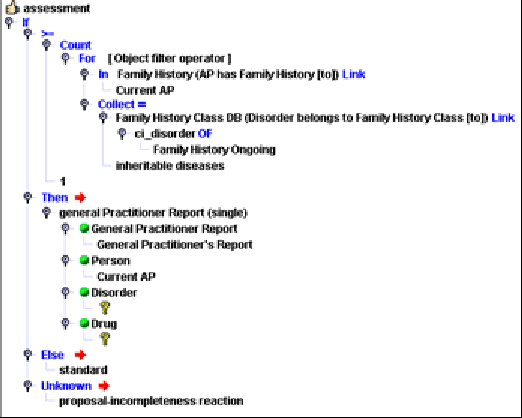
If the result of family history is more than one loading, the application is referred with the comment 'too many loadings' (026), otherwise the medical consolidation takes place.
Occupation risk
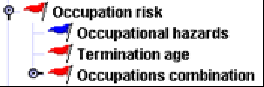
The occupational risk consists of the assessment of the occupation as stated in the application form, other occupation related information and the occupational hazard.
The AP’s occupation can be based on several data:
-
Occupation currently performed
-
Second occupation
-
Occupation from occupational status (only for IP and those occupational status which are listed in the Occupational Status database relation 'Occupational status has related occupation': currently nothing is included, but recommended entries are 'Unemployed’, ’Pensioner’, 'Housewife’, 'Apprentice’ and 'Student’)
The occupational assessment is performed on the basis of the Occupation Database, that is based on a classification applied by the ONS (Office of National Statistics UK) and comprises approximately 22,000 occupations. Due to the high number of entries, assessments can be made starting from level II and all sub-categories.
Please note that the basis of the Occupation DB in a different country then UK might be different to the ONS.
Assessments can be defined directly or via occupation classes. The assessment of a class is stored in the Occupation Class database. If occupation classes are used, every occupation needs to have an occupation class.
An occupation class can have assessments for all events or only single once. These assessments are used automatically for all occupations belonging to this class. Assessment means termination age restriction, annual benefit limitation, etc. Additionally occupation classes can have benefit related premium classes, not combined with any assessment information. These premium classes are used for class upgrades. In the delivery of Gen Re the occupation class used for the assessments is the premium class for all Disability benefits. If a company has different classes for e.g. WOP, the premium class can be entered in the relevant attribute.
Occupation classes are categorized usually with a number or a letter. If the occupation class is used for complete assessment, it is recommended to define subclasses starting with the related first position to assess as many occupations as possible with the class assessment.
Add loadings per mille/percent from combination and termination age (only for IP, WOP)
Loadings from occupation and termination age check are added.
Occupation/occupational hazard
Where the occupation already describes the occupational hazard, which can be assessed by the Occupation-DB alone, COMPASS does not consult the Occupational Hazard-DB. This will be noted in the Occupation Database by entering the appropriate occupational hazard in the relation Occupation has occupational hazard. For example, a loading for a Nuclear Physicist may already cover the radiation risk. If and when the code for radiation risks is entered in the relation, there will be no need for a separate action even if the applicant particularly mentions the radiation risk in his application. The occupation 'electrician', on the other hand, may not trigger any special action as the relation is empty. However, if the electrician mentions radiation as an occupational hazard in the application, the assessment will be based on the entry in the Occupational Hazard-DB (e.g. request questionnaire).
Occupation assessments hints
Considering the amount of job descriptions the assessment was specified on high hierarchy levels if possible. Beside group assessments, assessments of single occupations have been defined if necessary. The assessment was completely defined via occupational classes, based on the experience of Gen Re and public available information. Each company has to check the classification and assessments individually.
Occupational hazards according to database
The assessment is done for every occupational hazard unless it is included in the occupation. For LTC the assessment is done in every situation because the occupation is not checked separately. In addition, this check is done for LTC, if the relation ‘occupation has occupational hazard’ in the occupation has an entry and generates indirectly an occupational hazard. For ADB no check is done.
Occupational hazards are assessed on the basis of the Occupational Hazard-DB.
Occupational hazards can be selected from a selection panel. All hazards mentioned have to be allocated to a particular category; if none of the categories is applicable, 'other' should be chosen. Should any database changes be made between entering and assessing an application, the occupational hazard may no longer be in the database. The non-existing key is translated into ‘other occupational hazards’ and assessed according to that entry.
The following assessments have been used within the occupational hazard risk for compensation of the risk level:
-
standard
-
refer with the comment 'check occupational hazard'
-
questionnaire
-
decline
Termination Age
For each occupation a termination age limit for disability benefits (IP and WOP) can be specified for male and female applicants. This is done by selecting a termination-age category (called category in this chapter) in the benefit related attributes termination-age category male and termination-age category female.
For each category several entries in the termination age category database can exist (they have the same value in the attribute Termination Age-ID). At least one entry per category should exist. One entry describes a benefit payment period and an insurance period, and whether a loading is required for this constellation.
Currently only one entry per category is included, although more are possible. When several entries are created, this is mainly used to reflect the following idea: The normal allowable termination ages (insurance and benefit payment) need no loading (entry 3). When a higher termination age is applied for, this can be accepted with an additional loading. The loading is increased as the termination age is increased (e.g. 5-year step, 50% increment), up to a termination age, which is the highest acceptable termination age for the occupation (entry 1).
Example: Termination age category (Termination age 55 with options)
| Termination-Age Category | Termination age insurance period | Termination age benefit payment period | Loading | |
|---|---|---|---|---|
entry 1: |
G2 |
65 |
65 |
100 |
entry 2: |
G2 |
60 |
65 |
50 |
entry 3: |
G2 |
55 |
65 |
0 |
The termination age assessment is only performed, when the attribute termination age category male/female for the occupation has a non-blank entry.
The termination age that is used for the calculation is the sum of the age for assessment with the insurance period / benefit payment period. We will explain now, how the correct record for the calculated insurance period and benefit payment period is identified:
When the calculated insurance period is the same as the calculated benefit payment period, only those records from the relevant category are considered, that have an insurance period that equals the benefit payment period (only entry 1 in the example above).
Otherwise the remaining entries are checked. If no suitable record can be found, all records considered again.
Now the entry will be considered which has termination ages less or equal to the termination ages applied for and the loading is less or equal to the loading already applied for.
If a suitable record can be found, the result is ‘offer’ with the hints ‘termination age reduction for insurance period’ or/and ‘termination age reduction for benefit payment period’. The best matches will be offered.
If no record can be found which has a loading smaller or equal to the one applied for, the application is referred with the hint ‘check termination age’.
If no record can be found for the specified category, the occupation is referred with the hint ‘termination age category not found’.
Example 1:
An IP with termination age 70 for insurance and benefit payment period is applied for, the loading applied for is 25 %.
The specified termination age category has the following entries:
| No. | Termination age insurance period | Termination age benefit payment period | Loading |
|---|---|---|---|
1 |
age 55 |
age 65 |
0 |
2 |
age 55 |
age 55 |
0 |
3 |
age 60 |
age 60 |
25 |
4 |
age 65 |
age 65 |
50 |
The applied for termination ages are the same, therefore only record 2, 3 and 4 are considered. Only for record 2 and 3 the loading applied for is not exceeded.
The termination age is exceeded for both records; it has to be reduced. The maximum possible termination age comes from record 3. The result is ‘offer’ with the hints ’termination age reduction for insurance period to 60’ and ‘termination age reduction for benefit payment period to 60’ with loading 25%.
Example 2:
An IP with termination age 50 for insurance and benefit payment period is applied for, the loading applied for is 25 %.
The specified termination age category has the following entries:
| No. | Termination age insurance period | Termination age benefit payment period | Loading |
|---|---|---|---|
1 |
age 55 |
age 65 |
0 |
2 |
age 55 |
age 55 |
0 |
3 |
age 60 |
age 60 |
25 |
4 |
age 65 |
age 65 |
50 |
The applied for termination ages are the same, therefore record 2, 3 and 4 are considered. Only for record 2 and 3 the loading applied for is not exceeded.
If the termination age is okay for both entries, the record with the lowest termination ages is taken (record 2). The result is ‘standard’ with the hint ‘loading in premium too high’.
Occupations combination
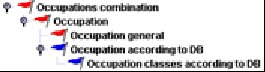
The occupation combination consists hierarchically of the database related assessment for the single occupations and the general occupation assessment. The results are consolidated as given below
No check is done for LTC.
Combination performed and second occupation for Life, Accident, CI, TPDany/ADL, H&S
Refer second occupation if not standard
If the occupation currently performed and the second occupation are different, both occupations are assessed. If one of the occupations is not standard, the application is referred with the comment 'check second occupation’.
Please refer to chapter Occupation general for rules for other benefits.
Combination performed occupation and occupation from occupational status
The result is the “worst“ result of all sub-risks.
Refer, if several clauses
If both occupations are assessed with exclusion clauses and the clauses are different, the application is referred with the hint ‚’check occupation’.
Refer, if several questionnaires
If both occupations are assessed with questionnaires and the questionnaires are different, the application is referred with the hint ‚’check occupation’.
Refer, if loading and exclusion clause
If both occupations are assessed with a loading and an exclusion clause, the application is referred with the hint ‘check occupation’.
Maximise loadings percent/maximise loadings per mille
The maximum loading is taken into account for further assessment.
Occupation general
The following assessments are processed for the performed occupation and the second occupation:
Occupation cannot be entered
Where '?' is entered for occupation, the application is referred with the comment 'occupation cannot be entered'.
Occupation unknown
A check is made to see whether the database contains any entry at all for the specific occupation. If not, the application is referred with the comment 'occupation not found'.
The following rules are evaluated additionally for IP and TPDown/similar benefits:
No fulltime employment
If the life to be assured has no full-time job or is unemployed, the application is declined with the comment 'no full-time job in last … months'. If the answers are not given, the reaction is ‘incomplete’.
Check times off work
If the life to be assured has been off work e.g., the application is referred with the comment ‘check times off work’. If the answer is not given, the reaction is ‘incomplete’.
Business miles/unusual use of machinery - 1
If the applicant indicates use of machinery or tools and the premium class of the life to be assured is a subset of ‘admin duties’ (class 1- please note: to be adapted to company specific classes) only, the application is referred with the comment 'unusual use of machinery'. If the use of machinery or tools is not known, the reaction is ‘incomplete’.
Business miles/unusual use of machinery - 2
If an applicant indicates an average business mileage exceeding 20,000 miles p.a. and is less or equal 100,000 miles p.a. and the premium class of the life to be assured is a subset of ‘admin duties’ (class 1) only, the application is referred and the comment 'occupation class change because of mileage' is given. If the average business miles exceed 100,000 miles p.a. the application is referred and the comment ‘business mileage exceeded’ is given. If the average business miles are not known, the reaction is ‘incomplete’.
Self employed rules - 1
If the life to be assured is self-employed and has been self-employed for less than 3 years, the occupational questionnaire will be requested. If the time is unknown, the reaction is ‘incomplete’
Self employed rules – 2
If the life to be assured is self-employed and the number of employees is below 2, the application is referred with the comment 'self-employed’. If the number of staff is unknown, the reaction is ‘incomplete’.
High amount of manual work
If the applicant indicates manual duties of more than 50% while his occupation does not imply manual duties to that extent (the occupational status is ‘employee’, ‘student’), the application is referred with the comment 'unusually high amount of manual work'.
Low amount of manual work
If the applicant indicates manual duties of less than 50% while his occupation would be expected (the occupational status is ‘housewife’, ‘worker’), the application is referred with the comment 'unusually low amount of manual work'.
Check working hours
If the applicant indicates working less than 17.50 hours per week, the application is referred with the comment ‘weekly working time less than expected’. If the working hours are unknown, the reaction is ‘incomplete’.
The following rules are evaluated if appropriate for IP:
Salary continuation
Any salary continuation stated by the applicant must not continue beyond the deferred period applied for. If it does and less than 100% of the previous salary is received, the comment ‘continuing income benefit memo required’ (422) is given. The result remains ‘standard’. If 100% or more of previous salary is received, the waiting period will be extended according to the next possible waiting period (4/13/26/52 weeks).
Deferred period
If the deferred period applied for is lower than specified in the assessment, the result is offer and the comment ‘increase waiting period to’ is given.
The following rules are evaluated if appropriate for IP, TPD and WOP:
All checks are benefit depending.
Occupation Class Shifts
If several different premium class changes apply for the currently performed occupation, the application will be referred with the comment ‘too many occupational class shifts’, e.g. premium class change because of mileage and duties.
Wrong Occupation class
If the derived premium class is different to the class of the proposal, the application will be referred with the comment ‘occupation class mismatch’. The check is done for the currently performed occupation.
Show Occupation class
The derived premium class for the currently performed occupation is passed to the output. The display of the class in the result is controlled by the benefit specific CSP show occupation class. The CSP can have the following values:
-
Show code and text
-
Show code only
-
Show text only
-
Do not show occupation class at all
This CSP has no influence on the result of the assessment of the occupation database and the occupation class check. But if the class is not displayed in the result, the class related result ‘too many occupation class shifts’ and ‘wrong occupation class’ are also not displayed.
Hint |
Combination performed and second occupation for IP, WOP, TPDown/similar
Refer second occupation
If the occupation currently performed and the second occupation are different, the application is referred with the comment 'check second occupation’.
Occupation according to database
Occupations are assessed on the basis of the Occupational DB. The assessment is processed for the occupation currently performed, for the second occupation and the occupation derived from the occupational status.
The following assessments have been used within the occupation database for compensation of the risk level:
-
standard
-
loading in percent or per mille
-
lien
-
exclusion clause
-
refer with the comment ‘check occupation’
-
questionnaire
-
decline
-
too unspecific, result is ‘incomplete’ and comment ‘occupational details too vague’ is given
Risk levels may depend on conditions. The following conditions are available, but not used in the Gen Re assessment:
-
Occupational status
-
Physical work
Occupational status
It might be necessary to depend the assessment of an occupation on the occupational status. This can easily be achieved with including the relevant occupational status in the condition of the assessment. As an example the assessment for the following combinations can be taken:
-
employees vs. freelance/self-employed
-
employees vs. civil servant
-
civil servant vs. freelance/self-employed
Physical work
It might be necessary for the assessment of an occupation to depend on the physical work. This can easily be achieved by including the answer to physical work (y/n) in the assessment. ). Alternatively the internal attribute physical work internal can be used. It is derived in the following way:
-
indicated in the application
-
for self-insured applicants the number of employees is taken into account, even when the no physical work is indicated in the proposal; the attribute is set when the number of employees is below the value of CSP maximum number of employees for self-insured AP.
-
from the occupational status in the occupation-DB “Worker”
If the information in not indicated in the proposal, the internal attribute is set to yes.
The terminal age is checked within the termination risk. The annual benefit is checked within the financial risk.
Add loadings percent/per mille
If the assessment for an occupation includes more than 1 rule and several loadings are given, e.g. a loading based on the class assessment and a loading based on the special job description, the loadings are added.
Occupation class according to database
The Occupation class databases includes the classification for IP, but also any other possible assessment on this level. The assessment is not only related for IP but can be defined for each event. Each occupation belonging to a class ‘inherits’ the defined assessment. This possibility avoids to define an individual assessment for each occupation and guarantees that the assessment for similar occupations is consistent. Only the class has to be defined for single occupations or groups of occupations.
For each occupation the assessments are displayed in the Occupation database, independent whether the assessment is based on an occupation class or is defined individually. Only the attributes business trip and AIDS value have to be defined individually for each occupation.
Non-medical risks
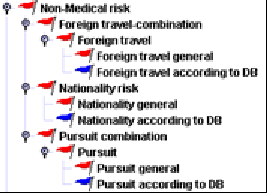
Non-medical risks refer to nationality, foreign travel and pursuit. Foreign travel and pursuits are assessed individually and are then combined. Once an assessment has been made for each non-medical category, an overall non-medical assessment is made.
The result is the “worst“ result of all sub-risks, i.e. foreign travel, pursuits, nationality.
Combinations of the three categories are not assessed separately. Standard results are always accepted; substandard cases will be referred during individual assessment.
Maximise loadings percent/Maximise loadings per mille
If there are loadings from foreign travel and pursuit only the highest loading will be taken into account.
Armed Forces check
If the question for current membership in the Armed Forces (are you under orders to go abroad or to Northern Ireland) is answered with ‘yes’, the questionnaire armed forces is requested.
Hint |
Foreign travel combination
The result is the “worst“ result of all sub-risks.
Too many foreign travels
If the overall result is ’standard’ or ’borderline standard’, the number of trips to foreign countries is checked against COMPASS limits. The number of trips is compared to CSP maximum number of foreign travels. If the number of trips is too high, the result is ‘refer’ and the application is referred with the comment ’too many trips abroad’.
Too many rateable trips abroad
Where several loadings arise, the application will be referred with the comment ‘too many rateable trips abroad’.
Maximise loadings per mille / Maximise loadings per mille / Maximise liens
For consolidation of the loading the highest loading/lien is taken into account.
Foreign travel general
Country cannot be captured
Where '?' is entered for foreign travel, the application is referred with the comment 'foreign travel cannot be entered'.
Country unknown
A check is made to see whether the database contains any entry at all for the specific country. If not, the application is referred with the comment 'foreign country not found'.
Travelling in the past
If there has been travel in the past and the acceptance of the current foreign travel entry is other than standard, the application will be referred with the comment ‘past foreign travel’.
Foreign travel according to database
The assessment of the foreign travel risk is based on the country database.
Initially the attributes medical crisis area and political crisis area are checked. If they are set to ‘yes’, the application will be referred with the comment 'crisis area (medical)' and/or 'crisis area (political)', regardless of the remaining database fields. This gives the underwriter an opportunity to promptly react to travel to politically or medically unstable areas.
The following assessments have been used within the foreign travel risk for compensation of the risk level:
-
standard
-
exclusion clause
-
loading
-
refer with the comment 'check foreign travel'
-
questionnaire
-
general practioneer report
-
decline
Combinations of these assessments are possible. Temporary restricted loadings or benefit related loadings can be implemented.
Risk levels may depend on conditions. The following conditions are used:
-
duration of trip
-
business trip
Duration of trip
Some countries can be assessed with the additional information about the 'duration of trip', which is often given in the proposal.
For a referral the comment 'check foreign travel (duration of stay)' can be given.
Business trip
If the occupation of the applicant includes usual business trips and according to this status accommodation, medical care, etc. are given, the attribute 'business trip' in the occupation database has a value. This attribute can be used as a condition for foreign travels.
For a referral the comment 'check foreign travel' can be given.
Referrals can be directed to special underwriters with different output texts for the result. A company is able to add output texts according to their needs.
Nationality risk
Nationality general
Nationality cannot be captured
Where '?' is entered for nationality, the application is referred with the comment 'nationality cannot be entered'.
Nationality unknown
A check is made to see whether the database contains any entry at all for the specific nationality. If not, the application is referred with the comment 'nationality not found'.
Nationality according to database
The assessment of the nationality risk of the applicant is based on the nationality database. The nationality database includes one term and code for every nationality. Synonym terms for a nationality can be added, and related to the main nationality term via the analogue functionality.
The following assessments have been used within the nationality risk for compensation of the risk level:
-
standard
-
refer with the comment 'nationality to be checked'
-
questionnaire
Other assessments, e.g. request of additional documents (work permission, etc). can be implemented.
Risk level may depend on the following conditions:
-
residence
-
branches of industry or occupation
-
maximum IP benefit
Residence
For check of the residence of the AP two relations have been defined:
The relation 'Region belongs to country' connects abbreviations, towns and regions of a country with the country (e.g. Paris belongs to France). The assessment of e.g. single regions can be different or the same.
The relation 'Country belongs to country group' enables you to define country groups (e.g. France belongs to Europe) in which each nationality can have the same assessment or can be different.
Via the attribute 'Residence' it can be implemented to treat the residence in one of the members of the country group as if the residence is in your own country. If the attribute ‘Residence’ is set to ‘domestic residence’, all entries of the relation ‘Region belongs to country’, e.g. synonyms to that country, will fulfil this condition. The country is taken from the CSP domestic residence.
The residence check is done with the internal attribute residence ok. For setting of the internal attribute the value of the country db attribute ’Residence’ is used and checked on adherence. The attribute ‘Residence’ has four values:
-
domestic residence or residence in country of nationality
-
residence irrelevant
-
residence in country group required
-
domestic residence required
For a referral the comment 'no suitable residence' can be given.
Branches of Industry, Occupation
The life assured’s occupation is checked against the relevant occupations/branches of industry. An example could be a nurse from Korea, who is accepted at standard terms, while Korean nationals with other occupations are referred.
The occupation check is done with the internal attribute occupation ok for nationality. For setting of the internal attribute the life assureds occupation is compared with the occupations of the relation ‘Nationality has agreed occupation group’.
For a referral the comment 'Nationality unacceptable because of occupation/industry’ can be given.
Hint |
Maximum IP benefit
A limitation of the annual IP benefit for nationalities is evaluated within the IP needs analysis. Furthermore, of course, this value can be used as a condition in a rule.
Pursuit combination
The result is the “worst“ result of all sub-risks.
Too many pursuits
If the final result is 'standard' or 'borderline standard', a check is made to establish whether the total number of pursuits does not exceed COMPASS limits. This is done by comparing the number of pursuits with the CSP maximum number of pursuits. If the number of pursuits is equal to or exceeds the value of the CSP, the result is 'refer' and the application is referred with the comment 'too many pursuits’.
Too many rateable pursuits
If there are rateable pursuits (e.g. with a loading) than the value of CSP maximum number of pursuit ratings is checked. If the number of rateable pursuits is equal to or exceeds the value of the CSP, the application is referred with the comment 'too many rateable pursuits'.
Adding loadings percent / Adding loadings per mille / Maximise liens
If there are several ratings from different pursuits and the result is not 'refer' yet, the overall rating is computed by adding all ratings. For liens the maximum is taken.
Pursuit general
Pursuit cannot be captured
Where '?' is entered for pursuit, the application is referred with the comment ‘pursuit cannot be entered'.
Pursuit unknown
A check is made to see whether the database contains any entry at all for the specific pursuit. If not, the application is referred with the comment ‘pursuit not found'.
Benefit too high (IP only)
If the possible IP benefit exceeds the value of the benefit attribute ’maximum benefit’, the application will be referred with hint ‘check annual benefit for pursuit’.
Hospital daily allowance exceeded (H&S only)
If the hospital daily allowance exceeds the value of the benefit attribute ’maximum daily hospital benefit’, the application will be referred with the hint ‘check daily hospital allowance for pursuit’.
Waiting period too short (IP and WOP only)
If the minimum IP waiting period applied for is lower than the waiting period noted in the benefit attribute ‘waiting period’, COMPASS will not accept the waiting period applied for and will offer the minimum waiting period. In detail the result for IP is ‘offer’ with the comment ‘Increase waiting period to‘.
Pursuit according to database
The assessment of pursuits is based on the Pursuit Database.
The following assessments have been used within the pursuit db for compensation of the risk level:
-
standard
-
exclusion clause
-
loading (if the loading should be limited to a special number of years, you can use the comment ‘loading limited for years’ as an additional hint).
-
refer with the comment 'check pursuit’
-
questionnaire
-
decline
Risk levels may depend on conditions. The following conditions are used:
-
foreign travel
-
amateur status
Amateur status
Some pursuits can be assessed if the additional information 'amateur (y/n)' is available. If the status is not ‘amateur’ but ‘professional’ the comment ‘pursuit as a professional’ can be given. If the status is unknown the comment ‘pursuit with unknown amateur status’ can be given.
Foreign travel
This condition to be checked is the combination of certain pursuits with foreign travel. If there are foreign travel the comment ‘pursuit and foreign travel’ can be given. The adherence of this condition is checked with the internal attribute pursuit abroad internal. The attribute is set if the answer to ‘exercising outside domestic residence’ is answered with ‘yes’ or the answer to the general ‘foreign travel’ question is ‘yes’.
If the answers are unknown/not available, but should be taken into consideration, the application is processed according to the incompleteness reaction given in the UNKNOWN part of the conditional reaction.
Other information can be used as condition too, e.g. the sum insured.
Financial assessment
The financial risk consists of several elements:
-
Request of documents because of financial limits
-
Referral because of financial limits
-
Needs analysis for IP based on annual income, occupation, occupational status, nationality
-
Referral because of special annual premium limits for PH and AP
-
Relation annual premium to annual income
-
Referral because of annual premium amount for special occupational status
These assessments are partially done for AP or PH, for single benefits or total sums. Previous insurances at the own company or other companies are taken into account. According to the need these checks are processed at different risk levels. This chapter describes now all financial checks, but the relevant chapter within the risk hierarchy are mentioned whenever the real check is done in another risk.
Determination of basic values
To assess the financial risk, COMPASS must know the life assured’s income (natural person, male or female). There are various ways to establish the life assured’s income:
Establish income
If policyholder and life assured are identical and apply for IP cover, income details may be in the application form. If the actual income is not available, a statistical average income will be established on the basis of occupation, occupational position, branch of industry, manual duties 'y'/'n'. A difference is made between the average income of blue-collar and white-collar workers. This difference can be individually changed by each company.
Those performing manual duties will be classified as blue-collar workers.
The occupational position and the classification blue- or white-collar worker is established as below:
| Occupational position | Blue-collar income | White-collar income |
|---|---|---|
Employee |
x |
|
Civil servant |
x |
|
Pensioner |
X |
|
Housewife |
X |
|
Student |
X |
|
Worker |
X |
|
Self-employed |
x |
|
Apprentice |
X |
|
Unemployed |
X |
|
Other |
X |
For the occupational position 'unemployed', the following exceptions regarding the occupation are made:
| Occupation | Income according to |
|---|---|
Housewife |
entry in branch of industry 'housewife' |
Student |
entry in branch of industry 'student' |
Apprentice |
entry in branch of industry 'apprentice' |
The table below shows which income is used for assessment:
| Occupation | Branch of industry | Occupational position | Manual duties (md) | Income according to |
|---|---|---|---|---|
X |
X |
X |
X |
Occupation and occupational position |
X |
X |
X |
- |
Occupation and occupational position |
X |
X |
- |
X |
Occupation and occupational position from occupation db |
X |
X |
- |
- |
Occupation and occupational position from occupation db |
X |
- |
X |
X |
Occupation and occupational position |
X |
- |
X |
- |
Occupation and occupational position |
X |
- |
- |
X |
Occupation and occupational position from occupation db |
X |
- |
- |
- |
Occupation and occupational position from occupation db |
- |
X |
X |
X |
Branch of industry and occupational position |
- |
X |
X |
- |
Branch of industry and occupational position |
- |
X |
- |
X |
Branch of industry and md |
- |
X |
- |
- |
Branch of industry and worker |
- |
- |
X |
- |
Average income and occupational position |
- |
- |
X |
X |
Average income and occupational position |
- |
- |
- |
X |
Average income and md. |
- |
- |
- |
- |
Average income all branches of industry/workers |
If the occupational position is unknown, the relevant category from the Occupation-DB is used. If both the occupation and occupational position are unknown, the statement about manual duties is used to determine the relevant category. If the occupational position is not clear from the application, e.g. if no distinction between blue-collar or white-collar work is made, the relevant field can be left empty; the system will then proceed on the basis of the occupational position from the Occupation-DB.
Apart from establishing the income, a further distinction can be made for male/female applicants (CSP income factor female). The income will then be multiplied by the relevant factor. E.g. CSP '1.00' means identical income for male and female lives.
Comparison between actual and average income (check income)
The annual gross income is required to establish the annual benefit needed. A plausibility check between income stated and average income is made (refer to relevant comments on average income), if the CSP maximum deviation from average income has a value exceeding ’0’ (’0’ means no plausibility check):
-
income is too high for occupation
-
income is too low for occupation
Check 1. is made by means of a company-specific (CSP maximum deviation from average income). The income is regarded ok if it is greater than the average income multiplied by 1/CSP and less than the average multiplied by the CSP. In the database, the average income is the gross income. However, if a company asks for net income in the application form (known from the value of CSP net income in application, this can easily be converted by means of the CSP ratio gross/net income. If it is not within the tolerance range, the application is referred with the comment 'average income is exceeded'.
If the normal income is within the tolerance range and additional income is mentioned, a plausibility check for the additional income is made as well. If the total income is unusually high that means greater than CSP maximum deviation from average income, the application is referred with the comment 'income/additional income unusually high'. In all cases, the income stated will be used for further assessments.
Monthly income
Check 2. is made to establish whether the monthly income was stated. Processing for incomes below the average income is as follows:
The test as described in check 1 is executed with the income multiplied by 13. If it passes the test, the system’s comment is 'income was regarded as monthly income'.
Total income
The income used for the needs analysis is displayed in the result with the hint ’annual income for need analysis’, if the annual benefit has to be reduced. The income indicated in the proposals is used. If it was considered as monthly income, the calculated annual income is used. If the income is missing, the derived average income is used.
Premium check for PH
A premium check is made for the PH as the legal owner of the policy, regardless of whether he actually pays the premium (PH risk – financial risk). If there are two PHs, their salaries are added together.
Ongoing premium check
The relation between income and premium as well as the overall annual COMPASS limit are checked.
Premium COMPASS limit
If the annual premium exceeds COMPASS’s limit (CSP COMPASS limit for annual premiums), the application is referred with the comment 'premium exceeds COMPASS limit’.
Relation premium/income
The relation premium/income is checked in two steps. First at all only the premium currently applied for is checked. If this premium exceeds a special percentage of the income, premiums of previous insurances are taken into account for the check of the second limit.
Premium payments for existing cover can be taken from the interface field cumul premium PH. Each company can decide for itself whether or not to take into consideration premiums other than for life cover.
If the income is indicated in the application form and it is not zero, it is taken for the assessment. Otherwise the average income is taken into account.
The relation between annual premium and annual income is checked against a warning limit (CSP warning ratio premium/income). If the CSP is exceeded, the relation between total premium (i.e. for current and existing cover) and annual income is checked against a critical limit (CSP critical ratio premium/income). If this is exceeded, a financial risk is assumed and the application is referred with the comment 'check relation premium/income'.
If this check should not be executed the CSP warning ratio premium/income should set to 0.
| Example | |
|---|---|
Factor for warning limit |
5% |
Factor for critical limit |
10 % |
Annual income |
18000 |
Gender PH |
male |
Calculation |
|
18000 * 0.05 = 900 p.a. = 75 p.m. |
|
18000 * 0.10 = 1800 p.a. = 150 p.m. |
|
Current monthly premium ⇐ 75 |
⇒ standard risk |
Current monthly premium > 75 ⇐ 150 |
⇒ standard risk |
Otherwise |
⇒ substandard risk, refer |
If several APs apply for the insurance nevertheless only the PH income is taken into account.
Single premium check
Single premium COMPASS limit
For single premium policies only a company-specific limit is checked (CSP COMPASS limit for single premium); where required, the application is referred with the comment 'single premium above COMPASS limit'.
Benefit specific total sum check
For all benefits (Life, IP own/similar, IP any/ADL, WOP own/similar, WOP any/ADL, ADB, LTC, DD) total sums can be checked to request documents or referrals to underwriter (AP risk – event sum check – financial limits). These limits are stored in the financial limit database. The sums/annual benefit of all currently applied for benefits with the same event are added, the bonus is taken into account too.
Also all known existing cover at the own company, i.e. taken from t he proposal and portfolio data, are taken into account (the CSP company is used for comparison), depending on the value of the benefit specific CSP own pre-existing covers included for financial limits.
The interface provides fields for all types of cover that could be relevant for the company. COMPASS does not directly access a company’s existing portfolio-DB. Existing cover is taken from the interface field sum_assured_f. The maximum pre-existing cover from both sources will be relevant. Furthermore all simultaneous applications that are marked 'a' (current in 'substandard' (y/n/a)) are accumulated. They are treated and assessed as separate applications.
If the CSP other pre-existing covers included for financial limits is 'yes', existing cover with other companies is also taken into consideration.
Various limits to be set by the individual company can be taken into consideration during financial assessment according to the entries included in the Financial Limit database, for example:
-
Financial questionnaire limit; for self-employed the request can depend on the time period defined in CSP fin IP month self-employed and the value of the relevant field in the financial limit database
-
Accountant’s report limit
-
Latest Tax Assessment Form limit
-
Proof of income limit
-
Maximum COMPASS limit for sum assured
-
….
Where certain pieces of evidence are automatic financial requirements, the system will check whether the evidence is available. If it is not available, the system will suggest to obtain the special evidence. If it is available and not marked ‘existence sufficient’, the application is referred with a hint to the relevant document.
For referral the following hints are available:
-
'sum insured exceeds COMPASS limit'
-
'annual benefit exceeds COMPASS limit'
Specialities Life
Life relation income sum
If the given income is not zero, then the following check is executed. The relation between sum assured and annual income is checked against the value of CSP financial life income sum. If the sum assured is greater than the income multiplied by the value of the CSP and greater than the loan (information from the interface field ‘borrowing’ for every life benefit), the comment ‘check sum assured compared with income’ is given and the application is referred. If this check should not be executed the CSP financial life income sum should set to 0.
Specialities Pension benefits
No previous cover is taken into consideration.
Specialities IP
For IP annual benefits including the bonus are taken into account, but only those benefits which are possible after the need assessment, i.e. possibly only the reduced annual benefit, if the CSP consolidate reduced is set to’ yes’.
The annual benefit can be related to the occupation class via the financial limits risk in the AP event sum risk.
Specialities Critical Illness
CI Relation income to sum
The calculated sum assured is checked against the amount (income_of_AP * CSP factor for CI sum assessment) plus the borrowing (information is taken from the interface field ‘borrowing’). If a certain limit is exceeded, the application is referred with the comment 'check sum assured compared with income'. Unless the income is mentioned in the application, the average income is used for calculation purposes.
CI occupational limit
The calculated sum assured is checked with the occupational limit from the occupation-DB-field maximum benefit sum. If the sum is exceeded, the application is referred with the comment ‘sum assured exceeds occupational limit’.
Specialities WOP
No financial checks are done for WOP.
Specialities TPD
TPD Relation income to sum
The calculated sum assured is checked against the amount (income_of_AP * CSP TPD limit income factor ) plus the borrowing (information is taken from the interface field ‘borrowing’). If a certain limit is exceeded, the application is referred with the comment 'check sum assured compared with income'. Unless the income is mentioned in the application, the average income is used for calculation purposes.
TPD occupational limit
The calculated sum assured is checked with the occupational limit from the occupation-DB-field maximum benefit sum. If the sum is exceeded, the application is referred with the comment ‘sum assured exceeds occupational limit’.
Specialities LTC
Need long term care
The LTC annual benefit is checked with the occupational limit from the occupation database field maximum benefit occupation. If the sum is exceeded, it is reduced and the comment ‘occupational fixed limit’ is given
-
General financial limits can be included in the financial limit database. If the benefit applied for is too high, the application is referred with the comment ‘reduction for general guidelines’.
IP need assessment
The check for IP own/similar is done before IP any /ADL.
For the need assessment the AP’s income is needed. The following income is taken into account, depending on the availability:
-
annual income from proposal
-
derived annual income if the income indicated in the proposal is considered as monthly income
-
average income, if nothing is indicated in the proposal
Establish need
There are two ways to establish the applicant’s need:
-
% of income, according to IP needs database and IP needs general database
-
by means of fixed values
The CSP IP need assessment will determine which method is carried out. If the CSP is 'y', the equation with the percentage of income is applied. If the CSP is ‘n’ only fixed limits are checked (occupation,..)
Percentage of income
COMPASS will distinguish between individual IP employed/self-employed (applied for by a life insured) and company IP (policyholder is the company, life assured is the employee). This is recognized by using the ‘relation of AP to PH’ or the ‘sex of policyholder’ field.
The IP need database includes records for income levels with related IP need percentages for company IP (executive), individual IP employee (employee) and individual IP self-employed (self employed). The state amount benefit will be taken into account once, also separated for the different IPs. The state amount benefit is stored in the IP needs general database.
The calculation is done as follows depending on the kind of policy:
As long as income up to > 0 the partial benefits are calculated as follows:
benefit =(min(income, income up to) – income from)* IP need percentage of this record
All partial benefits are added to the total possible IP benefit. The relevant state benefit is subtracted from the total.
The overall annual need according to income is now established.
| Example | |
|---|---|
Occupation |
engineer |
Income based on proposal |
80.000 |
Income up to (1) |
45.000 |
IP need percentage (1) |
0.75 |
Income from (2) |
45.000 |
Income up to (2) |
90.000 |
IP need percentage (2) |
0.33 |
State benefit |
3.060 |
Calculation |
|
Benefit 1 |
(Min (80.000, 45.000)-0)*0.75 = 33.750 |
Benefit 2 |
(Min (80.000, 90.000)-45.000)*0.33 = 11.550 |
Benefit 1 and benefit 2 |
45.300 |
- state amount |
3.060 |
Total possible IP benefit |
42.240 |
Reduction by previous cover
Depending on the benefits applied for, the reduction by previous cover will take into account the total IP coverage, independent on the type cover. This is done according to the following procedure:
IP own/similar
The maximum IP o/s will be derived as a minimum from the calculation explained above, and from possible fixed limits which can be specified in the occupation and nationality database. If the fixed limits are different for IP own and IP own/similar the minimum is taken.
The following benefits from other sources will be deducted from the need established, to obtain the realistic need for IP o/s:
-
Sum of
Maximum of IP cover
>>>>>> IP o/s cover at portfolio data (if not declined)
>>>>>> IP o/s cover at the own company indicated in the proposal
Sum of IP o/s cover applied for simultaneously at the own company indicated in the proposal -
Maximum of IP cover
Sum of IP cover indicated in the association registry
Sum of IP o/s cover at other companies indicated in the proposal -
50% of
Sum of IP any/ADL cover applied for simultaneously at the own company indicated in the proposal
Maximum of IP cover (if not declined)
>>>>>> IP any/ADL cover at portfolio data
>>>>>> IP any/ADL cover at the own company indicated in the proposal
Sum of IP any/ADL cover at other companies indicated in the proposal
The derived amount will be deducted from the need established for IP o/s.
For determination of the final IP o/s need, the IP o/s applied for are taken into account ascending depending on the deferred period. Step by step the IP o/s are deducted from the derived established need.
If the need is shortened or reduced to 0 during the calculation, the IP o/s benefit applied for is referred. If other IP o/s with longer deferred periods are still available, these ones are also referred to (please see chapter ‘assessment of need’ for more details).
If all IP o/s applied for can be allowed without any shortening, the result for IP o/s is ‘standard’. If there is still ‘open’ cover after deducting all IP o/s benefits applied for, the sum will be shown in the result as not covered need, if during IP any/ADL calculation no need deduction is done (please see chapter ‘assessment of need’ for more details).
IP any/ADL
The maximum IP any/ADL will be derived as a minimum from the calculation explained above, and from possible fixed limits, which can be specified in the occupation and nationality database. If the fixed limits are different for IP any and IP ADL the minimum is taken.
The following benefits from other sources will be deducted from the need established, to obtain the realistic need IP any/ADL:
-
Sum of final IP o/s benefits accepted ‘standard’
-
Sum of
Maximum of IP cover
>>>>>> IP o/s cover at portfolio data (if not declined)
>>>>>> IP o/s cover at the own company indicated in the proposal
Sum of IP o/s cover applied for simultaneously at the own company indicated in the proposal -
Maximum of IP cover
Sum of IP cover indicated in the association registry
Sum of IP o/s cover at other companies indicated in the proposal -
Sum of
Sum of IP any/ADL cover applied for simultaneously at the own company indicated in the proposal
Maximum of IP cover
>>>>>> IP any/ADL cover at portfolio data (if not declined)
>>>>>> IP any/ADL cover at the own company indicated in the proposal
Sum of IP any/ADL cover at other companies indicated in the proposal
The derived amount will be deducted from the need established for IP any/ADL.
For determination of the final IP any/ADL need, the IP any/ADL applied for are taken into account ascending depending on the deferred period. Step by step the IP any/ADL are deducted from the derived established need.
If the need is shortened or reduced to 0 during the calculation, the IP any/ADL benefit applied for is referred. If other IP any/ADL with longer deferred periods are still available, these ones are also referred (please see chapter ‘assessment of need’ for more details).
If all IP any/ADL applied for can be allowed without any shortening, the result for IP any/ADL is ‘standard’. If there is still ‘open’ cover after deducting all IP any/ADL benefits applied for, the sum will be shown in the result as not covered need (please see chapter ‘assessment of need’ for more details).
If no uncovered need is available after calculation of IP any/ADL benefit, also no uncovered need will be shown in the result for IP o/s.
Assessment of need
The following checks are processed alternatively (please only use one alternative via the CSP setting process):
1) IP over insured
The overall annual need established is compared to the amount applied for (available from interface). If the need is exceeded by the value of CSP IP over insured percentage or more, the application is referred with the comment ‘benefit exceeds need'. If the application is referred with due to exceeding annuity, an additional hint depending on the reason is given ‘reduction of benefit to’ together with the maximum possible value. Depending on the cause other comments can be given :
-
‘benefit exceeds occupational limit’
-
‘benefit exceeds nationality limit'
A rounding factor (CSP rounding of reduced annual benefit to) can be taken into account when the annual benefit is reduced.
2) Annual benefit in tolerance range
A tolerance range can be taken into account depending on the CSP annual benefit in tolerance range. If the tolerance range is used the comment ‘annual benefit in tolerance range’ is given with the relevant value.
| Example 1 | |
|---|---|
Need established |
19.863,- |
Amount applied for |
21.000,- |
CSP IP over insured percentage |
1.25 |
The amount applied for exceeds the need established, but by an amount within the limit for over insured. The amount applied for is accepted. |
| Example 2 | |
|---|---|
Need established |
19.400,- |
Amount applied for |
24.900,- |
CSP IP over insured percentage |
1.00 (without any influence) |
CSP annual benefit in tolerance range |
200 |
GSP rounding of reduced annual benefit |
500,- |
The amount applied for exceeds the need established by an amount above the limit. The tolerance range is exceeded too. The application will be referred. The hint ‘reduction of benefit to’ is added by 19.500,-, according to the rounding factor. |
Waiver of premium/Deduction of annual benefit
Before the reduced annual benefit is finally determined (and later on displayed in the result), COMPASS checks whether the minimum annual benefit (CSP minimum benefit (annual benefit)) is still exceeded. If the minimum amount is not exceeded, the annual benefit is reduced to ‘0’.
Show additional need
If the amount applied for is below the need established, the agent can be notified with a comment 'amount applied for below need', if desired by the company (CSP show additional need). The comment will state the amount not covered so far. The bonus is not taken into account here.
Overall rules:
-
Occupational status
Unless the occupation is stated as 'housewife', 'student' or 'apprentice', the occupational position 'unemployed' will always be referred with the comment 'check IP need for unemployed’.
Glossary of Terms
Attribute
An attribute belongs to an object, e.g. name of AP or sum insured of event.
Benefit
A company’s product is termed benefit in COMPASS. A benefit includes at least one event payment. Assessments for large databases (e.g. disorder db) are based on events and compensated on benefit level.
Compensation
A compensation is the direct assessment of a risk level.
Conditional assessment
Assessments can depend on conditions. A conditional assessment consists of at least one IF-THEN-ELSE - Statement.
CSP aids default
Definition which assumption should be made for missing HIV information.
CSP Aids level lifestyle questionnaire
If the calculated AIDS value exceeds the value of this CSP a lifestyle questionnaire is requested.
CSP Aids postal equation
Equation how to evaluate postcodes in regard to possible HIV infection.
CSP Annual benefit in tolerance range
Tolerance range for IP benefit, if it exceeds the need.
CSP Association registry reaction GPR
Definition whether a GPR is requested when an association registry entry is available.
CSP Physician inquiry
Determination of whether information on the treating GP should be requested (use in point of sale modules or source types).
CSP CI loading waiver per mille
Definition whether a per mille loading is waived for CI if no life plan is applied for.
CSP CI loading waiver percent
Definition whether a percent loading is waived for CI if no life plan is applied for.
CSP Combination of medical/non-medical ratings possible
Indication whether ratings for medical reasons and non-medical risk are permitted for automatic offer.
CSP Combination of occupation/medical ratings possible
Indication whether ratings for medical reasons and occupation are permitted for automatic offer.
CSP combination of occupation/non-medical ratings possible
Indication whether ratings for occupation and non-medical risk are permitted for automatic offer.
CSP Comment
Internal comment for this CSP.
CSP Company
Name of the own company.
CSP COMPASS limit for annual premiums
Maximum annual premium COMPASS may evaluate (including).
CSP COMPASS limit for single premium
Maximum single premium COMPASS may evaluate (including).
CSP Consolidate loadings when refer
Definition whether the loading consolidation shall take place although the overall result is already 'refer'.
CSP Consolidate reduced
Statement whether a reduced IP benefit is taken into account for other assessments or the IP benefit applied for.
CSP Conversion extra mortality
Definition if and how the extra mortalities are converted.
CSP Critical ratio pemium/income
Factor for critical limit. The factor is compared with the relation between total premium (for current and existing cover) and annual income (including).
CSP Domestic residence
Definition which country is considered as domestic residence.
CSP Examination limit life AIDS
Sum assured to be checked in regard to AIDS which is usually just under the general examination limit.
CSP Exclusion of eye disorders possible
Definition whether an exclusion clause for eye disorders is possible.
CSP Factor for CI sum assessment
Factor for check of the CI sum, compared to the income (including).
CSP Fin IP month self-employed
Limit for months of self-employment to be assessed depending on the period in regard to financial assessment.
CSP Financial life income sum
Factor for check of relation income/sum (including).
CSP GPR instead of paramedical if substandard
Statement, whether a paramedical can be requested although the medical result is substandard.
CSP Income factor female
Factor to establish income of female APs. The statistical average income is multiplied by this value.
CSP IP need assessment
Statement, whether IP need is to be calculated on the basis of equation.
CSP IP need ID
Definiton which IP need record shall be taken for assessment.
CSP IP over insured percentage
Factor of allowed excess for IP annual benefit.
CSP Lifestyle question reaction
COMPASS reacts according to the value of this CSP when after the evaluation of the lifestyle rules the result is standard and the life insured is older than 30 years. The CSP can have the value refer or request GPR.
CSP Maximum annual benefit for waiver of loading
Maximum annual benefit up to which loadings are waived.
CSP Maximum deviation from average income
Factor by which the income stated may exceed the average income.
CSP Maximum em from medical combi risk
Maximum extra mortality from several risk areas which COMPASS may process automatically.
CSP Maximum em from medical risk
Maximum extra mortality from one medical risk which COMPASS may process.
CSP Maximum loading per mille
Maximum per mille loading to be offered directly by COMPASS to clients.
CSP Maximum loading percent
Maximum percent loading to be offered directly by COMPASS to clients.
CSP Maximum medical age increase
Maximum age increase for medical reasons for which an offer can be issued (excluding).
CSP Maximum medical loading (percent)
Maximum medical loading in percent for which an offer can be issued.
CSP Maximum medical loading per mille
Maximum medical loading in per mille for which an offer can be issued.
CSP Maximum number medical ratings
Maximum number of medical ratings which COMPASS may process.
CSP Maximum number of disorder/drug ratings
Maximum number of rated disorders and drugs which COMPASS may process (including).
CSP Maximum number of disorders
Maximim number of disorders and drugs which COMPASS may evaluate (including).
CSP Maximum number of employees
Limit for number of employees to assume manual work for self-employed APs (excluding).
CSP Maximum number of foreign travels
Maximum number of trips abroad for COMPASS assessment (including).
CSP Maximum number of loadings
Maximum number of loadings to be offered directly by COMPASS to the client.
CSP Maximum number of pursuit ratings
Maximum number or rated pursuits for COMPASS assessment (including).
CSP Maximum number of pursuits
Maximum number of pursuits for COMPASS assessment (including).
CSP Maximum number offers
Number of offers which are allowed as a direct offer by COMPASS to a client.
CSP Maximum sum for waiver of loading
Maximum sum insured up to which loadings are waived.
CSP ME/GPR for preferred life
Document which is requested if a preferred life benefit is possible.
CSP Minimum annual benefit for diopters check
Minimum annual benefit for diopters check in IP benefits (excluding).
CSP minimum benefit (annual benefit)
Minimum annual benefit for IP (excluding).
CSP Minimum dioptres for long-sightedness
Limit to determine long-sightedness from this value on.
CSP Minimum dioptres for shortsightedness
Limit to determine shortsightedness from this value on.
CSP Minimum of annual benefit for requesting evidences
Minimum annual benefit to request medical evidences based on medical limit check.
CSP Minimum sum for requesting evidences
Minimum sum insured to request medical evidences based on medical limit check.
CSP Net income in application
Definition whether the net or gross income is asked for in the proposal.
CSP Other pre-existing covers included for financial checks
Statement whether existing cover by other companies mentioned in the application should be taken into consideration for financial assessment.
CSP Other pre-existing covers included for medical examination limits
Specification, whether previous covers by other companies should be considered for examination limits check.
CSP Own pre-existing covers included for financial check
Statement, whether existing cover at own portfolio should be taken into consideration for financial assessment.
CSP Own pre-existing covers included for medical limits only for aids
Specification whether previous covers at the own company should be added for the medical limits check in regard of HIV test.
CSP Ratio gross net income
Factor for deriving the gross income from the net income.
CSP Reaction GPR but no doctor
Statement, which reaction is done if a GPR is necessary but not doctor is indicated in the application form.
CSP Rounding of reduced annual benefit to
If the IP benefit is reduced, it will be rounded according to this value.
CSP Show additional need
Statement whether uncovered need should be displayed in the assessment result.
CSP Show premium class
Benefit specific definition whether and how the occupation class and related result, e.g. ‘occupation class mismatch’ is displayed in the assessment result.
CSP Signature age
Minimum age for applicants and policyholders to sign the contract without legal representative.
CSP Special event benefit reaction excluded
Definition whether the special event benefit is excluded if the result is 'refer' or 'offer' for non-medical reasons.
CSP TPD limit income factor
Factor for check of the TPD sum, compared to the income (including).
CSP Unit linked loading in percent
Death percentage up to which a loading is multiplied with the death percentage for unit linked covers.
CSP Waiver lien value
Maximum lien up to which liens are waived
CSP Waiver loading reaction is refer
If the loading is waived because of the low sum insured, the application is referred if this CSP is set to 'yes'.
CSP Waiver medical age increase
Limit for waiver of age increase for medical reasons (excluding).
CSP Waiver medical loading (per mille)
Limit for waiver of the medical loading in per mille (excluding).
CSP Waiver medical loading (percent)
Limit to waive the medical rating in percent.
CSP Warning ratio pemium/income
Factor for warning limit. The factor is compared with the relation between annual premium applied for and annual income (including).
Derived attribute
These are COMPASS internal attributes which have been derived from application data, e.g. duration of a disorder can be derived from onset and end of a disorder. Derived attributes can be used in assessments.
Direct assessment
The assessment is defined directly for a risk, e.g. loading or request document.
Event
Each benefit has at least one event payment. An event is death, disability, etc.
ICD10 classification
Classification used for coding of disorders. The ICD10 (international classification of disorders) is published by the World Health Organisation (WHO).
Paramedical
Medical person who will visit the assured person to check the health.
Risk level Large databases, e.g. disorder db, are assessed via risk levels. Risk levels are defined for each disorder, e.g. medium. Risk levels are compensated with direct assessments, e.g. medium risk level is a 50% loading.