ModifyCase Interface
COMPASS Version 6.2, 6.3, 6.4 © General Re Corporation 2021 - 2026. All Rights Reserved (created: 2025-05-05 generated: 2026-07-10)
| Please note that this document is still under revision, so slight changes still might occur before the final version of this draft. |
Introduction
Starting with version 6.2 Compass offers a REST Service that reads an XML Case (also called Input Interface) from the database (from the c40_casedata table), modifies certain parameters, and writes it back into the c40_casedata table, overwriting the old Case-XML. The parameters to be modified are coded as a JSON formatted body of the service.
POST /modifyCase
Modifies a XML Case in the database, by applying a set of changes described in the JSON formatted body.
| Parameter | Description |
|---|---|
caseId |
Id of the case to be modified - corresponds to the column rex_CaseId in the c40_casedata table |
subId |
ID of the Subsystem in which the case can be found in the database - corresponds to the column rex_SubID in the c40_casedata table |
loggingArea |
Logging-Area of the COMPASS Kernel |
| Type | Description |
|---|---|
ModifyCaseDto |
A JSON formatted description of the modifications to be applied. Main purpose of this document is the description of this structure. See JSON Body |
| Path | Type | Description |
|---|---|---|
responseEntity |
ResponseEntity |
the HTTP Response for this operation; a generic format used by many COMPASS REST services. See Output Fields |
ModifyCaseDto encapsulates certain information that is being applied to an existing Case. This is typically the technical information of a case, e.g. adding or removing benefits, changing details (like sum insured) of a benefit, or a few selected basic details about the persons involved.
Upon the invocation of this service, the Case identified by the caseId and subId will be read from the c40_casedata table, modified and then re-persisted into the same table again, provided that the input JSON does not contain any errors. The caseId is mapped to the rex_CaseID column, likewise the subId is mapped to the rex_SubID column of the c40_casedata table.
POST /modifyCase?caseId=Test0001&subId=TEST |
{
    "caseId": "Test0002",
    "locale": "en",
    "personsModifications": [{
        "id": "123",
        "age": 55,
        "name": "John Mustermann",
        "gender": 2,
        "benefitsToBeDeleted": [{
            "benefitName": "John Benefits",
            "benefitType": 0
        }],
        "newBenefits":[{
            "benefitType": 0,
            "smokerType": 2,
            "benefitName": "John Extra Benefits",
            "lifeBasicForm": 3,
            "singleLife": "true",
            "premiumPaymentYears": 1000,
            "premiumPaymentAnnual": 50000,
            "singlePremium": 3,
            "insurancePeriodYears": 10,
            "sumInsured": 100000,
            "limitGroup": 1001,
            "disabilityPaymentYears": 10,
            "disabilityWaitingPeriodWeeks": 12
        }],
        "benefitsToBeModified": [{
            "benefitType": "10",
            "benefitName": "John Benefits 2",
            "benefitSum": {
                "unit": 3,
                "value": 5000
            },
            "insurancePeriodYears": "5",
            "disabilityPaymentYears": "5",
            "disabilityWaitingPeriodWeeks": "2"
        }]
    }]
}{
"path": "/modifyCase",
"status": 0,
"statusText": null,
"errorDescriptions": [],
"jsonContent": null,
"byteContent": null,
"textContent": null
}JSON Body
In this section we discuss the format of the JSON Body to be passed to the modifyCase service.
Data Semantics
The JSON-formatted service body contains the information required to make certain changes to an existing Case-XML. It enables COMPASS to
-
modify certain details of Assured Persons
-
modify certain details of existing Benefits [1]
-
add new Benefits
-
delete existing Benefits
The selected Case must already exist in the database, and it will be overwritten by the modified Case.
The changes to the Case will affect the XML-elements Benefit, EventPayment, Payment and the Assured person (AP) CaseObjects.
The JSON has a correspondence to these XML-elements:
| XML | JSON | DTO |
|---|---|---|
Case |
top element (not named) |
|
CaseObject AP |
These elements are represented by a "person". As there can be more than one, it became an array called personsModifications |
|
Benefit |
These 3 are grouped in one "newBenefit". As there can be more than one "newBenefit", it became an array called newBenefits |
|
Benefit |
These 3 are grouped in one "benefitToBeDeleted". As there can be more than one "benefitToBeDeleted", it became an array called benefitsToBeDeleted |
|
Benefit |
These 3 are grouped in one "benefitToBeModified". As there can be more than one "benefitToBeModified", it became an array called benefitsToBeModified |
|
The input data structure is a nested data structure and looks as depicted in figure 1:
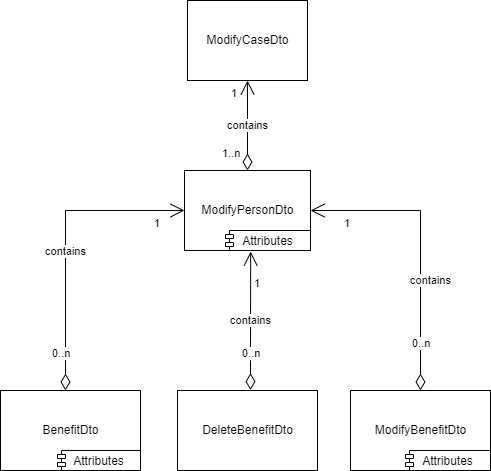
Each Case contains one or several assured persons. At least details for one of these persons should be modified. Therefore the ModifyCaseDto contains at least one ModifyPersonDto.
Each of these assured persons contains one or several benefits. Some of these benefits are to be modified (ModifyBenefitDto) or deleted (DeleteBenefitDto), and possibly some new benefits are to be included (BenefitDto).
Assured persons, new benefits, and benefits to be modified have attributes that describe the permitted changes. These attributes are presented for each type/Dto in the following chapter.
The elements and their attributes
The relations between the elements have already been presented in figure 1.
Figure 2 presents the attributes for each element type:
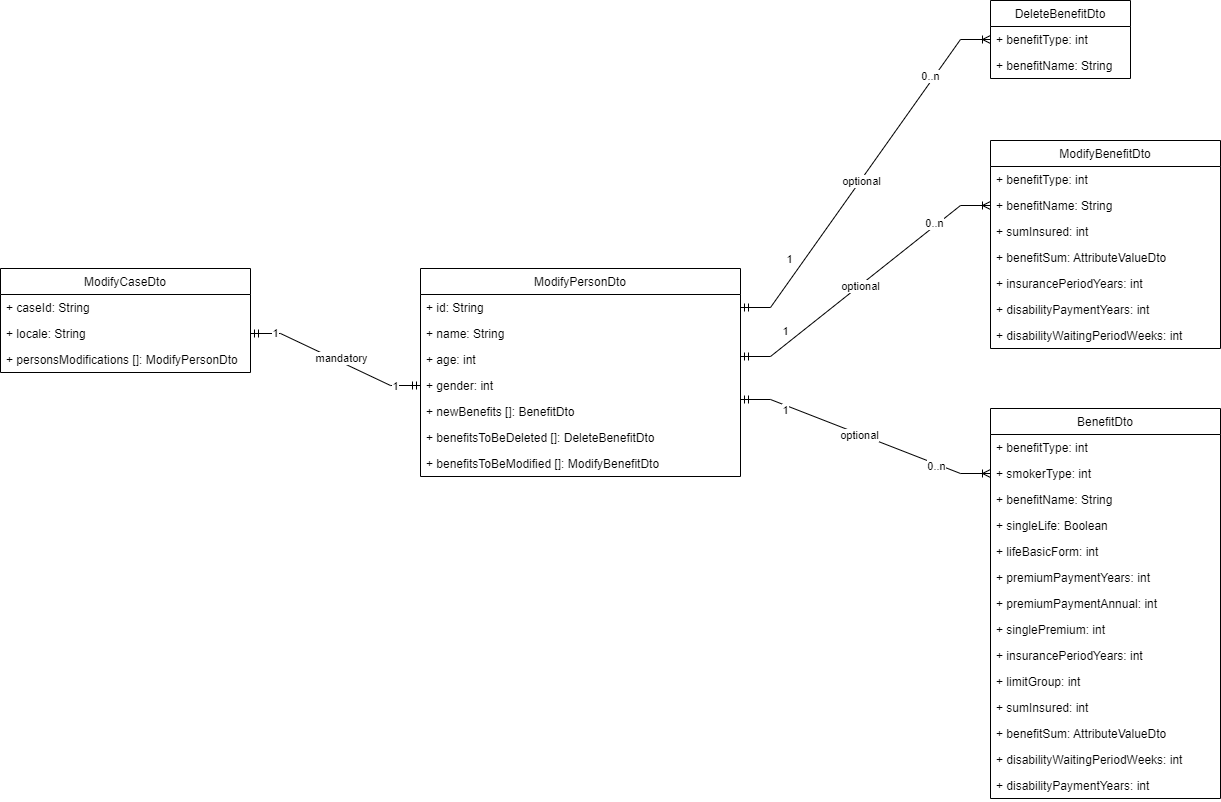
Moreover, there are special logical rules for some of the components and attributes, e.g. whether one or several specific attributes must be provided given that another attribute is provided. These logical rules must be considered when providing the attributes for a specific element. Detailed information about these logical rules is provided in the corresponding sections. As a rule we can state that when mandatory attributes of an element are not provided an error message will be returned.
Top element: ModifyCaseDto / Case
As can be seen in figure 2 the top element contains 3 proper attributes:
| attribute name | mandatory | format | comment |
|---|---|---|---|
caseId |
Yes |
String |
Name of the application to be modified. Should be identical to the service call parameter caseId |
locale |
Yes |
String |
2- or 4-Byte Locale: e.g. "en" or "nlBE" |
personsModifications |
Yes |
see personsModifications-list-element. It is a list with at least one element |
ModifyPersonDto / personsModifications
The personsModifications list contains one element for each Assured Person that requires a modification. Each element contains the following attributes:
| attribute name | mandatory | format | comment |
|---|---|---|---|
id |
Yes |
String |
Value of the CaseAttribute of typeID 307 of the assured person CaseObject. Only used to reference the correct CaseObject in the Case |
name |
Yes |
String |
Name of the assured person (CaseAttribute of typeID 44). Only used to reference the correct assured person CaseObject in the Case |
age |
No |
Integer |
Will become the age of the current assured person. Should only be included when the age should be changed. The age will also be adapted in secondary age-fields, e.g. in the EventPayment. |
gender |
No |
Integer |
Will become the gender of the current assured person. Should only be included when the gender should be changed. |
newBenefits |
Yes |
see newBenefits-list-element. The list contains one entry for each benefit to be added to the Case for the current assured person. The list can be empty. |
|
benefitsToBeDeleted |
Yes |
see benefitsToBeDeleted-list-element. The list contains one entry for each benefit to be removed from the Case. The list can be empty. |
|
benefitsToBeModified |
Yes |
see benefitsToBeModified-list-element. The list contains one entry for each benefit that should be modified. The list can be empty. |
id and name are used to identify the Assured Person within the Case.
age and gender of a person are optional and can be passed to modify the values in the Case.
When benefits are deleted, make sure that at least one existing benefit remains, or newBenefits contains at least one entry.
Example
Changing age and gender for an assured person:
Details
The application/case with ID Test0002 describes an assured person with an id 123 and name Christina. Below is an excerpt of this Case XML displaying the Assured Person object for this person:
<CaseObject Id="81" TypeId="27" TypeIdName="AP">
    <CaseAttribute TypeId="307" TypeIdName="id_no (person)">
        <CaseAttributeValue>
            <StringValue Value="123"/>
        </CaseAttributeValue>
    </CaseAttribute>
    <CaseAttribute TypeId="44" TypeIdName="name">
        <CaseAttributeValue>
            <StringValue Value="Christina"/>
        </CaseAttributeValue>
    </CaseAttribute>
    <CaseAttribute TypeId="21" TypeIdName="age at application">
        <CaseAttributeValue>
            <SingleValue UnitName="Year(s)" Value="55.0" Unit="16"/>
        </CaseAttributeValue>
    </CaseAttribute>
    <CaseAttribute TypeId="73" TypeIdName="sex">
        <CaseAttributeValue>
            <DBRefValue Name="Male" Id="2"/>
        </CaseAttributeValue>
    </CaseAttribute>
    ...
</CaseObject>
We would like to set the gender[2] of this person to "Female" and also update her age to "40". The following request to the modifyCase Interface will handle this:
{
    "caseId": "Test0002",
    "locale": "en",
    "personsModifications": [{
        "id": "123",
        "age": 40,
        "name": "Christina",
        "gender": 3,
        ...
    }]
}
After modification, the XML representation of the AP-element in the Case will look as follows:
<CaseObject Id="81" TypeId="27" TypeIdName="AP">
    <CaseAttribute TypeId="307" TypeIdName="id_no (person)">
        <CaseAttributeValue>
            <StringValue Value="123"/>
        </CaseAttributeValue>
    </CaseAttribute>
    <CaseAttribute TypeId="44" TypeIdName="name">
        <CaseAttributeValue>
            <StringValue Value="Christina"/>
        </CaseAttributeValue>
    </CaseAttribute>
    <CaseAttribute TypeId="21" TypeIdName="age at application">
        <CaseAttributeValue>
            <SingleValue UnitName="Year(s)" Value="40.0" Unit="16"/>
        </CaseAttributeValue>
    </CaseAttribute>
    <CaseAttribute TypeId="73" TypeIdName="sex">
        <CaseAttributeValue>
            <DBRefValue Name="Female" Id="3"/>
        </CaseAttributeValue>
    </CaseAttribute>
    ...
</CaseObject>| When an age value is provided, modifyCase also updates the age value of the CaseAttributes age at entry (examination limits) and age_for_assessment. |
<EventPayment Id="14" TypeId="1" TypeIdName="Insurance event payment">
    <CaseAttribute TypeId="37" TypeIdName="age at entry (examination limits)">
        <CaseAttributeValue>
            <SingleValue UnitName="Year(s)" Value="40" Unit="16"/>
        </CaseAttributeValue>
    </CaseAttribute>
    <CaseAttribute TypeId="292" TypeIdName="age_for_assessment">
        <CaseAttributeValue>
            <SingleValue UnitName="Year(s)" Value="40" Unit="16"/>
        </CaseAttributeValue>
    </CaseAttribute>
    ...
</EventPayment>
DeleteBenefitDto / benefitsToBeDeleted
The benefitsToBeDeleted list contains one entry for each Benefit that should be removed from the current Assured Person, and therefore from the Case.
Each element contains only the following two attributes to identify the Benefit:
| attribute name | mandatory | format | comment |
|---|---|---|---|
benefitType |
Yes |
Integer |
Value of the CaseAttribute of typeID 11 of the Benefit. Only used to reference the correct Benefit in the Case |
benefitName |
Yes |
String |
Name of the Benefit (CaseAttribute of typeID 108). Only used to reference the correct Benefit in the Case |
When removing the Benefit from the Case, also the corresponding EventPayment and Payment objects and any reference to them (e.g. CaseObjectRelations) are removed from the Case.
The service will not allow removing the last Benefit for the current Assured person. Either another Benefit is being added, or an error will occur.
Example
Removing one Benefit:
Details
In the following Case the Assured Person John Doe has multiple Benefits and the Benefit Life II with Benefit Type 0 should be removed.
<Case Complete="No" CaseMode="POS" VersionName="UK 6.0" CSP="1" Id="Test0002" VersionID="1085" Locale="en" NumberOfSourceChanges="1">
    ...
	<CaseObject Id="10" TypeId="27" TypeIdName="AP">
		<CaseAttribute TypeId="307" TypeIdName="id_no (person)">
			<CaseAttributeValue>
				<StringValue Value="123"/>
			</CaseAttributeValue>
		</CaseAttribute>
		<CaseAttribute TypeId="44" TypeIdName="name">
			<CaseAttributeValue>
				<StringValue Value="John Doe"/>
			</CaseAttributeValue>
		</CaseAttribute>
        ...
	</CaseObject>
	<Benefit Id="28" TypeId="0" TypeIdName="Benefit">
		<CaseAttribute TypeId="108" TypeIdName="name (benefit)">
			<CaseAttributeValue>
				<StringValue Value="Life II"/>
			</CaseAttributeValue>
		</CaseAttribute>
		<CaseAttribute TypeId="11" TypeIdName="benefit-type">
			<CaseAttributeValue>
				<DBRefValue Name="Life" Id="0"/>
			</CaseAttributeValue>
		</CaseAttribute>
        ...
	</Benefit>
	<EventPayment Id="99" TypeId="1" TypeIdName="Insurance event payment">
		<CaseAttribute TypeId="161" TypeIdName="Eventtype">
			<CaseAttributeValue>
				<DBRefValue Name="Death" Id="2"/>
			</CaseAttributeValue>
		</CaseAttribute>
        ...
	</EventPayment>
	<Payment Id="12" TypeId="0" TypeIdName="Payment of Contribution">
		<CaseAttribute TypeId="12" TypeIdName="included_loading percent">
			<CaseAttributeValue>
				<SingleValue UnitName="%" Value="1.0" Unit="12"/>
			</CaseAttributeValue>
		</CaseAttribute>
        ...
	</Payment>
    ...
	<CaseObjectRelation From="28" TypeIdName="Benefit has insurance event payment" To="99" TypeId="47"/>
	<CaseObjectRelation From="99" TypeIdName="insurance event payment has Payment of contribution" To="12" TypeId="53"/>
	<CaseObjectRelation From="99" TypeIdName="insurance event payment has AP" To="10" TypeId="20"/>
    ...
</Case>
To remove the benefit Life II (Benefit with Id 28), activate modifyCase with the following JSON data;
{
    "caseId": "Test0002",
    "locale": "en",
    "personsModifications": [{
        "id": "123",
        "age": 55,
        "name": "John Doe",
        "gender": 2,
        "benefitsToBeDeleted": [{
            "benefitName": "Life II",
            "benefitType": 0
        }],
        ...
}
Looking at the CaseObjectRelations of this Case, we can conclude that the Benefit Life II is related to the EventPayment object with id 99. This EventPayment object is related to the Payment object with id 12. And the EventPayment object is also related to the Assured Person John Doe whose id is 81.
Consequently in the above Case XML all displayed XML-Objects of Type Benefit, EventPayment, Payment and CaseObjectRelation will be removed
BenefitDto / newBenefits
The newBenefits list contains one entry for each Benefit that should be created for the current Assured Person. This element uses the BenefitDto known from the CreateCaseInDB Interface (see CreateCaseInDB:requestedBenefits).
A sample HTTP Request with JSON could be as follows:
{
    "caseId": "Test0002",
    "locale": "en",
    "personsModifications": [{
        "id": "123",
        "name": "John Doe",
        "newBenefits":[{
            "benefitType": 0,
            "smokerType": 2,
            "benefitName": "Life III",
            "lifeBasicForm": 3,
            "singleLife": "true",
            "premiumPaymentYears": 1000,
            "singlePremium": 3,
            "insurancePeriodYears": 10,
            "sumInsured": 100000,
            "limitGroup": 1001
        }],
        ...
    }]
}
As a result of this request, a new Benefit Life III along with a Payment, EventPayment and CaseObjectRelations are generated and added to the XML CaseData Interface.
| It is important to follow the logical rules of the CreateCaseInDB Interface for generating new Benefits. Please refer to the requestedBenefits section of the CreateCaseInDB-Interface for detailed information. |
ModifyBenefitDto / benefitsToBeModified
The benefitsToBeModified list contains one entry for each Benefit that should be modified.
Each element contains the following attributes to identify the Benefit and define changes:
| attribute name | mandatory | format | comment |
|---|---|---|---|
benefitType |
Yes |
Integer |
Value of the CaseAttribute of typeID 11 of the Benefit. Only used to reference the correct Benefit in the Case |
benefitName |
Yes |
String |
Name of the Benefit (CaseAttribute of typeID 108). Only used to reference the correct Benefit in the Case |
sumInsured |
No |
Integer |
Sum insured / lumpsum. Will be defined in CaseAttributes with ID 103, 109 and 150. |
benefitSum |
No |
Regular sum payment. Will be defined in CaseAttributes with ID 222, 65 and 132. |
|
insurancePeriodYears |
No |
Integer |
Duration period of an insurance in years. Will be defined in CaseAttributes with ID 121. |
disabilityPaymentYears |
No |
Integer |
Benefit payment period in years. Will be defined in CaseAttributes with ID 105. |
disabilityWaitingPeriodWeeks |
No |
Integer |
Waiting period for a disability in weeks. Will be defined in CaseAttributes with ID 316. |
benefitName and benefitType are necessary for identifying the Benefit to be modified.
The other 5 attributes will change the values found in the identified Benefit. In fact they will be applied to the EventPayment linked to the Benefit. As such they are optional benefits.
As the modifyCase Interface uses the validation functions provided by the CreateCaseInDB endpoint, the benefitSum or sumInsured, depending on the provided benefitType, must also be added. For more information please refer to the Requested Benefits section of the CreateCaseInDB interface.
Example
Modifying values for an existing Benefit:
Details
The Assured person John Doe (age 55, CaseObject not listed below) has an existing Income protection benefit called PHI I. In the Case-XML this is split into the following Benefit and EventPayment:
<Case Complete="No" CaseMode="POS" VersionName="UK 6.0" CSP="1" Id="Test0002" VersionID="1085" Locale="en" NumberOfSourceChanges="1">
...
    <Benefit Id="29" TypeId="0" TypeIdName="Benefit">
		<CaseAttribute TypeId="94" TypeIdName="smoker Type">
			<CaseAttributeValue>
				<DBRefValue Name="General Benefit" Id="2"/>
			</CaseAttributeValue>
		</CaseAttribute>
		<CaseAttribute TypeId="108" TypeIdName="name (benefit)">
			<CaseAttributeValue>
				<StringValue Value="PHI I"/>
			</CaseAttributeValue>
		</CaseAttribute>
		<CaseAttribute TypeId="11" TypeIdName="benefit-type">
			<CaseAttributeValue>
				<DBRefValue Name="IP own" Id="10"/>
			</CaseAttributeValue>
		</CaseAttribute>
	</Benefit>
	<EventPayment Id="98" TypeId="1" TypeIdName="Insurance event payment">
		<CaseAttribute TypeId="292" TypeIdName="age_for_assessment">
			<CaseAttributeValue>
				<SingleValue UnitName="Year(s)" Value="55.0" Unit="16"/>
			</CaseAttributeValue>
		</CaseAttribute>
		<CaseAttribute TypeId="103" TypeIdName="annuity_sum (sum insured)">
			<CaseAttributeValue>
				<SingleValue UnitName="£" Value="0" Unit="14"/>
			</CaseAttributeValue>
		</CaseAttribute>
		<CaseAttribute TypeId="37" TypeIdName="age at entry (examination limits)">
			<CaseAttributeValue>
				<SingleValue UnitName="Year(s)" Value="55.0" Unit="16"/>
			</CaseAttributeValue>
		</CaseAttribute>
		<CaseAttribute TypeId="316" TypeIdName="waiting_period">
			<CaseAttributeValue>
				<SingleValue UnitName="Weeks" Value="12.0" Unit="8"/>
			</CaseAttributeValue>
		</CaseAttribute>
		<CaseAttribute TypeId="105" TypeIdName="benefit_payment_period">
			<CaseAttributeValue>
				<SingleValue UnitName="Year(s)" Value="10.0" Unit="16"/>
			</CaseAttributeValue>
		</CaseAttribute>
		<CaseAttribute TypeId="161" TypeIdName="Eventtype">
			<CaseAttributeValue>
				<DBRefValue Name="Disability own/similar" Id="7"/>
			</CaseAttributeValue>
		</CaseAttribute>
		<CaseAttribute TypeId="121" TypeIdName="insurance_period">
			<CaseAttributeValue>
				<SingleValue UnitName="Year(s)" Value="10.0" Unit="16"/>
			</CaseAttributeValue>
		</CaseAttribute>
		<CaseAttribute TypeId="222" TypeIdName="benefit sum">
			<CaseAttributeValue>
				<SingleValue UnitName="£/Year" Value="1000" Unit="1"/>
			</CaseAttributeValue>
		</CaseAttribute>
          ...
	</EventPayment>
...
</Case>
The following table shows the current values for the above attributes, together with the values that should be updated:
| Attribute | CATY-ID | value | new value |
|---|---|---|---|
benefitType |
11 |
10 (IP own) |
|
benefitName |
108 |
PHI I |
|
benefitSum |
222 |
1000 £/Year |
5000 £/Year |
insurancePeriodYears |
121 |
10.0 Year(s) |
5.0 Year(s) |
disabilityPaymentYears |
105 |
10.0 Year(s) |
5.0 Year(s) |
disabilityWaitingPeriodWeeks |
316 |
12.0 Weeks |
2.0 Weeks |
age |
292, 37 |
55.0 Year(s) |
52.0 Year(s) |
Below is the JSON-Body for the modifyCase endpoint that will perform these changes:
{
    "caseId": "Test0002",
    "locale": "en",
    "personsModifications": [{
        "id": "123",
        "age": 52,
        "name": "John Doe",
        "gender": 2,
        "benefitsToBeModified": [{
            "benefitType": "10",
            "benefitName": "PHI I",
            "benefitSum": {
                "unit": 3,
                "value": 5000
            },
            "insurancePeriodYears": "5",
            "disabilityPaymentYears": "5",
            "disabilityWaitingPeriodWeeks": "2"
        }]
    }]
}
The updated Case-XML will be as follows;
<Case Complete="No" CaseMode="POS" VersionName="UK 6.0" CSP="1" Id="Test0002" VersionID="1085" Locale="en" NumberOfSourceChanges="1">
        ...
    <Benefit Id="29" TypeId="0" TypeIdName="Benefit">
		<CaseAttribute TypeId="108" TypeIdName="name (benefit)">
			<CaseAttributeValue>
				<StringValue Value="PHI I"/>
			</CaseAttributeValue>
		</CaseAttribute>
		<CaseAttribute TypeId="11" TypeIdName="benefit-type">
			<CaseAttributeValue>
				<DBRefValue Name="IP own" Id="10"/>
			</CaseAttributeValue>
		</CaseAttribute>
        ...
	</Benefit>
	<EventPayment Id="98" TypeId="1" TypeIdName="Insurance event payment">
		<CaseAttribute TypeId="292" TypeIdName="age_for_assessment">
			<CaseAttributeValue>
				<SingleValue UnitName="Year(s)" Value="52.0" Unit="16"/>
			</CaseAttributeValue>
		</CaseAttribute>
		<CaseAttribute TypeId="103" TypeIdName="annuity_sum (sum insured)">
			<CaseAttributeValue>
				<SingleValue UnitName="£" Value="0.0" Unit="14"/>
			</CaseAttributeValue>
		</CaseAttribute>
		<CaseAttribute TypeId="37" TypeIdName="age at entry (examination limits)">
			<CaseAttributeValue>
				<SingleValue UnitName="Year(s)" Value="52.0" Unit="16"/>
			</CaseAttributeValue>
		</CaseAttribute>
		<CaseAttribute TypeId="316" TypeIdName="waiting_period">
			<CaseAttributeValue>
				<SingleValue UnitName="Weeks" Value="2.0" Unit="8"/>
			</CaseAttributeValue>
		</CaseAttribute>
		<CaseAttribute TypeId="105" TypeIdName="benefit_payment_period">
			<CaseAttributeValue>
				<SingleValue UnitName="Year(s)" Value="5.0" Unit="16"/>
			</CaseAttributeValue>
		</CaseAttribute>
		<CaseAttribute TypeId="161" TypeIdName="Eventtype">
			<CaseAttributeValue>
				<DBRefValue Name="Disability own/similar" Id="7"/>
			</CaseAttributeValue>
		</CaseAttribute>
		<CaseAttribute TypeId="121" TypeIdName="insurance_period">
			<CaseAttributeValue>
				<SingleValue UnitName="Year(s)" Value="5.0" Unit="16"/>
			</CaseAttributeValue>
		</CaseAttribute>
		<CaseAttribute TypeId="222" TypeIdName="benefit sum">
			<CaseAttributeValue>
				<SingleValue UnitName="£/Month" Value="5000" Unit="3"/>
			</CaseAttributeValue>
		</CaseAttribute>
	</EventPayment>
...
</Case>
Output Fields
When the HTTP status code is 200, the service returns a CompassResponse [3] element. Other HTTP status codes are not described here (typically syntactically incorrect JSON body or missing or misspelled input parameters). Upon sending an error-free request to the endpoint, the XML Case is being read and modified based on the data provided in the request, and is then persisted into the database, overwriting the old Case. The response element returned by the interface has the following attributes.
path |
path of the invoked service, it will be /[ |
|---|---|
status / statusText |
an integer-text pair with the following 2 value-pairs: |
errorDescriptions |
A list of errors. Each error contains an error code and the corresponding error message describing the error occurred during the process. When no errors occurred, an empty list is returned. |
jsonContent |
contains the json formatted content of the response, will always be null |
byteContent |
contains the byte-formatted content of the response, will always be null |
textContent |
contains the textual content of the response, will always be null |
Example
A JSON body with no caseId
Request:
{
    "locale": "en",
    "personsModifications": [{
        "id": "123",
        "name": "John Doe",
        "age": 52,
        "gender": 2,
        "benefitsToBeDeleted": [{
            "benefitName": "Life II",
            "benefitType": 0
        }]
    ]}
}
Response:
HTTP-Status: 200 OK
{
    "path": "/compass/modifyCase",
    "status": 3,
    "statusText": "FATAL ERROR",
    "errorDescriptions": [
        {
            "errorCode": 512,
            "errorMessage": "InvalidArgumentException: Invalid or missing value for attribute(s): caseId. Please check your input data."
        }
    ],
    "jsonContent": null,
    "byteContent": null,
    "textContent": null
}
Error handling
Typical Error Scenarios
In this section the possible errors are per category. All errors return a status 3 and the statusText FATAL ERROR.
View Error Scenarios in Detail
Standard Elements
Non matching CaseIDs
The caseIds which are found on the HTTP Request and in JSON must match, otherwise this error occurs.
Example: An invalid input JSON with non-matching CaseId
Request:
http://localhost:8086/CompassService/modifyCase?caseId=Test0002&subId=TEST

{
    "caseId": "Test0001",
    "locale": "en",
    "personsModifications": [{
        "id": "123",
        "name": "John Doe",
        "age": 40
    }]
}
Response:
Status: 200 OK
{
    "path": "/modifyCase",
    "status": 3,
    "statusText": "FATAL ERROR",
    "errorDescriptions": [
        {
            "errorCode": 570,
            "errorMessage": "InvalidArgumentException: The provided caseIds in URL: Test0002 and in input JSON: Test0001 are not identical. Please provide identical caseIds both in URL and in input JSON."
        }
    ],
    "jsonContent": null,
    "byteContent": null,
    "textContent": null
}
CaseId does not match with a Case from the database
If the provided CaseId [in JSON-Body and in the request URL] does not return a Case XML from the database, then an error will be thrown.
Example: An valid input JSON with a caseId that returns no CaseData XML from the database
Request:
http://localhost:8086/CompassService/modifyCase?caseId=Test0003&subId=TEST

{
    "caseId": "Test0003",
    "locale": "en",
    "personsModifications": [{
        "id": "123",
        "name": "John Mustermann"
        "age": "55"
        "gender": "2"
    }]
}
Response:
Status: 200 OK
{
    "path": "/modifyCase",
    "status": 3,
    "statusText": "FATAL ERROR",
    "errorDescriptions": [
        {
            "errorCode": 572,
            "errorMessage": "InvalidArgumentException: The provided caseId in URL: Test0003 does not match with a Case from the database. Please provide a valid CaseId. "
        }
    ],
    "jsonContent": null,
    "byteContent": null,
    "textContent": null
}
CaseId in URL is empty
If the provided CaseId in URL is empty (it consists of tabs or spaces or blank characters) then an error will be thrown.
Example: An invalid input JSON with no modifications
Request:
http://localhost:8086/CompassService/modifyCase?caseId= &subId=TESTResponse:
Status: 200 OK
{
    "path": "/modifyCase",
    "status": 3,
    "statusText": "FATAL ERROR",
    "errorDescriptions": [
        {
            "errorCode": 571,
            "errorMessage": "InvalidArgumentException: The provided caseId in request URL is empty. Please provide a valid caseId."
        }
    ],
    "jsonContent": null,
    "byteContent": null,
    "textContent": null
}
No Modifications
If the provided input JSON contains no modifications, it will be considered as invalid and an error will occur. The provided input JSON must contain at least one deletion or modification or generation of a new benefit for a CaseData.
Example: An invalid input JSON with no modifications
Request:
{
    "caseId": "Test0001",
    "locale": "en",
    "personsModifications": [{
        "id": "123",
        "name": "John Mustermann"
    }]
}
Response:
Status: 200 OK
{
    "path": "/modifyCase",
    "status": 3,
    "statusText": "FATAL ERROR",
    "errorDescriptions": [
        {
            "errorCode": 566,
            "errorMessage": "InvalidArgumentException: The provided JSON contains no modifications to the CaseData, therefore it is invalid. Please check your input data."
        }
    ],
    "jsonContent": null,
    "byteContent": null,
    "textContent": null
}
CaseId not provided
In the following example, the caseId was not provided.
Example: An invalid input JSON with no caseId
Request:
{
    "locale": "en",
    "personsModifications": [{
        "id": "123",
        "name": "John Doe",
        "age": 52,
        "gender": 2,
        "benefitsToBeDeleted": [{
            "benefitName": "Life II",
            "benefitType": 0
        }]
    ]}
}
Response:
Status: 200 OK
{
    "path": "/modifyCase",
    "status": 3,
    "statusText": "FATAL ERROR",
    "errorDescriptions": [
        {
            "errorCode": 512,
            "errorMessage": "InvalidArgumentException: Invalid or missing value for attribute(s): caseId. Please check your input data."
        }
    ],
    "jsonContent": null,
    "byteContent": null,
    "textContent": null
}
Empty caseId provided
In the following example, an empty caseId was provided.
Example: An invalid input JSON with an empty caseId
Request:
{
    "caseId": "",
    "locale": "en",
    "personsModifications": [{
        "id": "123",
        "name": "John Mustermann",
        "age": 52,
        "gender": 2,
        "benefitsToBeDeleted": [{
            "benefitName": "Life II",
            "benefitType": 0
        }]
    }]
}
Response:
Status: 200 OK
{
    "path": "/modifyCase",
    "status": 3,
    "statusText": "FATAL ERROR",
    "errorDescriptions": [
        {
            "errorCode": 512,
            "errorMessage": "InvalidArgumentException: Invalid or missing value for attribute(s): caseId. Please check your input data."
        }
    ],
    "jsonContent": null,
    "byteContent": null,
    "textContent": null
}
Locale errors
When providing a locale, the following rules must be followed, otherwise an error might occur. Please note that if no locale is provided, a NullPointerException will occur at runtime.
-
The locale must not be empty
-
The locale must be either of length 2 or length 4
-
The locale must be supported by COMPASS
Empty locale provided
In the following example, an empty locale was provided.
Example: An invalid input JSON with an empty locale
Request:
{
    "caseId": "Test0001",
    "locale": "",
    "personsModifications": [{
        "id": "123",
        "name": "John Mustermann",
        "age": 52,
        "gender": 2,
        "benefitsToBeDeleted": [{
            "benefitName": "Life II",
            "benefitType": 0
        }]
}
Response:
Status: 200 OK
{
    "path": "/modifyCase",
    "status": 3,
    "statusText": "FATAL ERROR",
    "errorDescriptions": [
        {
            "errorCode": 512,
            "errorMessage": "InvalidArgumentException: Invalid or missing value for attribute(s): locale. Please check your input data."
        }
    ],
    "jsonContent": null,
    "byteContent": null,
    "textContent": null
}
Invalid locale provided
In the following example, an invalid locale was provided. The provided locale is of length 3 and does not correspond to a valid locale from the database.
Example: An invalid input JSON with an empty locale
Request:
{
    "caseId": "Test0001",
    "locale": "dxb",
    "personsModifications": [{
        "id": "123",
        "name": "John Mustermann",
        "age": 52,
        "gender": 2,
        "benefitsToBeDeleted": [{
            "benefitName": "Life II",
            "benefitType": 0
        }]
}
Response:
Status: 200 OK
{
    "path": "/modifyCase",
    "status": 3,
    "statusText": "FATAL ERROR",
    "errorDescriptions": [
        {
            "errorCode": 549,
            "errorMessage": "InvalidArgumentException: Locale 'dxb' at: ModifyCaseDto is invalid or not supported at the moment. Please provide a valid locale."
        }
    ],
    "jsonContent": null,
    "byteContent": null,
    "textContent": null
}
Unsupported locale provided
In the following example, even though the provided locale is available, it is not supported by COMPASS, thus an error occurs.
Example: An invalid input JSON with an unsupported locale
Request:
{
    "caseId": "Test0001",
    "locale": "pt",
    "personsModifications": [{
        "id": "123",
        "name": "John Doe",
        "age": 52,
        "gender": 2,
        "benefitsToBeDeleted": [{
            "benefitName": "Life II",
            "benefitType": 0
        }]
}
Response:
Status: 200 OK
{
    "path": "/modifyCase",
    "status": 3,
    "statusText": "FATAL ERROR",
    "errorDescriptions": [
        {
            "errorCode": 549,
            "errorMessage": "InvalidArgumentException: Locale 'pt' at: ModifyCaseDto is invalid or not supported at the moment. Please provide a valid locale."
        }
    ],
    "jsonContent": null,
    "byteContent": null,
    "textContent": null
}
personsModifications
Id not provided
In the following example, no id was provided for the Assured Person.
Example: An invalid input JSON with no id for Assured Person
Request:
{
    "caseId": "Test0001",
    "locale": "en",
    "personsModifications": [{
        "name": "John Doe",
        "age": 55,
        "gender": 0,
        "benefitsToBeDeleted": [{
            "benefitName": "Life II",
            "benefitType": 0
        }]
    }]
}
Response:
Status: 200 OK
{
    "path": "/modifyCase",
    "status": 3,
    "statusText": "FATAL ERROR",
    "errorDescriptions": [
        {
            "errorCode": 512,
            "errorMessage": "InvalidArgumentException: Invalid or missing value for attribute(s): id. Please check your input data."
        }
    ],
    "jsonContent": null,
    "byteContent": null,
    "textContent": null
}
Empty id provided
In the following example, an empty id was provided for the Assured Person.
Example: An invalid input JSON with an empty id for Assured Person
Request:
{
    "caseId": "Test0001",
    "locale": "en",
    "personsModifications": [{
        "id": "",
        "name": "John Doe",
        "age": 55,
        "gender": 0,
        "benefitsToBeDeleted": [{
            "benefitName": "Life II",
            "benefitType": 0
        }]
    }]
}
Response:
Status: 200 OK
{
    "path": "/modifyCase",
    "status": 3,
    "statusText": "FATAL ERROR",
    "errorDescriptions": [
        {
            "errorCode": 512,
            "errorMessage": "InvalidArgumentException: Invalid or missing value for attribute(s): id. Please check your input data."
        }
    ],
    "jsonContent": null,
    "byteContent": null,
    "textContent": null
}
Name not provided
In the following example, no name was provided for the Assured Person.
Example: An invalid input JSON with no name for Assured Person
Request:
{
    "caseId": "Test0001",
    "locale": "en",
    "personsModifications": [{
        "id": "123",
        "age": 52,
        "gender": 2,
        "benefitsToBeDeleted": [{
            "benefitName": "Life II",
            "benefitType": 0
        }]
    ]}
}
Response:
Status: 200 OK
{
    "path": "/modifyCase",
    "status": 3,
    "statusText": "FATAL ERROR",
    "errorDescriptions": [
        {
            "errorCode": 512,
            "errorMessage": "InvalidArgumentException: Invalid or missing value for attribute(s): name. Please check your input data."
        }
    ],
    "jsonContent": null,
    "byteContent": null,
    "textContent": null
}
Empty name provided
In the following example, an empty name was provided for the Assured Person.
Example: An invalid input JSON with an empty name for Assured Person
Request:
{
    "caseId": "Test0001",
    "locale": "en",
    "personsModifications": [{
        "id": "123",
        "name": "",
        "age": 55,
        "gender": 0,
        "benefitsToBeDeleted": [{
            "benefitName": "Life II",
            "benefitType": 0
        }]
    }]
}
Response:
Status: 200 OK
{
    "path": "/modifyCase",
    "status": 3,
    "statusText": "FATAL ERROR",
    "errorDescriptions": [
        {
            "errorCode": 512,
            "errorMessage": "InvalidArgumentException: Invalid or missing value for attribute(s): name. Please check your input data."
        }
    ],
    "jsonContent": null,
    "byteContent": null,
    "textContent": null
}
No Assured Person found for provided Id
In the following example, there is no Assured Person in CaseData XML with the provided id.
Example: An invalid input JSON with an invalid Assured Person id
Request:
{
    "caseId": "Test0001",
    "locale": "en",
    "personsModifications": [{
        "id": "135",
        "name": "John Doe",
        "age": 52,
        "gender": 2,
        "benefitsToBeDeleted": [{
            "benefitName": "Life II",
            "benefitType": 0
        }]
    }]
}
Response:
Status: 200 OK
{
    "path": "/modifyCase",
    "status": 3,
    "statusText": "FATAL ERROR",
    "errorDescriptions": [
        {
            "errorCode": 564,
            "errorMessage": "InvalidArgumentException: No ap found for id: 135. Please check your JSON Data and CaseData XML."
        }
    ],
    "jsonContent": null,
    "byteContent": null,
    "textContent": null
}
Provided id and name mismatch
The id of the Assured Person does not match with the provided name.
Example: An invalid input JSON with id-person mismatch
Request:
{
    "caseId": "Test0001",
    "locale": "en",
    "personsModifications": [{
        "id": "123",
        "name": "John Mustermann",
        "age": 52,
        "gender": 2,
        "benefitsToBeDeleted": [{
            "benefitName": "Life II",
            "benefitType": 0
        }]
}
Response:
Status: 200 OK
{
    "path": "/modifyCase",
    "status": 3,
    "statusText": "FATAL ERROR",
    "errorDescriptions": [
        {
            "errorCode": 565,
            "errorMessage": "InvalidArgumentException: Person (id: 123, name: John Mustermann) does not match with the ap from the CaseData. Please check your XML CaseData."
        }
    ],
    "jsonContent": null,
    "byteContent": null,
    "textContent": null
}
Invalid age provided (out of valid range)
In the following example, the provided age in the input data is out of the valid range.
Example: An invalid input JSON with an out of range age value
Request:
{
    "caseId": "Test0001",
    "locale": "en",
    "personsModifications": [{
        "id": "123",
        "name": "John Doe",
        "age": 160,
        "gender": 0,
        "benefitsToBeDeleted": [{
            "benefitName": "Life II",
            "benefitType": 0
        }]
    }]
}
Response:
Status: 200 OK
{
    "path": "/modifyCase",
    "status": 3,
    "statusText": "FATAL ERROR",
    "errorDescriptions": [
        {
            "errorCode": 543,
            "errorMessage": "InvalidArgumentException: The provided value for the attribute is out of the valid range. Attribute: age, given value: 160. Please check your input data."
        }
    ],
    "jsonContent": null,
    "byteContent": null,
    "textContent": null
}
Invalid age provided (negative value)
In the following example, the provided age has a negative value.
Example: An invalid input JSON with a negative age value
Request:
{
    "caseId": "Test0001",
    "locale": "en",
    "personsModifications": [{
        "id": "123",
        "name": "John Doe",
        "age": -5,
        "gender": 0,
        "benefitsToBeDeleted": [{
            "benefitName": "Life II",
            "benefitType": 0
        }]
    }]
}
Response:
Status: 200 OK
{
    "path": "/modifyCase",
    "status": 3,
    "statusText": "FATAL ERROR",
    "errorDescriptions": [
        {
            "errorCode": 541,
            "errorMessage": "InvalidArgumentException: Negative values are not allowed for the provided attribute: age. Provided value: -5. Please check your input data."
        }
    ],
    "jsonContent": null,
    "byteContent": null,
    "textContent": null
}
Invalid gender provided (No entry from database)
In the following example, the provided gender value does not return an entry from the database.
Example: An invalid input JSON with an invalid gender value
Request:
{
    "caseId": "Test0001",
    "locale": "en",
    "personsModifications": [{
        "id": "123",
        "name": "John Doe",
        "age": 52,
        "gender": 5,
        "benefitsToBeDeleted": [{
            "benefitName": "Life II",
            "benefitType": 0
        }]
    }]
}
Response:
Status: 200 OK
{
    "path": "/modifyCase",
    "status": 3,
    "statusText": "FATAL ERROR",
    "errorDescriptions": [
        {
            "errorCode": 512,
            "errorMessage": "InvalidArgumentException: Invalid or missing value for attribute(s): gender. Please check your input data."
        }
    ],
    "jsonContent": null,
    "byteContent": null,
    "textContent": null
}
Invalid gender provided (negative value)
In the following example, the provided gender has a negative value.
Example: An invalid input JSON with a negative gender value
Request:
{
    "caseId": "Test0001",
    "locale": "en",
    "personsModifications": [{
        "id": "123",
        "name": "John Doe",
        "age": 52,
        "gender": -2,
        "benefitsToBeDeleted": [{
            "benefitName": "Life II",
            "benefitType": 0
        }]
    }]
}
Response:
Status: 200 OK
{
    "path": "/modifyCase",
    "status": 3,
    "statusText": "FATAL ERROR",
    "errorDescriptions": [
        {
            "errorCode": 541,
            "errorMessage": "InvalidArgumentException: Negative values are not allowed for the provided attribute: gender. Provided value: -2. Please check your input data."
        }
    ],
    "jsonContent": null,
    "byteContent": null,
    "textContent": null
}
Case Modifications
In this section, the possible errors that might occur when processing the modifications to the CaseData XML are discussed.
Please note that the input JSON must contain at least one change (independent of change type), otherwise an error will occur.
Example: An invalid input JSON with no modifications
Request:
{
    "caseId": "Test0001",
    "locale": "en",
    "personsModifications": [{
        "id": "123",
        "name": "John Doe",
        "age": 52,
        "gender": 2
    }]
}
Response:
Status: 200 OK
{
    "path": "/modifyCase",
    "status": 3,
    "statusText": "FATAL ERROR",
    "errorDescriptions": [
        {
            "errorCode": 566,
            "errorMessage": "InvalidArgumentException: The provided JSON contains no modifications to the CaseData, therefore it is invalid. Please check your input data."
        }
    ],
    "jsonContent": null,
    "byteContent": null,
    "textContent": null
}
benefitsToBeDeleted
No benefitName provided
In the following example, no benefitName was provided for the benefitsToBeDeleted.
Example: An invalid input JSON with no benefitName in benefitsToBeDeleted
Request:
{
    "caseId": "Test0001",
    "locale": "en",
    "personsModifications": [{
        "id": "123",
        "name": "John Doe",
        "age": 52,
        "gender": 2,
        "benefitsToBeDeleted": [{
            "benefitType": 0
        }]
    }]
}
Response:
Status: 200 OK
{
    "path": "/modifyCase",
    "status": 3,
    "statusText": "FATAL ERROR",
    "errorDescriptions": [
        {
            "errorCode": 512,
            "errorMessage": "InvalidArgumentException: Invalid or missing value for attribute(s): benefitName. Please check your input data."
        }
    ],
    "jsonContent": null,
    "byteContent": null,
    "textContent": null
}
Empty benefitName provided
In the following example, an empty benefitName was provided for the benefitsToBeDeleted.
Example: An invalid input JSON with an empty benefitName in benefitsToBeDeleted
Request:
{
    "caseId": "Test0001",
    "locale": "en",
    "personsModifications": [{
        "id": "123",
        "name": "John Doe",
        "age": 52,
        "gender": 2,
        "benefitsToBeDeleted": [{
            "benefitName": "",
            "benefitType": 0
        }]
    }]
}
Response:
Status: 200 OK
{
    "path": "/modifyCase",
    "status": 3,
    "statusText": "FATAL ERROR",
    "errorDescriptions": [
        {
            "errorCode": 512,
            "errorMessage": "InvalidArgumentException: Invalid or missing value for attribute(s): benefitName. Please check your input data."
        }
    ],
    "jsonContent": null,
    "byteContent": null,
    "textContent": null
}
No benefitType provided
In the following example, no benefitType was provided in the benefitsToBeDeleted.
Please note that if an empty value is provided for benefitType, it will be set to 0 per default and this is a valid value since it returns an EventType from the database, therefore empty values should be avoided for benefitTypes.
Example: An invalid input JSON with no benefitType in benefitsToBeDeleted
Request:
{
    "caseId": "Test0001",
    "locale": "en",
    "personsModifications": [{
        "id": "123",
        "name": "John Doe",
        "age": 52,
        "gender": 2,
        "benefitsToBeDeleted": [{
            "benefitName": "Life II"
        }]
    }]
}
Response:
Status: 200 OK
{
    "path": "/modifyCase",
    "status": 3,
    "statusText": "FATAL ERROR",
    "errorDescriptions": [
        {
            "errorCode": 512,
            "errorMessage": "InvalidArgumentException: Invalid or missing value for attribute(s): benefitType. Please check your input data."
        }
    ],
    "jsonContent": null,
    "byteContent": null,
    "textContent": null
}
Invalid benefitType provided (negative value)
In the following example, a negative value for benefitType was provided in the benefitsToBeDeleted.
Example: An invalid input JSON with negative benefitType in benefitsToBeDeleted
Request:
{
    "caseId": "Test0001",
    "locale": "en",
    "personsModifications": [{
        "id": "123",
        "name": "John Doe",
        "age": 52,
        "gender": 2,
        "benefitsToBeDeleted": [{
            "benefitName": "Life II"
            "benefitType": -1
        }]
    }]
}
Response:
Status: 200 OK
{
    "path": "/modifyCase",
    "status": 3,
    "statusText": "FATAL ERROR",
    "errorDescriptions": [
        {
            "errorCode": 512,
            "errorMessage": "InvalidArgumentException: Invalid or missing value for attribute(s): benefitType. Please check your input data."
        }
    ],
    "jsonContent": null,
    "byteContent": null,
    "textContent": null
}
Invalid benefitType provided (No entry from database)
In the following example, the provided benefitType does not return an EventType from the database, therefore an error occurs.
Example: An invalid input JSON with an invalid benefitType in benefitsToBeDeleted
Request:
{
    "caseId": "Test0001",
    "locale": "en",
    "personsModifications": [{
        "id": "123",
        "name": "John Doe",
        "age": 52,
        "gender": 2,
        "benefitsToBeDeleted": [{
            "benefitName": "Life II"
            "benefitType": -1
        }]
    }]
}
Response:
Status: 200 OK
{
    "path": "/modifyCase",
    "status": 3,
    "statusText": "FATAL ERROR",
    "errorDescriptions": [
        {
            "errorCode": 563,
            "errorMessage": "InvalidArgumentException: Invalid Benefit Type: 20 provided. Please check your JSON Data."
        }
    ],
    "jsonContent": null,
    "byteContent": null,
    "textContent": null
}
No Benefit found for provided benefitType and benefitName
If there are no Benefits found in CaseData XML for the provided benefitType - benefitName pair, then an error will occur.
Example: An invalid input JSON with no Benefits in CaseData XML for provided benefitType and benefitName
Request:
{
    "caseId": "Test0001",
    "locale": "en",
    "personsModifications": [{
        "id": "123",
        "name": "John Doe",
        "age": 52,
        "gender": 2,
        "benefitsToBeDeleted": [{
            "benefitName": "Life II"
            "benefitType": 0
        }]
    }]
}
Response:
Status: 200 OK
{
    "path": "/modifyCase",
    "status": 3,
    "statusText": "FATAL ERROR",
    "errorDescriptions": [
        {
            "errorCode": 555,
            "errorMessage": "InvalidArgumentException: No benefit could be found with the provided benefitType: 0, benefitName: Life II. Please check your XML CaseData."
        }
    ],
    "jsonContent": null,
    "byteContent": null,
    "textContent": null
}
Deletion is not permitted because AP should have at least one Benefit
If the Benefit to be deleted is the only Benefit of the Assured Person and there are no new Benefits to be generated, then this deletion process will not be permitted and an error will be thrown.
Example: An valid input JSON with no new Benefits to be generated but the Benefit to be deleted is the last remaining Benefit of the Assured Person
Request:
{
    "caseId": "Test0001",
    "locale": "en",
    "personsModifications": [{
        "id": "123",
        "name": "John Doe",
        "age": 52,
        "gender": 2,
        "benefitsToBeDeleted": [{
            "benefitName": "Life II"
            "benefitType": 0
        }]
    }]
}
Response:
Status: 200 OK
{
    "path": "/modifyCase",
    "status": 3,
    "statusText": "FATAL ERROR",
    "errorDescriptions": [
        {
            "errorCode": 574,
            "errorMessage": "InvalidArgumentException: The deletion is not permitted because there would be no more Benefits remaining for Assured Person: John Doe. Each Assured Person should have at least one Benefit in CaseData XML."
        }
    ],
    "jsonContent": null,
    "byteContent": null,
    "textContent": null
}
The modifyCase will also check the counts of deletions, generations of new benefits and also the existing benefits. If there will not be at least one single Benefit for an Assured Person in the CaseData XML as a result of new generation and deletion processes, this validation will fail and an error will be thrown at runtime.
In the following example scenario, for the sake of simplicity, imagine that the following Assured Person has already 3 Benefits with the provided benefitTypes and benefitNames in the input JSON and the end user wants to send the following request to modifyCase Service. If this request were accepted, then the Assured Person would have no Benefits remaining in the CaseData XML, it would have led to a logical error in the interface structure, thus it is not permitted.
Example: An valid input JSON which aims to delete all of the existing Benefits of an Assured Person
Request:
{
    "caseId": "Test0002",
    "locale": "en",
    "personsModifications": [{
        "id": "456",
        "name": "Nadja Musterfrau",
        "benefitsToBeDeleted": [{
            "benefitType": 0,
            "benefitName": "NB 1"
        }, {
            "benefitType": 10,
            "benefitName": "NB 2"
        }, {
            "benefitType": 0,
            "benefitName": "NB 3"
        }]
    }]
}
Response:
Status: 200 OK
{
    "path": "/modifyCase",
    "status": 3,
    "statusText": "FATAL ERROR",
    "errorDescriptions": [
        {
            "errorCode": 574,
            "errorMessage": "InvalidArgumentException: The deletion is not permitted because there would be no more Benefits remaining for Assured Person: Nadja Musterfrau. Each Assured Person should have at least one Benefit in CaseData XML."
        }
    ],
    "jsonContent": null,
    "byteContent": null,
    "textContent": null
}
newBenefits
In this section, different error scenarios are covered.
Benefit already exists within CaseData XML
If a new Benefit is to be generated by modifyCase Service, then it should be ensured that the new Benefit contains a unique benefitType - benefitName pair which does not exist within a CaseData XML from the database, otherwise an error occurs.
Example: An invalid input JSON with same benefitName and benefitType in newBenefits
Request:
{
    "caseId": "Test0001",
    "locale": "en",
    "personsModifications": [{
        "id": "123",
        "name": "John Doe",
        "age": 52,
        "gender": 2,
        "newBenefits":[{
            "benefitType": 0,
            "smokerType": 2,
            "benefitName": "Mr.X B1",
            "lifeBasicForm": 3
        }]
    }]
}
Response:
Status: 200 OK
{
    "path": "/modifyCase",
    "status": 3,
    "statusText": "FATAL ERROR",
    "errorDescriptions": [
        {
            "errorCode": 569,
            "errorMessage": "InvalidArgumentException: Another Benefit with provided benefitType: 0 and benefitName: Mr.X B1 already exists within the CaseData XML. Please provide unique identifiers for each benefit."
        }
    ],
    "jsonContent": null,
    "byteContent": null,
    "textContent": null
}
Multiple Benefits with same BenefitType and BenefitName provided
If new Benefits are to be generated by modifyCase Service, then it should be ensured that each new Benefit contains a unique benefitType - benefitName pair in the provided JSON data, otherwise an error occurs.
Example: An invalid input JSON containing multiple Benefits with same benefitName and benefitType in newBenefits
Request:
{
    "caseId": "Test0001",
    "locale": "en",
    "personsModifications": [{
        "id": "123",
        "name": "John Doe",
        "age": 52,
        "gender": 2,
        "newBenefits":[{
            "benefitType": 0,
            "benefitName": "Mr.X B3",
            "smokerType": 2,
            "lifeBasicForm": 3
        }, {
            "benefitType": 0,
            "benefitName": "Mr.X B3",
            "smokerType": 4,
            "lifeBasicForm": 5
        }]
    }]
}
Response:
Status: 200 OK
{
    "path": "/modifyCase",
    "status": 3,
    "statusText": "FATAL ERROR",
    "errorDescriptions": [
        {
            "errorCode": 567,
            "errorMessage": "InvalidArgumentException: Multiple benefits with same benefitType: 0 and benefitName: Mr.X B3 exist in the provided input data. Please provide unique identifiers for each benefit."
        }
    ],
    "jsonContent": null,
    "byteContent": null,
    "textContent": null
}
benefitsToBeModified
Empty benefit modification provided
The provided benefit modification should contain at least one modification to a Benefit. Providing benefitName and benefitType alone is not sufficient, in such a case the benefit modication will be considered empty and an error will occur.
Example: An invalid input JSON with empty benefit modification in benefitsToBeModified
Request:
{
    "caseId": "Test0001",
    "locale": "en",
    "personsModifications": [{
        "id": "123",
        "name": "John Doe",
        "age": 52,
        "gender": 2,
        "benefitsToBeModified":[{
          "benefitName": "Mr.X B1",
          "benefitType": 0
        }]
    }]
}
Response:
Status: 200 OK
{
    "path": "/modifyCase",
    "status": 3,
    "statusText": "FATAL ERROR",
    "errorDescriptions": [
        {
            "errorCode": 568,
            "errorMessage": "InvalidArgumentException: Provided benefit modification (benefitType: 0 - benefitName: Mr.X B1) is empty. It contains no valid modifications. Please check your input data."
        }
    ],
    "jsonContent": null,
    "byteContent": null,
    "textContent": null
}
No benefitName provided
In the following example, no benefitName was provided for the benefitsToBeModified.
Example: An invalid input JSON with no benefitName in benefitsToBeModified
Request:
{
    "caseId": "Test0001",
    "locale": "en",
    "personsModifications": [{
        "id": "123",
        "name": "John Doe",
        "age": 52,
        "gender": 2,
        "benefitsToBeModified": [{
            "benefitType": "10",
            "benefitSum": {
                "unit": 3,
                "value": 5000
            },
            "insurancePeriodYears": "5",
            "disabilityPaymentYears": "5",
            "disabilityWaitingPeriodWeeks": "2"
        }]
    }]
}
Response:
Status: 200 OK
{
    "path": "/modifyCase",
    "status": 3,
    "statusText": "FATAL ERROR",
    "errorDescriptions": [
        {
            "errorCode": 512,
            "errorMessage": "InvalidArgumentException: Invalid or missing value for attribute(s): benefitName. Please check your input data."
        }
    ],
    "jsonContent": null,
    "byteContent": null,
    "textContent": null
}
Empty benefitName provided
In the following example, an empty benefitName was provided for the benefitsToBeModified.
Example: An invalid input JSON with an empty benefitName in benefitsToBeModified
Request:
{
    "caseId": "Test0001",
    "locale": "en",
    "personsModifications": [{
        "id": "123",
        "name": "John Doe",
        "age": 52,
        "gender": 2,
        "benefitsToBeModified": [{
            "benefitType": "10",
            "benefitName": "",
            "benefitSum": {
                "unit": 3,
                "value": 5000
            },
            "insurancePeriodYears": "5",
            "disabilityPaymentYears": "5",
            "disabilityWaitingPeriodWeeks": "2"
        }]
    }]
}
Response:
Status: 200 OK
{
    "path": "/modifyCase",
    "status": 3,
    "statusText": "FATAL ERROR",
    "errorDescriptions": [
        {
            "errorCode": 512,
            "errorMessage": "InvalidArgumentException: Invalid or missing value for attribute(s): benefitName. Please check your input data."
        }
    ],
    "jsonContent": null,
    "byteContent": null,
    "textContent": null
}
====== No benefitType provided
In the following example, no benefitType was provided in the benefitsToBeModified.
Please note that if an empty value is provided for benefitType, it will be set to 0 per default and this is a valid value since it returns an EventType from the database, therefore empty values should be avoided for benefitTypes.
Example: An invalid input JSON with no benefitType in benefitsToBeModified
Request:
{
    "caseId": "Test0001",
    "locale": "en",
    "personsModifications": [{
        "id": "123",
        "name": "John Doe",
        "age": 52,
        "gender": 2,
        "benefitsToBeModified": [{
            "benefitName": "Life II",
            "benefitSum": {
                "unit": 3,
                "value": 5000
            }
        }]
    }]
}
Response:
Status: 200 OK
{
    "path": "/modifyCase",
    "status": 3,
    "statusText": "FATAL ERROR",
    "errorDescriptions": [
        {
            "errorCode": 512,
            "errorMessage": "InvalidArgumentException: Invalid or missing value for attribute(s): benefitType. Please check your input data."
        }
    ],
    "jsonContent": null,
    "byteContent": null,
    "textContent": null
}
Invalid benefitType provided (negative value)
In the following example, a negative value for benefitType was provided in the benefitsToBeModified.
Example: An invalid input JSON with negative benefitType in benefitsToBeModified
Request:
{
    "caseId": "Test0001",
    "locale": "en",
    "personsModifications": [{
        "id": "123",
        "name": "John Doe",
        "age": 52,
        "gender": 2,
        "benefitsToBeModified": [{
            "benefitType": "-5",
            "benefitName": "Life II",
            "benefitSum": {
                "unit": 3,
                "value": 5000
            }
        }]
    }]
}
Response:
Status: 200 OK
{
    "path": "/modifyCase",
    "status": 3,
    "statusText": "FATAL ERROR",
    "errorDescriptions": [
        {
            "errorCode": 512,
            "errorMessage": "InvalidArgumentException: Invalid or missing value for attribute(s): benefitType. Please check your input data."
        }
    ],
    "jsonContent": null,
    "byteContent": null,
    "textContent": null
}
Invalid benefitType provided (No entry from database)
In the following example, the provided benefitType does not return an EventType from the database, therefore an error occurs.
Example: An invalid input JSON with an invalid benefitType in benefitsToBeModified
Request:
{
    "caseId": "Test0001",
    "locale": "en",
    "personsModifications": [{
        "id": "123",
        "name": "John Doe",
        "age": 52,
        "gender": 2,
        "benefitsToBeModified": [{
            "benefitType": "25",
            "benefitName": "Life II",
            "benefitSum": {
                "unit": 3,
                "value": 5000
            }
        }]
    }]
}
Response:
Status: 200 OK
{
    "path": "/modifyCase",
    "status": 3,
    "statusText": "FATAL ERROR",
    "errorDescriptions": [
        {
            "errorCode": 563,
            "errorMessage": "InvalidArgumentException: Invalid Benefit Type: 25 provided. Please check your JSON Data."
        }
    ],
    "jsonContent": null,
    "byteContent": null,
    "textContent": null
}
No Benefit found for provided benefitType and benefitName
If there are no Benefits found in CaseData XML for the provided benefitType - benefitName pair, then an error will occur.
Example: An invalid input JSON with no Benefits in CaseData XML for provided benefitType and benefitName in benefitsToBeModified
Request:
{
    "caseId": "Test0001",
    "locale": "en",
    "personsModifications": [{
        "id": "123",
        "name": "John Doe",
        "age": 52,
        "gender": 2,
        "benefitsToBeModified": [{
            "benefitType": "10",
            "benefitName": "Mr.X Special Benefits",
            "benefitSum": {
                "unit": 3,
                "value": 5000
            }
        }]
    }]
}
Response:
Status: 200 OK
{
    "path": "/modifyCase",
    "status": 3,
    "statusText": "FATAL ERROR",
    "errorDescriptions": [
        {
            "errorCode": 555,
            "errorMessage": "InvalidArgumentException: No benefit could be found with the provided benefitType: 10, benefitName: Mr.X Special Benefits. Please check your XML CaseData."
        }
    ],
    "jsonContent": null,
    "byteContent": null,
    "textContent": null
}
Invalid value provided for disabilityPaymentYears
If a negative value or out of allowed range value is provided for disabilityPaymentYears, then an error will occur. Please note that this is an optional attribute and no errors will occur, if it is not added to the benefitsToBeModified.
Example: An invalid input JSON with a negative disabilityPaymentYears in benefitsToBeModified
Request:
{
    "caseId": "Test0001",
    "locale": "en",
    "personsModifications": [{
        "id": "123",
        "name": "John Doe",
        "age": 52,
        "gender": 2,
        "benefitsToBeModified": [{
            "benefitType": "10",
            "benefitName": "Mr.X Special Benefits",
            "benefitSum": {
                "unit": 3,
                "value": 1000
            },
            "disabilityPaymentYears": -50
        }]
    }]
}
Response:
Status: 200 OK
{
    "path": "/modifyCase",
    "status": 3,
    "statusText": "FATAL ERROR",
    "errorDescriptions": [
        {
            "errorCode": 543,
            "errorMessage": "InvalidArgumentException: The provided value for the attribute is out of the valid range. Attribute: disabilityPaymentYears, given value: -50. Please check your input data."
        }
    ],
    "jsonContent": null,
    "byteContent": null,
    "textContent": null
}
Example: An invalid input JSON with an out of allowed range value for disabilityPaymentYears in benefitsToBeModified
Request:
{
    "caseId": "Test0001",
    "locale": "en",
    "personsModifications": [{
        "id": "123",
        "name": "John Doe",
        "age": 52,
        "gender": 2,
        "benefitsToBeModified": [{
            "benefitType": "10",
            "benefitName": "Mr.X Special Benefits",
            "benefitSum": {
                "unit": 3,
                "value": 1000
            },
            "disabilityPaymentYears": 1000000000
        }]
    }]
}
Response:
Status: 200 OK
{
    "path": "/modifyCase",
    "status": 3,
    "statusText": "FATAL ERROR",
    "errorDescriptions": [
        {
            "errorCode": 543,
            "errorMessage": "InvalidArgumentException: The provided value for the attribute is out of the valid range. Attribute: disabilityPaymentYears, given value: 1000000000. Please check your input data."
        }
    ],
    "jsonContent": null,
    "byteContent": null,
    "textContent": null
}
Invalid value provided for disabilityWaitingPeriodWeeks
If a negative value or out of allowed range value is provided for disabilityWaitingPeriodWeeks, then an error will occur. Please note that this is an optional attribute and no errors will occur, if it is not added to the benefitsToBeModified.
Example: An invalid input JSON with a negative disabilityWaitingPeriodWeeks in benefitsToBeModified
Request:
{
    "caseId": "Test0001",
    "locale": "en",
    "personsModifications": [{
        "id": "123",
        "name": "John Doe",
        "age": 52,
        "gender": 2,
        "benefitsToBeModified": [{
            "benefitType": "10",
            "benefitName": "Life II",
            "benefitSum": {
                "unit": 3,
                "value": 1000
            },
            "disabilityWaitingPeriodWeeks": -10
        }]
    }]
}
Response:
Status: 200 OK
{
    "path": "/modifyCase",
    "status": 3,
    "statusText": "FATAL ERROR",
    "errorDescriptions": [
        {
            "errorCode": 543,
            "errorMessage": "InvalidArgumentException: The provided value for the attribute is out of the valid range. Attribute: disabilityWaitingPeriodWeeks, given value: -10. Please check your input data."
        }
    ],
    "jsonContent": null,
    "byteContent": null,
    "textContent": null
}
Example: An invalid input JSON with an out of allowed range value for disabilityWaitingPeriodWeeks in benefitsToBeModified
Request:
{
    "caseId": "Test0001",
    "locale": "en",
    "personsModifications": [{
        "id": "123",
        "name": "John Doe",
        "age": 52,
        "gender": 2,
        "benefitsToBeModified": [{
            "benefitType": "10",
            "benefitName": "Life II",
            "benefitSum": {
                "unit": 3,
                "value": 1000
            },
            "disabilityWaitingPeriodWeeks": 1000000000
        }]
    }]
}
Response:
Status: 200 OK
{
    "path": "/modifyCase",
    "status": 3,
    "statusText": "FATAL ERROR",
    "errorDescriptions": [
        {
            "errorCode": 543,
            "errorMessage": "InvalidArgumentException: The provided value for the attribute is out of the valid range. Attribute: disabilityWaitingPeriodWeeks, given value: 1000000000. Please check your input data."
        }
    ],
    "jsonContent": null,
    "byteContent": null,
    "textContent": null
}
Invalid value provided for insurancePeriodYears
If a negative value or out of allowed range value is provided for insurancePeriodYears, then an error will occur. Please note that this is an optional attribute and no errors will occur, if it is not added to the benefitsToBeModified.
Example: An invalid input JSON with a negative insurancePeriodYears in benefitsToBeModified
Request:
{
    "caseId": "Test0001",
    "locale": "en",
    "personsModifications": [{
        "id": "123",
        "name": "John Doe",
        "age": 52,
        "gender": 2,
        "benefitsToBeModified": [{
            "benefitType": "10",
            "benefitName": "Life II",
            "benefitSum": {
                "unit": 3,
                "value": 1000
            },
            "insurancePeriodYears": -50
        }]
    }]
}
Response:
Status: 200 OK
{
    "path": "/modifyCase",
    "status": 3,
    "statusText": "FATAL ERROR",
    "errorDescriptions": [
        {
            "errorCode": 543,
            "errorMessage": "InvalidArgumentException: The provided value for the attribute is out of the valid range. Attribute: insurancePeriodYears, given value: -50. Please check your input data."
        }
    ],
    "jsonContent": null,
    "byteContent": null,
    "textContent": null
}
Example: An invalid input JSON with an out of allowed range value for insurancePeriodYears in benefitsToBeModified
Request:
{
    "caseId": "Test0001",
    "locale": "en",
    "personsModifications": [{
        "id": "123",
        "name": "John Doe",
        "age": 52,
        "gender": 2,
        "benefitsToBeModified": [{
            "benefitType": "10",
            "benefitName": "Life II",
            "benefitSum": {
                "unit": 3,
                "value": 1000
            },
            "insurancePeriodYears": 1000000000
        }]
    }]
}
Response:
Status: 200 OK
{
    "path": "/modifyCase",
    "status": 3,
    "statusText": "FATAL ERROR",
    "errorDescriptions": [
        {
            "errorCode": 543,
            "errorMessage": "InvalidArgumentException: The provided value for the attribute is out of the valid range. Attribute: insurancePeriodYears, given value: 1000000000. Please check your input data."
        }
    ],
    "jsonContent": null,
    "byteContent": null,
    "textContent": null
}
Non-existing attribute in Benefit attempted to be modified
If an attribute is attempted to be modified which is not present in the original Benefit of a CaseData XML, an error will occur. In the following example, the Benefit of the Assured Person does not contain the attribute disabilityPaymentYears, thus the modifyCase throws an error. Only attributes which are present in the Benefits of an Assured Person within a CaseData XML can be modified.
Example: An valid json input which attempts to modify disabilityPaymentYears attribute which is not present in the provided Benefit
Request:
{
    "caseId": "Test0002",
    "locale": "en",
    "personsModifications": [{
        "id": "456",
        "name": "Nadja Musterfrau",
        "benefitsToBeModified": [{
            "benefitType": 10,
            "benefitName": "NB 2",
            "disabilityPaymentYears": 15
        }]
    }]
}
Response:
Status: 200 OK
{
    "path": "/modifyCase",
    "status": 3,
    "statusText": "FATAL ERROR",
    "errorDescriptions": [
        {
            "errorCode": 573,
            "errorMessage": "InvalidArgumentException: The CaseAttribute: disabilityPaymentYears does not exist in the Benefit with benefitName: NB 2 - benefitType: 10. Only attributes which are present in the Benefits can be modified. "
        }
    ],
    "jsonContent": null,
    "byteContent": null,
    "textContent": null
}
benefitSum and sumInsured errors
modifyCase Interface uses the validation functions provided by CreateCaseInDB Interface, therefore the same possible errors might occur at runtime during processing of the sumInsured and/or benefitSum attributes of the benefitsToBeModified elements.
No benefitSum and sumInsured provided
In the following example, neither benefitSum, nor sumInsured was provided.
Example: An invalid benefitsToBeModified element with neither benefitSum, nor sumInsured
Request:
{
    "caseId": "Test0001",
    "locale": "en",
    "personsModifications": [{
        "id": "123",
        "name": "John Doe",
        "age": 52,
        "gender": 2,
        "benefitsToBeModified": [{
            "benefitType": "10",
            "benefitName": "Mr.X Special Benefits"
        }]
    }]
}
Response:
Status: 200 OK
{
    "path": "/modifyCase",
    "status": 3,
    "statusText": "FATAL ERROR",
    "errorDescriptions": [
        {
            "errorCode": 514,
            "errorMessage": "InvalidArgumentException: Either an invalid value or no values provided for one of these variables: benefitSum, sumInsured. A valid value for one of these attributes must be provided at Mr.X Special Benefits."
        }
    ],
    "jsonContent": null,
    "byteContent": null,
    "textContent": null
}
Both benefitSum and sumInsured provided
In the following example, both sumInsured and benefitSum are provided.
Example: An invalid benefitsToBeModified element with both benefitSum and sumInsured
Request:
{
    "caseId": "Test0001",
    "locale": "en",
    "personsModifications": [{
        "id": "123",
        "name": "John Doe",
        "age": 52,
        "gender": 2,
        "benefitsToBeModified": [{
            "benefitType": "10",
            "benefitName": "Mr.X Special Benefits",
            "benefitSum": {
                "unit": 3,
                "value": 1000
            },
            "sumInsured": 10000
        }]
    }]
}
Response:
Status: 200 OK
{
    "path": "/modifyCase",
    "status": 3,
    "statusText": "FATAL ERROR",
    "errorDescriptions": [
        {
            "errorCode": 515,
            "errorMessage": "InvalidArgumentException: Inconsistent JSON Structure. The attributes: benefitSum, sumInsured can not both exist at the same time at Mr.X Special Benefits. Only one of them should be provided."
        }
    ],
    "jsonContent": null,
    "byteContent": null,
    "textContent": null
}
sumInsured provided instead of benefitSum
In the following example, the sumInsured should have been provided instead of the benefitSum.
In addition to the rules above, when benefitSum is provided instead of the sumInsured, value and unit must be provided otherwise an error will occur. Unit is of type currency per time unit (i.e. £/Day or $/Month).
Example: An invalid requestedBenefits element with wrong benefitType
Request:
{
    "caseId": "Test0001",
    "locale": "en",
    "personsModifications": [{
        "id": "123",
        "name": "John Doe",
        "age": 52,
        "gender": 2,
        "benefitsToBeModified": [{
            "benefitType": "10",
            "benefitName": "Mr.X Special Benefits",
            "sumInsured": 10000
        }]
    }]
}
Response:
Status: 200 OK
{
    "path": "/modifyCase",
    "status": 3,
    "statusText": "FATAL ERROR",
    "errorDescriptions": [
        {
            "errorCode": 513,
            "errorMessage": "InvalidArgumentException: Inconsistent JSON Structure. The attribute: sumInsured needs to be replaced with benefitSum at Benefit: Mr.X Special Benefits."
        }
    ],
    "jsonContent": null,
    "byteContent": null,
    "textContent": null
}
Value not provided for benefitSum
if value is not provided for benefitSum, it will be considered as empty and an error will occur.
Example: An invalid benefitsToBeModified element with an invalid benefitSum
Request:
{
    "caseId": "Test0001",
    "locale": "en",
    "personsModifications": [{
        "id": "123",
        "name": "John Doe",
        "age": 52,
        "gender": 2,
        "benefitsToBeModified": [{
            "benefitType": "10",
            "benefitName": "Mr.X Special Benefits",
            "benefitSum": {
                "unit": 3
            }
        }]
    }]
}
Response:
Status: 200 OK
{
    "path": "/compass/createCaseInDB",
    "status": 3,
    "statusText": "FATAL ERROR",
    "errorDescriptions": [
        {
            "errorCode": 514,
            "errorMessage": "Either an invalid value or no values provided for one of these variables: benefitSum, sumInsured. A valid value for one of these attributes must be provided at Life II."
        }
    ],
    "jsonContent": null,
    "byteContent": null,
    "textContent": null
}
Negative value provided for benefitSum
If negative value(s) is provided for value or unit for a benefitSum, then an error will occur.
Example: An invalid benefitSum with a negative value
Request:
{
    "caseId": "Test0001",
    "locale": "en",
    "personsModifications": [{
        "id": "123",
        "name": "John Doe",
        "age": 52,
        "gender": 2,
        "benefitsToBeModified": [{
            "benefitType": "10",
            "benefitName": "Mr.X Special Benefits",
            "benefitSum": {
                "unit": 3,
                "value": -5000
            }
        }]
    }]
}
Response:
Status: 200 OK
{
    "path": "/modifyCase",
    "status": 3,
    "statusText": "FATAL ERROR",
    "errorDescriptions": [
        {
            "errorCode": 541,
            "errorMessage": "InvalidArgumentException: Negative values are not allowed for the provided attribute: benefitSum. Provided value: -5000. Please check your input data."
        }
    ],
    "jsonContent": null,
    "byteContent": null,
    "textContent": null
}
Negative unit provided for benefitSum
Example: An invalid benefitSum with an invalid, negative unit
Request:
{
    "caseId": "Test0001",
    "locale": "en",
    "personsModifications": [{
        "id": "123",
        "name": "John Doe",
        "age": 52,
        "gender": 2,
        "benefitsToBeModified": [{
            "benefitType": "10",
            "benefitName": "Mr.X Special Benefits",
            "benefitSum": {
                "unit": -3,
                "value": 5000
            }
        }]
    }]
}
Response:
Status: 200 OK
{
    "path": "/modifyCase",
    "status": 3,
    "statusText": "FATAL ERROR",
    "errorDescriptions": [
        {
            "errorCode": 541,
            "errorMessage": "InvalidArgumentException: Negative values are not allowed for the provided attribute: benefitSum. Provided value: -3. Please check your input data."
        }
    ],
    "jsonContent": null,
    "byteContent": null,
    "textContent": null
}
Unit not provided for benefitSum
Example: An invalid benefitSum with no unit
Request:
{
    "caseId": "Test0001",
    "locale": "en",
    "personsModifications": [{
        "id": "123",
        "name": "John Doe",
        "age": 52,
        "gender": 2,
        "benefitsToBeModified": [{
            "benefitType": "10",
            "benefitName": "Mr.X Special Benefits",
            "benefitSum": {
                "value": 5000
            }
        }]
    }]
}
Response:
Status: 200 OK
{
    "path": "/modifyCase",
    "status": 3,
    "statusText": "FATAL ERROR",
    "errorDescriptions": [
        {
            "errorCode": 517,
            "errorMessage": "InvalidArgumentException: The unit is invalid or not found for the attribute(s): benefitSum. Please check your input data."
        }
    ],
    "jsonContent": null,
    "byteContent": null,
    "textContent": null
}
Out of range value provided for benefitSum
In addition to the rule above, if a provided value for a benefitSum is out of range, then an error will occur.
Example: An invalid benefitSum with an out of range value
Request:
{
    "caseId": "Test0001",
    "locale": "en",
    "personsModifications": [{
        "id": "123",
        "name": "John Doe",
        "age": 52,
        "gender": 2,
        "benefitsToBeModified": [{
            "benefitType": "10",
            "benefitName": "Mr.X Special Benefits",
            "benefitSum": {
                "unit": 3,
                "value": 1000000000
            }
        }]
    }]
}
Response:
Status: 200 OK
{
    "path": "/modifyCase",
    "status": 3,
    "statusText": "FATAL ERROR",
    "errorDescriptions": [
        {
            "errorCode": 543,
            "errorMessage": "InvalidArgumentException: The provided value for the attribute is out of the valid range. Attribute: benefitSum, given value: 1000000000. Please check your input data."
        }
    ],
    "jsonContent": null,
    "byteContent": null,
    "textContent": null
}
Invalid unit provided for benefitSum
The provided unit for a benefitSum must be of currency per time unit, otherwise an error will occur.[4]
Example: An invalid benefitSum element with an invalid unit
Request:
{
    "caseId": "Test0001",
    "locale": "en",
    "personsModifications": [{
        "id": "123",
        "name": "John Doe",
        "age": 52,
        "gender": 2,
        "benefitsToBeModified": [{
            "benefitType": "10",
            "benefitName": "Mr.X Special Benefits",
            "benefitSum": {
                "unit": 4,
                "value": 1000
            }
        }]
    }]
}
Response:
Status: 200 OK
{
    "path": "/modifyCase",
    "status": 3,
    "statusText": "FATAL ERROR",
    "errorDescriptions": [
        {
            "errorCode": 517,
            "errorMessage": "InvalidArgumentException: The unit is invalid or not found for the attribute(s): benefitSum. Please check your input data."
        }
    ],
    "jsonContent": null,
    "byteContent": null,
    "textContent": null
}
Id provided for benefitSum
If an id is provided for a benefitSum, an error will occur. Only unit(s) and value(s) must be provided for the benefitSum(s).
Example: An invalid benefitSum that contains an id
Request:
{
    "caseId": "Test0001",
    "locale": "en",
    "personsModifications": [{
        "id": "123",
        "name": "John Doe",
        "age": 52,
        "gender": 2,
        "benefitsToBeModified": [{
            "benefitType": "10",
            "benefitName": "Mr.X Special Benefits",
            "benefitSum": {
                "id": 1,
                "unit": 3,
                "value": 1000
            }
        }]
    }]
}
Response:
Status: 200 OK
{
    "path": "/modifyCase",
    "status": 3,
    "statusText": "FATAL ERROR",
    "errorDescriptions": [
        {
            "errorCode": 551,
            "errorMessage": "InvalidArgumentException: Id: 1 was provided for benefitSum at requestedBenefits: Mr.X Special Benefits. Only unit and value must be provided for benefitSum(s)."
        }
    ],
    "jsonContent": null,
    "byteContent": null,
    "textContent": null
}
Error Codes by Category
In this section possible errors are listed per section. To refer to a specific use case, please click on the provided link. All errors return a status 3 and the statusText FATAL ERROR.
Standard Elements
Details
| Error Code | Message | Link |
|---|---|---|
570 |
"InvalidArgumentException: The provided caseIds in URL: Test0002 and in input JSON: Test0001 are not identical. Please provide identical caseIds both in URL and in input JSON." |
|
572 |
"InvalidArgumentException: The provided caseId in URL: Test0003 does not match with a Case from the database. Please provide a valid CaseId." |
|
571 |
"InvalidArgumentException: The provided caseId in request URL is empty. Please provide a valid caseId." |
|
566 |
"InvalidArgumentException: The provided JSON contains no modifications to the CaseData, therefore it is invalid. Please check your input data." |
|
512 |
"InvalidArgumentException: Invalid or missing value for attribute(s): caseId. Please check your input data." |
|
512 |
"InvalidArgumentException: Invalid or missing value for attribute(s): locale. Please check your input data." |
|
549 |
"InvalidArgumentException: Locale 'dxb' at: ModifyCaseDto is invalid or not supported at the moment. Please provide a valid locale." |
personsModifications
Details
| Error Code | Message | Link |
|---|---|---|
512 |
"InvalidArgumentException: Invalid or missing value for attribute(s): id. Please check your input data." |
|
512 |
"InvalidArgumentException: Invalid or missing value for attribute(s): name. Please check your input data." |
|
564 |
"InvalidArgumentException: No ap found for id: 135. Please check your JSON Data and CaseData XML." |
|
565 |
"InvalidArgumentException: Person (id: 123, name: John Mustermann) does not match with the ap from the CaseData. Please check your XML CaseData." |
|
543 |
"InvalidArgumentException: The provided value for the attribute is out of the valid range. Attribute: age, given value: 160. Please check your input data." |
|
541 |
"InvalidArgumentException: Negative values are not allowed for the provided attribute: age. Provided value: -5. Please check your input data." |
|
512 |
"InvalidArgumentException: Invalid or missing value for attribute(s): gender. Please check your input data." |
|
541 |
"InvalidArgumentException: Negative values are not allowed for the provided attribute: gender. Provided value: -2. Please check your input data." |
benefitsToBeDeleted
Details
| Error Code | Message | Link |
|---|---|---|
512 |
"InvalidArgumentException: Invalid or missing value for attribute(s): benefitName. Please check your input data." |
|
512 |
"InvalidArgumentException: Invalid or missing value for attribute(s): benefitType. Please check your input data." |
|
563 |
"InvalidArgumentException: Invalid Benefit Type: 20 provided. Please check your JSON Data." |
|
555 |
"InvalidArgumentException: No benefit could be found with the provided benefitType: 0, benefitName: Life II. Please check your XML CaseData." |
|
574 |
"InvalidArgumentException: The deletion is not permitted because there would be no more Benefits remaining for Assured Person: John Doe. Each Assured Person should have at least one Benefit in CaseData XML." |
Deletion is not permitted because AP should have at least one Benefit |
newBenefits
Details
| Error Code | Message | Link |
|---|---|---|
567 |
"InvalidArgumentException: Multiple benefits with same benefitType: 0 and benefitName: Mr.X B3 exist in the provided input data. Please provide unique identifiers for each benefit." |
Multiple Benefits with same BenefitType and BenefitName provided |
569 |
"InvalidArgumentException: Another Benefit with provided benefitType: 0 and benefitName: Mr.X B1 already exists within the CaseData XML. Please provide unique identifiers for each benefit." |
benefitsToBeModified
Details
| Error Code | Message | Link |
|---|---|---|
568 |
"InvalidArgumentException: Provided benefit modification (benefitType: 0 - benefitName: Mr.X B1) is empty. It contains no valid modifications. Please check your input data." |
|
512 |
"InvalidArgumentException: Invalid or missing value for attribute(s): benefitName. Please check your input data." |
|
512 |
"InvalidArgumentException: Invalid or missing value for attribute(s): benefitType. Please check your input data." |
|
563 |
"InvalidArgumentException: Invalid Benefit Type: 25 provided. Please check your JSON Data." |
|
555 |
"InvalidArgumentException: No benefit could be found with the provided benefitType: 10, benefitName: Mr.X Special Benefits. Please check your XML CaseData." |
|
543 |
"InvalidArgumentException: The provided value for the attribute is out of the valid range. Attribute: disabilityPaymentYears, given value: -50. Please check your input data." |
|
543 |
"InvalidArgumentException: The provided value for the attribute is out of the valid range. Attribute: disabilityWaitingPeriodWeeks, given value: -50. Please check your input data." |
|
543 |
"InvalidArgumentException: The provided value for the attribute is out of the valid range. Attribute: insurancePeriodYears, given value: -50. Please check your input data." |
|
573 |
"InvalidArgumentException: The CaseAttribute: disabilityPaymentYears does not exist in the Benefit with benefitName: NB 2 - benefitType: 10. Only attributes which are present in the Benefits can be modified. " |
|
514 |
"InvalidArgumentException: Either an invalid value or no values provided for one of these variables: benefitSum, sumInsured. A valid value for one of these attributes must be provided at Mr.X Special Benefits." |
|
515 |
"InvalidArgumentException: Inconsistent JSON Structure. The attributes: benefitSum, sumInsured can not both exist at the same time at Mr.X Special Benefits. Only one of them should be provided." |
|
513 |
"InvalidArgumentException: Inconsistent JSON Structure. The attribute: sumInsured needs to be replaced with benefitSum at Benefit: Life II." |
|
514 |
"Either an invalid value or no values provided for one of these variables: benefitSum, sumInsured. A valid value for one of these attributes must be provided at Life II." |
|
541 |
"InvalidArgumentException: Negative values are not allowed for the provided attribute: benefitSum. Provided value: -5000. Please check your input data." |
|
543 |
"InvalidArgumentException: The provided value for the attribute is out of the valid range. Attribute: benefitSum, given value: 1000000000. Please check your input data." |
|
517 |
"InvalidArgumentException: The unit is invalid or not found for the attribute(s): benefitSum. Please check your input data." |
|
551 |
"InvalidArgumentException: Id: 1 was provided for benefitSum at requestedBenefits: Mr.X Special Benefits. Only unit and value must be provided for benefitSum(s)." |