COCKPIT - Installation & Configuration
COMPASS Version 6.2, 6.3, 6.4 © General Re Corporation 2021 - 2026. All Rights Reserved (created: 2026-07-10 generated: 2026-07-10)
| Please note that this document is still under revision, so slight changes still might occur before the final version of this draft. |
Introduction
Version 6.4 of COMPASS offers an additional tool called COCKPIT.
COCKPIT is a web-based application that allows easy access on statistical data about applications that ran through COMPASS.
The applications that are analysed are those that are stored in the database tables C40_CaseData and C40_ResultData.
This document describes the installation and configuration of the required components.
For a description of the functionality of COCKPIT see Cockpit User Manual.
COCKPIT is an optional tool, and as such is not required for the use of COMPASS.
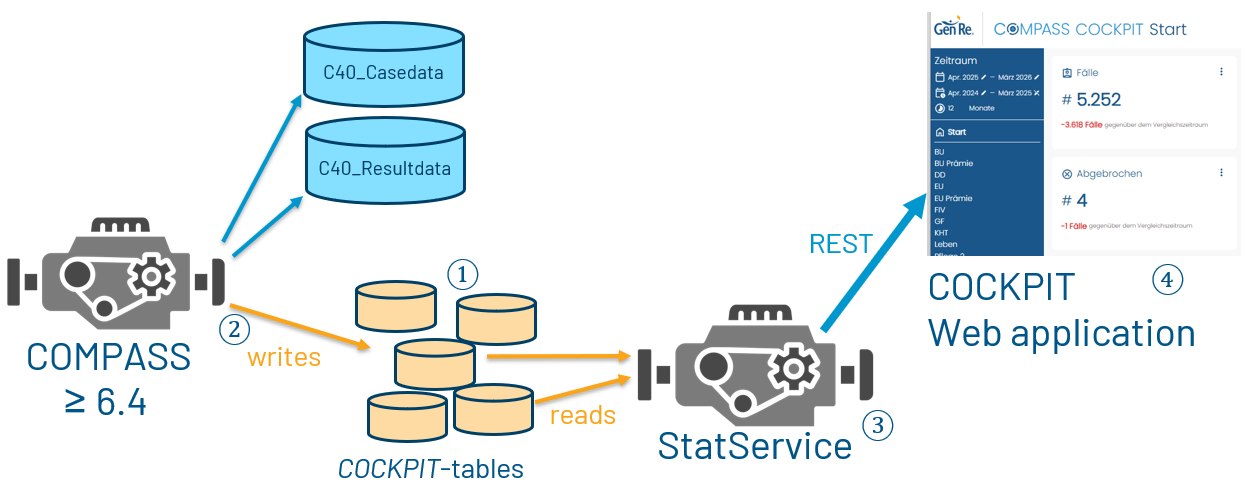
Should you decide to install COCKPIT, you will need to create certain database tables, see Database ①.
Once these tables are created, you can fill them while using the COMPASS Server or CompassService, see Filling the COCKPIT tables ②.
The StatService will read the data from the COCKPIT tables and make it available via REST endpoints.
These REST endpoints are used by the COCKPIT web application to display the data.
The sections StatService ③ and COCKPIT ④ describe the installation and configuration of these components.
Prerequisites
The database system has to support the ON DELETE CASCADE feature. This is the case for most modern RDBMS,
except for instance MySQL with MyISAM storage engine.
StatService and Cockpit are deployed as war files. To run they need a WebServer that supports Servlet 6.1+.
StatService is a Java 17 application.
Anonymisation
The data stored in the COCKPIT tables does not contain data that can be used to identify a person.
E.g. name or ID of a person are not stored in the COCKPIT tables.
Database
A set of new tables are required to store the statistical information. These tables should be accessible via the database
connection that is used by the COMPASS Server and/or COMPASS Service to read and write the Cases and Results.
|
Make sure the COCKPIT tables are being created in the same space (schema/tablespace/etc.) as the tables |
The COCKPIT tables are
-
c40_statcase -
c40_statcasedetail -
c40_stathighlevelresult -
c40_statresultdetail -
c40_statsource -
c40_statusersettings
When writing information from a Case-XML (no assessment result), only the tables c40_statcase, c40_statsource, and c40_statcasedetail are filled.
When adding information from a Result-XML, the tables c40_stathighlevelresult and c40_statresultdetail are also filled.
The table c40_statusersettings is used to store the settings of the users of the COCKPIT application.
Click for the CREATE SQL scripts for the MariaDB
  CREATE TABLE c40_statcase (
    cid INT NOT NULL AUTO_INCREMENT,
    casename VARCHAR(20) NOT NULL,
    subid CHAR(4),
    cspset INT NOT NULL,
    complete INT NOT NULL,
    pos INT NOT NULL,
    locale CHAR(4) NOT NULL,
    numberchanges INT,
    numberchangeassess INT,
    issueable INT,
    resultlevelid INT,
    thedate DATETIME,
    policy INT,
    PRIMARY KEY (cid),
    INDEX dateIndex (thedate)
  ) ENGINE=InnoDB DEFAULT CHARSET=utf8mb4 DEFAULT COLLATE=utf8mb4_unicode_ci;

  CREATE TABLE c40_statcasedetail (
    id INT NOT NULL AUTO_INCREMENT,
    catyid INT NOT NULL,
    catyname VARCHAR(250),
    cotybenefitid INT NOT NULL,
    cotybenefitname VARCHAR(250),
    value VARCHAR(250),
    cotykey VARCHAR(250),
    cotyunit VARCHAR(250),
    timeorcancel INT,
    xmlid INT NOT NULL,
    case_id INT NOT NULL,
    PRIMARY KEY (id),
    CONSTRAINT casedetail_main FOREIGN KEY (case_id) REFERENCES `c40_statcase` (`cid`) ON DELETE CASCADE,
    INDEX catyIndex (catyid),
    INDEX caseDetailCaseIdIndex (case_id)
  ) ENGINE=InnoDB DEFAULT CHARSET=utf8mb4 DEFAULT COLLATE=utf8mb4_unicode_ci;

  CREATE TABLE c40_stathighlevelresult (
    id INT NOT NULL AUTO_INCREMENT,
    cotybenefitid INT NOT NULL,
    cotybenefitname VARCHAR(250),
    resultlevelid INT NOT NULL,
    risktypeid INT NOT NULL,
    xmlid INT NOT NULL,
    case_id INT NOT NULL,
    PRIMARY KEY (id),
    CONSTRAINT highlevelresult_main FOREIGN KEY (case_id) REFERENCES `c40_statcase` (`cid`) ON DELETE CASCADE,
    INDEX riskIndex (risktypeid),
    INDEX highLevelResultCaseIdIndex (case_id)
  ) ENGINE=InnoDB DEFAULT CHARSET=utf8mb4 DEFAULT COLLATE=utf8mb4_unicode_ci;

  CREATE TABLE c40_statresultdetail (
    id INT NOT NULL AUTO_INCREMENT,
    risktypeid INT NOT NULL,
    risktypename VARCHAR(250),
    risktyperesultlevelid INT NOT NULL,
    apxmlid INT NOT NULL,
    benefitxmlid INT NOT NULL,
    benefittypeid INT NOT NULL,
    caseobjectxmlid INT NOT NULL,
    caseobjectdbid INT NOT NULL,
    caseobjectkey VARCHAR(12),
    caseobjectname VARCHAR(250),
    caseresulttypeid INT NOT NULL,
    caseresulttypename VARCHAR(250),
    caseresultresultlevelid INT NOT NULL,
    caseresultxmlid INT NOT NULL,
    caseresultsuppressedid INT NOT NULL,
    caseresultattributetypeid INT NOT NULL,
    caseresultattributetypename VARCHAR(250),
    caseresultattributedoubleorid DOUBLE NOT NULL,
    caseresultattributeunitorname VARCHAR(250),
    case_id INT NOT NULL,
    PRIMARY KEY (id),
    CONSTRAINT resultdetail_main FOREIGN KEY (case_id) REFERENCES `c40_statcase` (`cid`) ON DELETE CASCADE,
    INDEX case_id (case_id)
  ) ENGINE=InnoDB DEFAULT CHARSET=utf8mb4 DEFAULT COLLATE=utf8mb4_unicode_ci;

  CREATE TABLE c40_statsource (
    id INT NOT NULL AUTO_INCREMENT,
    typeid INT,
    complete INT NOT NULL,
    case_id INT NOT NULL,
    posModuleName VARCHAR(250),
    cancelledPosNodeName VARCHAR(250),
    PRIMARY KEY (id),
    CONSTRAINT source_main FOREIGN KEY (case_id) REFERENCES `c40_statcase` (`cid`) ON DELETE CASCADE,
    INDEX sourceCaseIdIndex (case_id)
  ) ENGINE=InnoDB DEFAULT CHARSET=utf8mb4 DEFAULT COLLATE=utf8mb4_unicode_ci;

  CREATE TABLE c40_statusersettings (
    userId VARCHAR(255) NOT NULL,
    settings longtext,
    PRIMARY KEY (userId)
  ) ENGINE=MyISAM DEFAULT CHARSET=latin1 DEFAULT COLLATE=latin1_swedish_ci;
Click for the CREATE SQL scripts for DB2
  create table C40_STATCASE (
    CID                INTEGER generated always as identity primary key,
    COMPLETE           INTEGER,
    CSPSET             INTEGER,
    ISSUEABLE          INTEGER,
    NUMBERCHANGEASSESS INTEGER,
    NUMBERCHANGES      INTEGER,
    POLICY             INTEGER,
    POS                INTEGER,
    RESULTLEVELID      INTEGER,
    THEDATE            TIMESTAMP(6),
    CASENAME           NVARCHAR(20),
    LOCALE             CHAR(4),
    SUBID              CHAR(4)
  );

  create table C40_STATCASEDETAIL (
    CASE_ID         INTEGER constraint caseDetailCaseId references C40_STATCASE on delete cascade,
    CATYID          INTEGER not null,
    COTYBENEFITID   INTEGER not null,
    ID              INTEGER generated always as identity primary key,
    TIMEORCANCEL    INTEGER,
    XMLID           INTEGER not null,
    CATYNAME        NVARCHAR(250),
    COTYBENEFITNAME NVARCHAR(250),
    COTYKEY         NVARCHAR(250),
    COTYUNIT        NVARCHAR(250),
    VALUE           NVARCHAR(250)
  );

  create table C40_STATHIGHLEVELRESULT (
    CASE_ID         INTEGER constraint highLevelResultCaseId references C40_STATCASE on delete cascade,
    COTYBENEFITID   INTEGER  not null,
    ID              INTEGER generated always as identity primary key,
    RESULTLEVELID   SMALLINT not null,
    RISKTYPEID      INTEGER  not null,
    XMLID           INTEGER  not null,
    COTYBENEFITNAME NVARCHAR(250)
  );

  create table C40_STATRESULTDETAIL (
    APXMLID                       INTEGER not null,
    BENEFITTYPEID                 INTEGER not null,
    BENEFITXMLID                  INTEGER not null,
    CASE_ID                       INTEGER constraint resultDetailCaseId references C40_STATCASE on delete cascade,
    CASEOBJECTDBID                INTEGER not null,
    CASEOBJECTXMLID               INTEGER not null,
    CASERESULTATTRIBUTEDOUBLEORID DOUBLE  not null,
    CASERESULTATTRIBUTETYPEID     INTEGER not null,
    CASERESULTRESULTLEVELID       INTEGER not null,
    CASERESULTSUPPRESSEDID        INTEGER not null,
    CASERESULTTYPEID              INTEGER not null,
    CASERESULTXMLID               INTEGER not null,
    ID                            INTEGER generated always as identity primary key,
    RISKTYPEID                    INTEGER not null,
    RISKTYPERESULTLEVELID         INTEGER not null,
    CASEOBJECTKEY                 NVARCHAR(12),
    CASEOBJECTNAME                NVARCHAR(250),
    CASERESULTATTRIBUTETYPENAME   NVARCHAR(250),
    CASERESULTATTRIBUTEUNITORNAME NVARCHAR(250),
    CASERESULTTYPENAME            NVARCHAR(250),
    RISKTYPENAME                  NVARCHAR(250)
  );

  create table C40_STATSOURCE (
    CASE_ID              INTEGER constraint sourceCaseId references C40_STATCASE on delete cascade,
    COMPLETE             INTEGER not null,
    ID                   INTEGER generated always as identity primary key,
    TYPEID               INTEGER,
    CANCELLEDPOSNODENAME NVARCHAR(100),
    POSMODULENAME        NVARCHAR(100)
  );

  create table C40_STATUSERSETTINGS (
    USERID   NVARCHAR(255) not null primary key,
    SETTINGS CLOB(1048576)
  );
SQL CREATE scripts for further database systems on request.
Database storage requirement
The program stores approximately 5 KB of data per application in the database schema. This value is based on typical client data volumes and should be used for capacity planning purposes.
Half of it is due to the Case-XML data, and the other half is due to the Result-XML data.
Applications with a large number of assured persons and/or benefits will require more storage.
Filling the COCKPIT tables
The technical requirements for COMPASS to fill the COCKPIT tables are explained in Technical requirements.
When these technical requirements are fulfilled, certain API commands update the COCKPIT tables:
Relevant API commands
capture
When an application (a Case-XML) is being captured/modified (capture command of the API), details of the modified
application are being written, without assessment results, to the COCKPIT tables.
It overwrites a possible entry for this application-ID in the COCKPIT tables.
This happens every time when the Case-XML is also written to the c40_casedata table, i.e. when the capturing process is finalised,
or when a SAVE command was issued.
assess
When an application is being assessed (assess command of the API), two situations are possible:
-
details of this application are not already in the COCKPIT tables → nothing happens, i.e. the details of the application are not to be found in the COCKPIT tables.
-
details of this application are already in the COCKPIT tables → possible previous assessment details are being removed from the tables, and the remaining data for this application is updated with the new assessment results
The table c40_statcase contains the column thedate which contains a time stamp. This timestamp is the date and time
when the record was last inserted or updated.
Technical requirements
By default, or when you update from 6.3 to 6.4 by exchanging the compass.jar or CompassService.war, the COMPASS engine will not
access the COCKPIT tables and thus will not fill them.
There are a few properties that need to be defined to enable COMPASS to fill the COCKPIT tables.
The properties are
-
FILL_STATS_TABLES
has to be defined and set to TRUE, otherwise COMPASS will not fill the COCKPIT tables -
STATS_TIME_THRESHOLD
optional property that accepts integers ≥ 0, that represent milliseconds. Default is 5000, i.e. 5 seconds.
Questions that took longer than this time to be answered are being recorded in the c40_statcasedetail table. -
(view-)name of the c40_statcase table
-
(view-)name of the c40_statcasedetail table
-
(view-)name of the c40_stathighlevelresult table
-
(view-)name of the c40_statresultdetail table
-
(view-)name of the c40_statsource table
|
For COMPASS to update the COCKPIT tables, the 5 tables have to be defined and accessible, and the property |
See the sections COMPASS Server and COMPASS Service for more details on how to define these properties.
COMPASS Server
When the COMPASS engine is the COMPASS Server, the properties have to be defined in the file compass.properties that
is located in the config/server folder of the COMPASS legacy installation.
systemname.CaseData.viewStatCaseData=c40_statcase
systemname.CaseData.viewStatCaseDetailData=c40_statcasedetail
systemname.CaseData.viewStatHighLevelResultData=c40_stathighlevelresult
systemname.CaseData.viewStatResultDetailData=c40_statresultdetail
systemname.CaseData.viewStatSourceData=c40_statsource
FILL_STATS_TABLES=true
STATS_TIME_THRESHOLD=7500
COMPASS Service
When the COMPASS engine is the CompassService, the properties can be defined in a variety of ways; see Properties Overview.
One of the options is via the file compass.properties. See details above in the COMPASS Server section.
In the other cases (COMPASSService-properties | -JSON | -YAML file) use the syntax
compass.[parameter.]stats.enabled for FILL_STATS_TABLES
compass.[parameter.]stats.timeThreshold for STATS_TIME_THRESHOLD
compass.database.case.viewname.StatCaseData
compass.database.case.viewname.StatSourceData
compass.database.case.viewname.statCaseDetailData
compass.database.case.viewname.statHighLevelResultData
compass.database.case.viewname.statResultDetailData
By the way - the 5 COCKPIT-tables are to be defined in the same way as the tables CaseData and ResultData, as COMPASS uses the same database connection to access them.
YAML example for compass.parameter.stats.enabled=true:
server:
  port: '8086'
  servlet:
    contextPath: "/CompassService"
compass:
  systemname: rm60
  parameter:
    stats:
      enabled: true
    fullloadsystem: false
    ...
JSON example for compass.parameter.stats.enabled=true:
{
  "server": {
    "port": "8086",
    "servlet": {
      "contextPath": "/CompassService"
    }
  },
  "compass": {
    "systemname": "rm60",
    "parameter": {
      "stats": {
        "enabled": true
      },
      "fullloadsystem": false,
      ...
    },
...
Transferring applications
There are two utilities to transfer data to the COCKPIT tables. Both are based on the legacy environment of COMPASS, and as such the properties as described in COMPASS Server should be set.
CreateStatsData
The class com.cr.compass.util.CreateStatsData, which is part of the compass.jar, can be called with the 3 parameters
-
Systemname
-
Sub-System-ID
-
Language-ID
It transfers all applications of this System [Systemname] and Sub-System-ID that are in the c40_casedata and c40_resultdata tables
to the COCKPIT tables.
Texts will be created in the language that is defined by the Language-ID parameter.
An application will receive the timestamp (c40_statcase.thedate-column) according to the following logic:
- If the application has a result, it will be the value of AssessmentDate in the Result-XML
- Otherwise the value in the c40_casedata.rex_ModificationDate-column
A sample batch file CreateStatsData.bat is provided in the bin folder of the COMPASS legacy installation.
A brief summary with the number of processed applications is written to console.
Example:
Found 3 cases in SubID TEM2.

Of these:

1 is correct, but has no Result.

0 couldn’t be processed at all.

0 have a Result that could not be processed.
|
Historical applications can contain references to items that no longer exist in the current COMPASS data, like POS-Modules, SourceTypes, Occupations, etc. Such application can’t be converted into the COCKPIT tables, or only partially, e.g. without names. |
Down-/LoadStatsData
Two tools for the loading and downloading of statistical information are available. These tools allow the transfer of application details from one set of COCKPIT tables to another.
The download or upload of cases will either read from or write to a QSAM file.
The cases or results written/read from these files are interpreted according to the compass.properties property Systemname.CaseData.qsamEncoding
(see settings of compass.properties).
Downloading Statistical Data
Calling the following Java class downloads case-details from the COCKPIT-tables to a flat file:
java com.cr.compass.database.util.DownLoadStatsData [-s systemID] [-sub subsystemID] [-t caseID]
The utility needs a System to work. When -s systemID is not provided, the application asks for a System in a graphical window.
The -sub subsystemID and -t caseID arguments are optional filters to restrict the number of downloaded cases.
subsystemID maps to the rex_SubID column, and caseID to the rex_CaseID column of the C40_CaseData table.
caseID can be used with the wildcards "_" and "%" as known from SQL. E.g. -t ABC_% will download only Cases with a caseID starting
with ABC, followed by at least one character.
By running this program, a file ./casedata/StatsData.txt is created. Each row contains the statistical data coming from one application with the following information:
| Content | Remarks |
|---|---|
Name of the subsystem of the case |
max. 4 bytes |
TAB (tabulator, “\t“) |
|
Name of the case |
max. 20 bytes |
TAB (tabulator, “\t“) |
|
JSON-formatted statistical data for this application |
any length |
End of line |
The cases downloaded to this file are:
-
all of the passed/selected System
-
all of the passed Subsystem
subsystemID, or of all Subsystems, when -sub not defined -
all cases when -t caseID was not included, or only cases matching
caseID(with SQL-wildcards)
This tool is part of the standard Windows delivery. The batch file downLoadStatsData.bat in the bin directory contains the call.
!! In the batch file use %% instead of % as SQL-wildcard
Loading Statistical Data
Calling the following Java class will upload statistical data:
java com.cr.compass.database.util.LoadStatsData [-s systemID]
If no system has been defined, the application asks for a system in a graphical window. A selection box contains all systems that can be found in the file compass.properties (see settings of compass.properties). All information from the file ./casedata/StatsData.txt are written into the database of the selected system. Data of applications that are already in the COCKPIT-tables is overwritten.
The StatsData.txt file has to be structured as defined in the Downloading Statistical Data section.
This tool is part of the standard Windows delivery. The batch file loadStatsData.bat in the bin directory contains the call.
Removing applications
If you want to remove applications from the COCKPIT tables, you have two options, that are presented in the following two subchapters.
One application is defined by the application-ID and the sub-ID. In the COCKPIT tables this is represented by the columns c40_statcase.casename and c40_statcase.subid.
via SQL
Due to the DELETE ON CASCADE option of the database, it is only required to remove the application from the c40_statcase table.
Related rows in other COCKPIT tables are removed by the CONSTRAINTs automatically.
Example removing the application ABC in Subsystem DEF:
DELETE FROM c40_statcase WHERE casename = 'ABC' AND subid = 'DEF';
via the Rest-API endpoint deleteCase
The REST endpoint deleteCase of the CompassService can be used to remove an application from the COCKPIT tables.
For this purpose add the parameter deleteStats=true to the request.
Example GET call removing the application ABC in Subsystem DEF:
./CompassService/deleteCase?caseId=ABC&subId=DEF&deleteStats=true
When the parameter deleteStats is not available, or not set to true, the application will be
removed from the c40_casedata and c40_resultdata tables, but not from the COCKPIT tables.
StatService
The StatService is a Spring Boot application that provides REST endpoints that are consumed by the COCKPIT frontend.
Prerequisites
StatService can be deployed in any Java servlet container that supports at least Servlet API 5.0.
StatService requires Java 17 or newer.
Endpoints
REST-endpoints provided by StatService are to be used via COCKPIT only and therefore are not described here.
During installation, you might want to check the availability of the endpoints via a browser or a REST client.
Use the version GET endpoint to check if the service is running: <host>:<port>/StatService/version
Swagger
By defining properties for Swagger
springdoc:
  swagger-ui:
    path: /api
you can access the Swagger UI at <host>:<port>/StatService/api to see the available endpoints.
Installation
The StatService distribution consists of the archive StatService.war. It can be deployed
in a Servlet Container (see Servlet Container) or as a standalone application using Spring Boot (see Standalone Server).
Servlet Container
StatService.war containing the StatService should be deployed in your Servlet
Container (i.e. Tomcat: webapps directory, OpenLiberty: dropins directory). If required, restart the container.
Standalone Server
The StatService.war contains a runnable environment that can be started with the Spring WarLauncher. This
way it is possible to start the WebApp without a third-party Servlet Container:
Copy StatService.war file to your Compass legacy lib directory.
Make sure Java 17 is installed, and run the following command using Java 17:
java -cp lib\StatService.war;dBDriver org.springframework.boot.loader.launch.WarLauncher
--spring.configname=StatService
Cache mechanism
The StatService does not access the COCKPIT tables with every request. Instead, it maintains an in-memory cache of the data to improve performance and reduce database load.
This cache is periodically refreshed based on the configuration properties cacheInterval and cacheFullReload.
The cacheInterval property defines how often the cache is incrementally updated, while the cacheFullReload property specifies when a complete reload of the cache occurs.
We suggest a value above 1 minute for the cacheInterval property, and a full reload only once per day.
Configuration
StatService needs configuration files which define the environment and the data to work with. This configuration-file may use one of the following formats:
| Format | File-Name (default) |
|---|---|
Properties |
StatService.properties |
YAML |
StatService.yml |
JSON |
StatService.json |
They all configure the same underlying configuration system, but they differ in syntax and readability.
Depending on the Web Server used, the configuration file can (or in certain cases must) be named differently.
E.g. in Open Liberty: application.properties or application.yml
Following, the configuration is explained as properties, where they are grouped in logical sections:
Logging
The application uses Spring Boot’s logging framework. These properties control where log messages are written, the verbosity of logging for different packages, and the format of log messages for both console and file output.
| Property | Example | Description |
|---|---|---|
logging.file.name |
./log/StatService.log |
Path and name of the log file where application logs are written. If omitted, logs are written only to the console. |
logging.level.root |
INFO |
Default logging level for all loggers. Common values are TRACE, DEBUG, INFO, WARN, ERROR, and OFF. |
logging.level.org. springframework.web |
DEBUG |
Logging level for Spring Web components. Increase to DEBUG when troubleshooting HTTP request processing. |
logging.level.org. springframework.web. filter.CommonsRequestLoggingFilter |
INFO |
Logging level for the Spring CommonsRequestLoggingFilter. Controls logging of HTTP request details when the filter is enabled. |
logging.level.org.hibernate.stat |
ERROR |
Logging level for Hibernate statistics. Typically left at ERROR unless diagnosing persistence-related issues. |
logging.pattern.console |
%d{ISO8601} [%highlight(%-5level)] %cyan(%logger{15}:%L) - %msg%n |
Log pattern used for console output. Defines the timestamp, log level, logger name, line number, and message format. |
logging.pattern.file |
%d{ISO8601} [%-5level] %logger{15}:%L - %msg%n |
Log pattern used for log file output. Similar to the console pattern but without ANSI colour codes. |
Spring Boot Configuration
The following Spring Boot properties configure the application’s runtime environment, database connectivity, JPA behaviour, management features, and security.
| Property | Example | Description |
|---|---|---|
spring.profiles.active |
default,noAuthorization |
Comma-separated list of active Spring profiles. See Authorisation for more details. |
spring.datasource.url |
jdbc:mariadb://localhost:3339/db64 |
JDBC URL of the database used by the application. Modify this value to point to the target database server which contains the COCKPIT tables. |
spring.datasource.username |
Username |
Username used to authenticate with the database. |
spring.datasource.password |
Secr3t |
Password used to authenticate with the database. This value should be protected and supplied securely in production environments. |
spring.datasource.driver |
org.mariadb.jdbc.Driver |
Fully qualified class name of the JDBC driver. For MariaDB, this is typically org.mariadb.jdbc.Driver. Mostly not required property, as Spring Boot can auto-detect the driver based on the JDBC URL. |
spring.jmx.enabled |
false |
Enables or disables Java Management Extensions (JMX). Set to true if the application should expose management beans for monitoring tools. |
spring.jpa.properties.hibernate. generate_statistics |
false |
Enables Hibernate performance statistics. This is primarily intended for development and performance analysis and should normally remain disabled in production. |
spring.security.oauth2. resourceserver.jwt.issuer-uri |
${compass.security.authServerUrl} |
URI of the OAuth 2.0/OpenID Connect issuer used to validate incoming JWT access tokens. Spring Boot retrieves the issuer metadata and public signing keys from this endpoint. See Authorisation for more details. |
Application Configuration
The following properties configure the application-specific behaviour of the Stat Service. They define the database views used by the application, security settings, supported languages and cache refresh intervals.
| Property | Example | Description |
|---|---|---|
compass.database.case. viewname.statCase |
c40_statcase |
Viewname of the statcase table - |
compass.database.case. viewname.statSource |
c40_statsource |
Viewname of the statsource table - |
compass.database.case. viewname.statCaseDetail |
c40_statcasedetail |
Viewname of the statcasedetail table - |
compass.database.case. viewname.statHighLevelResult |
c40_stathighlevelresult |
Viewname of the stathighlevelresult table - |
compass.database.case. viewname.statResultDetail |
c40_statresultdetail |
Viewname of the statresultdetail table - |
compass.database.case. viewname.statUserSettings |
c40_statusersettings |
Viewname of the statusersettings table - |
compass.security.cors.enabled |
true |
Enables Cross-Origin Resource Sharing (CORS). |
compass.security.cors.crossOrigin.urls |
Comma-separated list of allowed origins that may access the application’s REST API. |
|
compass.security.* |
Further properties for the authorization. See Authorisation for more details. |
|
compass.languages |
de,en |
Comma-separated list of supported application languages using ISO language codes. These languages will be used to display COCKPIT texts, but not changing the texts that are found in the COCKPIT tables. |
cacheInterval |
60000 |
Interval, in milliseconds, between incremental cache updates. See Cache mechanism for more details. |
cacheFullReload |
0 0 2 * * * |
Cron expression defining when the complete cache is reloaded from the database. In this example, the cache is refreshed daily at 02:00. See Cache mechanism for more details. |
Server Configuration
The following properties configure the embedded web server used by the application, including the HTTP port, application context path, session timeout, and error response behaviour.
These properties are not required when the StatService is deployed in a third-party Servlet Container, as the container manages these settings.
| Property | Example | Description |
|---|---|---|
server.port |
8080 |
TCP port on which the application listens for incoming HTTP requests. Change this value if another application is already using the default port or if a different port is required. |
server.servlet.context-path |
/StatService |
Base URL path under which the application is deployed. With this setting, all application endpoints are accessible under /StatService (for example, http://localhost:8080/StatService/…). |
server.servlet.session.timeout |
60 |
Maximum period of inactivity before an HTTP session expires. Unless a unit is specified (for example, 30m or 1h), the value is interpreted as 60 seconds by Spring Boot. |
server.error.include-message |
always |
Controls whether the error message is included in HTTP error responses. The value always causes the error message to be returned for every error response, which can be useful during development but should be reviewed for production deployments. |
Authorisation
StatService can secure its REST endpoints using different authorization mechanisms. The options are using Spring Security with OAuth2, Keycloak, or running without any authentication. This is handled via profiles:
Profiles
The desired Authorization / Authentication option is to specified in the property spring.profiles.active in
the file StatService.properties or StatService.yml (see Configuration).
There are 4 profiles available to customize the type of Authorization / Authentication:
| Profile | Explanation |
|---|---|
|
Mandatory |
|
Activate the Keycloak Authorization Configuration |
|
Activate Spring Authorization Configuration |
|
Service Endpoints are not secured. COCKPIT does not ask for a user/password |
2 profiles need to be specified - default plus one of the profiles keycloakAuthorization, springAuthorization or noAuthorization .
| If not exactly 2 profiles are specified or if the profile default is missing, the application will not start. |
| Profiles | Explanation |
|---|---|
|
StatService secured by Spring Authorization |
|
StatService secured by Keycloak Authorization |
|
Endpoints are not secured; the properties in Authorization properties are not required and will be ignored. |
Authorization properties
The following properties configure the OAuth 2.0 security that comes with the StatServer. Only those marked with a Ⓚ are of importance when Keycloak (profile keycloakAuthorization) is being used.
| Property | Example | Description |
|---|---|---|
compass.security.clientId |
cockpit-client |
Ⓚ OAuth 2.0 / Keycloak client identifier used by the application. |
compass.security.authServerUrl |
Ⓚ Base URL of the authorization server used for authentication and JWT validation. |
|
compass.security.requireHttps |
false |
Ⓚ Indicates whether HTTPS is required for communication with the authorization server. This should normally be true in production. |
compass.security.sessionCheckInterval |
15000 |
Ⓚ Interval, in milliseconds, for checking the user’s authentication session. |
compass.security. roleBasedResourceAccessEnabled |
true |
Enables role-based authorization for protected resources. |
compass.security. springAuthorization. tokenBlacklistingOnLogoutEnabled |
true |
Invalidates access tokens after logout by adding them to a token blacklist. |
Sample YAML configuration
Details
logging:
    file:
        name: ./log/StatService.log
    level:
        org:
            springframework:
                web: DEBUG
                web.filter.CommonsRequestLoggingFilter: INFO
            hibernate:
                stat: ERROR
        root: INFO
    pattern:
        console: '%d{ISO8601} [%highlight(%-5level)] %cyan(%logger{15}:%L) - %msg%n'
        file: '%d{ISO8601} [%-5level] %logger{15}:%L - %msg%n'
server:
    port: 8080
    servlet:
        contextPath: /StatService
    sessionTimeout: 60
    error:
        include-message: always
spring:
    profiles:
        active: default,noAuthorization
    datasource:
      url: jdbc:mariadb://localhost:3456/testDB
      username: user_xy
      password: pw_XY
    jmx:
        enabled: false
    jpa:
      properties:
          hibernate:
              generate_statistics: false

    security:
        oauth2:
            resourceserver:
                jwt:
                    issuer-uri: ${compass.security.authServerUrl}
springdoc:
    swagger-ui:
        path: /api

compass:
    database:
        case:
            viewname:
                statCase: c40_statcase
                statSource: c40_statsource
                statCaseDetail: c40_statcasedetail
                statHighLevelResult: c40_stathighlevelresult
                statResultDetail: c40_statresultdetail
                statUserSettings: c40_statusersettings
    security:
        cors:
            enabled: true
            crossOrigin:
                urls: http://10.130.130.115:8085,http://localhost:4200,http://localhost:8082
        clientId: cockpit-client
        authServerUrl: http://localhost:8080/AuthorizationServer
        requireHttps: false
        sessionCheckInterval: 15000
        roleBasedResourceAccessEnabled: true
        springAuthorization:
        tokenBlacklistingOnLogoutEnabled: true
    languages: de
# Cache interval(milliseconds) to update the cache values
cacheInterval: 60000
# Cache interval (cronjob) to read all infos from DB and update the cache values.
cacheFullReload: 0 0 2 * * *
COCKPIT
COCKPIT is a pure web application based on Angular.
It is delivered as a war-archive called Cockpit.war. It is being unpacked when deployed in a conventional HTTP server.
When a local servlet container such as Apache Tomcat is used, the WAR file can be copied to the webapps folder,
and is then accessible via localhost:8080/Cockpit .
Depending on the security of the StatService, COCKPIT will ask for a user/password login.
We recommend using the most recent version of Google Chrome to call and access COCKPIT.
The file appConfig.json
COCKPIT’s configuration is done via the Cockpit/appConfig.json file. A sample file follows:
{
  "StatService": "/StatService/",
  "baseHref": "/Cockpit/",
  "idleTimeout": {
    "showDialogAfterMs": 1200000,
    "timerMs": 600000
  }
}
The properties are:
| Property Name | Type | Mandatory | Description |
|---|---|---|---|
StatService |
String |
yes |
URL to the StatService |
baseHref |
String |
yes |
URI of this application |
showDialogAfterMs |
Integer |
only when Authorisation is enabled |
milliseconds of inactivity after which Login-dialogue pops up |
timerMs |
Integer |
only when Authorisation is enabled |
milliseconds of inactivity after login dialogue, after which user is being logged off |
If you would like to access COCKPIT under a different URL:
-
rename the war file to
[New name]and -
edit the base-href in index.html within that war file:
<base href="/[New name]/"> -
edit the base-href in appConfig.json within that war file:
"baseHref": "/[New name]/">
The file pageConfig.json
COCKPIT knows an optional configuration file Cockpit/pageConfig.json.
This file contains a default set of pages and widgets that are displayed to a user.
Unless the user stores on his/her machine/browser a different configuration, this configuration of pages and widgets is initially shown to them.
Do not modify this file manually. The documentation pageConfig.json explains how to export these settings from a running COCKPIT session. From there the file can be copied to the Cockpit folder of the web server.