Database
COMPASS Version 6.2, 6.3, 6.4 © General Re Corporation 2021 - 2026. All Rights Reserved (created: 2026-05-08 generated: 2026-07-10)
| Please note that this document is still under revision, so slight changes still might occur before the final version of this draft. |
Introduction
COMPASS stores the Assessment Knowledge and the Case related data in SQL databases. The database layer is written in pure Java, therefore every database system with a JDBC driver available can be used. This applies to the most commonly used database systems like MS SQL Server, MySQL, Oracle, DB2 etc.
What this document describes
This documentation describes the steps required to store the COMPASS data in an SQL database, and how to access these tables from COMPASS. The used tables, indexes and views/synonyms are described in detail.
Accessing case data and result data includes the information about the case and result data. This data might be accessed or created by your own application: Case data (input interfaces) can be produced by your application and be inserted into the CaseData table, while results (result interfaces) can be retrieved from the ResultData table.
Setting up a Database for special Market Versions describes configurations for some market versions.
Cache describes an additional feature of COMPASS, namely the cache implementation, which enables to store the state of a COMPASS client application temporarily, in order to establish COMPASS in a “stateless” environment, e.g. in a cloud.
Please also have a look at the document Database Utilities, which describes some utilities to work with the COMPASS database you might find useful.
Main changes compared to version 5.x
Compared to previous COMPASS versions, the C40_Author table has an additional column, which is used to ensure a single login to the RuleManager. This column will contain NULL for all rows, unless a user is logged in – in which case a timestamp is found in this column for the user.
Knowledge Data contains the DDL for the table.
Should you desire to update the existing table, use one of the following SQL statements:
----ALTER TABLE C40_Author ADD rex_AuthorTime NUMERIC(14)
----
or
ALTER TABLE C40_Author ADD rex_AuthorTime DECIMAL(14,0)or
ALTER TABLE C40_Author ADD rex_AuthorTime CHAR(14)depending on the data types supported by the chosen RDBMS.
By default, most RDBMS create new columns nullable. Make sure this is the case for the new column!
Related documentation
This document will be mainly read during the installation process. The installation of COMPASS Service and its components is described in the document Getting Started
Please also have a look at the document Database Utilities, which describes some utilities to work with the COMPASS database you might find useful.
Prerequisites
COMPASS works with data. It requires a database to store this data. COMPASS can connect to all SQL-databases that are accessible via a JDBC driver. The common RDBMS Oracle, Sybase, MySQL, MSSQL-Server and DB2 (UDB) are supported.
COMPASS can access tables directly or via views or synonyms. It is up to the client to decide for a direct table access, or via views or synonyms.
The database system should have enough space for the creation and loading of the tables and indexes. The tablespace should be at least 300 MB.
Additionally, COMPASS needs a JDBC driver for the RDBMS. This driver will have to be included in the lib-directory of the installation and made available to COMPASS when starting the service or the Rulemanager.
As an alternative to COMPASS setting up the connection via JDBC-driver it is possible for COMPASS to work with DataSources that provide the required connections (see DataSources - COMPASS Service).
COMPASS works with Unicode (UTF8 without BOM), and thus supports most languages. The database system should be able to store Strings in an encoding that represents the local characters. Via properties COMPASS can handle most database encodings. Some special constellations are presented in Setting up a Database for special Market Versions.
Systems, Case data, Knowledge data
A case is the data from an application; it comprises data about the Insured Person like name, age, occupation, but also about the benefits like sum insured, duration of the policy, etc.
A System is the set of all data needed by COMPASS to capture, display, assess and save a case.
This includes
-
User interface descriptions
-
Knowledge databases like disorders, occupations … with their assessment rules
-
Cases
-
Assessment results for these cases
The cases and assessment results are referred to as Case Data and Result Data; the other data is part of the Knowledge Data.
Installing the Database layer
Preparing the process
COMPASS accesses the database to store or modify 3 different sets of data: Knowledge Data (rules and UI definitions), Case Data and Cache. Of these three types of data, Knowledge Data is mandatory, while storing Case Data in tables is optional, and the use of Cache table is only required in the particular situation that COMPASS captures the user-input in a stateless manner via a fullRequest. These three types of data can be stored in the same environment, but also can be stored in different environments, even in different database systems. This means that all data could be stored in one database, say DB2, but also separated: Case Data in MySQL, Knowledge Data in DB2 and Cache table in MS SQL Server.
Case Data is stored in 3 tables:
-
C40_CaseData
-
C40_ResultData
-
C40_AuthorCase
Case Data table contains Input Interfaces, sorted by the System and a Subsystem (SubID). The SubID enables the administration of several sets of cases in the same table, e.g. a set of cases from the life environment plus a set of test cases, or a set of cases per user. This way, each user only sees the relevant cases.
The table ResultData has a similar structure. Sorted by System and SubID the assessment results (Result Interfaces) for each case are stored here.
The table AuthorCase stores the names of the users who have modified a Case and / or a Result in any of the two previously named tables.
The cache table is described in Cache:
-
C40_Cache
The Knowledge Data is stored in 11 tables:
-
C40_PersObj
-
C40_Index
-
C40_BoolOrInt
-
C40_String
-
C40_Double
-
C40_Keys
-
C40_Name
-
C40_GroupID
-
C40_Relation
-
C40_Author
-
C40_Search
The Knowledge Data is designed as a set of objects and their relations. The first 7 tables store the objects with their name, index, keys and attributes. The Relation table stores the relations between those objects. The GroupID table contains the highest allocated id_ for each type of objects. The Author table stores all names of users, who have done modifications to one of the other tables. The table Search stores information for the search engine, which works for some types of objects (disorders, pursuits, etc.).
Before starting with the creation of tables, one must be aware of the systems that are needed, and which database systems are going to store the data for each system.
Example:
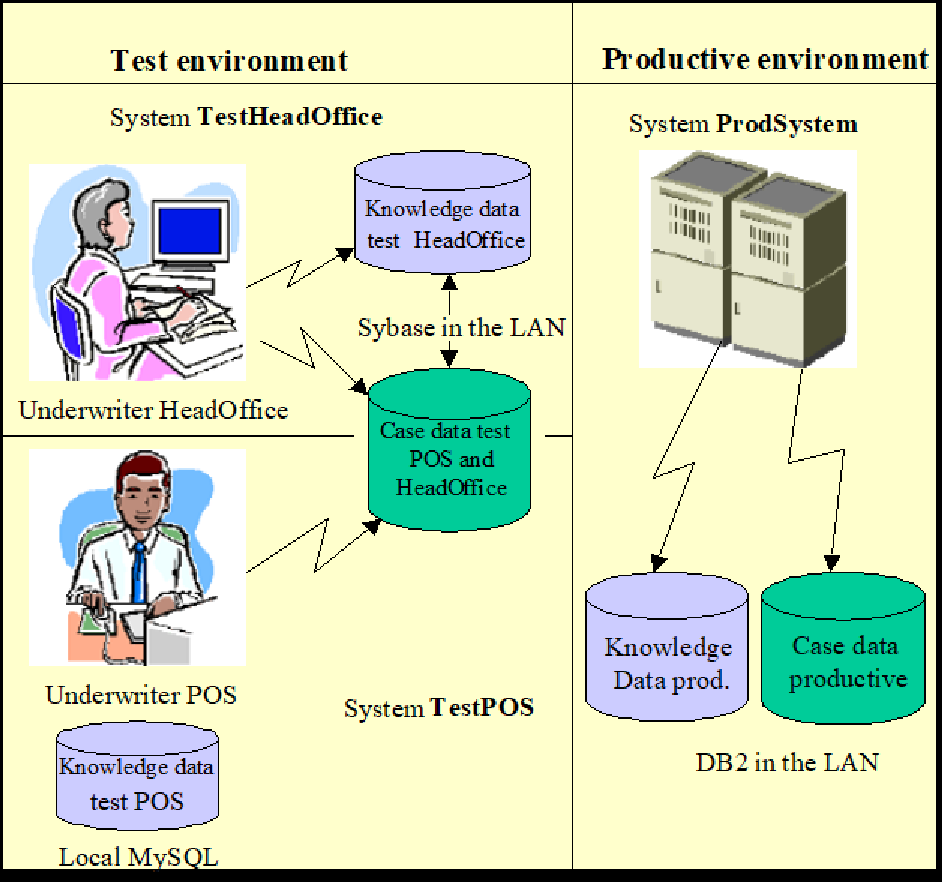
A company has an administration system, which uses COMPASS. This environment is separated completely from the testing environment. The productive database system is DB2. The System is called ProdSystem.
Two more systems are required for two underwriters who work on their local PCs. One of them is developing a new Point-of-Sale (POS) system, while the other is modifying assessment rules for the Head Office version and performs first tests with his modified Knowledge Data. The underwriter „POS“ works on a local MySQL, and saves his case data on a Sybase in the network. This system is called TestPOS. The underwriter „HeadOffice“ works completely on the Sybase in the network. This system is called TestHeadOffice.
The following tables have to be created:
DB2: Tables for the Knowledge Data and Case Data of the system ProdSystem.
MySQL: Tables for the Knowledge Data of the system TestPOS.
Sybase: Tables for the Knowledge Data of the system TestHeadOffice and tables for the Case Data for the systems TestPOS and TestHeadOffice.
The following picture explains this architecture:
When you know which systems store their data on which database systems, the required JDBC drivers have to be found, and made available to COMPASS via property file (see Settings in the compass.properties file). Alternatively COMPASS can use DataSources to retrieve database connections (see DataSources - COMPASS Service).
Creating and loading the Tables
Each system needs tables to store the Knowledge Data. When cases and/or results are being stored in databases, additional tables for Case Data must exist. These tables can be used from various COMPASS systems.
For each table, views or synonyms can be created. COMPASS accesses the tables via the name in the property file. This name can be a synonym name, a view name or a table name.
Not all database systems support views or synonyms, or the data types numeric(14), varchar, etc., therefore the attached DDL scripts have to be adapted to the particular database system.
A list of the tables with their structure follows:
Case data
Click for complete DDL
Table C40_AuthorCase :
rex_Author					char(20)			NOT NULL,
rex_AuthorKey				smallint			NOT NULL,
rex_AuthorRole				smallint			NOT NULL
Table C40_CaseData :
rex_CaseID					char(20)			NOT NULL,
rex_SubID					char(04)			NOT NULL,
rex_No						smallint			NOT NULL,
rex_Length					integer				NOT NULL,
rex_CaseData				char(250)	    	NOT NULL,
rex_SystemID				char(20)			NOT NULL,
rex_ModificationDate	    char(14)		    NOT NULL,
		if Column names of length 20 are not supported: rex_ModDate  char(14)  NOT NULL,
rex_AuthorKey 				smallint			NOT NULL
Table C40_ResultData :
rex_CaseID					char(20)			NOT NULL,
rex_SubID					char(04)			NOT NULL,
rex_No						smallint			NOT NULL,
rex_Length					integer				NOT NULL,
rex_ResultData				char(250)   		NOT NULL,
rex_SystemID				char(20)			NOT NULL,
rex_ModificationDate	    char(14)			NOT NULL,
    	if Column names of length 20 are not supported: rex_ModDate  char(14)  NOT NULL,
rex_AuthorKey 				smallint			NOT NULL
Knowledge Data
Click for complete DDL
Table C40_GroupID :
rex_GroupID	 				smallint			NOT NULL,
rex_MaxID	 				integer				NOT NULL
Table C40_Author :
rex_Author 					char(20)			NOT NULL,
rex_AuthorKey				smallint			NOT NULL,
rex_AuthorRole				smallint			NOT NULL,
rex_AuthorTime				numeric(14)
Table C40_PersObj :
rex_ID	 					integer				NOT NULL,
rex_GroupID	 				smallint			NOT NULL,
rex_StringYN 	 			char(01)			NOT NULL,
rex_IntOrBoolYN		 	    char(01)			NOT NULL,
rex_DoubleYN				char(01)			NOT NULL,
rex_NameYN  				char(01)			NOT NULL,
rex_ModificationDate        numeric(14)     	NOT NULL,
		if column names of length 20 are not supported: rex_ModDate  numeric(14)  NOT NULL,
rex_AuthorKey 				smallint			NOT NULL
Table C40_String :
rex_ID		 				integer				NOT NULL,
rex_GroupID	 				smallint			NOT NULL,
rex_OrderNo					tinyint				NOT NULL,
rex_String	 				varchar(250)    	NOT NULL
Table C40_BoolOrInt :
rex_ID		 				integer				NOT NULL,
rex_GroupID	 				smallint			NOT NULL,
rex_OrderNo					tinyint				NOT NULL,
rex_BoolOrInt				integer				NOT NULL
Table C40_Double :
rex_ID	 					integer				NOT NULL,
rex_GroupID	 				smallint			NOT NULL,
rex_OrderNo					tinyint				NOT NULL,
rex_Double	 				numeric(14,4)   	NOT NULL
Table C40_Name :
rex_ID						integer				NOT NULL,
rex_GroupID	 				smallint			NOT NULL,
rex_LanguageID			    char(04)			NOT NULL,
rex_No			 			smallint			NOT NULL,
rex_Name					varchar(250)	NOT NULL
Table C40_Relation :
rex_FrID					integer				NOT NULL,
rex_FrGroupID				smallint			NOT NULL,
rex_ToID					integer				NOT NULL,
rex_ToGroupID				smallint			NOT NULL,
rex_No						integer				NOT NULL,
rex_RelID					smallint			NOT NULL,
rex_ModificationDate	    numeric(14)     	NOT NULL,
		if column names of length 20 are not supported: rex_ModDate  numeric(14)  NOT NULL,
rex_AuthorKey 				smallint			NOT NULL
Table C40_Index :
rex_ID						integer				NOT NULL,
rex_GroupID					smallint			NOT NULL,
rex_Index					char(20) 			NOT NULL
Table C40_Keys :
rex_ID						integer				NOT NULL,
rex_GroupID					smallint			NOT NULL,
rex_CustKey					char(12) 			NULL,
rex_GcreKey					char(12)		 	NULL
Table C40_Search :
rex_Feature					integer				NOT NULL,
rex_GroupID					smallint			NOT NULL,
rex_LanguageID		    	char(04) 			NOT NULL,
rex_FFSid001				integer				NOT NULL,
rex_FFSid002				integer				NOT NULL,
rex_FFSid003				integer				NOT NULL,
rex_FFSid004				integer				NOT NULL,
rex_FFSid005				integer				NOT NULL,
rex_FFSid006				integer				NOT NULL,
rex_FFSid007				integer				NOT NULL
Cache table
See Cache.
Remarks
Database systems that do not support the data type tinyint can use smallint or integer instead. When the data type smallint is also not supported, integer should be used. When the data type numeric(14) is not supported, use char(14) instead.
When varchar(250) is not supported, use char(250) instead. This means that more space will be used in your database system, especially in the Names table.
For most tables, indexes should be created. SQL-Create scripts for Oracle database system shows the create-SQL Scripts for the tables together with the recommended indexes.
Names of tables, synonyms or views can be chosen freely. We recommend using the following name structure:
System prefix + Default table name (+ = Concatenation)
Default table names are the names as defined in Case data and Knowledge Data. The System prefix can be C40_ (COMPASS version 4.0 introduced this table format), but can also be the empty String.
Please bear in mind that with UTF-8 (or similar) encoded databases/tables representation has to ensure that each symbol will fit into one char. In some database system UTF-8 encoded databases/tables are free to represent symbols as byte or char. If byte is chosen for special symbols (e.g. ä,ö,ß, € …), 2 characters are needed and therefore data can’t be stored due to restriction of the length of the column. In that case please choose the representation symbol to be stored in one char.
Running the scripts
Included in the delivery are DDL scripts for the required tables and DROP scripts for those tables. Initial Load-Data for the databases is generally provided as tab-separated-value files (one file per table). For some databases LOAD-scripts are provided, however, depending on the type of database, load- / import-scripts need to be provided by the very Database Administrator.
Chances are that the SQL scripts provided need to be adapted. The names of the objects to be created can be modified. Execute those scripts in an SQL-editor of your choice.
The load scripts provided are, as far as possible, batch programs. These scripts make use of some standard load programs (bcp, sqlldr, etc.), so this program has to be in the PATH. Update the names of the tables in the scripts, and also the properties for the connection: user, password, database and server. These properties can be modified in the delivered scripts.
Loading of the Double-table can create problems, due to the format of decimal numbers. Some database systems expect the decimal separator as a comma, some as a dot. In this case, please adapt the import scripts accordingly, alternatively, please update the data file for the double table by replacing “,” by “.” or vice versa before loading.
For each database system there are a variety of load or import programs. Refer to your Database Administrator or check your database manual.
The content of the Knowledge Data tables is often exchanged between Gen Re and you as the COMPASS user. Gen Re sends the content of these tables in 11 tab-separated value files, and expects the same format when receiving data. This format is explained in the following chapter.
Exchange format of Knowledge Data
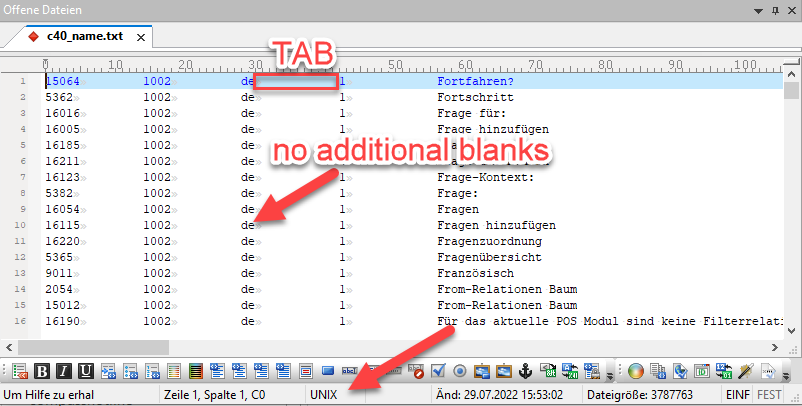
To exchange Knowledge Data between Gen Re and our COMPASS customers, there is a standard format of 11 flat files, which correspond to the 11 tables as described in Knowledge Data File-names contain the table-names , with the suffix .txt, e.g. C40_Relation.txt is the file that contains the data belonging to the C40_relation table
The files are in the following format:
-
Content of columns are separated by TABs
-
Strings/char columns are not enclosed by quotation marks
-
Strings/char columns are not filled with blanks
-
Files are in UNIX format, and not DOS (basic difference is the CRLF vs LF)
-
Files do not include the column names
-
Whenever possible, files are in UTF-8 (without BOM) encoding (e.g. for most European languages; other languages might require other encodings that should be agreed with Gen Re)
-
Decimal separator in the C40_double.txt is a “.”
To enable a quick exchange of data between our customers and Gen Re, the process of downloading and loading data should be automated, and setup and tested at an early stage of integration.
Settings in the compass.properties file
The compass.properties file contains several variables needed by COMPASS to find the correct data for a system. Those variables are listed here; in this example for the system Systemname, RDBMS is of type Oracle:
Access of Case data:
Systemname.CaseData.driver=[name of your JDBC-driver, i.e. oracle.jdbc.driver.OracleDriver]
Name of the database driver
Systemname.CaseData.password=[Passwort for DB-user]
Password for the user that connects to the database.
Systemname.CaseData.url=[JDBC-URL to access the database, i.e. jdbc:oracle:thin:@DEKOWD155E:1521:ORCL]
JDBC-URL of the database (different for each environment, database system and JDBC driver)
Systemname.CaseData.user=[Name of DB-user]
Name of the user that connects to the database.
Systemname.CaseData.reconnect=true
If this property is set to “true”, then the database connection will be reconnected, if it has been dropped or is otherwise unavailable. This should be used e.g. when the database server drops unused connections after a certain time (e.g. 30 minutes). Set this property only if required, as it slows down the database performance. When this property is not in included in the compass.properties-file, or its value is set to anything other than “true”, the reconnect is not attempted.
Systemname.CaseData.viewAuthor=C40_AuthorCase
The Author table is known under this name (table name, view name or synonym name)
Systemname.CaseData.viewCaseData=C40_CaseData
The Case table is known under this name (table name, view name or synonym name)
Systemname.CaseData.viewResultData=C40_ResultData
The Result table is known under this name (table name, view name or synonym name)
Accessing Knowledge Data:
Systemname.database.driver=[name of your JDBC-driver, i.e. oracle.jdbc.driver.OracleDriver]
Name of the database driver
Systemname.database.password=[Passwort for DB-user]
Password for the user that connects to the database.
Systemname.database.real=java.lang.Float
java.lang.Float or java.lang.Double; responsible for the representation of decimal numbers
Systemname.database.url=[JDBC-URL to access the database, i.e. jdbc:oracle:thin:@DEKOWD155E:1521:ORCL]
JDBC-URL of the database (different for each environment, database system and JDBC driver)
Systemname.database.user=[Name of DB-user]
Name of the user that connects to the database.
Systemname.database.reconnect=true
If this property is included with the value “true”, then the connection described by the parameters above will be reconnected, if it has been dropped or is otherwise unavailable. This feature can be used e.g. when the database server drops unused connections after a certain time (e.g. 30 minutes). Set this property only if required, as it slows down the database performance. When this property is not in included in the compass.properties-file, or its value is set to anything other than “true”, the reconnect is not attempted.
Systemname.viewname.Author=C40_Author
The Author table is known under this name (table name, view name or synonym name)
Systemname.viewname.BoolOrInt=C40_BoolOrInt
The BoolOrInt table is known under this name (table name, view name or synonym name)
Systemname.viewname.Double=C40_Double
The Double table is known under this name (table name, view name or synonym name)
Systemname.viewname.Group=C40_GroupID
The GroupID table is known under this name (table name, view name or synonym name)
Systemname.viewname.Index=C40_Index
The Index table is known under this name (table name, view name or synonym name)
Systemname.viewname.Keys=C40_Keys
The Keys table is known under this name (table name, view name or synonym name)
Systemname.viewname.Name=C40_Name
The Name table is known under this name (table name, view name or synonym name)
Systemname.viewname.PersObj=C40_PersObj
The PersObj table is known under this name (table name, view name or synonym name)
Systemname.viewname.Relation=C40_Relation
The Relation table is known under this name (table name, view name or synonym name)
Systemname.viewname.Search=C40_Search
The Search table is known under this name (table name, view name or synonym name)
Systemname.viewname.String=C40_String
The String table is known under this name (table name, view name or synonym name)
Remark: When running under Unix, table-, synonym- or view-names are case-sensitive - this may also hold true on Windows depending on your configuration of the operating system.
Example
MySQLLocal is the name of a System. For this system the following properties are required in the file compass.properties. Please be aware that for other languages/encodings, e.g. Korean, Chinese et al., additional properties may be required (see Setting up a Database for special Market Versions).
Entries describing the Case Data:
MySQLLocal.CaseData.driver=org.gjt.mm.mysql.Driver
MySQLLocal.CaseData.password=your_password
MySQLLocal.CaseData.url=jdbc:mysql://localhost:3306/rex
MySQLLocal.CaseData.user=root
MySQLLocal.CaseData.viewAuthor=C40_AuthorCase
MySQLLocal.CaseData.viewCaseData=C40_CaseData
MySQLLocal.CaseData.viewResultData=C40_ResultData
Entries describing the Knowledge Data:
MySQLLocal.database.driver=org.gjt.mm.mysql.Driver
MySQLLocal.database.password=your_password
MySQLLocal.database.real=java.lang.Double
MySQLLocal.database.url=jdbc:mysql://localhost:3306/rex
MySQLLocal.database.user=root
MySQLLocal.viewname.Author=C40_Author
MySQLLocal.viewname.BoolOrInt=C40_BoolOrInt
MySQLLocal.viewname.Double=C40_Double
MySQLLocal.viewname.Group=C40_GroupID
MySQLLocal.viewname.Index=C40_Index
MySQLLocal.viewname.Keys=C40_Keys
MySQLLocal.viewname.Name=C40_Name
MySQLLocal.viewname.PersObj=C40_PersObj
MySQLLocal.viewname.Relation=C40_Relation
MySQLLocal.viewname.Search=C40_Search
MySQLLocal.viewname.String=C40_String
This example shows that the Knowledge Data and the Case Data are stored in the same database: a MySQL running on localhost, port 3306, database is rex. The user root with password "your_password" can access these tables. All tables have the default names.
Remark: When using a DataSource to establish the connection for Case Data and/or Knowledge Data, several of the above properties are not used: driver, user, password and url, i.e. are ignored.
Language/Encoding Support: There are further properties that can be used for special languages and encodings. These properties are not mandatory; a default encoding from the system properties of the operating system is taken if the properties are not defined in compass.properties.
Please be aware that the values of the following encoding-properties have to be valid Java names for the corresponding encodings!
3 Properties required for the Knowledge Data:
Systemname.database.characterEncoding=UTF-8
Encoding in which the Strings in the Name-table are encoded. The data to be loaded into the tables will be encoded in this encoding.
Systemname.database.databaseEncoding=ISO8859_1
Encoding in which the database is set up.
Systemname.database.specialeurosignhandling=false
When ”true”, the Euro-sign “€” is coded as “&EURO” in the database, otherwise no special handling is done.
4 Properties describing Case Data:
Systemname.CaseData.characterEncoding=UTF-8
Encoding in which the Strings in the Case Data and Result Data-tables are encoded.
Systemname.CaseData.databaseEncoding=ISO8859_1
Encoding in which the database for the cases / results is set up.
Systemname.CaseData.qsamEncoding=ISO8859_1
For the download- and load-utilities (see Down-/ Upload of Cases and Assessment Results) a description of the encoding in which the cases and results are written to / read from file.
Systemname.CaseData.specialeurosignhandling=false
When ”true”, the Euro-sign “€” is encoded as “&EURO” in the database, otherwise no special handling is done.
Systemname.CaseData.rightPadChar=false
When ”true”, the values of char-columns are right-padded with blanks up to the length of the column, when COMPASS accesses these tables. This is required for certain drivers and database systems, e.g. Oracle.
Remark: In most environments, the properties databaseEncoding, characterEncoding and qsamEncoding should be used together.
Accessing the tables from other programs
You can access these tables from other programs. The access of the Case Data is explained in detail in the next chapter. Knowledge Data should only be accessed in read-only mode from other applications. Most probably only the search data and the keys (tables Keys and Search) are being accessed from other applications.
Accessing case data and result data
Depending on your integration scenario, your application might write Case Data into the table CaseData, or it might read assessment results from the ResultData table.
For a couple of years now the RMI-based COMPASS Server offers the LIGHT_MODE_API commands transferCase and transferResult to persist or retrieve cases / results from the Case- or Result-table. As such, please refer to older versions of this document in case a manual read or write process to these tables is required.
For all other applications using REST-based communication, please refer to APIs Overview .
Cache
The cache table is a table that is required from version 5.3 onwards (both COMPASS Server and COMPASS Service), in case the operation capture is issued as a stateless fullRequest by COMPASS Server (COMPASS Service is always stateless and therefore also needs the cache table). In such situations COMPASS stores a status object in the cache table. The cache table is accessible via a connection coming from a DataSource (see DataSources - COMPASS Service) or via properties, as described below.
In case the database is setup via properties, it is also possible to run this connection via a connection pool (based on apache.commons.dbcp2) or, alternatively, via a single JDBC connection.
Settings in the compass.properties file
To use this feature, six entries are required:
Systemname.CacheData.cacheType=SQL
This entry defines a type of the cache implementation. Currently, supports only SQL.
Systemname.CacheData.viewCacheData=C40_Cache
This entry defines a table name in which the state of a client should be saved
This entry needs to be specified for both connection-types PLAIN and CONNECTION_POOL (see below).
Systemname.CacheData.driver=org.gjt.mm.mysql.Driver
Name of the database driver (different for each JDBC driver)
This entry needs to be specified for both connection-types PLAIN and CONNECTION_POOL (see below).
Systemname.CacheData.user=ROOT_POS
Name of the user that connects to the database
This entry needs to be specified for both connection-types PLAIN and CONNECTION_POOL (see below).
Systemname.CacheData.password=
Password of the user defined above
This entry needs to be specified for both connection-types PLAIN and CONNECTION_POOL (see below).
Systemname.CacheData.url=jdbc:mysql://localhost:3306/COMPASS_CACHE
URL of the database (different for each environment, database system and JDBC driver)
This entry needs to be specified for both connection-types PLAIN and CONNECTION_POOL (see below).
Systemname.CacheData.rightPadChar=false
When ”true”, the values of char-columns are right-padded with blanks up to the length of the column, when COMPASS accesses these tables. This is required for certain drivers and database systems, e.g. Oracle. Default is "false".
The last 5 properties are ignored when working with a DataSource.
CacheConnectionType =[ CONNECTION_POOL | PLAIN | DATASOURCE ]
|
Use single JDBC connection as defined in compass.properties |
|
Use COMPASS-internal connection pool |
|
Use external Datasource being passed to COMPASS |
When CacheConnectionType is not specified, default behaviour is
CacheConnectionType.PLAIN.
If you decide to use the implemented connection pool for the Cache Database, the following properties are relevant:
|
Sets the target for the minimum number of idle objects to maintain in the pool |
|
Sets the cap on the number of "idle" instances in the pool |
|
Sets the cap on the number of objects that can be allocated by the pool |
SQL-Create statements:
1) For MySQL database system:
create table C40_Cache(
    CACHE_ID        char(20)        NOT NULL,
    CACHE_SUBID 	char(4) 		NOT NULL,
    CACHE_BLOB 		mediumblob,
 	CACHE_STMP 		timestamp		NOT NULL DEFAULT CURRENT_TIMESTAMP
                 ON UPDATE CURRENT_TIMESTAMP,
 	CONSTRAINT 		CONSTR_ID 		UNIQUE (CACHE_ID, CACHE_SUBID)
);
2) For Oracle database system:
create table C40_Cache (
    CACHE_ID        char(20)            NOT NULL,
    CACHE_SUBID		char(4)             NOT NULL,
    CACHE_BLOB		blob,
    CACHE_STMP		timestamp			DEFAULT CURRENT_TIMESTAMP,
    CONSTRAINT 		CONSTR_ID 			UNIQUE (CACHE_ID, CACHE_SUBID)
);
3) For MS-SQL Server:
create table C40_Cache (
    CACHE_ID        char(20)            NOT NULL,
    CACHE_SUBID		char(4)             NOT NULL,
    CACHE_BLOB 		varbinary(max),
    CACHE_STMP 		datetime  			DEFAULT GETDATE(),
    CONSTRAINT 		CONSTR_ID 			UNIQUE (CACHE_ID, CACHE_SUBID)
);
The timestamp in the fourth column can be used to identify cancelled applications. Such rows can be removed after a specified time. Such a deletion is responsibility of the COMPASS customer.
DataSources - COMPASS Service
The COMPASS Service connects to the Knowledge Data, and if required to the Case Data, and when capturing risk relevant data with the fullRequest it also accesses the cache-table.
These connections can be built in the traditional way by using a JDBC driver, a URL and user/password credentials, which are all stored in te configuration file like compass.properties.
Since version 5.3 it is possible to pass DataSources (javax.sql.DataSource) to Compass, and it will use a connection from a DataSource to connect to Knowledge Data, Case Data or Cache table. As COMPASS can have up to three connections, also 3 DataSources can be defined in COMPASS:
For the Cache table:
DatabaseCacheManager.setDataSource(String aSystemID, DataSource aDataSource)
For the Case Data:
DatabaseCaseManager.setDataSource(String aSystemID, DataSource aDataSource)
For the Knowledge Data:
DatabaseAccessManager.setDataSource(String aSystemID, DataSource aDataSource)
All three methods are static, and should be called after COMPASS startup, but before the instances of Database[Cache|Case|]Manager are created. The system-ID is first Parameter, followed by the DataSource.
It is not possible to call any of these methods twice to define another DataSource for one System.
The reconnect-property makes use of the DataSource in the way that the DataSource is being asked for another Connection, when the existing can no longer be used.
To retrieve a Connection object COMPASS uses the method DataSource.getConnection()
Connection Pool
When being run in stateless mode, COMPASS makes use of a cache database into which a state-object is written after each transaction. Those inserts / selects into / from the database can be costly since those objects may be as large as 1 MB.
If you face any performance problems running COMPASS, we recommend using the built-in connection pool (which will pool the connection to the Cache Database only and does not affect Case Data, Result Data or Knowledge Data.
Appendix
SQL-Create scripts for Oracle database system
Case data
create table C40_CaseData (
    rex_CaseID              char(20)        NOT NULL,
    rex_SubID		        char(04)		NOT NULL,
    rex_No			        smallint		NOT NULL,
    rex_Length		        integer			NOT NULL,
    rex_CaseData	        char(250)		NOT NULL,
    rex_SystemID		    char(20)		NOT NULL,
    rex_ModificationDate	char(14)		NOT NULL,
    if column names of length 20 are not supported: rex_ModDate     char(14)    NOT NULL,
    rex_AuthorKey 			smallint		NOT NULL
);
create unique index xC40_CaseData1 ON C40_CaseData (
rex_CaseID ASC,
rex_SubID ASC,
rex_SystemID ASC,
rex_No ASC
);create table C40_ResultData (
rex_CaseID char(20) NOT NULL,
rex_SubID char(04) NOT NULL,
rex_No smallint NOT NULL,
rex_Length integer NOT NULL,
rex_ResultData char(250) NOT NULL,
rex_SystemID char(20) NOT NULL,
rex_ModificationDate char(14) NOT NULL,
if column names of length 20 are not supported: rex_ModDate char(14) NOT NULL,
rex_AuthorKey smallint NOT NULL
);create unique index xC40_ResultData1 ON C40_ResultData (
rex_CaseID ASC,
rex_SubID ASC,
rex_SystemID ASC,
rex_No ASC
);create table C40_AuthorCase (
rex_Author char(20) NOT NULL,
rex_AuthorKey smallint NOT NULL,
rex_AuthorRole smallint NOT NULL
);Knowledge data
create table C40_GroupID (
	rex_GroupID             smallint        NOT NULL,
	rex_MaxID				integer			NOT NULL
);
create table C40_Author (
rex_Author char(20) NOT NULL,
rex_AuthorKey smallint NOT NULL,
rex_AuthorRole smallint NOT NULL,
rex_AuthorTime numeric(14)
);create table C40_PersObj (
rex_ID integer NOT NULL,
rex_GroupID smallint NOT NULL,
rex_StringYN char(01) NOT NULL,
rex_IntOrBoolYN char(01) NOT NULL,
rex_DoubleYN char(01) NOT NULL,
rex_NameYN char(01) NOT NULL,
rex_ModificationDate numeric(14) NOT NULL,
if column names of length 20 are not supported: rex_ModDate numeric(14) NOT NULL,
rex_AuthorKey smallint NOT NULL
);create unique index xC40_PersObj1 ON C40_PersObj (
rex_GroupID ASC,
rex_ID ASC
);create table C40_String (
rex_ID integer NOT NULL,
rex_GroupID smallint NOT NULL,
rex_OrderNo smallint NOT NULL,
rex_String varchar(250) NOT NULL
);create unique index xC40_String1 ON C40_String (
rex_GroupID ASC,
rex_ID ASC,
rex_OrderNo ASC
);create table C40_BoolOrInt (
rex_ID integer NOT NULL,
rex_GroupID smallint NOT NULL,
rex_OrderNo smallint NOT NULL,
rex_BoolOrInt integer NOT NULL
);create unique index xC40_BoolOrInt1 ON C40_BoolOrInt (
rex_GroupID ASC,
rex_ID ASC,
rex_OrderNo ASC
);create table C40_Double (
rex_ID integer NOT NULL,
rex_GroupID smallint NOT NULL,
rex_OrderNo smallint NOT NULL,
rex_Double numeric(14,4) NOT NULL
);create unique index xC40_Double1 ON C40_Double (
rex_GroupID ASC,
rex_ID ASC,
rex_OrderNo ASC
);create table C40_Name (
rex_ID integer NOT NULL,
rex_GroupID smallint NOT NULL,
rex_LanguageID char(04) NOT NULL,
rex_No smallint NOT NULL,
rex_Name varchar(250) NOT NULL
);create unique index xC40_Name1 ON C40_Name (
rex_GroupID ASC,
rex_ID ASC,
rex_No ASC,
rex_LanguageID ASC
);create index xC40_Name2 ON C40_Name (
rex_GroupID ASC,
rex_LanguageID ASC
);create index xC40_Name3 ON C40_Name (
rex_ID ASC,
rex_GroupID ASC,
rex_LanguageID ASC
);create table C40_Relation (
rex_FrID integer NOT NULL,
rex_FrGroupID smallint NOT NULL,
rex_ToID integer NOT NULL,
rex_ToGroupID smallint NOT NULL,
rex_No integer NOT NULL,
rex_RelID smallint NOT NULL,
rex_ModificationDate numeric(14) NOT NULL,
if column names of length 20 are not supported: rex_ModDate numeric(14) NOT NULL,
rex_AuthorKey smallint NOT NULL
);create unique index xC40_Relation1 ON C40_Relation (
rex_FrID ASC,
rex_FrGroupID ASC,
rex_RelID ASC,
rex_No ASC
);create index xC40_Relation2 ON C40_Relation (
rex_ToID ASC,
rex_ToGroupID ASC,
rex_RelID ASC
);create index xC40_Relation3 ON C40_Relation (
rex_RelID ASC
);create table C40_Index (
rex_ID integer NOT NULL,
rex_GroupID smallint NOT NULL,
rex_Index char(20) NOT NULL
);create index xC40_Index ON C40_Index (
rex_GroupID ASC,
rex_Index ASC
);create table C40_Keys (
rex_ID integer NOT NULL,
rex_GroupID smallint NOT NULL,
rex_CustKey char(12) NULL,
rex_GcreKey char(12) NULL
);create unique index xC40_Keys1 ON C40_Keys (
rex_GroupID ASC,
rex_ID ASC
);create unique index xC40_Keys2 ON C40_Keys (
rex_GroupID ASC,
rex_GcreKey ASC
);create index xC40_Keys3 ON C40_Keys (
rex_CustKey ASC
);create table C40_Search (
rex_Feature integer NOT NULL,
rex_GroupID smallint NOT NULL,
rex_LanguageID char(04) NOT NULL,
rex_FFSid001 integer NOT NULL,
rex_FFSid002 integer NOT NULL,
rex_FFSid003 integer NOT NULL,
rex_FFSid004 integer NOT NULL,
rex_FFSid005 integer NOT NULL,
rex_FFSid006 integer NOT NULL,
rex_FFSid007 integer NOT NULL
);create index xC40_Search1 ON C40_Search (
rex_GroupID ASC,
rex_LanguageID ASC,
rex_Feature ASC
);Setting up a Database for special Market Versions
For certain market versions the compass.properties requires special system- and database-dependant properties. In this chapter we will focus on the properties for the database systems MySQL and Oracle.
SEA Version: Korean, Chinese
The South East Asian versions of COMPASS include the languages Korean, Simplified Chinese and Traditional Chinese. Thus we deliver the load-texts for the SEA-versions in UTF-8 format (without BOM).
The following configurations are sample configurations only!
Oracle
-
Run COMPASS with the Oracle database set up in the encoding WE8ISO8859P1.
-
Load the data into the Oracle tables using
sqlldrsetting thecharactersetandNLS_LANGtoWE8ISO8859P1. -
Download the data from the Oracle table by setting “
NLS_LANG=GERMAN_GERMANY.WE8ISO8859P1” before using the sqlplus-command. -
Set the following properties:
System.database.characterEncoding=UTF-8

System.database.databaseEncoding=ISO8859_1

System.database.specialeurosignhandling=false

…

System.CaseData.databaseEncoding=ISO8859_1

System.CaseData.characterEncoding=UTF-8

System.CaseData.qsamEncoding=ISO8859_1

System.CaseData.rightPadChar=true

System.CaseData.specialeurosignhandling=false
MySQL
-
Run COMPASS with the corresponding JDBC-driver for your MySQL-version
-
Set the following properties:
System.database.url= jdbc:mysql://localhost:3306/rex?useUnicode=true&characterEncoding=Cp850

System.database.characterEncoding=UTF-8

System.database.databaseEncoding=Cp850

System.database.specialeurosignhandling=false

…

System.CaseData.databaseEncoding=Cp850

System.CaseData.characterEncoding=UTF-8

System.CaseData.qsamEncoding=ISO8859_1

System.CaseData.url= jdbc:mysql://localhost:3306/rex?useUnicode=true&characterEncoding=Cp850
Polish Version
Two encodings are typical for the polish market: ISO8859-2 and Windows1250 (CP1250). The database and/or load-texts can be delivered in any of those two encodings. In the following we will focus on the more common CP1250 encoding.
Remark: The following configurations are sample configurations only!
Oracle
-
Run COMPASS with the Oracle database set up in the encoding EE8MSWIN1250.
-
Load the data into the Oracle tables using
sqlldr. -
No further Encoding-properties are required.
MySQL
-
Run COMPASS with the corresponding JDBC-driver for your MySQL-version
-
Set the following properties when using the CP1250 encoding:
System.database.url=

jdbc:mysql://localhost:3306/rex?useUnicode=true&characterEncoding=windows-1250

…

System.CaseData.url=

jdbc:mysql://localhost:3306/rex?useUnicode=true&characterEncoding=windows-1250 + -
Set the following properties when using the ISO8859-2 encoding:
System.database.url=

jdbc:mysql://localhost:3306/rex?useUnicode=true&characterEncoding=ISO-8859-2

…

System.CaseData.url=

jdbc:mysql://localhost:3306/rex?useUnicode=true&characterEncoding=ISO-8859-2
No further Encoding-properties are required.
Hebrew Version
As of COMPASS 6.3, the Java Locale ”he” is used for Hebrew. The language properties in compass.properties have to contain this value, and not “iw” anymore, which is the old Hebrew-representation.
The common encoding for the Hebrew-using market is ISO8859-8.
Remark: The following configurations are sample configurations only!
MySQL
-
Run COMPASS with the correspondig JDBC-driver for your MySQL-version
-
Set the following properties when using the CP850 encoding:
System.database.url=

jdbc:mysql://localhost:3306/rex?useUnicode=true&characterEncoding=hebrew

System.database.databaseEncoding=Cp850

…

System.CaseData.databaseEncoding=Cp850

System.CaseData.qsamEncoding=ISO8859_1

System.CaseData.url=

jdbc:mysql://localhost:3306/rex?useUnicode=true&characterEncoding=hebrew -
Set the following properties when using the ISO8859-8 encoding:
System.database.url=

jdbc:mysql://localhost:3306/rex?useUnicode=true&characterEncoding=ISO-8859-8

…

System.CaseData.url=

jdbc:mysql://localhost:3306/rex?useUnicode=true&characterEncoding=ISO-8859-8
Oracle
-
Load the data into the Oracle tables using
sqlldr. -
Set the following properties:
System.database.characterEncoding=ISO8859_8

System.database.databaseEncoding=ISO8859_1

System.database.specialeurosignhandling=false

…

System.CaseData.databaseEncoding=ISO8859_1

System.CaseData.characterEncoding=ISO8859_8

System.CaseData.qsamEncoding=ISO8859_1

System.CaseData.rightPadChar=true

System.CaseData.specialeurosignhandling=false
Oracle
-
Load the data into the Oracle tables using
sqlldrsetting thecharactersetandNLS_LANGtoIW8ISO8859P8. -
Download the data from the Oracle table by setting “
NLS_LANG=GERMAN_GERMANY.IW8ISO8859P8” before using the sqlplus-command. -
Set the following properties:
System.database.characterEncoding=ISO8859_8

System.database.databaseEncoding=ISO8859_8

System.database.specialeurosignhandling=false

…

System.CaseData.databaseEncoding=ISO8859_8

System.CaseData.characterEncoding=ISO8859_8

System.CaseData.qsamEncoding=ISO8859_8

System.CaseData.rightPadChar=true

System.CaseData.specialeurosignhandling=false