API Overview
Introduction
This document describes the commands and messages that are passed between a client and the COMPASS server, once the connection has been established.
From on COMPASS 6, COMPASS offers a REST-based API.
However, COMPASS continues to support the legacy APIs such as SEARCH_API and LIGHT_MODE_API. Precondition for usage of said APIs is to run COMPASS as its own Java-based server (COMPASS Server) rather than run CompassService and its REST-services when deployed in a container.
Within this document, the legacy APIs LIGHT_MODE_API and SEARCH_API are described in more detail. Detailled information about the REST-API, its methods and usage can be found in the document REST APIs. We highly recommend using the new REST-based API.
Each of these APIs has a special use, and is able to handle a set of specific commands:
-
The
SEARCH_APIuses commands that are explained in SEARCH API. This API is basically used when a search of terms is required; e.g. the request is “retrieve a set of terms similar to broncitis”, as the word is misspelled. An example of the use can be found in searchRequest / fullSearchRequest. -
The
LIGHT_MODE_APIis used whenever you want to assess a case, show the result of an assessment, capture data of a case, or simply view a case. These and all other requests to the server are explained in request / fullRequest. The server will reply with commands explained in chapter response / fullResponse. Some basic XML elements that are frequently used in the requests and replies are explained in Basic XML Elements, Logging. This API will be the standard way of communication with the COMPASS server for all operations that are not a “stand alone” search. Several examples of communication between client and COMPASS server are described in chapters Assess one or more cases, Show a result and Capture a case with ScreenBuilder + assessment.
As all commands are XML elements, a basic knowledge of XML (DTD) is necessary for this documentation. The DTD for all XML structures is included in this document, but can also be found in the directory config/dtd of the standard delivery.
Stateless Server
Starting with version 5.3 the COMPASS server allows a stateless communication with the clients. For this purpose the Light_Mode_API XML elements request and response have been adjusted resulting in the new elements fullRequest and fullResponse. For the SEARCH_API elements searchRequest and searchResponse the new elements fullSearchRequest and fullSearchResponse have been introduced. The main difference between the requests and fullRequests is the implicit disconnect after the operation. If used with the correct Server functionality the “connection” is also included, transforming a previously 3-step operation
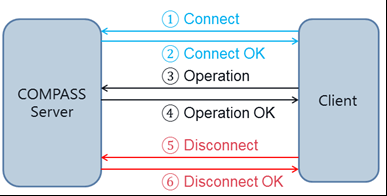
into a stateless single-step call of the COMPASS server:
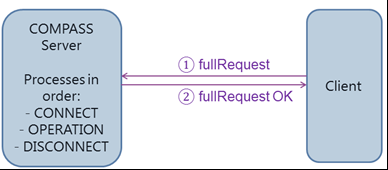
Instead of the fullRequest OK a fullResponse element is used. Similar commands have been introduced for the SEARCH_API.
The full-requests and full-responses allow a stateless communication with the COMPASS server. The new XML-elements are discussed in request / fullRequest and SEARCH API.
LIGHT MODE API
The LIGHT_MODE_API wraps all commands that are sent to the COMPASS server to either create a case, capture data of a case, assess and view a case, but also retrieve the textual assessment result for a case, etc. All existing requests to the server and responses from the server are listed.
Basic XML Elements, Logging
This chapter describes some basic XML elements that are used within more complex XML elements in the chapters request / fullRequest and response / fullResponse. Additionally some basic about the logging functionality are explained in Logging.
The basic XML elements are used to describe either a case (more precise: an input interface; see Input-Interface), an assessment result (more precise: a result interface; see Result), or a text that can be a textual assessment result or the printout of a case (this text has no XML syntax, and is mainly a string).
In the communication between server and client a case, a result or a textual result can be passed either
-
via a pointer to a database entry (the case or the result are stored in a database table)
Represented by the XML element databaseReference -
via a file reference (the case, the result or the textual result are stored in a file)
Represented by the XML element fileReference -
via memory (the case, the result or the textual result is passed as an argument of a XML-element)
Represented by the XML elements directResultReference, directCaseReference or directTextReference (depending if a case, a result or a textual result is passed)
For COMPASS Server (not the Service),
-
it does not have to be passed, as it is the currently loaded case or result This situation is represented by the XML element currentReference. However, this only holds true if only one COMPASS server is running - otherwise COMPASS cannot determine which COMPASS server is handling the reference.
Similarly these references can be used to describe where a newly created case, result, or textual result is expected, e.g. if the result of an assessment should be written into a file, use the fileReference-XML element.
We will present these 6 XML elements in detail:
The XML element databaseReference has the two mandatory attributes id and subId. Within a system they identify a unique case or a unique result (looking only at this element we do not know whether it is a case or a result). The id is the name of the case, and of length ⇐ 20. The subId is a String of length ⇐ 4.
Example:
<databaseReference id=”Testcase01” subID=”TEST”>
</databaseReference>
The XML element fileReference has the mandatory attribute file. The content of file is a filename including the path, where either a case, a result or a textual result is saved. The value of this attribute is not restricted in length.
Example:
<fileReference file=”C:/case.txt”></fileReference>The XML element directTextReference has the mandatory attribute text. The value of text is normally a string containing a textual result of an assessment of a case. The value of this attribute is not restricted in length. When the directTextReference should contain a return value, then the text attribute should contain the empty string:
Example:
<directTextReference text=””>
</directTextReference>
The XML element directCaseReference has no attributes, but has to contain one XML element case. Please refer to the document Input-Interface for details about the XML element case.
Example:
<directCaseReference>
 	<Case Id=...>...
 	</Case>
</directCaseReference>
The XML element directResultReference has no attributes, but can contain one XML element Result. Please refer to the document Result-Interface for details about the XML element Result.
Example:
<directResultReference>
 	<Result Id=...>...
 	</Result>
</directResultReference>
The XML element currentReference has no attributes and does not contain XML elements.
Example:
<currentReference></currentReference>textDestinationReference
This XML element has no attributes and describes how an unstructured text will be passed during the communication. There are only 2 ways: either the text will be passed as an argument, or the text is in a file, and a file reference is passed. This means, the textDestinationReference wraps either a directTextReference or a fileReference.
Examples:
<textDestinationReference>
 	<directTextReference text=”This is just text”>
 	</directTextReference>
</textDestinationReference>
or
<textDestinationReference>
 	<fileReference file=”C:/file.txt”></fileReference>
</textDestinationReference>
caseSourceReference
This XML element has no attributes and describes how a case (this means an input interface) will be passed to the COMPASS engine during the communication. There are 4 ways: either the case will be passed as an argument, or the case is in a file and a file reference is passed, or the case is in the database and a database reference is passed, or the case is already known to the server from the context, and a current-reference is passed. This means, the caseSourceReference wraps either a directCaseReference, a fileReference, a databaseReference or a currentReference:
Examples:
<caseSourceReference>
 	<directCaseReference>
 		<Case Id=...>...
 	 	</Case>
 	</directCaseReference>
</caseSourceReference>
or
<caseSourceReference>
 	<fileReference file=”C:/file.txt”>
 	</fileReference>
</caseSourceReference>
or
<caseSourceReference>
 	<databaseReference id=”Case01” subId=”TEST”>
 	</databaseReference>
</caseSourceReference>
or
<caseSourceReference>
 	<currentReference>
 	</currentReference>
</caseSourceReference>
caseDestinationReference
This XML element has no attributes and describes how a case (this means an input interface) shall be (or is) passed back from the COMPASS engine. There are 3 ways: either the case will be returned by the server as an argument, or the case will be written into a file and a file reference is passed, or the case is inserted into the database and a database reference is passed back to the client. This means, the caseDestinationReference wraps either a directCaseReference, a fileReference or a databaseReference:
Examples:
<caseDestinationReference>
 	<directCaseReference>
 		<Case/>
 	</directCaseReference>
</caseDestinationReference>
or
<caseDestinationReference>
 	<fileReference file=”C:/file.txt”>
 	</fileReference>
</caseDestinationReference>
or
<caseDestinationReference>
 	<databaseReference id=”Case01” subId=”TEST”>
 	</databaseReference>
</caseDestinationReference>
resultDestinationReference
This XML element has no attributes and describes how a result (this means a result interface) shall be (or is) passed back from the COMPASS engine. There are 3 ways: either the result will be returned by the server as an argument, or the result will be written into a file and a file reference is passed, or the result is inserted into the database and a database reference is passed back to the client. This means, the resultDestinationReference wraps either a directResultReference, a fileReference or a databaseReference:
Examples:
<resultDestinationReference>
 	<directResultReference>
	</directResultReference>
</resultDestinationReference>
or
<resultDestinationReference>
 	<fileReference file=”C:/file.txt”>
 	</fileReference>
</resultDestinationReference>
or
<resultDestinationReference>
 	<databaseReference id=”Case01” subId=”TEST”>
 	</databaseReference>
</resultDestinationReference>
resultSourceReference
This XML element has no attributes and describes how a result (this means a result interface) will be passed to the COMPASS engine during the communication. There are 4 ways: either the result will be passed as an argument, or the result is in a file and a file reference is passed, or the result is in the database and a database reference is passed, or the result is already known to the server from the context, and a current-reference is passed. This means, the resultSourceReference wraps either a directResultReference, a fileReference, a databaseReference or a currentReference:
Examples:
<resultSourceReference>
 	<directResultReference>
 		<Result Id=...>...
 	 	</Result>
 	</directResultReference>
</resultSourceReference>
or
<resultSourceReference>
 	<fileReference file=”C:/file.txt”>
 	</fileReference>
</resultSourceReference>
or
<resultSourceReference>
 	<databaseReference id=”Case01” subId=”TEST”>
 	</databaseReference>
</resultSourceReference>
or
<resultSourceReference>
 	<currentReference>
 	</currentReference>
</resultSourceReference>
Logging
COMPASS uses the logging framework Log4J2. With level “INFO” there are two extensions for COMPASS called „LoggingArea“ and „SubArea“ available.
Warning and errors are reported from COMPASS without using „LoggingArea“/„SubArea“ if level „WARN“ or higher has been activated in the Log4J configuration.
You will find more details in the documentation „COMPASS Trouble Shooting“.
| Document "COMPASS Trouble Shooting" not available yet |
request / fullRequest
For the LIGHT_MODE_API all messages sent to the server are wrapped in either the XML element request or in a fullRequest. Both elements are similar in their semantics. The difference being:
-
a request triggers a response from the COMPASS server, while a fullRequest gets a fullResponse from the Server.
-
A fullRequest disconnects from the COMPASS server after processing the request
-
A request has no XML-attributes, while a fullRequest has 2 optional XML attributes
idandsubId:-
id: only required if the request contains a capture operation or an userAction. Should be the id of the Case. -
subID: only required if the request contains a capture operation or an userAction. A 4-byte long identifier. The status of the capture process can be found in the Cache-table under this Subsystem and ID.
-
Both XML request / fullRequest contain the following optional elements, which either can be
-
a command to the server (like “assess the current case”, or “show a textual result”), which is represented by the XML element operation
or
-
the input of a user (like “the user pressed the button SEARCH”, or “the user changed a field on the last screen and pressed OK”), which is represented by the XML element userAction.
These 2 XML elements are described in the following subchapters.
Examples:
<request><operation>...</operation></request>or
<fullRequest><operation>...</operation></fullRequest>or
<fullRequest id=”Testid01” subID=”TEST”>
 	<operation><capture …>...</operation>
</fullRequest>
or
<request><userAction screenId=...>...</userAction></request>operation
The XML element operation has no attributes and wraps exactly one of the following XML elements: capture, assess, writeTextualResult, writeTextualCase, checkCompleteness, deleteCaseFromDB, deleteResultFromDB, convertResult, transferCase and transferResult. We will explain in the subchapters what each of these XML elements invokes on the COMPASS server.
Example:
<request>
 	<operation>
 		<assess=...>...
 		</assess>
 	</operation>
</request>
capture
This command is used when a case (this mean an Input Interface) does already exist, and all information for one SourceType (see Input-Interface for more details about a SourceType) shall be captured or modified.
-
language required attribute; pass in form of a locale: “en” for English, “de” for German, “pl” for Polish, etc. You will find the supported languages in the compass.properties-file of the server installation. This value will set the default language when capturing the information.
-
sourceType required attribute; references the relevant SourceType by its numerical ID. Only screens of this SourceType will be shown during the capturing process.
-
loggingArea required attribute; the passed integer value will tell the server that during the activity of capturing information a certain area of the server operations will be logged. Pass “0” if no logging is desired. Please refer to Logging for more information.
-
checkCaseData this attribute is not required; possible values are “NoCheck”, “OnErrorWarning”, “OnErrorWarningSkipWrongAttributes” and “OnErrorCancel”. NoCheck will be assumed if the attribute is missing. The value of this attribute defines how the server will react if the old case is not correct: NoCheck means that nothing is done; OnErrorWarning means that a warning is issued, OnErrorWarningSkipWrongAttributes means that a warning is issued and unknown CaseAttributes are ignored and CaseAttributes with wrong DataType are also ignored OnErrorCancel means that the operation is cancelled. The server response will then contain a return code other than 0.
-
groupScreens this attribute triggers the SB 2.0 protocol, as long as its value is
TRUE. Otherwise (value =FALSEor attribute omitted) the SB 1.0 protocol is used.
When sending the capture command to the server, the server has to know what the existing case is (where the server can find it, or if it is passed as an argument), and where it should write the modified case. This is specified by passing two other XML elements:
1. a caseSourceReference for the original case, and
2. a caseDestinationReference for the modified case.
Example:
<request>
 	<operation>
		<capture language=”en” sourceType=”101”	loggingArea=”0”>
			<caseSourceReference>
 				<databaseReference id=”Case01”
 								 subId=”TEST”>
 			 	</databaseReference>
 			</caseSourceReference>
			<caseDestinationReference>
 				<databaseReference id=”Case01”
 								 subId=”TEST”>
 			 	</databaseReference>
 			</caseDestinationReference>
 		</capture>
 	</operation>
</request>
This request tells the COMPASS server: Capture or modify the information of SourceType 101 for the case called Case01 of the subsystem TEST, which is currently stored in the database, and store the modified case again in the database (thus overwriting the old case).
createAndCapture
This is an internal command and should not be used by any implementors of COMPASS. If a case needs to be created the first time and if COMPASS is running as a service, the API CreateCaseInDB may be used.
view
This is an internal command and should not be used by any implementors of COMPASS.
assess
This command is used when an existing case shall be assessed by COMPASS server.
Click to view the attributes of the operation assess
, The assess XML element has the following attributes:
-
language required attribute; pass in form of a locale: “en” for English, “de” for German, “pl” for Polish, etc. You will find the supported languages in the compass.properties-file of the server installation. This value will set the main language in which the result will be created.
-
loggingArea required attribute; the passed integer value will tell the server that during the activity of assessing a certain area of the server operations will be logged. Pass “0” if no logging is desired. Please refer to Logging for more information.
-
checkCaseData this attribute is not required; possible values are “NoCheck”, “OnErrorWarning” and “OnErrorCancel”. NoCheck will be assumed, if the attribute is missing. The value of this attribute defines how the server will react if the case is not correct: NoCheck means that nothing is done; OnErrorWarning means that a Warning is issued, and OnErrorCancel means that the operation is cancelled. The server response will then contain a return code other than 0.
-
worstCase this attribute is not required; possible values are
trueandfalse.falsewill be assumed if the attribute is missing. If and only if the value of this attribute istrue, then a special calculation for cancelled POS-modules is performed. Otherwise the POS-cancel reaction is applied.
When sending the assess command to the server, the server has to know what the case is (where the server can find it, or if it is passed as an argument). This is specified by passing a caseSourceReference XML element.
Additionally the server has to know what to do with the created result (the result interface). It can be stored, or passed back to the client via memory. This is specified by passing a resultDestinationReference. If the result should be passed back by memory, the directResultReference does not contain a Result.
Example:
<request>
 	<operation>
		<assess language=”en” loggingArea=”0”>
			<caseSourceReference>
 				<directCaseReference>
 			 		<Case Id=...>...
 			 	 	</Case>
 			 	</directCaseReference>
 			</caseSourceReference>
			<resultDestinationReference>
 				<databaseReference id=”Case03”
 								 subId=”TEST”>
 			 	</databaseReference>
 			</resultDestinationReference>
 		</assess>
 	</operation>
</request>
This request tells the COMPASS server: Assess the case passed as an argument. Create a result in English, and store the result interface in the database under the name Case03 in the subsystem TEST.
showResult
This is an internal command and should not be used by any implementors of COMPASS. The command is used when an existing assessment result (a result interface) shall be converted into a result screen (Screenbuilder 1) that is being returned by the COMPASS server only (not available in COMPASS service)
Click to view the attributes of the operation showResult
-
language required attribute; pass in form of a locale: “en” for English, “de” for German, “pl” for Polish, etc. You will find the supported languages in the compass.properties-file of the server installation. This value will set the main language in which the screen containing the textual result will be created.
-
userType required attribute; references a user type by its numerical ID. The user type will specify how the textual result will be configured. The main user Type will be 1001 for the underwriters’ view on the result
-
loggingArea required attribute; the passed integer value will tell the server that during the activity of creating the textual result a certain area of the server operations will be logged. Pass “0” if no logging is desired. Please refer to Logging for more information.
When sending the showResult command to the server, the server has to know what the result interface is (where the server can find it, or if it is passed as an argument). This is specified by passing a resultSourceReference XML element.
Example:
<request>
 	<operation>
		<showResult language=”en” userType=”1001”
 				 loggingArea=”0”>
			<resultSourceReference>
 				<directResultReference>
 			 		<Result Id=...>...
 			 	 	</Result>
 			 	</directResultReference>
 			</resultSourceReference>
 		</showResult>
 	</operation>
</request>
This request tells COMPASS: Take the result interface passed via memory, and create a textual result, put it on a result screen and return it in form of a screen response (see screen).
writeTextualResult
This command is used when an existing assessment result (a result interface) shall be converted by COMPASS server only (not available in COMPASS service) into a HTML result that can be visualised by a browser.
Click to view the attributes of the operation writeTextualResult
-
language required attribute; pass in form of a locale: “en” for English, “de” for German, “pl” for Polish, etc. You will find the supported languages in the compass.properties-file of the server installation. This value will set the main language in which the textual result will be created.
-
userType required attribute; references a user type by its numerical ID. The user type will specify how the textual result will be configured. The main user Type will be 1001 for the underwriters’ view on the result
-
loggingArea required attribute; the passed integer value will tell the server that during the activity of creating the textual result a certain area of the server operations will be logged. Pass “0” if no logging is desired. Please refer to Logging for more information.
When sending the writeTextualResult command to the server, the server has to know what the result interface is (where the server can find it, or if it is passed as an argument), and where to write the textual result. This is specified by passing a resultSourceReference and a textDestinationReference XML element.
Example:
<request>
 	<operation>
		<writeTextualResult language=”en” userType=”1001”
 						loggingArea=”0”>
			<resultSourceReference>
 				<directResultReference>
 			 		<Result Id=...>...
 			 	 	</Result>
 			 	</directResultReference>
 			</resultSourceReference>
 			<textDestinationReference>
 			 	<directTextReference text=””>
 			 	</directTextReference>
 			</textDestinationReference>
 		</writeTextualResult>
    </operation>
</request>
This request tells the COMPASS server: Take the result interface passed via memory, and create a textual result in the main language English, that will be passed back via memory, too.
writeTextualCase
This command is used when an existing case (an input interface) shall be converted by the COMPASS server into a HTML string containing all questions and answers given during the capturing of the case. The writeTextualCase XML element has the following attributes:
-
language required attribute; pass in form of a locale: “en” for English, “de” for German, “pl” for Polish, etc. You will find the supported languages in the
compass.properties-file of the server installation. This value will set the main language in which the textual output of the case will be created. -
sourceType required attribute; references the relevant SourceType by its numerical ID. The output will contain only questions and answers of the screens of this SourceType.
-
loggingArea required attribute; the passed integer value will tell the server that during the activity of creating the textual output a certain area of the server operations will be logged. Pass “0” if no logging is desired. Please refer to Logging for more information.
-
checkCaseData this attribute is not required; possible values are “NoCheck”, “OnErrorWarning” and “OnErrorCancel”. NoCheck will be assumed, if the attribute is missing. The value of this attribute defines how the server will react if the case is not correct: NoCheck means that nothing is done; OnErrorWarning means that a warning is issued, and OnErrorCancel means that the operation is cancelled. The server response will then contain a return code other than 0.
-
textType this attribute is not required; possible values are “HTML”, “PDF” and “XML”. HTML will be assumed, if the attribute is missing. The value of this attribute defines the format of the output-file.
-
groupScreens this attribute produces a caseprint-XML based on SB2 protocol, is set to TRUE. If omitted or set to FALSE, it will produce the SB1 protocol. If set to TRUE, the
textTypehas to be “XML” or “PDF”.
When sending the writeTextualCase command to the server, the server has to know what the case is (where the server can find the input interface, or if it is passed as an argument), and where to write the textual case. This is specified by passing a caseSourceReference and a textDestinationReference XML element.
Example:
<request>
 	<operation>
		<writeTextualCase language=”en” sourceType=”101”
 					  loggingArea=”0” textType=”HTML”>
			<caseSourceReference>
 				<fileReference file=”C:/case.txt”>
 			 	</fileReference>
 			</caseSourceReference>
 			<textDestinationReference>
				<fileReference file=”C:/case.html”>
 			 	</fileReference>
 			</textDestinationReference>
 		</writeTextualCase>
 	</operation>
</request>
This request tells the COMPASS server: Take the input interface (the case) stored in the file c:/case.txt, and create a textual representation of the questions and answers in the main language English, and save this as HTML in the file c:/case.html.
For more details about this operation see Case Print.
checkCompleteness
This command is used when an existing case (an input interface) should be checked for completeness regarding a specific SourceType. “Completeness” in the sense that all mandatory fields have been answered and all plausibility rules have been satisfied. This can be used when technical data has changed, and before starting a new capture cycle you want to check whether it is required at all. The checkCompleteness XML element has the following attributes:
-
sourceType required attribute; references the relevant SourceType by its numerical ID. The completeness check is done for this SourceType.
-
loggingArea required attribute; the passed integer value will tell the server that during the activity of creating the textual output a certain area of the server operations will be logged. Pass “0” if no logging is desired. Please refer to Logging for more information.
When sending the checkCompleteness command to the server, the server has to know what case to analyse (where the server can find the input interface, or if it is passed as an argument). This is specified by passing a caseSourceReference XML element.
Response: There are a couple of possible responses from the server.
-
Case is complete in respect to the passed SourceType:
<response><operationResult returnCode="0"></operationResult></response>
-
Case is incomplete in respect to the passed SourceType:
<response><operationResult returnCode="1"></operationResult></response>
-
Case was not captured with the passed SourceType, or the passed SourceType-ID is unknown to the COMPASS server:
<response>
  <operationResult returnCode="2">
    <errorDescription
 	 errorText="com.cr.compass.exception.CompassOperationException:
 			 Id for SourceType invalid 27"
      errorCode="125">
    </errorDescription>
  </operationResult>
</response>
Further returnCodes 2 and 3 are explained in operationResult.
Example:
<request>
 	<operation>
		<checkCompleteness loggingArea="0" sourceType="27">
			<caseSourceReference>
				<databaseReference subId="TEST" id="Case001"/>
			</caseSourceReference>
		</checkCompleteness>
 	</operation>
</request>
This request tells the COMPASS server: Take the input interface (the case) stored in the database with the ID Case001 and the Sub-ID TEST, and check whether it there are mandatory fields in SourceType 27 that have not been answered.
transferCase
This command is used when an existing Input Interface should be transferred from one location to another. A “location” can be the database, the calling instance, or a file. Typically this operation is used to put an Input Interface into the database, but it could also be used to duplicate an Input Interface in the database, or to retrieve an Input Interface to the calling application. The transferCase XML element has the following attribute:
-
loggingArea required attribute; the passed integer value will tell the server that during the operation a certain area of the server operations will be logged. Pass “0” if no logging is desired. Please refer to Logging for more information.
When sending the transferCase command to the server, the server has to know what the case is (where the server can find it, or if it is passed as an argument). This is specified by passing a caseSourceReference XML element. Additionally the server has to know the location, where the case (the Input Interface) shall be returned to; this is specified by passing a caseDestinationReference XML element.
Remarks:
-
The operation overwrites an existing file or entry in the database
-
When the operation is writing to a file, it expects this file to exist.
-
The Input Interface might be reordered and reorganised by this operation; e.g. when values are not correct, they are set to a correct value!
Example:
<request>
    <operation>
	   <transferCase loggingArea="0">
		 <caseSourceReference>
 		    <fileReference file="C:/Temp/case.txt">
 		    </fileReference>
 		 </caseSourceReference>
		 <caseDestinationReference>
 		    <databaseReference id="Case01FromFile" subId="TEST">
 		    </databaseReference>
		 </caseDestinationReference>
 	   </transferCase>
    </operation>
</request>
This request tells the COMPASS server: Take the Input Interface from the file C:/Temp/case.txt and write it into the database with the ID Case01FromFile of the Subsystem TEST.
transferResult
This command is used when an existing Result Interface should be transferred from one location to another. A “location” can be the database, the calling instance, or a file. Typically this operation is used by a calling application to retrieve a Result Interface from the database, but it could also be used to write a Result Interface into a file, or to duplicate an existing Result Interface. The transferResult XML element has the following attributes:
-
loggingArea required attribute; the passed integer value will tell the server that during the transfering activity a certain area of the server operations will be logged. Pass “0” if no logging is desired. Please refer to Logging for more information.
-
language required attribute; pass in form of a locale: “en” for English, “de” for German, “pl” for Polish, etc. You will find the supported languages in the
compass.properties-file of the server installation. This value will generate texts in the new Result Interface; i.e. the new Result Interface might not be copy of the old one.
When sending the transferResult command to the server, the server has to know what the Result Interface is (i.e. where the server can find it, or if it is passed as an argument). This is specified by passing a resultSourceReference XML element. Additionally the server has to know the location, where the result (the Result Interface) shall be returned to; this is specified by passing a resultDestinationReference XML element.
Remarks:
-
The operation overwrites an existing file or Result Interface in the database
-
When the operation is writing to a file, it creates the file, or overwrites its contents.
-
The Result Interface might be reordered, reorganised, or its language changed by this operation; e.g. when values are not correct, they are set to a correct value!
Example:
<request>
    <operation>
        <transferResult loggingArea="0" language="en">
            <resultSourceReference>
                <currentReference></currentReference>
            </resultSourceReference>
            <resultDestinationReference>
                <directResultReference>
                </directResultReference>
            </resultDestinationReference>
        </transferResult>
    </operation>
</request>
This request tells the COMPASS server: Take the Result Interface it is currently working with, and pas it back via a directResultReference to the calling instance.
convertResult
This command is used when an existing Result Interface should be converted to the format NIResult. This NIResult can’t be written to the database, but can be written to file or returned via a directResultReference. The convertResult XML element has one attribute:
-
loggingArea required attribute; the passed integer value will tell the server that during the conversion a certain area of the server operations will be logged. Pass “0” if no logging is desired. Please refer to Logging for more information.
When sending the convertResult command to the server, the server has to know what the Result Interface is (i.e. where the server can find it, or if it is passed as an argument). This is specified by passing a resultSourceReference XML element. Additionally the server has to know the location, where the result (the Result Interface) shall be returned to; this is specified by passing a resultDestinationReference XML element.
Remarks:
-
The resultDestinationReference doesn’t accept a databaseReference.
-
When the operation is writing to a file, it creates the file, or overwrites its contents.
-
See New Result for details about the
NIResultelement
Example:
<request>
    <operation>
        <convertResult loggingArea="0">
            <resultSourceReference>
                <currentReference></currentReference>
            </resultSourceReference>
            <resultDestinationReference>
                <directResultReference>
                </directResultReference>
            </resultDestinationReference>
        </convertResult>
    </operation>
</request>
This request tells the COMPASS server: Take the Result Interface it is currently working with, convert it into a NIResult interface, and pass this one back to the calling instance.
deleteCaseFromDB
This command is used when an existing Input Interface should be removed (deleted) from the database. The deleteCaseFromDB XML element has the following attribute:
-
loggingArea required attribute; the passed integer value will tell the server that during the operation a certain area of the server operations will be logged. Pass “0” if no logging is desired. Please refer to Logging for more information.
-
deleteStats optional attribute included with version 6.4; TRUE/FALSE; default is FALSE.
If TRUE, then a possible entry in the Cockpit/Stats-tables will be also removed.
Additional requirements:-
caseSourceReference is a databaseReference to extract CaseID
idandsubId -
property
FILL_STATS_TABLESistruein the filecompass.properties
-
When sending the deleteCaseFromDB command to the server, the server has to identify the case/application. As it can only delete it from the database, it requires a caseSourceReference XML element which in turn contains a databaseReference.
Remarks:
-
If the caseSourceReference contains a directReference or a fileReference the operation is aborted with the return Code 2.
-
The operation is successful if the input interface was deleted, or was not previously in the database.
Example:
<request>
    <operation>
	   <deleteCaseFromDB loggingArea="0">
		 <caseSourceReference>
		    <databaseReference id="Case01InDB" subId="TEST">
 		    </databaseReference>
 		 </caseSourceReference>
 	   </deleteCaseFromDB>
    </operation>
</request>
This request tells the COMPASS server: Delete the Input Interface with ID Case01InDB of the Subsystem TEST from COMPASS’ casedata-table.
deleteResultFromDB
This command is used when an existing Output/Result Interface should be removed (deleted) from the database. The deleteResultFromDB XML element has the following attribute:
-
loggingArea required attribute; the passed integer value will tell the server that during the operation a certain area of the server operations will be logged. Pass “0” if no logging is desired. Please refer to Logging for more information.
When sending the deleteResultFromDB command to the server, the server has to identify the result. As it can only delete it from the database, it requires a resultSourceReference XML element which in turn contains a databaseReference.
Remarks:
-
If the resultSourceReference contains a directReference or a fileReference the operation is aborted with the return Code 2.
-
The operation is successful if the result interface was deleted, or was not previously in the database.
Example:
<request>
    <operation>
	   <deleteResultFromDB loggingArea="0">
		 <resultSourceReference>
		    <databaseReference id="Result01InDB" subId="TEST">
 		    </databaseReference>
 		 </resultSourceReference>
 	   </deleteResultFromDB>
    </operation>
</request>
This request tells the COMPASS server: Delete the Result Interface with ID Result01InDB of the Subsystem TEST from COMPASS’ resultdata-table.
userAction
This element is sent to the COMPASS engine as a reply, when the COMPASS engines last response was a screen (see screen).
The XML element userAction has the two attributes screenID and screenCommand. It also contains some or none of the answer XML elements. When the communication is based on the ScreenBuilder 2 protocol, only 0 or 1 answer elements are allowed. The attribute screenID contains the numeric ID of the screen as described in the last screen received from the server. The attribute screenCommand contains the numeric ID of a key as described in the last screen sent by the server. It should be the number of the key that the user pressed last.
Additionally the server needs to know if any values have been entered or modified on the current screen. Therefore for each modified field (question/answer), a XML element answer will be needed. The answer has an attribute question, which is numerical and is the ID of the question as described in the last screen sent by the server.
The answer groups a set of modified values. Each value is again a XML element specifying either
-
an ID, if the selected value is from a selection type (all valid entries from a selection type have got an ID in the last screen description sent by the server, or
-
a value, which could be a string, or a number, or/and
-
a unit belonging to the value, the numeric ID of the unit is given by the last screen description sent by the server.
None of these 3 attributes is mandatory, as a value could also have been deleted.
Example:
<request>
 	<userAction screenID=”12” screenCommand=”33”>
		<answer question=”712”>
			<value id=”77”>
 			</value>
			<value id=”79”>
 			</value>
 		</answer>
		<answer question=”713”>
			<value value=”179” unit=”34”>
 			</value>
 		</answer>
 	</userAction>
</request>
This request tells the COMPASS server: The last screen was the screen with ID 12, and the button with the ID 33 has been pressed last. The answers to 2 questions on that screen have previously been modified: The first question appears to have been a multiple selection box, as two values have been chosen (the values with ID 77 and 79). The second question (with ID 713) could have been the height question, where the value has been set to 179, and the unit 34 is probably “cm”.
The communication between COMPASS server and a client using the structures userAction and screen is generally more complicated, as a userAction always makes reference of the screen passed previously. Therefore this communication is described more in detail in the document Screenbuilder 2.0.
startSession
This XML element is not supported by the LIGHT_MODE_API, although a reference to this element can be found in the config/dtd/request.dtd file.
endSession
This XML element is not supported by the LIGHT_MODE_API, although a reference to this element can be found in the config/dtd/request.dtd file.
response / fullResponse
For the LIGHT_MODE_API, all messages sent from the server are wrapped in the XML element response or fullResponse. A fullResponse is in its semantics and syntax identical to a response. While response is the answer to a request, a fullResponse is the answer to a fullRequest. In the following we will only refer to the XML element response, but all statements are also valid for the fullResponse.
The XML element response has no attributes, and contains either
-
an answer to a request from the client, including an information whether the operation was successful or not, which is represented by the XML element operationResult, or
-
a screen description, which is represented by the XML element screen.
These 2 XML elements are described in the following subchapters.
Examples:
<response>
 	<operationResult returnCode=”0”>...
 	</operationResult>
</response>
or
<fullResponse>
 	<operationResult returnCode=”0”>...
 	</operationResult>
</fullResponse>
or
<response><screen ...>...</screen></response>or
<fullResponse><screen ...>...</screen></fullResponse>operationResult
The XML element operationResult has one mandatory attribute returnCode. The value for returnCode can be either
-
0 - normal processing
-
1 - a warning has been submitted; the operation might have created a wrong result
-
2 - the operation failed
-
3 - fatal error on server-side
The operationResult also wraps up to one of the following XML elements: caseDestinationReference (see caseDestinationReference), resultDestinationReference (see resultDestinationReference) or textDestinationReference (see textDestinationReference). It also wraps some or none of the XML elements errorDescription:
An errorDescription has the 2 mandatory attributes errorCode and errorText. These two attributes specify a server error. errorCode contains the numeric code for the error, and errorText contains the error message in textual form. An errorCode 0 means that the server operation was successful. The possible error codes can vary from client to client and from system to system.
A list of possible error codes and their meaning can be found in the document “troubleshooting”.
| document "troubleshooting" not available yet |
Examples:
<response>
 	<operationResult returnCode=”1”>
		<textDestinationReference>
			<fileReference file=”C:/case.html”>
		 	</fileReference>
		</textDestinationReference>
		<errorDescription errorCode =”23” errorText=”blabla”>
 		</errorDescription>
		<errorDescription errorCode =”25” errorText=”bloblo”>
 		</errorDescription>
 	</operationResult>
</response>
This response tells the client that the last operation might not have been successful, as the returnCode is 1. A textual output could be created though and it is stored in the file C:/case.html. Two (invented) error descriptions for this return code have been created. They have the error codes 23 and 25.
screen
The XML element screen can be a server response to a userAction or an operation (i.e. capture). It describes a screen that should be displayed by the client.
A screen consists of a title, a width and height, a position, an internal ID, a button row, a navigation row, a body containing all the questions and answers, etc. The complete syntax is described in the document Screenbuilder 2.0 .
DTD
A complete list of the DTDs for the LIGHT_MODE_API is included in the config/dtd directory of the standard installation. Additionally all relevant DTDs except those for case, result and screen are described in the following subchapters.
Basic References
<!ELEMENT fileReference EMPTY>
<!ATTLIST fileReference
	file	CDATA		#REQUIRED>
<!ELEMENT databaseReference EMPTY>
<!ATTLIST databaseReference
	id	    CDATA		#REQUIRED
	subId	CDATA		#REQUIRED>
<!ELEMENT currentReference EMPTY>
<!ELEMENT directTextReference EMPTY>
<!ATTLIST directTextReference
	text	CDATA		#REQUIRED>
<!ELEMENT directResultReference (Result?)>
<!ELEMENT directCaseReference (Case)>
<!ELEMENT textDestinationReference
    (fileReference|directTextReference)>
<!ELEMENT resultSourceReference
 	(currentReference |
        databaseReference |
        fileReference |
        directResultReference)>
<!ELEMENT resultDestinationReference
 	(databaseReference |
        fileReference |
        directResultReference)>
<!ELEMENT caseSourceReference
 	(currentReference |
        databaseReference |
        fileReference |
        directCaseReference)>
<!ELEMENT caseDestinationReference
 	(databaseReference |
        fileReference |
        directCaseReference)>
request / fullRequest
<!ELEMENT request (operation|userAction)>
<!ELEMENT fullRequest (operation|userAction)>
<!ATTLIST fullRequest
	id      CDATA       #IMPLIED
	subId   CDATA       #IMPLIED>
<!ELEMENT operation
    (capture|createAndCapture |
        view|assess|showResult |
        writeTextualResult|writeTextualCase|convertResult |
        transferCase|transferResult|firstVote|deleteCaseFromDB |
        deleteResultFromDB)>
<!ELEMENT firstVote (caseSourceReference, caseDestinationReference)>
<!ATTLIST firstVote
	language		CDATA		#REQUIRED
	sourceType		CDATA		#REQUIRED
	loggingArea	    CDATA		#REQUIRED
	checkCaseData   (NoCheck |
        OnErrorWarning |
        OnErrorCancel |
	    OnErrorWarningSkipWrongAttributes) "NoCheck">
<!ELEMENT capture (caseSourceReference, caseDestinationReference)>
<!ATTLIST capture
	language		CDATA		#REQUIRED
	sourceType		CDATA		#REQUIRED
	loggingArea	    CDATA		#REQUIRED
	checkCaseData   (NoCheck |
        OnErrorWarning |
        OnErrorCancel |
 		OnErrorWarningSkipWrongAttributes) "NoCheck"
	groupScreens 	(true | false)	"false">
<!ELEMENT createAndCapture (caseDestinationReference)>
<!ATTLIST createAndCapture
	caseID		    CDATA		#REQUIRED
	cspSettings	    CDATA		#REQUIRED
	language		CDATA		#REQUIRED
	sourceType		CDATA		#REQUIRED
	caseMode		(HeadOffice|POS)	"HeadOffice"
	loggingArea	    CDATA		#REQUIRED>
<!ELEMENT view (caseSourceReference)>
<!ATTLIST view
	language		CDATA		#REQUIRED
	sourceType		CDATA		#REQUIRED
	loggingArea	    CDATA		#REQUIRED
	checkCaseData	(NoCheck |
        OnErrorWarning |
        OnErrorCancel)	"NoCheck">
<!ELEMENT assess (caseSourceReference, resultDestinationReference)>
<!ATTLIST assess
	language		CDATA		#REQUIRED
	loggingArea	    CDATA		#REQUIRED
	checkCaseData	(NoCheck |
        OnErrorWarning |
        OnErrorCancel)	"NoCheck"
	worstCase 		(true | false) "false">
<!ELEMENT showResult (resultSourceReference)>
<!ATTLIST showResult
	language		CDATA		#REQUIRED
	userType		CDATA		#REQUIRED
	loggingArea	    CDATA		#REQUIRED>
<!ELEMENT writeTextualResult
 	(resultSourceReference, textDestinationReference)>
<!ATTLIST writeTextualResult
	language		CDATA		#REQUIRED
	userType		CDATA		#REQUIRED
	loggingArea	    CDATA		#REQUIRED>
<!ELEMENT writeTextualCase
 	(caseSourceReference, textDestinationReference)>
<!ATTLIST writeTextualCase
	language		CDATA		#REQUIRED
	sourceType		CDATA		#REQUIRED
	loggingArea	    CDATA		#REQUIRED
	checkCaseData	(NoCheck |
        OnErrorWarning |
        OnErrorCancel)	"NoCheck"
 	textType  		(HTML|XML|PDF)	"HTML"
	groupScreens	(true | false)	"false">
<!ELEMENT checkCompleteness (caseSourceReference)>
<!ATTLIST checkCompleteness
	sourceType		CDATA		#REQUIRED
	loggingArea	    CDATA		#REQUIRED>
<!ELEMENT transferCase
	 (caseSourceReference, caseDestinationReference)>
<!ATTLIST transferCase
	loggingArea	    CDATA		#REQUIRED>
<!ELEMENT transferResult
	 (resultSourceReference, resultDestinationReference)>
<!ATTLIST transferResult
	language		CDATA		#REQUIRED
	loggingArea	    CDATA		#REQUIRED>
<!ELEMENT convertResult
        (resultSourceReference, resultDestinationReference)>
<!ATTLIST convertResult
	loggingArea     CDATA #REQUIRED>
<!ELEMENT deleteCaseFromDB (caseSourceReference)>
<!ATTLIST deleteCaseFromDB
	loggingArea	    CDATA		#REQUIRED>
<!ELEMENT deleteResultFromDB (resultSourceReference)>
<!ATTLIST deleteResultFromDB
	loggingArea	    CDATA		#REQUIRED>
<!ELEMENT userAction (answer)*>
<!ATTLIST userAction
	screenID 		CDATA 	#REQUIRED
	screenCommand 	CDATA		#REQUIRED>
<!ELEMENT answer (value)*>
<!ATTLIST answer
	question 		CDATA 	#REQUIRED>
<!ELEMENT value EMPTY>
<!ATTLIST value
 	id    		CDATA 	#IMPLIED
	value 		CDATA 	#IMPLIED
	unit  		CDATA 	#IMPLIED>
response / fullResponse
<!ELEMENT response (operationResult|screen)>
<!ELEMENT fullResponse (operationResult|screen)>
<!ELEMENT operationResult
 	((caseDestinationReference|resultDestinationReference|
 	  textDestinationReference)?, errorDescription*)>
<!ATTLIST operationResult
	returnCode 	    CDATA		#REQUIRED>
<!ELEMENT errorDescription EMPTY>
<!ATTLIST errorDescription
	errorCode		CDATA		#REQUIRED
	errorText		CDATA		#REQUIRED>
SEARCH API
The search server assigns a COMPASS key to a term entered by a user. When the term exists in the COMPASS data, the key for this term is returned; otherwise a set of possibly matching terms with their keys is returned.
The search server is integrated into COMPASS, but can also be called directly from any other company program. This is of special interest when the company wants to build a case according to the Input Interface documentation. During the recording of data the user will be prompted to decide for one of the terms offered by COMPASS. This happens e.g. for occupations, disorders, drugs, pursuits, etc. Only if a term that exists in the COMPASS databases can be found, a key can be assigned to the term. This key is required in most of the situations when building the input interface.
When a search should be performed, the API SEARCH_API should be passed during the connection process. Then all messages sent to the server are wrapped in the XML element searchRequest. All messages sent from the server are wrapped in the XML-structure searchResponse. Both XML elements are explained in the following subchapters.
An example for a search communication found below, see searchRequest / fullSearchRequest.
searchRequest / fullSearchRequest
The XML element searchRequest (and its corresponding full-version fullSearchRequest; see Stateless Server) is used, when the client needs to assign a key to a specific term. Thus the search server needs to have a search term, which is the word that has to be searched, and the information about the database where the term should be searched in. E.g. the (misspelled) term undervriter has to be searched in the occupations database. The server will answer with a set of candidates, hopefully containing the term underwriter. For the search several other parameters for the search can be set: how many candidates shall be returned as a maximum, or the “quality” of the result, or the language in which the search shall be performed, etc.
The XML elements searchRequest and fullSearchRequest have no attributes, and contain exactly one XML element search. The element search contains all relevant information in its parameters:
In some cases we have specified a length, as the length is sometimes required by existing systems during the integration. We have specified the maximal lengths, which are not always the maximum length for a special request or a special constellation. E.g. occupation terms have a length of maximal 80 bytes, whereas disorders can be of length 250.
| Attribute | Explanation |
|---|---|
systemId |
Insert here the name of a system when the search is database based. When files are used instead of the database, the name of the system that has been used to prepare the files has to be passed. |
groupId |
Numerical ID of the database to be searched: |
language |
Language, in which the search shall be performed. Use the entries as found in the file config/server/compass.properties: |
filter |
Specifies, whether in a search result all found terms are being returned, or if the hierarchy-entries are being filtered. This is of special interest in the occupations- and the disorders DB, as in those databases hierarchy entries are no real disorders or occupations, but disorder-groups or occupation-groups. For all other databases this parameter should be set to "false". If the attribute is missing, “false” will be assumed. |
identityMatch |
Defines the strategy used to identify words as similar or identical. The strategy "sameWords" identifies terms as equal, when all word parts of searchString are found in the candidate. E.g. the searchString “director, managing” will be identified with the entry “managing director”. |
searchString |
The term, for which the key is searched. This attribute is mandatory. |
maxResults |
Limits the amount of found candidates of a search, if the search did not find a perfect match. If the attribute is missing the value “150” will be assumed. |
minQuality |
Values between 1 and 1000 Specifies a “quality” of the search, i.e. found candidates have to satisfy this quality. "1" means that nearly no similarities have to be found, and "1000" means that only exact matches are being returned. The number of found word parts defines the “similarity”. A term is more “similar” to another term when more word parts from one are contained in the other term. Sensible values are around 250 to 500. When this value is too low, several useless candidates will be offered, otherwise, if the value is too high, a search with a misspelled word will not return the expected term. You can use this value to control the number of candidates: E.g. call the search server with strict criteria, and if all candidates are rejected, a second search with less strict criteria gives a wider set of possible matches. If the attribute is missing, the quality “300” will be assumed. Integer (4) Example:
First call with When the expected term has not been returned as a candidate, start a second search with |
logLevel |
Values between 0 and 100 Controls the amount of information that is being written into a log file. Logging should only be activated for problem analysis. If the attribute is missing no logging will be done. 0: no logging |
Example:
Searching for the term “farmer” in the occupation database:
<searchRequest>
 	<search systemId="TESTSYS"
 			groupId="2139"
 			language="en"
 			filter="true"
 			identityMatch="sameWords"
 			searchString="farmer"
 			maxResults="150"
 			minQuality="150"
 			logLevel="0" >
 	</search>
</searchRequest>
searchResponse / fullSearchResponse
For the SEARCH API, all messages sent from the server are wrapped in the XML element searchResponse or fullSearchResponse. While searchResponse is the answer to a searchRequest, a fullSearchResponse is the answer to a fullSearchRequest. In the following we will only refer to the XML element searchResponse, but all statements are also valid for the fullSearchResponse.
The result from a search (this means the reply to a searchRequest) is being sent by the server in XML format. When the search could be executed successfully, a searchResponse with a searchResult containing all candidates is returned. If the search created an error the searchResponse will contain an errorDescription instead.
Search successful
When the search was performed without an error, the XML element searchResponse wraps a searchResult. A searchResult has the mandatory attribute totalResults that describes the number of found candidates. Additionally a searchResult contains XML elements candidate (as many as specified by totalResults). Each candidate stands for one found term that matches the search string. The element candidate contains all relevant information in its attributes:
| Attribute | Explanation |
|---|---|
totalResults Attribute of searchResult |
Number of found terms (candidates). When less than maxResults candidates are found, all candidates are listed. If more than maxResults candidates are found, no candidates are listed. This attribute is mandatory. |
Id Attribute of candidate |
Internal ID of the found term. This ID can be used when populating the input interface of COMPASS. This attribute is always filled. |
Quality Attribute of candidate |
Value between 0 and 1000 Specifies the degree of similarity of the candidate with the searchString. A direct match has the quality 1000. The lower the value, the less the similarity between the searchTerm and text. This attribute is always filled. |
Text Attribute of candidate |
Name of the candidate in the database. This attribute is always filled. |
Key Attribute of candidate |
COMPASS key for the found candidate term. This key is not always being returned, as some searchable databases do not use keys. |
Example:
The search produced only one candidate: fruit farmer with the key 160155.
<searchResponse>
 	<searchResult totalResults="1">
 		<candidate id="2055"
 				quality="345"
 				text="Fruit farmer"
 				key="160155">
 		</candidate>
 	</searchResult>
</searchResponse>
Search failed
The XML element errorDescription describes an error that happened during the search processing. It has two mandatory attributes:
errorCode |
integer |
mandatory |
errorText |
string |
mandatory |
The error codes with their corresponding messages are:
0 |
Error opening data access |
1 |
Error closing data access |
2 |
Error search term missing |
3 |
Error write result |
4 |
Error close result |
5 |
Error database manager |
6 |
Error read data |
7 |
Error file not found |
8 |
Error unsupported encoding |
9 |
Error read empty text (correct language) |
Example:
The search produced an error, as the search data file could not be closed correctly.
<searchResponse>
 	<errorDescription errorCode="1"
 				  errorMessage="Error closing data access">
 	</errorDescription>
</searchResponse>
DTD
The DTD for the SEARCH_API is presented only as far as important for the client.
searchRequest / fullSearchRequest
<!ELEMENT searchRequest (search)>

<!ELEMENT fullSearchRequest (search)>

<!ELEMENT search EMPTY>
<!ATTLIST search
	systemId		CDATA			#REQUIRED
	groupId		    CDATA			#REQUIRED
	language		CDATA			#REQUIRED
	filter		    (true|false)	"false"
	identityMatch	(sameWords)	    "sameWords"
	searchString	CDATA			#REQUIRED
	maxResults		CDATA			"150"
	minQuality		CDATA			"150"
	logLevel		CDATA			"0"
>
searchResponse / fullSearchResponse
<!ELEMENT searchResponse (searchResult|errorDescription)>
<!ELEMENT fullSearchResponse (searchResult|errorDescription)>
<!ELEMENT errorDescription EMPTY>
<!ATTLIST errorDescripiton
	errorCode		CDATA			#REQUIRED
	errorText		CDATA			#REQUIRED>
<!ELEMENT searchResult (candidate*)>
<!ATTLIST searchResult
	totalResults	CDATA			#REQUIRED>

<!ELEMENT candidate EMPTY>
<!ATTLIST candidate
	quality		    CDATA			#REQUIRED
	id			    CDATA			#REQUIRED
	text			CDATA			#REQUIRED
	key			    CDATA			#IMPLIED>
LIGHT_MODE_API Communication Examples
In the following chapters the most common integration scenarios for the LIGHT_MODE_API are described. We start with a general chapter about error handling, as this can affect all integration scenarios.
Handling a returnCode >0 in an operationResult
When the operationResult has a returnCode =0 and it does not contain an errorDescription, the last operation was successful, and the next operation can be sent to the server (disconnecting from the server is also possible).
A similar procedure can be recommended for the returnCode =1. A warning can mostly be ignored, although an existing errorDescription could be evaluated and sent to the client, as the last operation could have produced a non-desired result.
If a returnCode =2 is returned, the errorDescriptions should be evaluated before proceeding with the next operation. It is recommended to analyse this error, but the cycle of requests and responses can be continued. A possible result from the operation is mostly corrupt.
If a returnCode =3 is returned, the errorDescriptions should be evaluated. It is possible that no further commands can be exchanged between the COMPASS server and the client. It is strongly recommended to analyse this error, and therefore to stop the cycle of requests and responses. A possible result from the operation is mostly corrupt.
Assess one or more cases
This scenario is also often referred to as “darkmode”. It means that all information required by COMPASS to assess an application has already been gathered, and put into the form of an input interface (see Input-Interface).
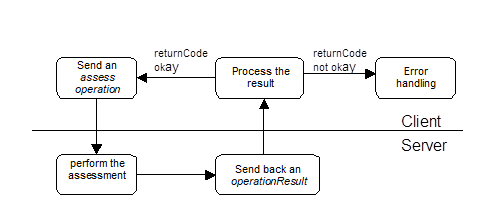
This information is sent to the server in the form of an assess operation. The server will respond with an operationResult. If the operationResult does not require an error handling (see Handling a returnCode >0 in an operationResult), the assessment was successful, and depending on your assess command the result (a result interface) can be collected from the database, from a file or from the directResultReference passed back in the operationResult.
Remark: When a directResultReference is used because the result is expected via memory, the assess operation contains a directResultReference that does not contain a Result.
The next operation can be sent to the server. This can be another assessment.
The following diagram illustrates a cycle of assessments.
Show a result
When you want to visualise an existing assessment result for one case, you have three options:
-
Query the result directly from the Result-table as XML or JSON file from the COMPASS database and process the contents. If you are running COMPASS in REST mode, you can also use the API transferResultFromDB. More information about how to retrieve the Result - interface can be found here: Retrieving the Result Interface. More hints for the visualisation of a result are given in the document Result-Interface.
-
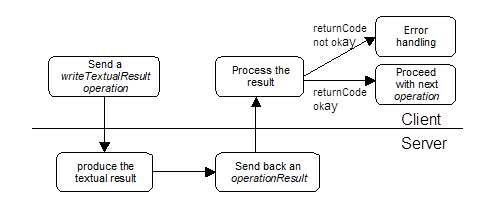
Use the writeTextualResult operation. The operationResult from the server will describe a HTML string, which contains the result in a form that a browser can visualise. After this the client can proceed with another operation request to the server.
The following diagram illustrates the cycle when using the writeTextualResult operation:
Capture a case with ScreenBuilder + assessment
When you want to modify, or capture data from an existing case, the capture operation will be used. The answer will be a screen, that has to be visualised, and the changes to this screen and the last key pressed by the user will have to be passed to the server as a userAction. The server will answer to each userAction with a screen until the current screen is the last screen of the sequence, and the client has pressed “OK”. Only now the server replies with an operationResult (only if an error occurred during the screen – userAction dialog, the server will reply with an errorDescription operationResult before). The client can proceed with the assessment now as described in Assess one or more cases.
The following diagram illustrates this cycle:
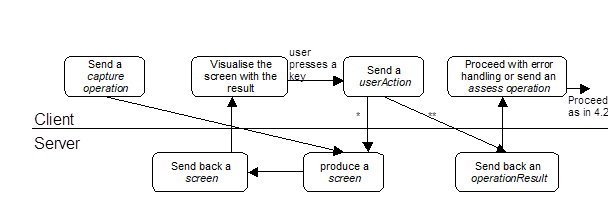
*:take this way if the current screen is not the last screen, or the user did not press “OK”
**:take this way if the current screen is the last screen and the user pressed “OK”
General Cycle
The cycle of userAction and screen will only happen after the following operation:
-
capture
The cycle will be finished by the server with an operationResult, that will contain a returnCode informing the client whether the operation was successful or not.
For all other operations the server will answer with an immediate operationResult.
Every answer of the server can be an operationResult containing a returnCode >0 and an errorDescription.
The following flow chart illustrates the general cycle for the LIGHT_MODE_API:
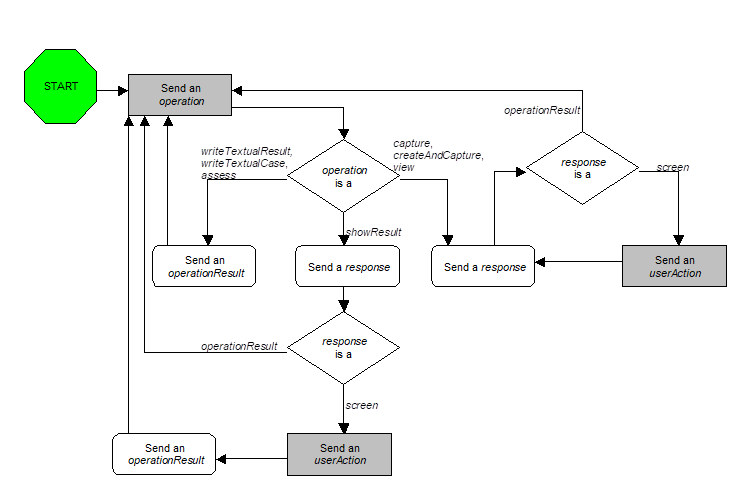
Client commands are shown in grey rectangles, server commands in white boxes with round corners.