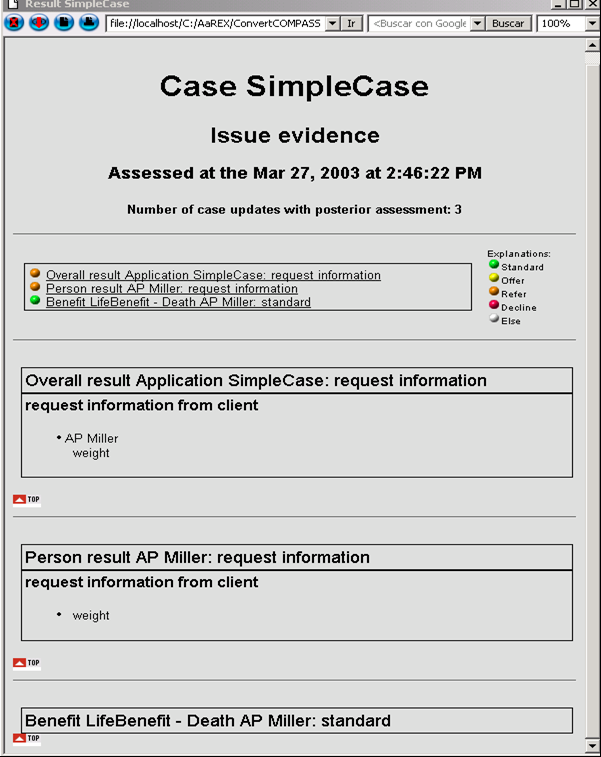
Result Interface
COMPASS Version 6.2, 6.3, 6.4 © General Re Corporation 2021 - 2026. All Rights Reserved (created: 2025-05-05 generated: 2026-07-10)
| Please note that this document is still under revision, so slight changes still might occur before the final version of this draft. |
Introduction
This document describes the structure of the Result Interface and its components. The result interface stores the assessment result for one case (i.e. one application). Besides of the description of the structure of the interface and the used objects, you will find typical examples of how to extract information from the interface.
|
German / deutsch
While this documentation is in English certain parts also include the German translation. This is currently the case in the
|
Terminology
In the following chapters you will come across the following terms:
| Object | Type (if applicable) |
|---|---|
|
|
|
|
|
|
|
These terms are described in detail in the next chapters, but it might be useful to have a simple understanding right from the beginning:
CaseObjectTypes are: Disorder, Pursuit, Benefit, Policy Holder, Assured Person, etc. [this is not completely correct: Benefit is a Benefitdescription, and there are the other specifications EventPaymentDescription and PaymentDescription, which will be treated as CaseObjectTypes in this introduction since they are sub-classes of CaseObjectType].
The Input Interface has to collect all data recorded during the input process: disorders like asthma and cough, a policy holder called John Smith, an assured person called Peter Miller, a hobby called golf, a benefit called “Endowment”, etc.
These “things” called asthma, cough, John Smith, Peter Miller, golf, and Endowment are CaseObjects. Each of these CaseObjects is of one CaseObjectType: asthma is a disorder, John Smith is a Policy Holder, Endowment is a Benefit, etc.
At this moment we do not know who had asthma, therefore we describe a relation between the assured person Peter Miller and the disorder asthma. This relation is a CaseObjectRelation, and it means: Assured person Peter Miller has had the disorder asthma. Only certain relations make sense to COMPASS, so does “Assured person has disorder”, or “benefit has policy holder”, but not “pursuit has disorder”. The allowed relations are those described as CaseObjectTypeRelations. The CaseObjectTypeRelation also describes how often a relation can exist, e.g. it is possible to restrict the number of policy holders (PH) for a benefit, by defining the `CaseObjectTypeRelation`Benefit has PH as a n:1 relation.
For most CaseObjects there are describing attributes, like gender=male, height=178 cm, weight=75 kg for Peter Miller, or the duration = 1 week of the cough, or hospitalisation = yes for asthma. These attributes are called CaseAttributes. Not all attributes are allowed for every CaseObjectType, e.g. disorder allows the attribute hospitalisation(yes/no), but not the attribute sum assured, which makes sense for a benefit. The allowed attributes for a CaseObjectType are described as CaseAttributeTypes that are related to a CaseObjectType.
Every CaseAttribute can have one or more values, or a value with a unit. The precise value is described as a CaseAttributeValue, and can be a String, an Integer, a real number, a selection text (like yes/no), etc.
Mainly we can say:
-
CaseObjectTypes,CaseAttributeTypesandCaseObjectTypeRelationsdescribe what is allowed in the Input Interface, and -
CaseObjects,CaseAttributes,CaseObjectRelationsandCaseAttributeValuesare the terms that are used within the interface.
The assessment result of an application is stored in a structure called Result.
The risk hierarchy specifies the way COMPASS follows when assessing a case. This is done normally by evaluating very detailed risks (risk of one disorder, or of the occupation, etc), and based on them calculating more complex risks (risk of the combination of all disorders for one person), ending in the calculation of the risk for each person and each applied benefit and finally an overall result. For each of these risks COMPASS creates one structure CaseRisk in the Result Interface representing the assessment result for the risk. Some CaseRisks are omitted in the result interface when the assessment result is STANDARD.
When an assessment result for a CaseRisk is shown in the result interface, the structure CaseResult is used to describe the precise assessment result for this CaseRisk. The CaseResult can contain information about Missing information (information needed for a proper assessment), an Explanation for the result, and/or some CaseResultAttributes. These are required for the detailed description of the assessment result.
The aforesaid explains the relation between a Risk and the Result. What is still missing is the assignment between a specific CaseObject (representing the Risk) and the Risk (CaseRisk). This is done via the `RiskCaseObjectRelations, which express the relation between a CaseRisk and a CaseObject. For example for the Risk AP there might be two results, as there are two APs. So each result needs a `RiskCaseObjectRelation to the corresponding AP. CaseObjects have a similar structure as in the Input Interface; they have CaseAttributes, which again consist of CaseAttributeValues.
Mainly we can say:
-
CaseResults are the assessment results (decline, offer, refer to underwriting,…)
-
CaseRisks relate the results to a risk from the risk hierarchy
-
RiskCaseObjectRelations specify the relation between
CaseObjectsandCaseRisks
Besides of these COMPASS related terms, some XML related terms are used throughout the documentation. The reader of this document should have at least basic knowledge of DTDs and XML. This knowledge is indispensable for the person responsible in decoding the result interface.
Another term used in this documentation is locale. This term denotes a string, or an object, defining a country and a language. Subtypes of languages in one country are of no interest. Sometimes only the language is important.
Selection types are a number of entries presented in a GUI-element like a list box, or a combo-box, and the user is able to select one or more of the entries.
SourceType
A SourceType groups questions (CaseObjectTypes and CaseAttributeTypes) and contains the display information for every screen and every question defined within the SourceType. A case as described in the Input Interface consists of one or more SourceTypes,a technical SourceType and a risk-related SourceType].
SourceTypes have always the Top-CaseObject Application, from which via CaseObjectRelations it is possible to navigate to all other CaseObjects.
The Result Interface
General
The Result Interface is an XML string. Its format is similar to the format of the Input Interface. The components of the interface (see DTD) are described in detail in the following subchapters.
The result of a case assessment is described basically with the three elements:
-
Risks with their results (
CaseRisks) -
Case Objects (
CaseObjects) -
Relations between Objects and Risks (
RiskCaseObjectRelations)
Be aware that only Case Objects required for the further processing of the result are stored in the Result Interface
The processing of the Result Interface (see Automatic Processing of the Result) requires teamwork between the underwriting and the IT departments: The underwriters define the scope of information that should be displayed after an assessment, and the programmers will extract this information from the interface and the display it in the desired way.
The assessment with COMPASS works according to the risk-hierarchy: Sub risks are consolidated to more general risks. A detailed description of the risk hierarchy can be found in the document Knowledge Description. The elements of the risk-hierarchy required for the further processing can be found in Overview of existing RiskTypes.
Elements and Structure of the Interface
This chapter describes the syntax of all XML-elements found in the Result Interface. Partly the syntax is also given by the DTD, but not all dependencies and restrictions can be described by the DTD, so they are explained in this chapter. For every XML element its attributes are listed and described, and which other XML elements can be contained in the current element.
The outermost XML element wrapping everything else is the Result-element.
Result-Element
The XML element Result contains all information about the assessment for a specific case. It groups a number of other XML elements, which are explained later in this chapter:
-
Any number of CaseRisks
-
Any number of RiskCaseObjectRelations
-
Any number of CaseObjects, Benefits, EventPayments, Payments
A Result consists of the following XML-attributes:
ID String
The ID or Name of the current Case
CSP String
The ID of the set of CSPs used during the assessment. Corresponds to the CSP-attribute of the Case-element in the Input Interface.
Locale String
Language in which the texts are described in the Result Interface. In the Input Interface each `CaseObject can have its own language, for the result only one overall language is allowed.
NumberOfSourceChanges Integer passed as a String
COMPASS fills this field with the times the Input Interface has been modified. The value comes from the Input Interface. Typically you will find only low values here. High values can be a hint for the misuse of the system (lots of data-updates).
NumberOfChangeAssessCycles Integer passed as a String
COMPASS fills this field with the number of cycles of data recording/modifying and assessments. Several assessments without changing of the input data do not increase this value. Typically you will find only low values here. High value might show a misuse of the system (lots of data-updates with subsequent assessments).
ResultLevelId Integer passed as a String
The overall result of the application as an ID (see Overview of existing ResultLevels)
ResultLevelIdName String
The overall result of the complete application in textual form; optional as implied by ResultLevelId
PolicyCanBeIssued String (YES or NO)
This field states whether a policy for this case can be issued depending on the assessment result
AssessmentDate Date
Date and time of the assessment in the format YYYYMMDDHHMMSS
PatchID Integer
ID of the current PATCH element of the knowledge-data. If no PATCH element exists, this attribute is not included.
PatchName String
Name (or ID, if no name exists) of the current PATCH element of the knowledge-data. If no PATCH element exists, this attribute is not included.
VersionID Integer
ID of the current VERSION element of the knowledge-data. If no VERSION element exists, this attribute is not included.
VersionName String
Name (or ID, if no name exists) of the current VERSION element of the knowledge-data. If no VERSION element exists, this attribute is not included.
Example:
<Result
    ResultLevelIdName="refer"
    NumberOfChangeAssessCycles="2"
    PolicyCanBeIssued="NO"
    CSP="0"
    AssessmentDate="20021224235959"
    Id="Application1"
    Locale="en"
    ResultLevelId="5"
    NumberOfSourceChanges="4">
...
</Result>
The CaseRisk Element
CaseRisks build a connection between risks from the risk-hierarchy and the results (CaseResults). A result is defined as a CaseResult within a CaseRisk. There can be more than one result for a risk, i.e. a CaseRisk can contain several CaseResults.
The CaseRisk XML-element can have the following XML-attributes:
ID String
ID of this CaseRisk. It is needed for referencing the CaseRisk; it is assigned automatically by COMPASS and is unique for all CaseRisk in one case
RiskTypeId Integer passed as String
ID of a node of the risk-hierarchy (see Overview of existing RiskTypes). The CaseResults are valid for this RiskType.
RiskTypeIdName String
Name of the corresponding node of the risk-hierarchy (optional, as implied by RiskTypeId).
ResultLevelId Integer passed as String
ID of the ResultLevel (see Overview of existing ResultLevels) which has been calculated for this CaseRisk. This ResultLevel is derived from the results found in the elements CaseResults.
ResultLevelIdName String
Name of ResultLevelId (optional, as implied by ResultLevelId).
RiskText String
Name of the assessment. Additional text that typically is more precise/more suitable for display than RiskTypeIdName.
Example:
<CaseRisk
    RiskText="Disorder Chronic Bronchitis"
    RiskTypeIdName="Disorder according to DB"
    ResultLevelIdName="refer"
    RiskTypeId="20"
    Id="110111112"
    ResultLevelId="5">

    <CaseResult
    ...
    </CaseResult>
    ...
    <CaseResult
    ...
    </CaseResult>
</CaseRisk>
The CaseResult Element
CaseResults represent different kinds of results: besides of the assessment result (a loading, decline, an exclusion clause, etc.) that is described via CaseResultAttributes, we find Explanations that describe the way COMPASS took to come to this result. Documents or information that have to be requested from the client, hospitals or doctors are represented as MissingInfo elements. When there is a MissingInfo element, this means that COMPASS couldn’t make a final decision for the current CaseResult.
Therefore the XML element CaseResult groups any number and combination of the following XML elements, which are explained later in this chapter:
-
CaseResultAttributes
-
MissingInfo
-
Explanations
The CaseResult XML-element consists of the following XML-attributes:
ID String
ID of the CaseResult. It is needed for referencing the CaseResult, it is assigned automatically by COMPASS and is unique for all CaseResults in one case.
ResultTypeId Integer passed as String
ID of the ResultType (Loading, Hint, refer etc.). The possible ResultTypes are listed in ResultTypes with ResultAttributeTypes.
ResultTypeIdName String
Name of the ResultType defined by ResultTypeId, therefore optional.
ResultLevelId Integer passed as String
ID of the result level of the current assessment (see Overview of existing ResultLevels).
ResultLevelIdName String
Text of ResultLevelId (optional, as implied by ResultLevelId).
SuppressedById Integer passed as String
ID of a CaseResult that suppresses the current CaseResult (only if required).
SuppressedByType String (“Consolidated“ or “Subsumed“)
Specifies the reason why the current CaseResult has been suppressed. When a CaseResult is suppressed by a consolidation (e.g. loadings from different medical areas are consolidated into one loading) the suppressed results can be found in the Result Interface with this attribute set to “Consolidated“.
Another situation arises when two or more equal results, or results containing each other (e.g. two medical examinations, or one GPR and a medical examination), are requested. COMPASS suppresses one (the weaker) of the CaseResults when displaying the result, and marks all suppressed CaseResults as “Subsumed“. Both “SuppressedBy”-attributes only appear together in the Result Interface.
Example:
<CaseResult
    ResultLevelIdName="standard"
    ResultTypeIdName="Hint on occupational class"
    Id="4"
    ResultLevelId="1"
    ResultTypeId="29">

    <CaseResultAttribute
        ...
    </CaseResultAttribute>
</CaseResult>
The MissingInfo Element
A MissingInfo element always refers to information required for the assessment, which is not available; e.g. a question has been left unanswered. The XML-element MissingInfo does not contain other XML-elements, and has the following XML-attributes:
CaseAttributeTypeId String
ID of a CaseAttributeType (question) for which information is missing. Please refer to the Input Interface description for a complete list of CaseAttributeTypes.
CaseAttributeTypeIdName String
Name of the CaseAttributeType; implied by CaseAttributeTypeId (therefore optional)
SourceTypeId String
ID of the SourceType, in which the CaseAttributeType with missing information is defined (optional)
SourceTypeIdName String
Name of the SourceType specified by SourceTypeId (therefore optional).
CaseObject String
ID of the CaseObject, for which the information defined by `CaseAttributeType is missing. This ID has to be an ID of a CaseObject, a Benefit, an EventPayment or a Payment described in the Result Interface.
Example:
<MissingInfo CaseObject="8" CaseAttributeTypeId="158" CaseAttributeTypeIdName="Height"></MissingInfo>The Explanation Element
An Explanation gives additional information to a result. It explains the situation that lead to the current CaseResult. Explanations can be defined in the maintenance program and can be used in rules, so that they appear in the result. An Explanation does not contain other XML-elements and has the following XML-attributes:
ExpressionClass String
This attribute specifies the kind of expression that is evaluated, so that the explanation text is included in the result (normally 15 for the class “ComposedExpression”). Should be used only for debugging.
ExpressionId String
This attribute specifies the ID of the expression that is responsible for the explanation text to be included in the result (goes together with ExpressionClass).
Addition String (None |Negative |Unknown)
This attribute specifies the way the explanation text has to be interpreted: either as the negation of Text, or as unknown, or as it is. Example: When Text is „weight too low“, then the negation is „NOT weight too low“.
PersistentExplanationId String
ID of the explanation, if an explanation could be found (see Overview of existing Explanations)
Text String
Textual form of the explanation. When a PersistentExplanationId is given, then this attribute contains the text corresponding to the ID; otherwise it contains a generated text out of the Expression and the Addition.
Example:
<Explanation ExpressionClass="15" ExpressionId="26876" Addition="None" PersistentExplanationId="1086" Text="Beneficiary Death female"> </Explanation>The CaseObject-/Benefit-/Payment-/EventPayment-Element
CaseObjects (and its subclasses Benefit/Payment/EventPayment) are not specifically required for the result. They exist in the Input Interface, and some are copied into the Result Interface by COMPASS to avoid having to analyse the Input Interface when evaluating the Result Interface. Some other XML Elements reference them by their ID, e.g. the attribute `CaseObject`of the XML Element MissingInfo.
For a detailed description of the elements, please see CaseObject, Benefit, Payment and EventPayment
The CaseAttribute Element
Every CaseObject`in the Result Interface has to contain at least one `CaseAttribute; otherwise it will not be listed in the Result Interface. These attributes can be any CaseAttributes from the Input Interface. In difference to the Input Interface, only one value (one CaseAttributeValue) per CaseAttribute is allowed.
An XML element CaseAttribute contains exactly one CaseAttributeValue-XML element, which is explained in The AttributeValue- and the CaseAttributeValue-Element.
For a detailed description of the element CaseAttribute, please see CaseAttribute
The XML element CaseAttribute consists of the following XML-attributes:
TypeId String
Key or ID of the CaseAttributeType (see “Input Interface Description”).
TypeIdName String
Name of the CaseAttributeType (optional, as implied by TypeId).
Example:
<CaseAttribute TypeId="262" TypeIdName="Conversion right (y/n)">
   <CaseAttributeValue
   ...
   </CaseAttributeValue>
</CaseAttribute>
The AttributeValue- and the CaseAttributeValue-Element
CaseAttributeValues and AttributeValues encapsulate a value. The value can be a string, a number, a date, etc., but also a pointer to an internal database (the YES/NO-database, or the type-of-drink-database) or a period of time (see DTD).
The XML elements AttributeValue and CaseAttributeValue group any number (none is possible) of Value-XML elements, which are explained in chapter Value-Elements.
The XML elements AttributeValue and CaseAttributeValue have no XML-attributes.
Example:
<CaseAttributeValue>
  <StringValue Value="abc"></StringValue>
</CaseAttributeValue>
or
<AttributeValue>
  <SingleValue UnitName="EUR/Year" Value="30000.0" Unit="1">
  </SingleValue>
</AttributeValue>
The CaseResultAttribute Element
Every CaseResult can contain CaseResultAttributes,
which are of specific ResultAttributeTypes defined within COMPASS (see Overview of existing ResultAttributeTypes for a
list of possible ResultAttributeTypes). How many and which CaseResultAttributes are contained in a CaseResult is defined
by its ResultType-attribute (see ResultTypes with ResultAttributeTypes for the list of ResultTypes and their ResultAttributeTypes).
Every XML element CaseResultAttribute contains exactly
one AttributeValue-XML element (The AttributeValue- and the CaseAttributeValue-Element), and consists of the following XML-attributes:
ResultAttributeTypeId String
Key or ID of the ResultAttributeType (see Overview of existing ResultAttributeTypes)
ResultAttributeTypeIdName String
Name of the ResultAttributeType (implied by ResultAttributeTypeId)
Example:
<CaseResultAttribute ResultAttributeTypeIdName="Text" ResultAttributeTypeId="0">
    <AttributeValue>
      <DBRefValue Name="Exclusion Clause for eye disorders" Id="198">
      </DBRefValue>
    </AttributeValue>
</CaseResultAttribute>
The RiskCaseObjectRelation Element
The RiskCaseObjectRelation creates a relation between a CaseObject(a Benefit, an EventPayment or a Payment) and a CaseRisk. A CaseRisk can be related to several CaseObjects.
The XML element RiskCaseObjectRelation contains no XML elements, and has the following XML-attributes:
From String
Internal ID of the CaseRisk
To String
Internal ID of the CaseObject, `Benefit, Payment or EventPayment
Example:
<CaseRisk RiskTypeIdName="Application risk" RiskTypeId="24" Id="11" ResultLevelIdName="standard" ResultLevelId="1"></CaseRisk>

<CaseObject Id="0" TypeId="25" TypeIdName="Application"> … </CaseObject>

<RiskCaseObjectRelation To="0" From="11"></RiskCaseObjectRelation>
Value-Elements
AttributeValues and CaseAttributeValues contain a Value. Possible Values are: BoolValues, DateValues, DualValues, AggregateValues, SingleValues, PeriodValues, StringValues, DBRefValues, CORefValues and ListValues.
Every Value has a different representation as an XML-element, and has different XML-attributes. All used Values are explained in detail.
StringValue
A StringValue contains a string. This string is passed in the mandatory attribute Value.
<StringValue Value="Miller"></StringValue>SingleValue
Numerical values are passed as SingleValue elements. The number, which can be a real number, is passed in the mandatory attribute Value. If a unit is required, the ID of the unit is passed in the attribute Unit and the name of the unit can be passed in the attribute UnitName. A list of existing units is described in the Input Interface Description. When no unit is required, only the attribute Value is passed. The decimal separator is always a “.”.
<SingleValue Unit="16" UnitName="Year(s)" Value="43"></SingleValue>DBRefValues
Database fields are often found in the interface, as all selection types are defined as databases. The fields are defined as DBRefValue elements, and contain the ID and the name of the database entry in the attributes Id and Name. Some databases (e.g. disorder-database) allow the specification of a key that is unique for each entry. This key is passed as the value of the attribute Key. Also the language might be of importance, therefore this value is passed as the locale in the attribute Locale. The key is invariant in different sets of data (Systems), while the ID can vary from system to system.
<DBRefValue Name="no" Id="0" Key=""></DBRefValue>When COMPASS builds the Result Interface, the Id is only written when Key is not available.
A list of available selection texts can be found in the Input Interface description.
DateValues
A DateValue describes a date. It contains the attributes Year, Month and Day. When available, all three attributes are filled, but no attribute is mandatory.
<DateValue Year="2002"></DateValue>
<DateValue Year="2023" Month="2" Day="25"></DateValue>
PeriodValues
Also periods of time can be passed via the interface. Periods of time are passed with the element PeriodValue, which consists of two elements DateFrom and DateTo, which are DateValues, and the element Duration, which is a SingleValue with the unit Day, Week, Month or Year. At least one of elements DateFrom, DateTo and Duration has to be passed. A PeriodValue cannot describe hours or smaller time units.
<PeriodValue>
  <DateFrom>
    <DateValue Year="2001" Month="8"></DateValue>
  </DateFrom>
  <DateTo>
    <DateValue Year="2001" Month="9"></DateValue>
  </DateTo>
  <Duration>
    <SingleValue Unit="8" UnitName="Week(s)" Value="3">
    </SingleValue>
  </Duration>
</PeriodValue>
DualValues
A DualValue is used to represent values that consist of two numerical values. They are rare. One example is the blood pressure, where always two values (systolic/diastolic; e.g. 80/120) are measured. This situation is represented by two numerical values in the attributes Value1 and Value2. Additionally a dual-value unit has to exist, which is specified with the attributes Unit (ID of the unit) and the optional attribute UnitName (name of the unit).
<DualValue Value1="80" Value2="120" Unit="17"></DualValue>AggregateValues
AggregateValues have been introduced to represent values, which consist of two numerical values, but could also consist of only one value, depending on the unit. Examples are the height, which is measured in cm, or in feet and inches, and the weight, which is either measured in kg, or in stones and pounds. Such a value is represented by the element AggregateValue, which requires two numerical values in the attributes Value1 and Value2. Additionally a mandatory aggregate-value-unit is passed in the attribute Unit (ID of the unit) and can be also named with the attribute UnitName (name of the unit).
Internally COMPASS is able to convert from the aggregate-value unit to the single-value unit.
<AggregateValue Value1="5" Value2="10" Unit="7"></AggregateValue>CaseObjectReferenceValues - CORefValues
CORefValues are direct references to CaseObjects that are listed in the Result Interface. In the attribute Value the ID of the referenced `CaseObject`is passed. Typically the assured persons are referenced this way.
<CORefValue Value="3"></CORefValue>ListValues
ListValues contain some Values, all of which have to be of the same type. Typically they contain CORefValues. There is no restriction about the number of values contained in one ListValue; the ListValue might not have any elements.
<ListValue> <CORefValue Value="16"></CORefValue> </ListValue>BoolValues
These values are currently not used, but could be used in the future. Please refer to the DTD for their syntax.
Automatic Processing of the Result
This chapter discusses all aspects of the further processing of the Result Interface: The semantics of the Result Interface structure is described, and the relation between assessment and risk-hierarchy is presented. It is also described when and which elements can be found in the interface, and the dependencies between those elements.
The actual further processing of this information depends largely on your requirements. Typically you might need the following information:
-
The overall result
-
Actions (sending out questionnaires, refer to underwriting, etc.)
-
Detailed assessment results for persons and/or benefits
A technical hint: As the Result Interface is an XML-object, it is recommended to use an XML parser to analyse it. XML parsers are able to read an XML structure, and if this is well formed, to convert it into a simple structure that can easily be further processed. Be aware that the encoding of the XML String might cause trouble with some parsers.
But before you can process a Result Interface it is necessary to know how to retrieve it from COMPASS:
Retrieving the Result Interface
During the communication between client and COMPASS server via the LIGHT MODE API an assessment for a case has taken place. The assessment result is a Result Interface that can be returned to the client via memory, or it can be written into a file or into the database table ResultData (see the API documentation for a description of the LIGHT MODE API).
The result can be retrieved either as XML or JSON content. For those working with the CompassService, please refer to the Result manipulation API
The client is responsible to retrieve the Result Interface in form of a long string. This is already the case when the Result Interface is returned via memory. When the Result Interface is stored in a file, the file has to be read to retrieve the string. When the Result Interface is stored in the ResultData table (see Database ), one case is split into parts and stored in the table. All parts of one result have the same Case-ID and SubID (column names in the table are rex_CaseID and rex_SubID), and are numbered through (column rex_No), so it is possible to rebuild the Result Interface from these parts (column rex_ResultData) by concatenation.
Once the client has the Result Interface as a complete string, the analysis of the result can start.
Structure of the Result Interface
Knowledge of the risk-hierarchy of COMPASS is essential for the understanding of the result interface:
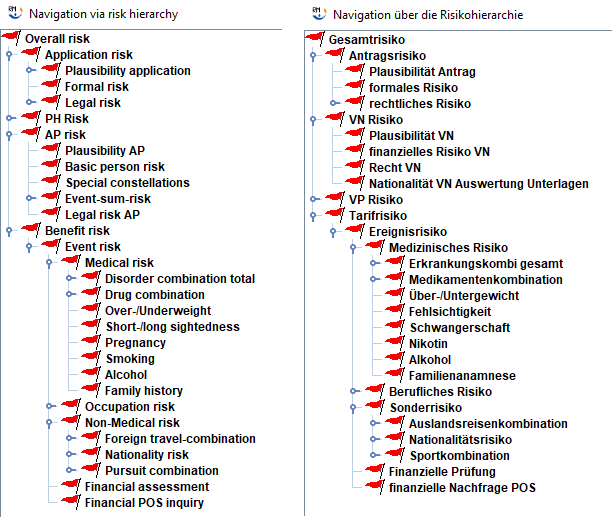
A list with all existing risks (RiskTypes) can be found in Overview of existing RiskTypes. The risk hierarchy shows all RiskTypes that are being evaluated by the underwriting engine of COMPASS in a hierarchical way: Some risks contain more detailed secondary risks; e.g. the risk Special risk depends largely on the result of the secondary risks Nationality-risk, Pursuit combination and Foreign travel-combination.
COMPASS generates an internal result for each RiskType, starting by evaluating the most detailed secondary risks, and using the results of these for the evaluation of more general risks, up to the calculation of the result for Total-risk. The calculation of risks based on secondary risks is called consolidation. During the consolidation secondary results can be suppressed. The suppressed results are marked as suppressed in the result-interface.
A result for a RiskType is stored in the Result Interface if and only if at least one of the following conditions applies:
-
The result is substandard (the assessment result for this risk was not inconspicuous)
-
The corresponding RiskType is a basic RiskType, i.e. one of the following RiskTypes
-
Overall risk
-
Application risk
-
PH risk
-
AP risk
-
Benefit risk
-
In the Result Interface a result for a RiskType is represented by a CaseRisk element. As described in The CaseRisk Element the CaseRisk belongs to a RiskType, and contains the results in form of CaseResult-elements. Thus, a CaseRisk groups results for one risk. Several CaseRisks can exist for one RiskType.
Besides from the CaseRisks there are CaseObjects in the Result Interface. Some, but not all CaseObjects defined in the Input Interface can be found in the Result Interface: only those CaseObjects referenced by a result (a CaseResult or a CaseRisk) appear in the Result Interface. These CaseObjects do not contain every CaseAttribute they have in the Input Interface: only those CaseAttributes required for an interpretation of the Result Interface are listed. Additionally other CaseObjects, created during the assessment, can appear in the Result Interface. These CaseObjects and their CaseAttributes are derived from information gathered from other CaseObjects of the Input Interface.
A CaseResult represents the details of a non-standard result (e.g. details of a loading, or details about a questionnaire that is requested). For one risk (one CaseRisk) several CaseResults can exist (e.g. request of a questionnaire + request of a hospital report). Each CaseResult is of a specific ResultType. This ResultType implies that only attributes of a specific ResultAttributeType are relevant and permitted; e.g. for the ResultType Questionnaire the questionnaire itself and the person that has to fill out the questionnaire are required. The dependency between ResultTypes and ResultAttributeTypes is listed in ResultTypes with ResultAttributeTypes.
CaseRisks that are listed in the Result Interface have relations to one or more CaseObjects. In the Result Interface the element RiskCaseObjectRelation expresses this relation. The relations classify the current CaseRisk. Every CaseRisk is at least linked via a RiskCaseObjectRelation with the current Application-CaseObject.
Example: The CaseRisk W is an assessment result for a disorder. One RiskCaseObjectRelation links this CaseRisk with an assured person X; another RiskCaseObjectRelation links this CaseRisk with a benefit Y, and another RiskCaseObjectRelation links this CaseRisk with the current application Z.
This example describes: the assessment W is valid for person X who applies for the benefit Y in the application Z.
There are correlations between the RiskTypes and the possible results (ResultTypes). E.g. the ResultType Sum Reduction does not appear as a possible ResultType for the RiskType formal risk. These dependencies are not listed in this documentation, as every company is free to define results for a RiskType via the maintenance program.
Example:
This example is based on a case with one Assured Person (AP) who is also policyholder (PH). This person applies for a Term insurance, and his only risks, as encountered by COMPASS are a slight overweight and his cough, which did not stop since 1997. The overweight results in an extra mortality of 25% (shown in yellow), while the cough results in the request of a General Practitioner’s Report (shown in orange). Standard risks are shown in green.
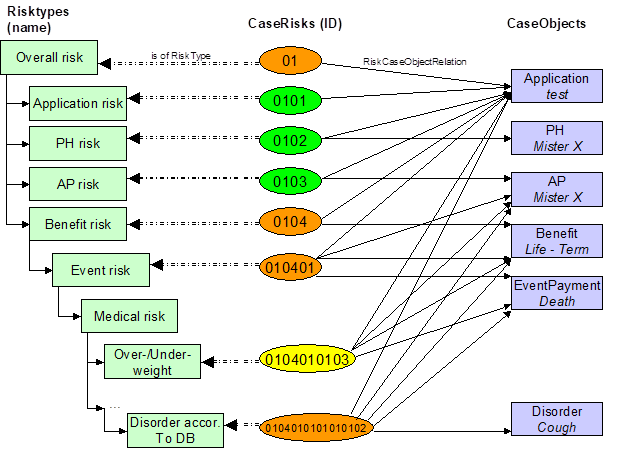
CaseRisks and CaseObjects can be found in the Result Interface. On the left hand side the involved risks are listed, in the hierarchy given by COMPASS (see beginning of chapter).
The diagram also shows the Relations between CaseRisks and CaseObjects: each arrow on the right represents a RiskCaseObjectRelation. The arrows to the left stand for the relation between CaseRisk and RiskType.
Each CaseRisk that is not standard (green) can have a CaseResult, which contains ResultType-specific CaseResultAttributes; see the following diagram:
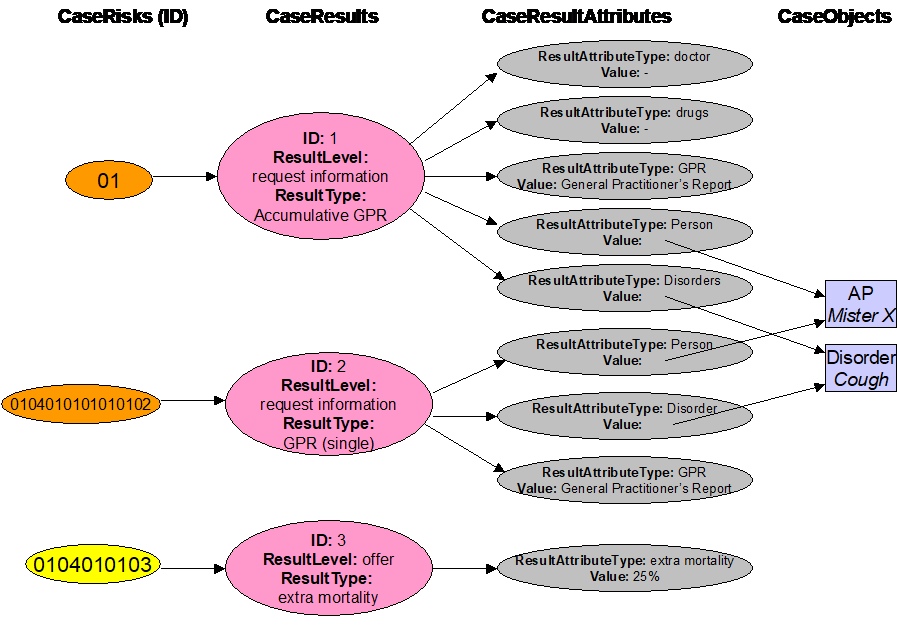
In this case the CaseRisks 0104 and 010401 don’t have further CaseResults, although they are not standard. It is quite common for a risk to not have a better result than the worst of the sub-risks: thus CaseRisks 0104 and 010401 also have the “request information”-ResultLevel inherited from CaseRisk 0104010101010102. These two CaseRisks would only have a CaseResult of their own, when their risk calculation would add new details, which are not already specified in its sub-results.
IDs of CaseRisks are built in a hierarchical way. When one ID is a starting substring of another ID, it can be derived that the risk with the longer ID is a sub-risk of the other risk.
On the other hand, if one CaseRisk cR1 has CaseObjectTypeRelations to a set S of CaseObjects, and another CaseRisk cR2 has CaseObjectTypeRelations to a subset of S, it can be safely assumed that cR1 is a sub-risk of cR2.
For most RiskTypes of the risk hierarchy there can be several CaseRisks. The above example suggests that there is only one CaseRisk for each RiskType, but this is not the case:
When an application contains e.g. two Assured Persons (APs) or two disorders, then there will be two CaseRisks for the RiskType AP risk (one risk is being calculated for each AP) or two CaseRisks for the Risktype Disorder according to DB.
Extracting information
After the assessment of one case COMPASS stores the assessment result in the Result Interface. Based on this Result Interface COMPASS can show or print the result in textual form. This textual result meets the requirements of some companies, but it isn’t customisable. Therefore some customers will have to analyse the Result Interface by themselves, in order to populate own databases with some result details, or to create an own representation of the assessment result.
Thus there are manifold motivations for the analysis of the Result Interface. This chapter first presents a general approach to the analysis of the Result Interface, then focusing on three typical scenarios.
General procedure
The analysis and further processing of the Result Interface will typically be handled by a computer program. We assume that the Result Interface is available to the program and has been parsed. XML-Parsers do present the XML-String in a manageable format, i.e. that you can easily read attributes from XML-Elements, or collect XML-Elements from a certain type, etc. The use of an XML-Parsers is not mandatory, but proofs to be quite useful.
The general analysis is made up of the following 6 steps – not all of them require programming work:
1. Identifying the interesting RiskTypes
This step does not involve programming.
The analysis and the further processing of the Result Interface depend highly on the information requirements of each company. These requirements have to be analysed with care, and the affected RiskTypes in the Result Interface have to be spotted. E.g. when the assessment result for an assured person is requested – the AP risk RiskType contains this information.
In certain situations the requirement is more specific: not all RiskTypes should be evaluated, but only those of a special “context”. E.g. not all benefits (Benefit risk) should be evaluated, but only the Disability-benefits; or: the RiskType AP risk should only be evaluated for APs called "Bond".
In the Result Interface the context is given by RiskCaseObjectRelations between a RiskType and CaseObjects. For the most typical RiskTypes the context is always a follows:
Overall risk: there is exactly one Overall risk per application
Application risk: there is exactly one Application risk per application
AP risk: Context is an assured person – i.e. there is an AP risk for every assured person.
PH risk: Context is a policy holder – i.e. there is a PH risk for every policy holder.
Benefit risk: Context is a Benefit – i.e. there is a Benefit risk for every benefit.
Event risk: Context is a Benefit, an assured person and an event-payment – i.e. there is an Event risk for every AP defined in the event for a Benefit.
For other risks additional CaseObjects might be involved.
Example
<CaseObject Id="0" TypeId="25" TypeIdName="Application"> ... </CaseObject>
<CaseObject Id="3" TypeId="27" TypeIdName="AP"> ... </CaseObject>
<CaseRisk RiskTypeIdName="AP risk" ResultLevelIdName="standard"
 	RiskTypeId="22" Id="0103" ResultLevelId="1"></CaseRisk>
<RiskCaseObjectRelation To="3" From="0103"></RiskCaseObjectRelation>
<RiskCaseObjectRelation To="0" From="0103"></RiskCaseObjectRelation>
2. Identifying other involved RiskTypes
This step does not require programming.
Analysing one RiskType involves the analysis of the sub-RiskTypes, as they contain details that are not visible on the father-RiskType. E.g. the Medical Risk RiskType is REFER, but the reasons for this REFER lie within the Over-/Underweight RiskType, the Disorder RiskType, or other sub-RiskTypes:
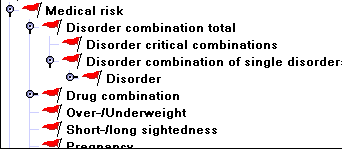
Identify the sub-RiskTypes for the RiskTypes defined in step 1.
3. Retrieving the CaseRisks of those RiskTypes
From now on programming is required.
Step 2 produced a list of RiskTypes. The CaseRisks for those RiskTypes have to be collected from the Result Interface. Not for all RiskTypes a corresponding CaseRisk exists. When there is no CaseRisk for a specific RiskType x and for all its Sub-RiskTypes, this means that the assessment result was standard for this RiskType x. Collect those CaseRisks.
4. Grouping/Ordering those CaseRisks
Step 3 leaves us with a set of CaseRisks that have been qualified as important. It is time now to group them, i.e. put all CaseRisks in one group, that have a similar context, i.e. it has to be clear for which benefit, event, person, disorder, etc. the current CaseRisk is valid.
E.g. when there are 2 Assured Persons (AP) Holmes and Watson, and one Disorder-CaseRisk for Asthma, it is important to know which AP suffered from this impairment.
It is up to the client to decide which groups they need. Typically there will be one group for every benefit, one for each person (with benefit-independent information) and one for CaseRisks coming from the Application risk. Prepare those groups.
For the grouping of CaseRisks the following two choices are possible:
a) via the context: Every CaseRisk has relations (RiskCaseObjectRelations) to some CaseObjects that specify precisely to which context (i.e. for which AP, benefit, event, disorder, etc.) the current CaseRisk belongs.
b) via the ID of the CaseRisk: when an ID of a CaseRisk risk1 is a starting substring of the ID of a CaseRisk risk2, then risk2 is in the context of risk1. Indeed the RiskCaseObjectRelations of risk2 contain all RiskCaseObjectRelation from risk1. This approach is useful, when you have a CaseRisk, and want to have all sub-CaseRisks: the IDs of the sub-CaseRisks start with the ID of the CaseRisk.
For our above example (Holmes, Watson, Asthma) this means:
a) The CaseRisk for Asthma has enough relations (RiskCaseObjectRelations) to specify precisely for which AP, benefit, event and disorder it is valid. One RiskCaseObjectRelation will establish the relation between one of the APs (Holmes or Watson) with the Asthma-disorder.
b) There is one CaseRisk Event risk for Holmes (ID = “010501”) and one for Watson (ID = “010502”) (we do not focus on the benefit, assuming there is only one benefit). The CaseRisk for Asthma has the ID “0105010102", and thus it is a sub-CaseRisk of “010501”, i.e. the disorder is Holmes’.
The following extract of a Result Interface shows these relations:
<CaseObject   Id="0" TypeIdName="Application" ...> ... </CaseObject>
<Benefit      Id="1" TypeIdName="Benefit" ...> -Life- </Benefit>
<EventPayment Id="2" TypeIdName="Insurance event payment" -Death- />
<CaseObject   Id="3" TypeIdName="AP" ...> -Holmes- </CaseObject>
<CaseObject   Id="6" TypeIdName="AP" ...> -Watson- </CaseObject>
<EventPayment Id="7" TypeIdName="Insurance event payment" -Death- />
<CaseObject   Id="8" TypeIdName="Disorder cons." ...> -Asthma- </CaseObject>

<CaseRisk Id="010501" RiskTypeIdName="Event risk" ... ></CaseRisk>
  <RiskCaseObjectRelation To="3" From="010501"></RiskCaseObjectRelation>
  <RiskCaseObjectRelation To="2" From="010501"></RiskCaseObjectRelation>
  <RiskCaseObjectRelation To="0" From="010501"></RiskCaseObjectRelation>
  <RiskCaseObjectRelation To="1" From="010501"></RiskCaseObjectRelation>
<CaseRisk Id="0105010102" RiskTypeIdName="Disorder according to DB" ...>
  <CaseResult ... />
</CaseRisk>
  <RiskCaseObjectRelation To="8" From="0105010102"></RiskCaseObjectRelation>
  <RiskCaseObjectRelation To="1" From="0105010102"></RiskCaseObjectRelation>
  <RiskCaseObjectRelation To="0" From="0105010102"></RiskCaseObjectRelation>
  <RiskCaseObjectRelation To="2" From="0105010102"></RiskCaseObjectRelation>
  <RiskCaseObjectRelation To="3" From="0105010102"></RiskCaseObjectRelation>
<CaseRisk Id="010502" RiskTypeIdName="Event risk" ... ></CaseRisk>
  <RiskCaseObjectRelation To="6" From="010502"></RiskCaseObjectRelation>
  <RiskCaseObjectRelation To="7" From="010502"></RiskCaseObjectRelation>
  <RiskCaseObjectRelation To="0" From="010502"></RiskCaseObjectRelation>
  <RiskCaseObjectRelation To="1" From="010502"></RiskCaseObjectRelation>
Put each CaseRisk into the group reserved for its context, either via a) or b).
5. Evaluating the CaseRisks/CaseResults
Now that all relevant CaseRisks have been detected and put into their context, every of those CaseRisks has to be analysed in detail. Analysing a CaseRisk means evaluating its CaseResults:
-
Educe the ResultType of the
CaseResult. -
Based on the ResultType evaluate the corresponding
CaseResultAttributes. When theCaseResultAttributesare references toCaseObjects(CORefValues), evaluate theseCaseObjects. -
Find any MissingInfo object in the
CaseResult. A MissingInfo object describes an application question to which no answer has been given. -
Find any Explanation object in the
CaseResult. They contain a text that explains the result more in detail. This is mainly the case for the AIDS-risk. -
Depending on the suppressedBy attributes of the
CaseResult, the company can decide if the result of the currentCaseRiskwill be processed further.
For each CaseRisk evaluate all its CaseResults as described above.
6. Further processing of the information
With all this information available, the company decides how to proceed: passing the case for human underwriting, issuing the policy, requesting further documents, etc.
Recommendation for the visualisation of the result:
It is useful to create a function/method for each ResultType used in your environment. This method should deal with the available ResultAttributes and return a String-representation of the passed CaseResult.
Scenario I: Policy can (not) be Issued
An insurance company wants to know whether the assessment allows an issuing of the policy or no. This is the simplest query a company can have, and therefore this information can easily be found in the Result Interface as the value of the attribute PolicyCanBeIssued of the Result-XML-element. When the value is “Yes”, the policy can be issued, otherwise the policy should not be issued. The reason for a “No” is available only after a deeper analysis of the Result Interface.
Example: the policy should not be issued automatically:
<Result ResultLevelIdName="request information"
        NumberOfChangeAssessCycles="1"
        PolicyCanBeIssued="No" CSP="0" AssessmentDate="20021010000000"
        Id="SimpleCase" Locale="en" ResultLevelId="3"
        NumberOfSourceChanges="1"> </Result>
Scenario II: Gathering Follow-Up Actions
Assuming that the overall result was ”policy cannot be issued“ a list of the following actions has to be created. Following actions can be:
-
Request documents/medical evidences
-
Make further inquiries at the client (send questionnaires or ask for missing answers)
-
Make modifications on the benefit details (increase waiting period, defer application, include an exclusion clause, etc) and offer the modified benefit to the client
-
Decline the application
-
Refer to underwriting
-
Etc.
Each ResultType will trigger some kind reaction on the company’s side. It is up to the company to decide which action will be taken depending on the ResultType. Typically a “refer” (ID=0) will lead to a referral to human underwriting of the application (ResultLevel Refer); an “inquiry at client” (ID=46) will lead to a client-inquiry asking for omitted answers (ResultLevel Request Information); an exclusion clause will lead to an offer that will be made to the client (ResultLevel Offer); etc. For each ResultType the corresponding ResultLevel is shown in table ResultTypes with ResultAttributeTypes.
In the following we will restrict ourselves to describe the gathering of information for the ResultLevel Request Information. This means, that all information that is still needed for a final assessment of the application will be collected. This can be an omitted answer of the client, but also medical documents, and/or questionnaires.
For this purpose first those CaseResults should be collected, which have a ResultLevel of type Request Information (ID=3) and are part of a CaseRisk that has a ResultLevel other than Standard. Such a CaseRisk could look like:
<CaseRisk   RiskTypeIdName="Total risk"
            ResultLevelIdName="refer"
            RiskTypeId="21"
            Id="1"
            ResultLevelId="5">
This CaseRisk could contain the following CaseResult with ResultLevel 3 (Request Information):
<CaseResult ResultLevelIdName="request information"
            ResultTypeIdName="medical examination for person"
            Id="2"
            ResultLevelId="3"
            ResultTypeId="39">
...
Once the CaseResults are collected, they have to be analysed:
Each CaseResult has a ResultTypeId. E.g. a ResultTypeId "39" is a "medical examination for person". All ResultTypes with their attributes (ResultAttributeTypes) can be found in chapter ResultTypes with ResultAttributeTypes. In our example (medical examination for person) the relevant attributes are Document and Person. Thus the following CaseResultAttributes will be part of the CaseResult (the shown AttributeValues are exemplary, but could also be empty):
...
<CaseResultAttribute ResultAttributeTypeIdName="medical examination" ResultAttributeTypeId="10">
  <AttributeValue>
     <DBRefValue Name="medical attest" Id="2"> </DBRefValue>
  </AttributeValue>
</CaseResultAttribute>


<CaseResultAttribute ResultAttributeTypeIdName="person" ResultAttributeTypeId="19">
  <AttributeValue>
     <CORefValue Value="5"> </CORefValue>
  </AttributeValue>
</CaseResultAttribute>
...
With this information it is possible to determine the document and the person that should be examined. The document is stored as a DBRefValue, the person as a CORefValue, which points to the CaseObject with the ID 5 in the Result Interface.
This process has to be repeated for all CaseResults described above. Typically you can restrict the search for CaseResults to those within the CaseRisk „Overall risk“, as only documents should be listed, which are required for the whole application.
All suppressed CaseResults or information requests can be ignored. They can be recognised when the attributes SupressedById or SupressedByType are set.
Scenario III: Results at person- or benefit-level
This chapter describes how the results for each benefit and for each person are collected from the Result Interface.
Read out the results for an assured person (AP) or a policy holder (PH)
The CaseRisk for an AP has the RiskTypeId 22 (see chapter Overview of existing RiskTypes). The ResultLevel of the AP’s CaseRisk gives a first rough idea of the assessment result for an AP.
<CaseRisk RiskTypeIdName="AP Risk"
          ResultLevelIdName="standard"
          RiskTypeId="22"
          Id="13"
          ResultLevelId="1">
</CaseRisk>
In this example the result for the AP is standard. Several CaseRisks with the same RiskType can exist (e.g. when several APs exist in one application); only via the RiskCaseObjectRelations it is possible to find out for which AP the current result (the current CaseRisk) is valid.
<RiskCaseObjectRelation To="3" From="13"></RiskCaseObjectRelation>
<RiskCaseObjectRelation To="0" From="13"></RiskCaseObjectRelation>
In this example 2 relations going out from the CaseRisk are shown, one to the CaseObject with the ID 0 and one to the CaseObject with the ID 3 in the Result Interface:
<CaseObject Id="0" TypeId="25" TypeIdName="Application">
  <CaseAttribute TypeId="0" TypeIdName="Application-ID">
    <CaseAttributeValue>
      <StringValue Value="SimpleCase" />
    </CaseAttributeValue>
  </CaseAttribute>
</CaseObject>
<CaseObject Id="3" TypeId="27" TypeIdName="AP">
  <CaseAttribute TypeId="307" TypeIdName="Person-ID">
    <CaseAttributeValue>
      <StringValue Value="007" />
    </CaseAttributeValue>
  </CaseAttribute>
  ...
</CaseObject>
Check which of these 2 related CaseObjects is of type 27 (ID of the Assured Person-CaseObjectType), and you know the person which is assessed as Standard, in this case the person with ID “007”.
The analysis of the CaseRisk follows the rules specified in General procedure. In the current example there is no need to do this analysis, as the ResultLevel is standard.
To determine the assessment result for a policy holder the process is similar, but instead of starting with a CaseRisk of RiskTypeId 22 (assured person) the relevant CaseRisk has a RiskType Policyholder (ID=23). When checking for the CaseObjects referenced by the RiskCaseObjectRelations beside of the Assured Person CaseObjects also the Policyholder CaseObjects have to be evaluated.
A referenced person-CaseObject can contain the attribute “Identifies”. This means that the assured person is the same person as the policy holder. In this specific situation a PH-risk and an AP-risk exist for the same person.
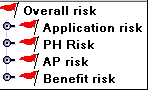
A substandard assessment result for a person can result from a minor assured person, from missing signatures, the AIDS risk of the person, etc. Please note, that in the risk-hierarchy the person-risk (AP risk or PH risk) is at the same level as the Benefit risk. This means that the person result is independent from the benefit. A person might be assessed as Standard, but be declined for a special benefit. Thus the evaluation of the benefit results is also very important.
Read out the results for a benefit
The result for a benefit is defined by the ResultLevel of a CaseRisk with RiskTypeId 36 (see Overview of existing RiskTypes).
<CaseRisk RiskTypeIdName="benefit risk"
          ResultLevelIdName="request information"
          RiskTypeId="36"
          Id="14"
          ResultLevelId="3">
</CaseRisk>
In this example the result for the benefit is a request of information. A CaseRisk for each benefit does exist; only via the RiskCaseObjectRelation we can know the Benefit related to this result.
<RiskCaseObjectRelation To="0" From="14"></RiskCaseObjectRelation>
<RiskCaseObjectRelation To="1" From="14"></RiskCaseObjectRelation>
In this case there are 2 relations going out from the benefit-CaseRisk, one to the CaseObject with the ID 0 and one to the CaseObject with the ID 1. The CaseObject with ID 0 is again the Application, and the CaseObject with the ID 1 is the Benefit “Life”. It can be found in the Result Interface, and could look as follows:
<Benefit Id="1" TypeId="0" TypeIdName="applied Benefit">
  <CaseAttribute TypeId="11" TypeIdName="benefit-types">
    <CaseAttributeValue>
      <DBRefValue Name="Life" Id="0" />
    </CaseAttributeValue>
  </CaseAttribute>
  ...
</Benefit>
The benefit risk consists of one or more event risks which are represented in the Result Interface by CaseRisks of RiskType “9”.
<CaseRisk RiskTypeIdName="event risk"
          ResultLevelIdName="request information"
          RiskTypeId="9"
          Id="141"
          ResultLevelId="3" />
Each event risk is related to an event and an assured person (and obviously also to the Benefit and the application). This is represented by RiskCaseObjectRelations to these four CaseObjects:
<RiskCaseObjectRelation To="3" From="141" />  <!-- refers to an event -->
<RiskCaseObjectRelation To="2" From="141" />  <!-- refers to a person -->
<RiskCaseObjectRelation To="0" From="141" />  <!-- refers to application -->
<RiskCaseObjectRelation To="1" From="141" />  <!-- refers to the benefit -->
This structure is used also in sub-risks, to show the relation between the sub-risk and its super-risks. E.g. the event risk has the sub risk “medical risk” which is represented by a CaseRisk with RiskTypeId “25”. This CaseRisk has outgoing RiskCaseObjectRelations to the same CaseObjects as the super event risk plus one RiskCaseObjectRelation to the CaseObject representing the medical risk. Following with our example this would give us:
<RiskCaseObjectRelation To="3" From="1415" />   <!-- refers to an event -->
<RiskCaseObjectRelation To="2" From="1415" />   <!-- refers to a person -->
<RiskCaseObjectRelation To="0" From="1415" />   <!-- refers to application -->
<RiskCaseObjectRelation To="1" From="1415" />   <!-- refers to the benefit -->
<RiskCaseObjectRelation To="5" From="1415" />   <!-- refers to the medical risk CaseObject -->
Another way to find the relation between super CaseRisk and sub CaseRisk is via the IDs of the CaseRisks: The sub CaseRisks IDs start with the ID-String of the super CaseRisk. In our example:
Benefit CaseRisk ID 		= 14

Event CaseRisk ID			= 141

Medical risk CaseRisk ID	= 1415
Sub-risks of the event risk (medical risk, special risk, over/underweight, pursuit risk, etc) can only be found in the Result Interface if these risks are not Standard. Each of the risks under the event risk has a relation to the Benefit, the event and the person. For each of these non-standard CaseRisks a result can be found as specified in General procedure.
DTD
Every Result Interface is represented by the XML-element Result. The DTDs for Result and all elements included in a Result are listed below. Some of the elements like CaseAttributes or the Values exist in the Input Interface, too. Please notice that the DTD for these elements can be different in both interfaces.
<!ELEMENT Result (CaseRisk?, RiskCaseObjectRelation?, CaseObject?, Benefit?, EventPayment?, Payment?)*>
<!ELEMENT Result (CaseRisk?, RiskCaseObjectRelation?, CaseObject?, Benefit?, EventPayment?, Payment?)*>
<!ATTLIST Result
	Id CDATA #REQUIRED
	CSP CDATA #REQUIRED
	Locale CDATA #REQUIRED
	NumberOfSourceChanges CDATA #REQUIRED
	NumberOfChangeAssessCycles CDATA #REQUIRED
	ResultLevelId CDATA #REQUIRED
	ResultLevelIdName CDATA #IMPLIED
	PolicyCanBeIssued (Yes | No) #IMPLIED
	AssessmentDate CDATA #REQUIRED
	PatchID CDATA #IMPLIED
	PatchName CDATA #IMPLIED
	VersionID CDATA #IMPLIED
	VersionName CDATA #IMPLIED
>
<!ELEMENT CaseRisk (CaseResult*)>
<!ATTLIST CaseRisk
	Id CDATA #REQUIRED
	RiskTypeId CDATA #REQUIRED
	RiskTypeIdName CDATA #IMPLIED
	ResultLevelId CDATA #REQUIRED
	ResultLevelIdName CDATA #IMPLIED
	RiskText CDATA #IMPLIED
>
<!ELEMENT CaseResult ((CaseResultAttribute?, MissingInfo?, Explanation?)*)>
<!ATTLIST CaseResult
	Id CDATA #REQUIRED
	ResultTypeId CDATA #REQUIRED
	ResultTypeIdName CDATA #IMPLIED
	ResultLevelId CDATA #REQUIRED
	ResultLevelIdName CDATA #IMPLIED
	SuppressedById CDATA #IMPLIED
	SuppressedByType (Consolidated | Subsumed) #IMPLIED
>
<!ELEMENT CaseResultAttribute (AttributeValue)>
<!ATTLIST CaseResultAttribute
	ResultAttributeTypeId CDATA #REQUIRED
	ResultAttributeTypeIdName CDATA #IMPLIED
>
<!ELEMENT AttributeValue (BoolValue | DateValue | DualValue | AggregateValue | SingleValue | PeriodValue | StringValue | DBRefValue | CORefValue | ListValue)?>
<!ELEMENT MissingInfo EMPTY>
<!ATTLIST MissingInfo
	CaseAttributeTypeId CDATA #REQUIRED
	CaseAttributeTypeIdName CDATA #IMPLIED
	SourceTypeId CDATA #IMPLIED
	SourceTypeIdName CDATA #IMPLIED
	CaseObject CDATA #REQUIRED
>
<!ELEMENT Explanation EMPTY>
<!ATTLIST Explanation
	ExpressionClass CDATA #REQUIRED
	ExpressionId CDATA #REQUIRED
	Addition (None | Negative | Unknown) "None"
	PersistentExplanationId CDATA #IMPLIED
	Text CDATA #IMPLIED
>
<!ELEMENT RiskCaseObjectRelation EMPTY>
<!ATTLIST RiskCaseObjectRelation
	From CDATA #REQUIRED
	To CDATA #REQUIRED
>
<!ELEMENT Case (Source+, PosRequest*, (CaseObject | Benefit | Payment | EventPayment | CaseObjectRelation)*)>
<!ATTLIST Case
	Id CDATA #REQUIRED
	CSP CDATA #REQUIRED
	NumberOfSourceChanges CDATA #IMPLIED
	CaseMode (POS | HeadOffice | FORM) #REQUIRED
	Locale CDATA #REQUIRED
	Complete (Yes | No) #IMPLIED
	PatchID CDATA #IMPLIED
	PatchName CDATA #IMPLIED
	VersionID CDATA #IMPLIED
	VersionName CDATA #IMPLIED
>
<!ELEMENT Source EMPTY>
<!ATTLIST Source
	Id CDATA #REQUIRED
	TypeId CDATA #REQUIRED
	TypeIdName CDATA #IMPLIED
	RelatedCaseObject CDATA #REQUIRED
	DefaultSource (Yes | No) #IMPLIED
	Complete (Yes | No) #IMPLIED
>
<!ELEMENT PosRequest (IdBeforeTermChange?)>
<!ATTLIST PosRequest
	Id CDATA #REQUIRED
	ModuleId CDATA #REQUIRED
	ModuleName CDATA #IMPLIED
	GeneratedInSource CDATA #REQUIRED
	RelatedCaseObject CDATA #REQUIRED
	SuppressedByAskedOnce CDATA #IMPLIED
	SuppressedByResult (Yes | No) #IMPLIED
	CancelledAtNode CDATA #IMPLIED
	GeneratedByModuleChange CDATA #IMPLIED
>
<!ELEMENT IdBeforeTermChange (DBRefValue)>
<!ELEMENT CaseObjectRelation EMPTY>
<!ATTLIST CaseObjectRelation
	From CDATA #REQUIRED
	To CDATA #REQUIRED
	TypeId CDATA #REQUIRED
	TypeIdName CDATA #IMPLIED
>
<!ELEMENT CaseObject (CaseAttribute*)>
<!-- Locale and AddedByPosRequest are only used in case not in result -->
<!-- There must be at least one CaseAttribute unless the CaseObject identifies -->
<!-- with another case object with attributes specified -->
<!ATTLIST CaseObject
	Id CDATA #REQUIRED
	TypeId CDATA #REQUIRED
	TypeIdName CDATA #IMPLIED
	Identifies CDATA #IMPLIED
	Locale CDATA #IMPLIED
	AddedByPOSRequest CDATA #IMPLIED
	NotDeletable (true | false) #IMPLIED
>
<!ELEMENT Benefit (CaseAttribute*)>
<!-- Locale and AddedByPosRequest are only used in case not in result -->
<!-- There must be at least one CaseAttribute unless the CaseObject identifies -->
<!-- with another case object with attributes specified -->
<!ATTLIST Benefit
	Id CDATA #REQUIRED
	TypeId CDATA #REQUIRED
	TypeIdName CDATA #IMPLIED
	Identifies CDATA #IMPLIED
	Locale CDATA #IMPLIED
	AddedByPOSRequest CDATA #IMPLIED
>
<!ELEMENT EventPayment (CaseAttribute*)>
<!-- Locale and AddedByPosRequest are only used in case not in result -->
<!-- There must be at least one CaseAttribute unless the CaseObject identifies -->
<!-- with another case object with attributes specified -->
<!ATTLIST EventPayment
	Id CDATA #REQUIRED
	TypeId CDATA #REQUIRED
	TypeIdName CDATA #IMPLIED
	Identifies CDATA #IMPLIED
	Locale CDATA #IMPLIED
	AddedByPOSRequest CDATA #IMPLIED
>
<!ELEMENT Payment (CaseAttribute*)>
<!-- Locale and AddedByPosRequest are only used in case not in result -->
<!ATTLIST Payment
	Id CDATA #REQUIRED
	TypeId CDATA #REQUIRED
	TypeIdName CDATA #IMPLIED
	Identifies CDATA #IMPLIED
	Locale CDATA #IMPLIED
	AddedByPOSRequest CDATA #IMPLIED
>
<!ELEMENT CaseAttribute (CaseAttributeValue+)> <!-- in result there is exactly one value per attribute -->
<!ATTLIST CaseAttribute
	TypeId CDATA #REQUIRED
	TypeIdName CDATA #IMPLIED
	Last (true | false) #IMPLIED
>
<!ELEMENT CaseAttributeValue (BoolValue | DateValue | DualValue | AggregateValue | SingleValue | PeriodValue | StringValue | DBRefValue | CORefValue | ListValue)?>
 <!-- Source and TemporalDescription are only used in case not in result -->
<!ATTLIST CaseAttributeValue
	Source CDATA #IMPLIED
	TemporalDescription CDATA #IMPLIED
	Time CDATA #IMPLIED
>
<!ELEMENT BoolValue EMPTY>
<!ATTLIST BoolValue
	Value (true | false) #REQUIRED
>
<!ELEMENT DateValue EMPTY>
<!ATTLIST DateValue
	Year CDATA #IMPLIED
	Month CDATA #IMPLIED
	Day CDATA #IMPLIED
>
<!ELEMENT DualValue EMPTY>
<!ATTLIST DualValue
	Value1 CDATA #REQUIRED
	Value2 CDATA #REQUIRED
	Unit CDATA #REQUIRED
	UnitName CDATA #IMPLIED
>
<!ELEMENT AggregateValue EMPTY>
<!ATTLIST AggregateValue
	Value1 CDATA #REQUIRED
	Value2 CDATA #REQUIRED
	Unit CDATA #REQUIRED
	UnitName CDATA #IMPLIED
>
<!ELEMENT SingleValue EMPTY>
<!ATTLIST SingleValue
	Value CDATA #REQUIRED
	Unit CDATA #IMPLIED
	UnitName CDATA #IMPLIED
>
<!ELEMENT PeriodValue (DateFrom?, DateTo?, Duration?)>
<!ELEMENT DateFrom (DateValue)>
<!ELEMENT DateTo (DateValue)>
<!ELEMENT Duration (SingleValue)>
<!ELEMENT StringValue EMPTY>
<!ATTLIST StringValue
	Value CDATA #REQUIRED
>
<!ELEMENT DBRefValue EMPTY>
<!ATTLIST DBRefValue
	Name CDATA #IMPLIED
	Id CDATA #IMPLIED
	Key CDATA #IMPLIED
	Locale CDATA #IMPLIED
>
<!ELEMENT CORefValue EMPTY>
<!ATTLIST CORefValue
	Value CDATA #REQUIRED
>
<!ELEMENT ListValue (BoolValue* | DateValue* | DualValue* | (AggregateValue | SingleValue)* | PeriodValue* | StringValue* | DBRefValue* | CORefValue* | ListValue*)>
Data Model of the Result Interface
The following data model shows the dependencies between the XML-elements of the Result Interface. You will find all previously described XML-elements and the dependencies between them.
Every shown relation has a cardinality with the following denotation:
0..1 the FROM-object contains at most one TO-object (not required here)
0..n the FROM-object contains any number of TO-objects
1 the FROM-object contains exactly one TO-object
1..n the FROM-object contains at least one TO-object (not required here)
Example:
Every CaseAttribute has exactly one CaseAttributeValue. Therefore the relation between CaseAttribute and CaseAttributeValue has a cardinality of 1.
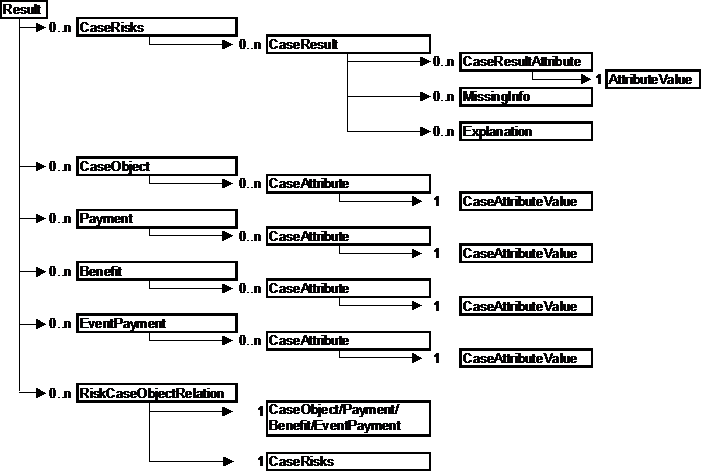
In fact a Result has to contain at least 5 CaseRisks, 1 for each of the always-present risks Application risk, Benefit risk, AP risk, PH risk and Event risk.
Data Types
The tables in the subchapters are as up-to-date as possible. As each client is able to create more terms, the IDs for those new terms cannot be included in the lists. IDs of Objects referenced in the Result Interface describes how to get the complete list of terms and IDs valid in your environment.
Overview of existing RiskTypes
Each RiskType is shown with its ID and name. The RiskTypes can also be found in the risk-hierarchy of the maintenance program, showing the hierarchy between them.
| ID | Text | Text German |
|---|---|---|
0 |
Over-/Underweight |
Über-/Untergewicht |
1 |
Financial limits |
finanzielle Grenzen |
2 |
Pursuit combination |
Sportkombination |
3 |
Occupation risk |
Berufliches Risiko |
5 |
Alcohol |
Alkohol |
6 |
Disorder |
Erkrankung |
7 |
Legal risk AP |
Recht VP |
8 |
Foreign travel according to DB |
Ausland nach DB |
9 |
Event risk |
Ereignisrisiko |
10 |
Special constellations |
besondere Konstellationen |
11 |
Legal risk |
rechtliches Risiko |
12 |
Financial assessment |
Finanzielle Prüfung |
13 |
Non-Medical risk |
Sonderrisiko |
14 |
Foreign travel general |
Ausland allgemein |
15 |
Smoking |
Nikotin |
16 |
Nationality according to DB |
Nationalität nach DB |
17 |
Nationality risk |
Nationalitätsrisiko |
18 |
Basic person risk |
Basis Personen Risiko |
19 |
Occupations combination |
Berufskombination |
20 |
Disorder according to DB |
Erkrankung nach DB |
21 |
Overall risk |
Gesamtrisiko |
22 |
AP risk |
VP Risiko |
23 |
PH Risk |
VN Risiko |
24 |
Application risk |
Antragsrisiko |
25 |
Medical risk |
Medizinisches Risiko |
26 |
Occupational hazards |
berufliche Gefahren |
27 |
Disorder general |
Erkrankung allgemein |
28 |
Examination limits |
Untersuchungsgrenzen |
30 |
Nationality general |
Nationalität allgemein |
31 |
Foreign travel-combination |
Auslandsreisenkombination |
32 |
Pursuit according to DB |
Sport nach DB |
33 |
Occupation |
Beruf |
34 |
Occupation general |
Beruf allgemein |
35 |
Foreign travel |
Auslandsreise |
36 |
Benefit risk |
Tarifrisiko |
37 |
Legal risk PH |
Recht VN |
38 |
Occupation according to DB |
Beruf nach DB |
39 |
Special agreements |
besondere Vereinbarungen |
40 |
Disorder combination of single disorders |
Erkrankungskombination von Einzelerkr. |
41 |
Formal risk |
formales Risiko |
43 |
Occupation classes according to DB |
Berufsklassen |
44 |
Nationality PH evaluate documents |
Nationalität VN Auswertung Unterlagen |
45 |
Pregnancy |
Schwangerschaft |
46 |
Short-/long sightedness |
Fehlsichtigkeit |
47 |
Financial risk PH |
finanzielles Risiko VN |
48 |
Drug according to DB |
Medikament nach DB |
49 |
Drug combination |
Medikamentenkombination |
50 |
Pursuit general |
Sport allgemein |
51 |
Pursuit |
Sport |
52 |
Event-sum-risk |
Ereignissummenrisiko |
53 |
Drug |
Medikament |
54 |
Drug general |
Medikament allgemein |
55 |
Disorder critical combinations |
Erkrankung kritische Kombinationen |
56 |
Disorder combination total |
Erkrankungskombi gesamt |
57 |
Termination age |
Endalter |
59 |
Family history |
Familienanamnese |
60 |
Sum Needs assessment |
Summen Bedarfsprüfung |
63 |
Plausibility AP |
Plausibilität VP |
64 |
Plausibility PH |
Plausibilität VN |
65 |
Plausibility application |
Plausibilität Antrag |
67 |
Financial POS inquiry |
finanzielle Nachfrage POS |
70 |
Plausibility Beneficiary death |
|
71 |
Plausibility beneficiary maturity |
Overview of existing ResultLevels
The ResultLevels are shown with ID and name, ordered by their ID.
| ID | Text | Text German |
|---|---|---|
0 |
offer |
Angebot |
1 |
standard |
normal |
2 |
defer |
zurückstellen |
3 |
request information |
Info-Anforderung |
4 |
borderline standard |
noch normal |
5 |
refer |
weiterleiten |
6 |
decline |
ablehnen |
7 |
substandard, but acceptable |
erhöht akzeptabel |
Overview of existing ResultAttributeTypes
The ResultAttributeTypes are shown with ID, name and DataType, ordered by their ID.
| ID | Text | Text German | DataType |
|---|---|---|---|
0 |
text |
Text |
DBRefValue – to Hinttext-DB [Hinweistext-DB] |
1 |
General Practitioner Report |
Arztbericht |
DBRefValue – to Document-DB [Unterlagen-DB] |
2 |
Waiting period |
Wartezeit |
SingleValue - Integer ≥ 0 |
3 |
Annual benefit |
Rentenhöhe |
SingleValue - Integer ≥ 0 |
4 |
Extra mortality |
Übersterblichkeitshöhe |
SingleValue – Integer |
5 |
amount |
Betragshöhe |
SingleValue - Integer ≥ 0 |
6 |
loading in percent |
Zuschlagshöhe in Prozent |
SingleValue – Integer |
7 |
termination age |
Endalter |
SingleValue - Integer ≥ 0 and ≤ 150 |
8 |
loading in per mille |
Zuschlagshöhe in Promille |
SingleValue - Integer ≥ 0 |
9 |
questionnaire |
Fragebogen |
DBRefValue – to Document-DB [Unterlagen-DB] |
10 |
medical examination |
ärztliche Untersuchung |
DBRefValue – to Document-DB [Unterlagen-DB] |
11 |
exclusion clause |
Klausel |
DBRefValue – to Exclusion Clause-DB [Klausel-DB] |
13 |
occupational class (key/text) |
Prämienklasse (Schlüssel) |
StringValue – length 80 |
14 |
Reason |
Grund |
DBRefValue – to “Comment for Need Reduction”-DB |
15 |
difference amount |
Differenzbetrag |
SingleValue - Integer ≥ 0 |
16 |
Companies |
Gesellschaften |
ListValue – with DBRefValues of Company-DB [Gesellschafts-DB] |
17 |
Disorder |
Erkrankung |
CORefValue – to a Disorder |
18 |
Number |
Anzahl |
SingleValue - Integer >=0 |
19 |
Person |
Person |
CORefValue – to a Person (AP or PH) |
20 |
Document |
Unterlage |
DBRefValue – to Document-DB [Unterlagen-DB] |
21 |
Doctor |
Arzt |
ListValue – With Doctor-CORefValues |
25 |
Application field 1 |
Antragsfeld 1 |
DBRefValue – to Application Field-DB |
26 |
Application field 2 |
Antragsfeld 2 |
DBRefValue – to Application Field-DB |
27 |
Disorders |
Erkrankungen |
ListValue – With Disorder-CORefValues |
28 |
Drugs |
Medikamente |
ListValue – With Drug-CORefValues |
29 |
Drug |
Medikament |
CORefValue – to a Drug |
30 |
Additional text |
Zusatzangabe |
String Value – length 20 |
32 |
Lien |
SingleValue - Integer |
|
33 |
years |
SingleValue - Integer ≥ 0 |
|
35 |
specified occupation limit |
gesetzte Berufsfestgrenze |
SingleValue - Integer >=0 |
36 |
upgrade shift |
Upgrade erwünscht |
LogicalValue |
37 |
Premium class |
Prämienklasse |
DBRefValue – to Premium Class-DB [Prämienklassen-DB] |
48 |
CI cover |
Deckungselement |
DBRefValue - to CI conditions DB [DD-Deckungs-DB] |
ResultTypes with ResultAttributeTypes
All important ResultTypes with their ID and Text are listed ordered by their ID. The ResultTypes are shown on grey background. For each ResultType the corresponding ResultAttributeTypes are listed also with ID and text directly after the ResultType. Additionally the ResultLevel for each ResultType is listed on the left.
| RL | ID | Text | Text German | Comment |
|---|---|---|---|---|
5 |
0 |
refer |
weiterleiten |
refer to underwriting |
0 |
text |
|||
0 |
2 |
loading in per mille |
Zuschlag in Promille |
loading in per mille |
8 |
loading in per mille |
|||
1 |
4 |
hint |
Hinweis |
hint |
0 |
text |
|||
7 |
5 |
agreed exclusion clause |
akzeptierte Klausel |
agreed exclusion clause is needed |
11 |
exclusion clause |
|||
19 |
Person |
|||
2 |
8 |
defer |
zurückstellen |
application is deferred for a certain period of time |
2 |
Waiting period |
|||
0 |
10 |
waiting period |
Wartezeit |
Waiting period is changed to a new value (only for IP, and disability products) |
2 |
Waiting period |
|||
1 |
11 |
inclusion |
Einschluss |
the risk specified in the following clause is included |
11 |
exclusion clause |
|||
0 |
12 |
extra mortality |
Übersterblichkeit |
self-explanatory |
4 |
Extra mortality |
|||
4 |
13 |
hint on disclaimer |
Hinweis auf Verzicht |
A low rating (e.g. loading, lien) has been waived. Result is Nearly standard |
0 |
text |
|||
0 |
14 |
reduction of annual benefit |
Rentenreduzierung |
the annual benefit is reduced to a new value |
3 |
Annual benefit |
|||
14 |
Reason |
|||
1 |
15 |
step by step |
Zug um Zug |
step by step (missing information is attached as MissingInfo XML-objects) |
0 |
18 |
loading in percent |
Zuschlag in Prozent |
self-explanatory |
6 |
loading in percent |
|||
7 |
19 |
agreed Loading in percent |
akzeptierter Zuschlag in Prozent |
agreed loading in percent is needed |
0 |
text |
|||
6 |
loading in percent |
|||
6 |
20 |
decline |
Ablehnung |
self-explanatory |
0 |
text |
|||
0 |
21 |
termination age for insurance |
Endalter für Versicherung |
termination age has been changed |
7 |
termination age |
|||
1 |
22 |
with reservation |
Vorbehalt |
!! For POS only !! |
0 |
23 |
sum-reduction |
Summenbegrenzung |
the sum assured is reduced to a smaller value |
5 |
amount |
|||
0 |
24 |
termination age for payment |
Endalter für Leistung |
termination age for the payment is reduced |
7 |
termination age |
|||
0 |
26 |
exclusion clause |
Klausel |
self-explanatory |
11 |
exclusion clause |
|||
1 |
29 |
hint on occupation class |
Hinweis auf Prämienklasse |
the calculated occupation class appears in the result. Does only appear if required so by a CSP |
13 |
occupation class (key/text) |
|||
5 |
30 |
refer due to annual benefit |
Weiterleiten wegen Rentenhöhe |
self-explanatory |
0 |
text |
|||
14 |
Reason |
|||
15 |
difference amount |
|||
3 |
32 |
request information from association registry |
Sonderwagnisanfrage |
historical (UK specific) |
9 |
questionnaire |
|||
16 |
Companies |
|||
7 |
33 |
agreed Loading per mille |
akzeptierter Zuschlag Promille |
agreed loading in per mille is needed |
0 |
text |
|||
8 |
loading in per mille |
|||
0 |
34 |
extra mortality for disorder |
Übersterblichkeit für Erkrankung |
extra mortality for a consolidated disorder |
4 |
Extra mortality |
|||
17 |
Disorder |
|||
18 |
Number |
can be ignored; number of disorders leading to this result |
||
0 |
35 |
loading percent for disorder |
Zuschlag Prozent für Erkrankung |
loading in percent for a consolidated disorder |
6 |
loading in percent |
|||
17 |
Disorder |
|||
18 |
Number |
can be ignored; number of disorders leading to this result |
||
3 |
38 |
questionnaire for person |
Fragebogen für Person |
self-explanatory |
9 |
questionnaire |
|||
19 |
Person |
|||
3 |
39 |
medical examination for person |
ärztliche Untersuchung für Person |
self-explanatory |
10 |
medical examination |
|||
19 |
Person |
|||
5 |
40 |
refer to company doctor for person |
Vorlage Gesellschaftsarzt für Person |
refer to companies doctor |
19 |
Person |
|||
5 |
42 |
attached document evaluate |
beigefügte Unterlage auswerten |
the attached document should be evaluated |
19 |
Person |
|||
20 |
Document |
|||
5 |
43 |
attached document superfluous |
beigefügte Unterlage überflüssig |
the attached document is not needed |
19 |
Person |
|||
20 |
Document |
|||
5 |
44 |
refer due to incompleteness |
weiterleiten wegen Unvollständigkeit |
refer, and all missing fields are passed as XML MissingInfo objects |
3 |
46 |
inquiry at client |
Nachfrage beim Kunden |
request information; the missing answers (fields) are passed as XML-MissingInfo objects |
3 |
49 |
general Practitioner Report (single) |
Arztbericht (einzeln) |
self-explanatory |
1 |
General Practitioner Report |
|||
17 |
Disorder |
|||
19 |
Person |
|||
29 |
Drug |
|||
3 |
51 |
accumulative-GPR |
Sammel-Arztbericht |
self-explanatory |
1 |
General Practitioner Report |
|||
19 |
Person |
|||
21 |
Doctor |
|||
27 |
Disorders |
|||
28 |
Drugs |
|||
1 |
52 |
hint with annual benefit |
Hinweis mit Rentenhöhe |
hint with a reference to the annual benefit |
0 |
text |
|||
3 |
Annual benefit |
|||
5 |
58 |
refer because of incompleteness (with application fields) |
Weiterleiten wegen Unvollständigkeit (mit Antragsfeldern) |
refer because some answers (fields) have not been given |
0 |
text |
|||
25 |
Application field 1 |
|||
26 |
Application field 2 |
|||
3 |
59 |
inquiry at client (with application fields) |
Nachfrage beim Kunden (mit Antragsfeldern) |
self-explanatory |
0 |
text |
|||
25 |
Application field 1 |
|||
26 |
Application field 2 |
|||
1 |
60 |
step by step (with application fields) |
Zug um Zug (mit Antragsfeldern) |
step by step result, with specific fields |
0 |
text |
|||
25 |
Application field 1 |
|||
26 |
Application field 2 |
|||
5 |
67 |
agreed exclusion clause superfluous |
akzeptierte Klausel überflüssig |
self-explanatory |
11 |
exclusion clause |
|||
5 |
71 |
refer with addendum |
Weiterleiten mit Zusatz |
a refer with two texts |
0 |
text |
|||
30 |
Additional text |
|||
0 |
77 |
lien |
self-explanatory, typically only for Saving benefits |
|
32 |
lien |
|||
0 |
78 |
age increase |
a modification of the age |
|
33 |
years |
|||
3 |
208 |
medical examination already agreed to |
request a medical examination which the client already agreed to do |
|
19 |
Person |
|||
20 |
Document |
|||
5 |
209 |
document already available |
a document to be requested is already available, thus it has to be evaluated → REFER |
|
19 |
Person |
|||
20 |
Document |
|||
3 |
211 |
inquiry at client (with text) |
request an information from the client which is not related to a specific field |
|
0 |
text |
|||
5 |
212 |
refer with application field |
weiterleiten mit Antragsfeld |
self-explanatory |
0 |
text |
|||
25 |
Application field 1 |
|||
26 |
Application field 2 |
|||
0 |
237 |
exclusion of cover |
Ausschluss Deckungselement |
|
48 |
CI cover |
There are also the ResultTypes with IDs 9, 31, 47, and 48, that can appear in the Result Interface, but can be ignored when analysing the Result Interface.
Overview of existing Explanations
The available Explanations are shown with ID and name, ordered by their ID.
Please note that with the COMPASS maintenance program updates of the Explanations are possible. Only the Explanations included in the standard delivery are listed:
| ID | Text |
|---|---|
1001 |
travel to at-risk area |
1003 |
at-risk occupation |
1004 |
way of infection |
1005 |
marital status: single |
1006 |
sex: male |
1007 |
at-risk nationality |
1008 |
residing in major city |
1009 |
HIV positive |
1010 |
proposer and life to be assured both male |
1011 |
suspicious beneficiary |
1012 |
suspicious signature |
1013 |
suspicious sum assured |
1015 |
disorder suggestive of AIDS symptoms |
1016 |
partner is HIV positive |
1018 |
business partner is HIV positive |
1019 |
life assured male, premiums paid by male individual |
1020 |
joint life, both lives male |
1023 |
Age unknown |
1025 |
at-risk age group |
1027 |
no foreign travel in at-risk country |
1030 |
AP and accountholder have both the same name |
1031 |
AP and account holder have different names |
1032 |
AP and account holder have both the same gender |
1033 |
AP and account holder have different gender |
1034 |
account holder is no application person |
1035 |
account holder is application person |
1036 |
Occupation ok |
1037 |
AP female |
1038 |
other beneficiary for maturity |
1039 |
no Other Beneficiary for maturity |
1040 |
Gender of the beneficiary maturity is unknown |
1041 |
Gender of the beneficiary maturity is known |
1042 |
no further organisations as beneficiaries maturity |
1043 |
other Organisation for beneficiary maturity |
1044 |
other beneficiary for Death |
1045 |
no other beneficiary for Death |
1046 |
Gender of the beneficiary Death is known |
1047 |
Gender of the beneficiary Death is unknown |
1048 |
other Organisation for beneficiary Death |
1049 |
no other organisation for beneficiary Death |
1050 |
Drug/ illegal drug-question answered with Yes |
1054 |
no at-risk age group |
1055 |
AP male |
1056 |
AP not male |
1059 |
local residence |
1060 |
HIV-negative |
1061 |
no noticeable signature |
1062 |
AIDS: no at-risk nationality |
1065 |
no partner is HIV-positive |
1066 |
Name of the beneficiary maturity unknown |
1067 |
Name of the beneficiary maturity known |
1068 |
Beneficiary maturity male |
1069 |
Beneficiary maturity not male |
1070 |
Name of the beneficiary Death unknown |
1071 |
Name of the beneficiary Death known |
1072 |
Beneficiary Death male |
1073 |
Beneficiary Death not male |
1074 |
no business partner is HIV-positive |
1076 |
Disorder inconspicuous in relation to HIV |
1079 |
no exclusive AP |
1080 |
exclusive AP |
1081 |
Exclusivity of the AP not determinable |
1082 |
Gender of the AP is not determinable |
1083 |
Gender PH irrelevant |
1084 |
Gender PH not determinable |
1085 |
Beneficiary Death not female |
1086 |
Beneficiary Death female |
1087 |
Beneficiary maturity female |
1088 |
Beneficiary maturity not female |
1089 |
AP not female |
1090 |
residence of AP unknown |
1091 |
no local residence |
1092 |
no residing in major city |
1093 |
residing in major city unknown |
1094 |
marital status: not single |
1095 |
marital status unknown |
1096 |
marital status: married |
1097 |
pursuit as an amateur |
1098 |
pursuit as a professional |
1099 |
unknown amateur status |
1100 |
exercising outside domestic residence |
1101 |
exercising only at domestic residence |
1102 |
exercising outside domestic residence is unknown |
1103 |
minimum time elapsed adhered to |
1104 |
minimum time elapsed not adhered to |
1105 |
time elapsed not available |
1106 |
maximum duration adhered to |
1107 |
maximum duration not adhered to |
1108 |
maximum duration not available |
1109 |
suitable residence |
1110 |
no suitable residence |
1111 |
unknown residence |
1112 |
duration of stay ok |
1113 |
duration of stay too long |
1114 |
unknown duration of stay |
1118 |
no business trips |
1119 |
business trips ok |
1120 |
unknown business trips |
IDs of Objects referenced in the Result Interface
In the current chapter several objects that are required for decoding the interface are listed with their IDs. As these lists can only momentarily be up to date, COMPASS offers a utility that prints all required objects together with their ID. This comprises the CaseAttributeTypes, CaseObjectTypes, etc, but also all groups described in the current chapter, like Explanations, ResultAttributeTypes, etc.
Please check the database documentation for the utility PrintIDs.
Example of a Result Interface
The example case shown in this chapter is a 33-year-old person applying for a life benefit of 50000 Pounds, and the main risk of the case is, that the weight of the assured person is not mentioned in the application (and therefore not in the Input Interface). Thus a MissingInfo and a ResultType called “inquiry at client” can be found in the Result Interface.
The CaseObjects are: Application, Assured Person (=Policy Holder), the Life benefit, and the event “Death”.
The risks described in the Result Interface are:
-
Overall risk
-
Application risk
-
Assured person risk
-
Plausibility AP risk
-
Policy holder risk
-
Benefit risk
-
Event risk
For each of these risks a result is given. As the weight information is required, the overall result is “Policy can not be issued”.
The Result Interface
<?xml version="1.0" standalone="yes" ?>
<Result ResultLevelIdName="request information"
        NumberOfChangeAssessCycles="2"
        PolicyCanBeIssued="No" CSP="1" AssessmentDate="20030327135754"
        Id="SimpleCase" Locale="en" ResultLevelId="3"
        NumberOfSourceChanges="3">

  <CaseObject Id="3" TypeId="27" TypeIdName="AP">
    <CaseAttribute TypeId="307" TypeIdName="id_no (person)">
      <CaseAttributeValue>
        <StringValue Value="007" />
      </CaseAttributeValue>
    </CaseAttribute>
    <CaseAttribute TypeId="44" TypeIdName="name">
      <CaseAttributeValue>
        <StringValue Value="Miller" />
      </CaseAttributeValue>
    </CaseAttribute>
    <CaseAttribute TypeId="61" TypeIdName="nationality">
      <CaseAttributeValue>
        <DBRefValue Name="United Kingdom" Key="GB" Locale="en" />
      </CaseAttributeValue>
    </CaseAttribute>
  </CaseObject>

  <CaseObject Id="0" TypeId="25" TypeIdName="Application">
    <CaseAttribute TypeId="0" TypeIdName="apply_key">
      <CaseAttributeValue>
        <StringValue Value="SimpleCase" />
      </CaseAttributeValue>
    </CaseAttribute>
  </CaseObject>

  <CaseObject TypeIdName="PH" Id="5" TypeId="28" Identifies="3">
    <CaseAttribute TypeId="307" TypeIdName="id_no (person)">
      <CaseAttributeValue>
        <StringValue Value="007" />
      </CaseAttributeValue>
    </CaseAttribute>
    <CaseAttribute TypeId="44" TypeIdName="name">
      <CaseAttributeValue>
        <StringValue Value="Miller" />
      </CaseAttributeValue>
    </CaseAttribute>
    <CaseAttribute TypeId="61" TypeIdName="nationality">
      <CaseAttributeValue>
        <DBRefValue Name="United Kingdom" Key="GB" Locale="en" />
      </CaseAttributeValue>
    </CaseAttribute>
  </CaseObject>

  <Benefit Id="1" TypeId="0" TypeIdName="Benefit">
    <CaseAttribute TypeId="11" TypeIdName="benefit-type">
      <CaseAttributeValue>
        <DBRefValue Name="Life" Id="0" />
      </CaseAttributeValue>
    </CaseAttribute>
    <CaseAttribute TypeId="108" TypeIdName="name (benefit)">
      <CaseAttributeValue>
        <StringValue Value="LifeBenefit" />
      </CaseAttributeValue>
    </CaseAttribute>
    <CaseAttribute TypeId="383" TypeIdName="DERIVED Benefit-type internal">
      <CaseAttributeValue>
        <DBRefValue Name="Life" Id="0" />
      </CaseAttributeValue>
    </CaseAttribute>
  </Benefit>

  <EventPayment Id="2" TypeId="1" TypeIdName="Insurance event payment">
    <CaseAttribute TypeId="161" TypeIdName="Eventtype">
      <CaseAttributeValue>
        <DBRefValue Name="Death" Id="2" />
      </CaseAttributeValue>
    </CaseAttribute>
  </EventPayment>

  <CaseRisk RiskTypeIdName="Overall risk"
            ResultLevelIdName="request information" RiskTypeId="21"
            Id="1" ResultLevelId="3" />
  <RiskCaseObjectRelation To="0" From="1" />

  <CaseRisk RiskTypeIdName="Application risk"
            ResultLevelIdName="standard" RiskTypeId="24"
            Id="11" ResultLevelId="1" />
  <RiskCaseObjectRelation To="0" From="11" />

  <CaseRisk RiskTypeIdName="PH Risk"
            ResultLevelIdName="standard" RiskTypeId="23"
            Id="12" ResultLevelId="1" />
  <RiskCaseObjectRelation To="5" From="12" />
  <RiskCaseObjectRelation To="0" From="12" />

  <CaseRisk RiskTypeIdName="AP risk"
            ResultLevelIdName="request information" RiskTypeId="22"
            Id="13" ResultLevelId="3" />
  <RiskCaseObjectRelation To="3" From="13" />
  <RiskCaseObjectRelation To="0" From="13" />

  <CaseRisk RiskTypeIdName="Plausibility AP"
            ResultLevelIdName="request information" RiskTypeId="63"
            Id="131" ResultLevelId="3">
    <CaseResult ResultLevelIdName="request information"
                ResultTypeIdName="inquiry at client" Id="1"
                ResultLevelId="3" ResultTypeId="46">
      <MissingInfo CaseObject="3" CaseAttributeTypeId="36"
                   CaseAttributeTypeIdName="weight" />
    </CaseResult>
  </CaseRisk>
  <RiskCaseObjectRelation To="3" From="131" />
  <RiskCaseObjectRelation To="0" From="131" />

  <CaseRisk RiskTypeIdName="Benefit risk"
            ResultLevelIdName="standard" RiskTypeId="36"
            Id="14" ResultLevelId="1" />
  <RiskCaseObjectRelation To="1" From="14" />
  <RiskCaseObjectRelation To="0" From="14" />

  <CaseRisk RiskTypeIdName="Event risk"
            ResultLevelIdName="standard" RiskTypeId="9"
            Id="141" ResultLevelId="1" />
  <RiskCaseObjectRelation To="3" From="141" />
  <RiskCaseObjectRelation To="2" From="141" />
  <RiskCaseObjectRelation To="0" From="141" />
  <RiskCaseObjectRelation To="1" From="141" />
</Result>