Input Interface
Introduction
This document describes the structure of the XML Input Interface and its components. Besides of the general design, datatypes and lengths of the fields you will find examples of typical objects (disorders, person, benefits, etc) and how to insert them into the interface.
|
Please note that from on COMPASS version 6.2, COMPASS also provides a REST-API to create an Input Interface for a Case. A detailed documentation can be found here: Create Case in DB |
Used documentation
Additional documentation:
Result Interface Description – The Result Interface has a similar structure as the Input Interface. The description is analogue to this document.
Terminology
In the following chapters you will be confronted with the following terms:
| Object | TypeDef of Object (if any) |
|---|---|
|
|
|
|
|
|
|
These terms are described in detail in the next chapters, but it might be useful to have a simple understanding right from the beginning:
CaseObjectTypes are: Disorder, Pursuit, Benefit, Policy Holder, Assured Person, etc. (this is not completely correct: Benefit is a Benefitdescription, and there are the other specifications EventPaymentDescription and PaymentDescription, which will be treated as CaseObjectTypes in this introduction).
The Input Interface has to collect all data recorded during the input process: disorders like asthma and cough, a policy holder called John Smith, an assured person called Peter Miller, a hobby called golf, a benefit called “Endowment”, etc.
These “things” called asthma, cough, John Smith, Peter Miller, golf, and Endowment are CaseObjects. Each of these CaseObjects is of one CaseObjectType: asthma is a disorder, John Smith is a Policy Holder, Endowment is a Benefit, etc.
At this moment we do not know who had asthma, therefore we describe a relation between the assured person Peter Miller and the disorder asthma. This relation is a CaseObjectRelation, and it means: Assured person Peter Miller has had the disorder asthma. Only certain relations make sense to COMPASS, so does “Assured person has disorder”, or “benefit has policy holder”, but not “pursuit has disorder”. The relations allowed are those described as CaseObjectTypeRelations.
The CaseObjectTypeRelation also describes how often a relation can exist, e.g. it is possible to restrict the number of policy holders (PH) for a benefit, by defining the CaseObjectTypeRelation Benefit has PH as a relation of cardinality n:1.
For most CaseObjects there are describing attributes, like gender=male, height=178 cm, weight=75 kg for Peter Miller, or the duration = 1 week of the cough, or hospitalisation = yes for asthma. These attributes are called CaseAttributes. Not all attributes are allowed for every CaseObjectType, e.g. disorder allows the attribute hospitalisation(yes/no), but not the attribute sum assured, which makes sense for a benefit. The allowed attributes for a CaseObjectType are described as CaseAttributeTypes that are related to a CaseObjectType.
Every CaseAttribute can have one or more values, or a value with a unit. The precise value is described as a CaseAttributeValue, and can be a String, an Integer, a real number, a selection text (like yes/no), etc.
Mainly we can say:
-
CaseObjectTypes,CaseAttributeTypesandCaseObjectTypeRelationsdescribe what is allowed in the Input Interface, and -
CaseObjects,CaseAttributes,CaseObjectRelationsandCaseAttributeValuesare the terms that are used within the interface.
Besides of these COMPASS related terms, some terms related to the XML structure of the interface are used in this documentation. The reader of this document should have at least basic knowledge of DTDs and XML. This knowledge is indispensable for the person responsible in populating the Input Interface.
Another term used in this documentation is locale. This term denotes a string, or an object, defining a country and a language. Subtypes of languages in one country are of no interest. Sometimes only the language is needed.
Selection types are a number of entries presented in a gui-element like a listbox, or a combo-box, and the user is able to one or more of the entries.
SourceType
A SourceType groups questions (CaseObjectTypes and CaseAttributeTypes) and contains the display information for every screen and every question defined within the SourceType. A Case as described in this documentation consists of one or more SourceTypes, at least one technical SourceType and any number of risk-related SourceTypes.
Populating the interface
General
The Input Interface is the XML structure containing the information COMPASS needs to
-
start capturing application details from the applicant(s) or
-
assess the application or
-
start the case-print
The typical workflow is first a, then b, then c.
To start with a an Input Interface containing the technical data (basic data about the assured person, and the benefits applied for) has to be built by you.
Should you prefer to skip a and start with b then the Input Interface should contain the risk relevant data as well (previously called Dark Mode).
Should you start with a, the Input Interface is filled-up by COMPASS with the information the applicant disclosed. This updated interface is then used for b and/or c.
Independently if your process starts with a or b, you have to build the XML Input Interface.
To define exactly which information should be included in the Input Interface the underwriting department needs to be consulted / involved.
In the next chapter you will find a list of possible CaseObjects, their CaseAttributes and the relations between the CaseObjects that are defined in the case-model.
When running through a in Point of Sale mode (POS Mode) COMPASS is interacting directly with the applicant.
In case COMPASS needs more information to evaluate the risk, COMPASS will trigger POS questionnaires asking additional questions until all necessary information is gathered.
At the end of the capturing process a, COMPASS will create an updated Input Interface that contains some POS-specific elements. These elements (PosRequest) should not be modified by you!
The main XML-element of the Input Interface is called Case. It contains Sources (see SourceType). All questions described in a SourceType should be included in the Input Interface.
This is not strictly required, but has the implicit denotation, that these questions have been asked and have been left unanswered; instead of the implication that the questions were not asked.
If an answer to a question has not been given, the value is not mentioned within the CaseAttributeValue (see DTD of the Input interface), or the CaseAttribute is not inserted at all into the Input Interface.
When inserting numbers into the interface, do not use separator other than “.“ as a decimal separator. This is valid for all languages and/or locales.
While this document deals only with the XML-format, certain services of the COMPASS engine return the Input Interface in JSON format. Differences between XML and JSON are addressed in the document XMLvsJSON.
Structure of the Interface
As mentioned before, the Input Interface is stored in XML format, and is therefore bound to the XML-rules. The elements of the XML-Input Interface, as specified in the DTD in the next chapter, are described in detail in the following paragraphs.
Please consider that length-restraints are not given due to the XML-structure of the Input Interface. Nonetheless some questions (CaseAttributeTypes) have a length, when the length is required by internal rules (often numerical values have a range of valid data).
The case described in the Input Interface consists of Sources (see SourceType), which group questions and objects (CaseAttributes and CaseObjects).
Typically there will exist one technical SourceType, describing the benefits (sum insured, duration, etc), some basic data about the persons involved in the application (age, marital status, etc) or details about previous insurances. This data is available from the companies’ administration system and is only passed to COMPASS.
Risk relevant data, which can also be captured via COMPASS, contains personal data about disorders, pursuits, occupation, etc. This information is also typically captured by one risk-relevant SourceType, but can also be captured by several SourceTypes, especially in POS mode.
All the different SourceTypes are represented by Source elements in the Case-element, who is therefore the outermost XML-element:
The Case Element
The XML element Case groups a number of other XML elements, which are explained in this chapter:
-
at least one
Source -
if in POS mode:
PosRequests -
CaseObjects,Benefits,EventPayments,Payments,CaseObjectRelations
The XML Case element consists of the following XML-attributes:
Id - String
The ID of the current application/case
Locale - String
The language of the application (corresponds to the Java-Locale). Use “en” for applications in English
CSP - String
The numerical ID of the CSP-set to be used for the processing this application.
CaseMode - String("POS", "FORM" (deprecated) or "HeadOffice")
Defines the set of rules for the capturing and assessment: Point of Sale or Head-Office.
NumberOfSourceChanges - Integer passed as a String
Do not fill this field. COMPASS fills this field with the number of changes of the Input Interface. Typically you will find only low values here. A high value might show a misuse of the system (lots of data-updates with subsequent assessments).
Complete - String("Yes" or "No")
Do not fill this field. COMPASS fills this field with "Yes" if all data has been captured, and the case can be assessed. Otherwise the field is set to "No", and at least one Source-Element should be incomplete.
PatchID - Integer
ID of the current PATCH element of the Knowledge Data. When no PATCH element exists, this attribute is not included. Attribute is not mandatory, e.g. if Input Interface is built separately from COMPASS. It is set though, when the Input Interface is modified by COMPASS.
PatchName - String
Name (or ID, if no name exists) of the current PATCH element of the Knowledge-Data. If no PATCH element exists, this attribute is not included. Attribute is not mandatory, e.g. when if Input Interface is built separately from COMPASS. It is set though, when the Input Interface is modified by the COMPASS Server.
VersionID - Integer
ID of the current VERSION element of the Knowledge Data. When no VERSION element exists, this attribute is not included. Attribute is not mandatory, e.g. when if Input Interface is built separately from COMPASS. It is set though, when the Input Interface is modified by COMPASS.
VersionName - String
Name (or ID, if no name exists) of the current VERSION element of the Knowledge-Data. If no VERSION element exists, this attribute is not included. Attribute is not mandatory, e.g. when if Input Interface is built separately from COMPASS. It is set though, when the Input Interface is modified by COMPASS.
Example:
<Case	Locale="en"
        CSP="0"
        Complete="Yes"
        NumberOfSourceChanges="2"
        Id="new"
        CaseMode="HeadOffice">
...
</Case>
The Source Element
Every value stored in the interface as a CaseAttributeValue, is related to exactly one Source (SourceType).
The XML element Source consists of the following XML-attributes:
Id - String
An integer value to identify this SourceType, and therefore unique within the Case. This ID is used to associate a CaseAttributeValue via its Source-attribute to a given SourceType (see The CaseAttributeValue Element).
TypeId - Integer
The ID of the SourceType in the knowledge data.
TypeIdName - String
The name of the SourceType. (Optional, as TypeId is the relevant attribute here)
DefaultSource - String (“Yes” or “No”)
In a Case exactly one SourceType has to be defined as the default SourceType. CaseAttributeValues, that have no reference to any SourceType implicitly refer to the default SourceType.
RelatedCaseObject - String (CaseObjectReference)
Reference to the Application CaseObject via its ID.
Complete - String("Yes" or "No")
Do not fill this field. COMPASS fills this field with "Yes" if all data of the current Source has been captured. Otherwise the field is set to "No", and the Source-type should be modified (capture operation) before the case can be assessed.
Example:
<Source Complete="Yes" TypeIdName="ContractDetails" Id="1" DefaultSource="Yes" RelatedCaseObject="0" TypeId="1"></Source>The CaseObject- (Benefit-, Payment-, EventPayment-) Element
CaseObjects group information from a certain context. They contain CaseAttributeValues and are related to each other via CaseObjectRelations. Typical CaseObjects are Assured Person, Application, Policy Holder, Pursuit, Doctor, Occupation, Disorder, Previous Insurance, etc.
There are some Case Objects that describe special data. Benefit-Informations are described via the element Benefit, Contributions via Payment, and Benefit Payments via EventPayment. These XML-elements have different names to differentiate them from other CaseObjects; although they behave in the same way than the other CaseObjects. All have CaseAttributes, CaseAttributeValues and are related to each other via CaseObjectRelations.
The XML elements CaseObject, Benefit, Payment and EventPayment group any number (at least one if the Identifies-attribute is not used) of CaseAttribute-XML elements, which are also explained in this chapter.
The XML elements CaseObject, Benefit, Payment and EventPayment consist of the following XML-attributes:
Id - Integer
Every CaseObject has to contain the Id-attribute. this ID is used for referencing the CaseObject within the interface, and can be assigned freely as long as it is unique within the Case.
When capturing data with COMPASS, this ID is assigned automatically.
TypeId - String
The ID of the CaseObjectType in the Case model (see CaseObjectTypes).
TypeIdName - String
The name of the CaseObjectType in the Case model. (optional, as implied by TypeId)
Locale - String
Language of the CaseObject (corresponds to the Java-Locale). Use “en” for English. If not specified, then the Locale value from the Case-element is taken.
Identifies - String CaseObjectReference
To express that two CaseObjects are identical (e.g. Assured person is also policy holder), create a second CaseObject, which references via this attribute to the ID of the first object.
AddedByPOSRequest - String
This attribute is assigned by COMPASS automatically when running in POS-mode. It describes that this object has been created triggered by a POS-inquiry. It does only exist for CaseObjectTypes (not for BenefitDescriptions, PaymentDescriptions and EventPaymentDescriptions).
NotDeletable - true or false
This attribute is set to true by customers for CaseObjects that should not be deleted or removed during the following capture operation. Should this attribute be missing, or set to another value than true, the CaseObject can be deleted.
Example:
<CaseObject Id="3" TypeId="27" TypeIdName="AP">
...
</CaseObject >
or
<Payment Id="4" TypeId="0" TypeIdName="Contribution">
...
</Payment>
The CaseAttribute Element
Every CaseObject has attributes that are stored in CaseAttributes. A CaseAttribute consists of the description (specified by the CaseAttributeType) and one or more values (the CaseAttributeValues), e.g. the description “residence” and the value “Singapore”.
The XML element CaseAttribute groups a number (at least one) of CaseAttributeValue-XML elements.
The XML element CaseAttribute consists of the following XML-attributes:
TypeId - String
The ID of the CaseAttributeType in the Case model (see CaseAttributeTypes).
TypeIdName - String
The name of the CaseAttributeType in the Case model. (optional, as implied by TypeId)
Last - true or false
This attribute is only set when capturing of this information was done with SB2 protocol, and the current command is SAVE. If the attribute is present and set to true, this means that the last modification was done on this field.
Example:
<CaseAttribute TypeId="262" TypeIdName="Conversion right (y/n)">
...
</CaseAttribute>
The CaseAttributeValue Element
CaseAttributeValues encapsulate a value. The value can be a string, a number, a date, etc.; but also a pointer to an internal database (the YES/NO-database, or the type-of-drink-database), or a period of time. See also DTD of the Input interface.
The XML element CaseAttributeValue groups a number (none is possible) of value-XML elements, which are explained in The Value Elements.
The XML element CaseAttributeValue consists of the following XML-attributes:
Source - Integer
Reference to a SourceType. If no Source is specified, the default SourceType is implied.
For Point-of-Sale use the ID of a PosRequest is inserted instead of a SourceType.
Time - String
This attribute is only set when capturing of this information was done with SB2 protocol. Its content is a number that represents in milliseconds the time it took to answer the corresponding question. If the question was modified several times, it shows the time the last modification took.
Example:
<CaseAttributeValue Source="2">
...
</CaseAttributeValue>
The Value Elements
Possible Values are BoolValues, DateValues, DualValues, AggregateValues, SingleValues, PeriodValues, StringValues, DBRefValues, CORefValues and ListValues. Not all of these Value-types are currently used. Those which are important for the interface are described in the subsequent chapter How to populate the Interface with the datatypes.
Each of these Value-types has its own attributes to describe the value. E.g. a StringValue has only one XML-attribute containing a string. The SingleValue contains a number, but can also contain a unit, e.g. 3 cm. Also check the DTD / XSD for more details.
Example:
<SingleValue UnitName="Year(s)" Value="12.0" Unit="16"></SingleValue>The CaseObjectRelation Element
Each CaseObject has a unique ID (XML attribute Id). To establish a relation between two CaseObjects it is necessary to have the involved IDs, and the corresponding CaseObjectTypeRelation.
The XML element CaseObjectRelation consists of the following XML-attributes:
From - String
Id of the CaseObject, from which the relation comes.
To - String
Id of the CaseObject, to which the relation points.
TypeId - String
Id of the corresponding CaseObjectTypeRelation
TypeIdName - String
Name of the corresponding CaseObjectTypeRelation(optional, as implied by TypeId).
Example:
<CaseObjectRelation From="0" TypeIdName="Application has Policy Holder" To="5" TypeId="50"></CaseObjectRelation>The PosRequest Element
After the data capturing, the answers to the questions of the inquiry modules can be found in the Input Interface. It is recommended not to insert PosRequests manually into the interface; COMPASS will insert those PosRequests into the Input Interface during data capturing automatically.
Therefore in POS mode another Element PosRequest can be found in the Interface, which should be under complete control of COMPASS.
A POS-module is very similar to a Source element; it groups questions of a certain context. One PosRequest references one POS-module. The XML element PosRequest consists of the following XML-attributes:
Id - String
ID of the PosRequest. This ID is used to reference the PosRequest in the interface.
ModuleId - String
ID of the POS-Module, that corresponds to this PosRequest
ModuleName - String
Name of the POS-module identified by ModuleId (optional, as identified by ModuleId)
RelatedCaseObject - String
ID of the CaseObject (attribute Id), which triggered this inquiry
GeneratedInSource - String
ID of the Source, in which the PosRequest has been generated.
GeneratedByModuleChange - String (only if available)
ID of the PosRequest, that has been asked before the current PosRequest. Is the ID of the predecessor, if PosRequests follow each other directly.
CancelledAtNode - String (internal)
ID of the POS-node, at which the answering of the current POS module has been cancelled. This is needed, if the case has to be recaptured.
SuppressedByAskedOnce - String (only if available)
ID of a PosRequest, in which answers to current questions have already be given.
SuppressedByResult - String (YES or NO)
States, whether answers are irrelevant due to other assessment results. Default value is NO.
The PosRequest can contain one XML-element called IdBeforeTermChange which has to contain a DBRefValue. This DBRefValue points to a database entry, which was the original unprecise database-entry, before the client answered with a more precise term (term change).
Example:
<PosRequest ModuleId="1002" Id="3" RelatedCaseObject="3" SuppressedByResult="No" GeneratedInSource="2" ModuleName="breathing difficulties">
    <IdBeforeTermChange>
        <DBRefValue Name="asthma" Id="2148" Key="">
        </DBRefValue>
    </IdBeforeTermChange>
</PosRequest>
How to populate the Interface with the datatypes
Creating an interface can be achieved in 2 ways:
You either create an interface and enter the needed When implementing the populating of the interface, the following routines proved to be useful:
-
A routine that adds
CaseObjectRelationsto the XML-stream -
One routine for each needed datatype that creates the
CaseAttributeswith theirCaseAttributeValues(this part is described in detail in the subchapters) -
A routine that inserts
CaseObjectsinto the XML-stream -
One routine that adds the Source-elements, and wraps the Case element around the rest of the XML-string.
The routines used for the datatypes are different for each datatype, thus special features are described in the following for each datatype.
Empty fields – this means unanswered questions – can be inserted using the following structure:
    <CaseAttribute TypeId="…" TypeIdName="…">
      <CaseAttributeValue Source="1">
      </CaseAttributeValue>
    </CaseAttribute>
or they are simply not inserted into the Input Interface. When data capturing is done with COMPASS, these CaseAttributes are not inserted into the interface.
Textfields
Text fields are passed as StringValue elements. The text is defined in the mandatory attribute value.
 <CaseAttribute TypeId="44" TypeIdName="Name">
   <CaseAttributeValue Source="1">
     <StringValue Value="Miller"></StringValue>
   </CaseAttributeValue>
 </CaseAttribute>
Numerical fields
Numerical fields are passed as SingleValue elements. The number, which can be a real number, is defined as the mandatory attribute value.
If a Unit is required for the CaseAttribute, the ID of the Unit is passed in the attribute Unit and the optional name of the Unit in the attribute UnitName.
If no Unit is required, only the attribute Value is passed. The decimal separator has to be a “.”, other separators are not allowed.
 <CaseAttribute TypeId="21" TypeIdName="Age at proposal">
   <CaseAttributeValue Source="1">
     <SingleValue Unit="16" UnitName="Year(s)" Value="43" >
     </SingleValue>
   </CaseAttributeValue>
 </CaseAttribute>
Database fields
Database fields are quite often found in the interface, as all selection types are defined as databases.
The fields are defined as DBRefValue elements, and contain the ID and the name of the database entry in the attributes Id and Name.
Some databases (e.g. disorder-database) allow the specification of a Key in addition to the ID.
The Key is passed as the attribute Key. Also the language might be of importance, therefore this value is passed as the locale in the attribute Locale. The Key is unique also in different sets of data (Systems), while the ID could vary.
    <CaseAttribute TypeId="54" TypeIdName="Deletions">
      <CaseAttributeValue Source="2">
        <DBRefValue Name="no" Id="0" Key=""></DBRefValue>
      </CaseAttributeValue>
    </CaseAttribute>
For DBRefValues that refer to a value of a database without keys (ie. a selection text) the Id attribute should always be filled: both when you build the DBRefValue, and when COMPASS builds and returns a DBRefValue. The Name is also mostly filled, but implied by the Id.
For DBRefValues that refer to a value of a database with keys (ie. Disorders, Occupations, etc.) the proceeding is more difficult:
-
The proceeding when COMPASS reads the interface is the following: First the
Keyattribute is evaluated. If a match in the database is found, no further attributes are required. Otherwise theIdattribute is evaluated in a similar way. If neither theKeynorIdare available, theNametogether with theLocaleare evaluated. In this case COMPASS will not search for the Id nor the Key of the passed name, but assume that the passed name could not be found in the corresponding database (ie. the misspelled term “caugh” cold not be found in the disorder database, thus it has no key nor Id). -
When COMPASS saves the interface the
Keyis always set when available. If theKey(and thus theId) is not available, then COMPASS saves onlynameandLocale. -
When filling the Input Interface follow these instructions: If the referenced entry has a key, insert the key at the
Keyattribute. Otherwise insert only the name and the Locale of the language. -
The length of the optional
Nameattribute is dependent from the database, and varies from 2 to 250 characters. TheIdandKeyentries are of length up to 20 characters.
Due to these possibilities no attribute is mandatory.
A list of available selection texts can be found in Selection texts.
Date fields
Date fields describe a date, and are represented by the DateValue element. It contains the attributes Year, Month and Day. When available, make sure that all three attributes are filled. No attribute is mandatory, but it makes sense to fill a month only together with a year, and a day only if the month is available. As e.g. sometimes only the month is available, the DateValue is flexible enough to capture all kinds of combinations.
 <CaseAttribute TypeId="214" TypeIdName="Date of application">
   <CaseAttributeValue Source="1" >
      <DateValue Year="2002" Month="10" Day="17" ></DateValue>
   </CaseAttributeValue>
 </CaseAttribute>
Period fields
Also periods of time can be passed via the interface. Periods of time are passed with the element PeriodValue, which consists of two elements DateFrom and DateTo, which are DateValues, and the element Duration, which is a SingleValue with the unit Day/Week/Month/Year. At least one of elements DateFrom, DateTo and Duration has to be passed.
<CaseAttribute TypeId="215" TypeIdName="Duration of treatment">
   <CaseAttributeValue Source="7">
     <PeriodValue>
       <DateFrom>
         <DateValue Year="2001" Month="8"></DateValue>
       </DateFrom>
       <DateTo>
         <DateValue Year="2001" Month="9"></DateValue>
       </DateTo>
       <Duration>
         <SingleValue Unit="8" UnitName="Week(s)" Value="3">
         </SingleValue>
       </Duration>
     </PeriodValue>
   </CaseAttributeValue>
</CaseAttribute>
Dual values
Dual values are used to represent values, which typically consist of two numerical values. They are very rare. One example is the blood pressure, where always two values (systolic/diastolic) are measured (e.g. 80/120). This value is represented by the element DualValue, which requires two numerical values in the attributes Value1 and Value2. Additionally a dual-value unit has to exist, which is specified with the attributes Unit (Id of the unit) and the optional attribute UnitName (name of the unit).
 <CaseAttribute TypeId="217" TypeIdName="Blood pressure Values">
   <CaseAttributeValue Source="1">
      <DualValue Value1="80" Value2="120" Unit="1"></DualValue>
   </CaseAttributeValue>
 </CaseAttribute>
Aggregate values
Aggregate values have been introduced to represent values, which consist of two numerical values, but could also consist of only one value, depending on the unit. Examples are the height, which is measured in cm, or in feet and inches, and the weight, which is either measured in kg, or in stones and pounds. Such a value is represented by the element AggregateValue, which requires two numerical values in the attributes Value1 and Value2. Additionally the aggregate-value unit has to be passed with the attribute Unit (Id of the unit) and can be also named with the attribute UnitName (name of the unit).
Internally COMPASS is able to convert from the aggregate-value unit to the single-value unit.
 <CaseAttribute TypeId="218" TypeIdName="Height in Feet/Inches">
   <CaseAttributeValue Source="1">
      <AggregateValue Value1="5" Value2="10" Unit="7">
      </AggregateValue>
   </CaseAttributeValue>
 </CaseAttribute>
Lists
Lists are basically not used in the Input Interface. They appear quite often in the result interface. There are only few fields of a ListType, e.g. the CaseAttributeType 900 (related questions). This CATY is basically filled via the ScreenBuilder capturing operation of COMPASS. Please refer to the DTD for the syntax of a ListValue.
Bool fields and CORefValues
These values are currently not used, but could be used in the future. CORefValues are references to CaseObjects, and can be found in the result interface. Please refer to the DTD to see the syntax of their use.
Interface fields
The first subsection briefly describes the CaseObjectTypes involved.
The following subsection describes CaseObjectTypes, their CaseObjectTypeRelations and their CaseAttributes.
The third subsection gives an overview of all CaseAttributeTypes for a given SourceType.
The last subsection gives an overview of all CaseObjectTypeRelations.
CaseObjectTypes
Each CaseObjectType, EventPaymentDescription, PaymentDescription and BenefitDescription is described briefly in this chapter.
Show CaseObjectTypes
Beneficiary |
Details about a beneficiary for death and/or maturity |
Pre-existing Insurance Portfolio |
Details about a pre-existing insurance with the own company |
Pre-existing Insurance Application |
Details about a pre-existing insurance with another company |
Agreed Paramedical Examination |
Details about an agreed paramedical examination between client and company |
Agreed Medical Examination |
Details about an agreed medical examination between client and company |
Smoking in the past |
Smoking habits in the past |
Smoking present |
Details about current smoking habits |
Alcohol present |
Details about current drinking habits for one type of drink |
Alcohol in the past |
Drinking habits in the past for one type of drink |
Association registry |
Information from the Association Registry (Register of substandard cases) |
Drug |
Details about one drug/medicine |
CI conditions |
Range of conditions covered by the CI-benefit |
Foreign Travel |
Details about one trip abroad |
PH |
Details about one policy holder |
AP |
Details about one assured person |
Pursuit |
Details about one pursuit |
Application |
Details about the application |
Doctor |
Details about one doctor |
Occupational Hazard |
Details for one occupational hazard |
Question number |
Number of a question |
Special Agreement |
Details about an special agreement between client and company |
Agreed rating |
Details about an agreed aggravation, rating, exclusion clause between client and company |
Occupation |
Details for one occupation |
Family History |
Details for one Family disorder |
Document |
Details for one document |
Disorder |
Details for one disorder |
Benefit |
Details about the applied benefit |
Insurance event payment |
Details about the insurance payment for the current event |
Payment of Contribution |
Details about the payment of the premium, contribution |
CaseObjectTypes/CaseAttributeTypes/CaseObjectTypeRelations
Every CaseObjectType (CaseObject, COTY), BenefitDescription (Benefit), PaymentDescription (Payment) and EventPaymentDescription (EventPayment) has some attributes (CaseAttributeTypes), and some Relations (CaseObjectTypeRelations) that point to this COTY. A list of all these CaseObjectTypes can be printed via the COMPASS utility PrintCOTYs. It generates one section for each COTY based on your current data (see Database Utilities - Print COTYS). The HTML-printout for one COTY (here the COTY Beneficiary) looks as follows:
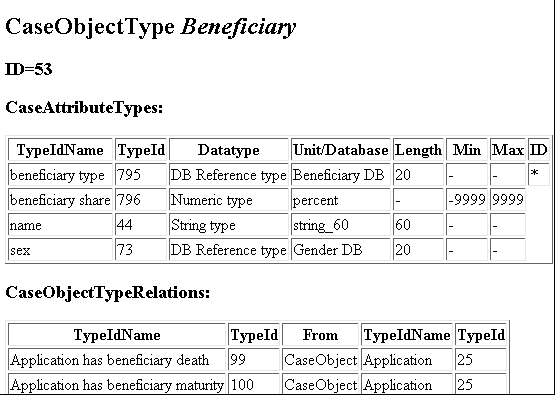
In the first lines you find the name, the ID and the type of the CaseObjectType.
In the subsequent table its CaseAttributeTypes are presented; with their name, ID, data type, unit or database and length in the Interface.
For numeric values the minimal and maximal possible values are shown. Additionally every CaseObjectType has one mandatory ID-attribute, which is marked by the “*” in the last column.
The second table shows the CaseObjectTypeRelations that point to the current CaseObjectType.
For each CaseObjectTypeRelation, its name, ID and the CaseObject to which the CaseObjectTypeRelation is referring to plus the CaseObjectType of the CaseObject are listed.
CaseAttributeTypes
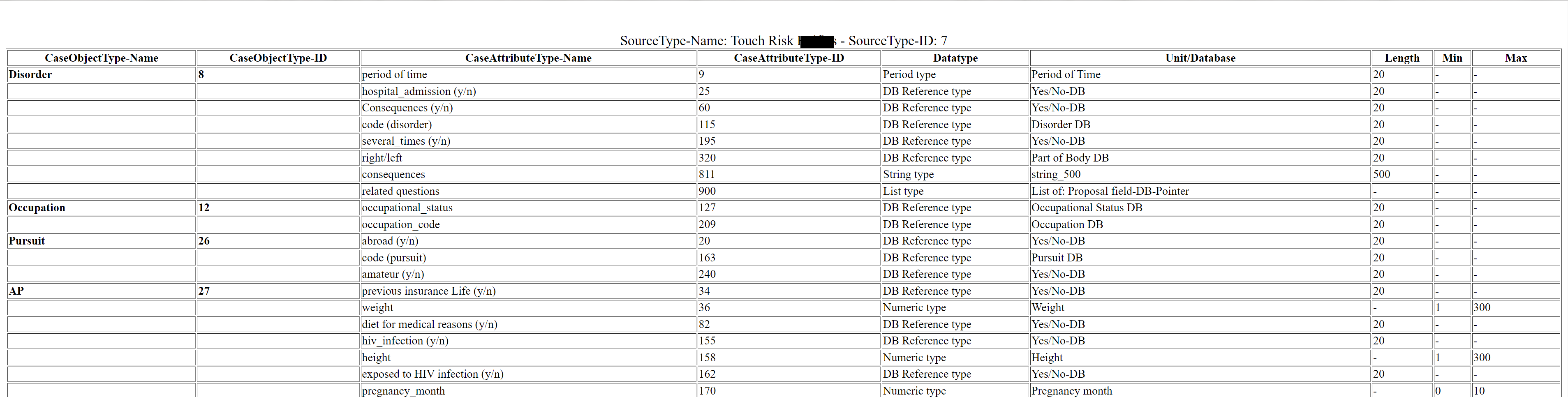
All CaseAttributeTypes used for a certain SourceType and their attributes can be printed into an HTML file by using the utility Database Utilities - UsedCATYForSourceTypeInSystem.bat:
CaseObjectTypeRelations
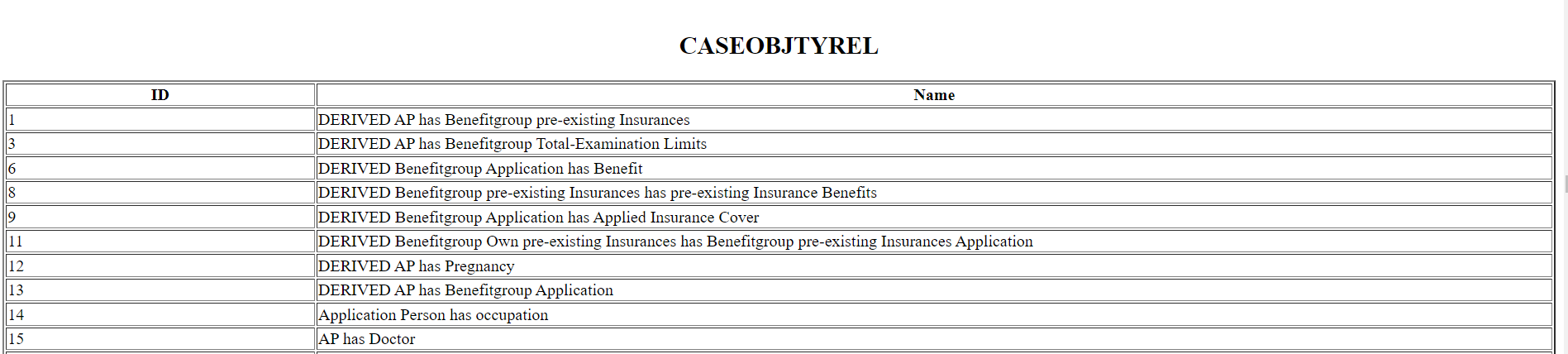
A list of all CaseObjectTypeRelations, that are available and can be used in the Input Interface can be produced by the utility Database Utilities - Print Ids.
The utility prints a list of all Persistent Object Constants, i.e. CaseObjectTypes, CaseAttributeTypes, SourceTypes and last not least CaseObjectTypeRelations together with their Id:
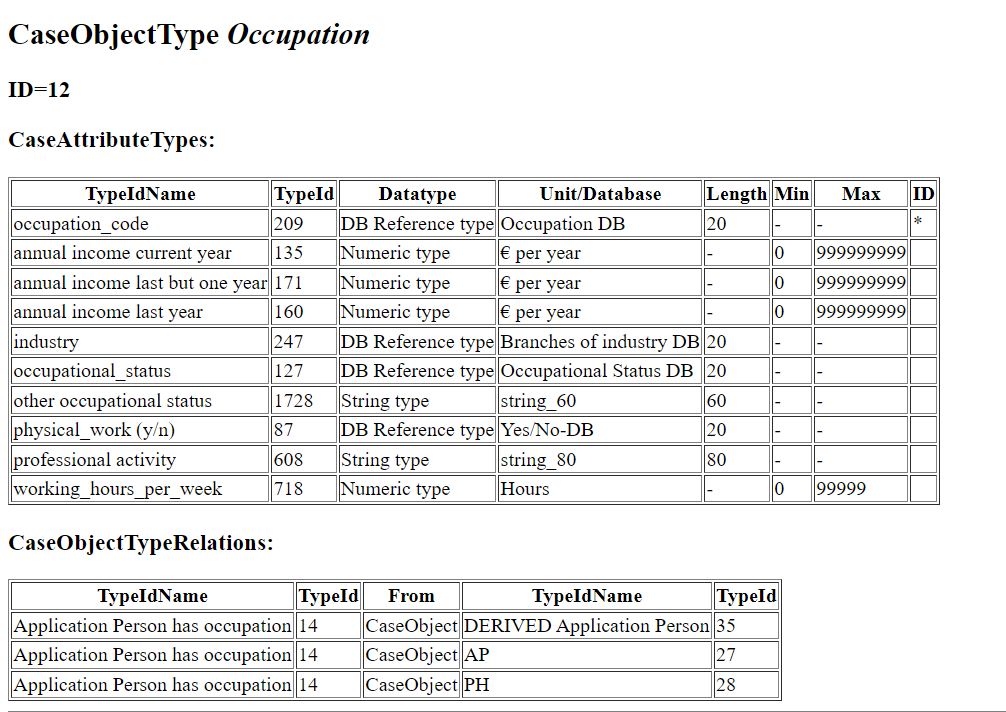
The utility Database Utilities - Print COTYs prints a list showing every CaseObjectTypeRelation incl. the names of their references:
Data mapping for the Input Interface
The following applies to the transfer of Application data:
-
This
CaseObjectalways exists. -
If signatures(y/n) is answered YES, then the other signature fields are not evaluated.
-
If account_holder_x is answered YES, then details of the account holder should be passed.
-
Every application has
CaseObjectRelationsto at least one Policy Holder, One Assured person, and one Benefit.
The following applies to the transfer of Alcohol in the past and Alcohol present data:
-
These structures are similar and only asked for Assured Persons: you specify the amount drunk, and the type of alcoholic drink.
-
If amount_drunk_now is passed, a
CaseObjectAlcohol present should not be passed. -
If amount_drunk_then is passed, a
CaseObjectAlcohol in the past should not be passed. -
If drinking_x is passed as NO, a
CaseObjectAlcohol present should not be passed. -
If ever_drunk is passed as NO, a
CaseObjectAlcohol in the past should not be passed.
The following applies to the transfer of Smoking in the past and Smoking present data:
-
These structures are similar and only asked for Assured Persons: you specify the number smoked and the stuff smoked.
-
If number_cigarettes_now is passed, a
CaseObjectSmoking present should not be passed. -
If number_smoked_then is passed, a
CaseObjectSmoking in the past should not be passed. -
If number_smoked_now is passed, a
CaseObjectSmoking present should not be passed. -
If smoking_x is passed as NO, a
CaseObjectSmoking present should not be passed. -
If ever_smoked is passed as NO, a
CaseObjectSmoking in the past should not be passed.
The following applies to the transfer of Assured Person (AP) data:
-
Every assured Person has one occupation, so the
CaseObjectRelationof Type AP has Occupation has to exist. -
Make sure that admin_work_perc and physical_work_perc are not more than 100 when added.
-
Do not set family_disorders to NO, if
CaseObjectsof type Family History are included in the case -
Do not set foreign_travel_x to NO, if
CaseObjectsof type Foreign Travel are included in the case -
Do not set medicine or drugs (y/n) to NO, if
CaseObjectsof type Drug are included in the case -
Do not set occupational_hazards_x to NO, if
CaseObjectsof type Occupational Hazard are included in the case -
Do not set pursuit_x to NO, if
CaseObjectsof type Pursuit are included in the case -
In the event that an investment_income is stated, investment_income_x should not be answered with NO.
-
In the event that other disability benefits (other_dis_benefit) is stated, other_dis_benefit_x should not be answered with NO.
-
In the event that sideline income is stated, sideline_x should not be answered with NO.
-
In the event that average_business_miles are stated, driving_business_x should not be answered with NO.
The following applies to the transfer of CI-conditions data:
-
For each CI-condition included in the benefit, an own
CaseObjectshould be created. -
As a shortcut: when the CI benefit includes all CI-conditions, it is possible to pass no CI-condition.
The following applies to the transfer of Document data:
-
For medical documents from portfolio the date is not relevant. Every document stated is considered as relevant.
The following applies to the transfer of Drug data:
-
Use the fields quantity and drug_unit only as a pair (recommended).
The following applies to the transfer of Occupation data:
-
For each Assured person and each policy holder one Occupation
CaseObjecthas to exist. -
In the event that physical_work_percentage is given with a value >0, then the field physical_work (y/n) should not be answered with NO.
The following applies to the transfer of Policy Holder (PH) data:
-
Every policy holder has one occupation, so the
CaseObjectRelationof Type PH has Occupation has to exist. -
In the event that an investment_income is stated, investment_income_x should not be answered with NO.
-
When the policy holder is a company, age and marital status are not used for the assessment. Any value can be passed.
The following applies to the transfer of Previous Insurances Own company data:
-
The attributes life basic_form and life policy-type should be passed only if benefit-types points to Life.
-
The attributes pension examination limits and sum_assured_e are exclusive, and should be used depending on the benefit-type.
-
The attributes pension_financial and sum_assured_f are exclusive, and should be used depending on the benefit-type.
The following applies to the transfer of Question Number data:
-
Only one question should be referenced by one
CaseObjectQuestion Number, although the attribute is called list_questions.
The following applies to the transfer of applied Benefit data:
-
The attributes life basic_form and life policy-type should be passed only if benefit-types points to Life.
-
Every benefit has one
EventPaymentDescription, so theCaseObjectRelationof Type Benefit has applied insurance cover has to exist.
The following applies to the transfer of applied insurance cover data:
-
If the corresponding benefit-types (see applied benefit) is IP, waiting_period must be stated.
-
If the corresponding benefit-types (see applied benefit) is CI, at least one
CaseObjectCI-condition has to exist.
The following applies to the transfer of Payment of contribution data:
-
The attributes included_loading percent and included_loading permille are exclusive, and should be used depending on the benefit-type.
Periods of time, consisting of two possible dates and a possible duration, should generally be passed in consistent form. This means that the from-date should be before the to-date. The duration should be in a reasonable relation to the dates, if both dates are passed.
IDs of objects referenced in the input interface
In the chapter Data types several objects that are required for populating the interface are listed with their IDs.
As these lists can only momentarily be up to date, COMPASS offers a utility that prints all required objects together with their ID.
This comprises the CaseAttributeTypes, CaseObjectTypes, etc, but also the selection texts like drink type or any other database like pursuits, nationalities, etc.
Please check PrintIds in the database documentation for details about the utility.
CaseAttributeTypes used in a specific SourceType
A utility described in chapter 6.5 of the database documentation lists all CaseAttributeTypes used in a SourceType. This utility is called UsedCATYForSourceTypeInSystem.
DTD of the Input interface
Show DTD
<?xml encoding="UTF-8"?>

        <!ELEMENT Case (Source+, PosRequest*, (CaseObject | Benefit | Payment | EventPayment | CaseObjectRelation)*)>
        <!ATTLIST Case
                Id CDATA #REQUIRED
                CSP CDATA #REQUIRED
                NumberOfSourceChanges CDATA #IMPLIED
                CaseMode (POS | HeadOffice | FORM) #REQUIRED
                Locale CDATA #REQUIRED
                Complete (Yes | No) #IMPLIED
                PatchID CDATA #IMPLIED
                PatchName CDATA #IMPLIED
                VersionID CDATA #IMPLIED
                VersionName CDATA #IMPLIED
                >
        <!ELEMENT Source EMPTY>
        <!ATTLIST Source
                Id CDATA #REQUIRED
                TypeId CDATA #REQUIRED
                TypeIdName CDATA #IMPLIED
                RelatedCaseObject CDATA #REQUIRED
                DefaultSource (Yes | No) #IMPLIED
                Complete (Yes | No) #IMPLIED

                >
        <!ELEMENT PosRequest (IdBeforeTermChange?)>
        <!ATTLIST PosRequest
                Id CDATA #REQUIRED
                ModuleId CDATA #REQUIRED
                ModuleName CDATA #IMPLIED
                GeneratedInSource CDATA #REQUIRED
                RelatedCaseObject CDATA #REQUIRED
                SuppressedByAskedOnce CDATA #IMPLIED
                SuppressedByResult (Yes | No) #IMPLIED
                CancelledAtNode CDATA #IMPLIED
                GeneratedByModuleChange CDATA #IMPLIED
                >
        <!ELEMENT IdBeforeTermChange (DBRefValue)>

        <!ELEMENT CaseObjectRelation EMPTY>
        <!ATTLIST CaseObjectRelation
                From CDATA #REQUIRED
                To CDATA #REQUIRED
                TypeId CDATA #REQUIRED
                TypeIdName CDATA #IMPLIED
                >

        <!ELEMENT CaseObject (CaseAttribute*)>
        <!-- Locale and AddedByPosRequest are only used in case not in result -->
        <!-- There must be at least one CaseAttribute unless the CaseObject identifies -->
        <!-- with another case object with attributes specified -->

        <!ATTLIST CaseObject
                Id CDATA #REQUIRED
                TypeId CDATA #REQUIRED
                TypeIdName CDATA #IMPLIED
                Identifies CDATA #IMPLIED
                Locale CDATA #IMPLIED
                AddedByPOSRequest CDATA #IMPLIED
                NotDeletable (true | false) #IMPLIED
                >

        <!ELEMENT Benefit (CaseAttribute*)>
        <!-- Locale and AddedByPosRequest are only used in case not in result -->
        <!-- There must be at least one CaseAttribute unless the CaseObject identifies -->
        <!-- with another case object with attributes specified -->
        <!ATTLIST Benefit
                Id CDATA #REQUIRED
                TypeId CDATA #REQUIRED
                TypeIdName CDATA #IMPLIED
                Identifies CDATA #IMPLIED
                Locale CDATA #IMPLIED
                AddedByPOSRequest CDATA #IMPLIED
                >


        <!ELEMENT EventPayment (CaseAttribute*)>
        <!-- Locale and AddedByPosRequest are only used in case not in result -->
        <!-- There must be at least one CaseAttribute unless the CaseObject identifies -->
        <!-- with another case object with attributes specified -->
        <!ATTLIST EventPayment
                Id CDATA #REQUIRED
                TypeId CDATA #REQUIRED
                TypeIdName CDATA #IMPLIED
                Identifies CDATA #IMPLIED
                Locale CDATA #IMPLIED
                AddedByPOSRequest CDATA #IMPLIED
                >

        <!ELEMENT Payment (CaseAttribute*)>
        <!-- Locale and AddedByPosRequest are only used in case not in result -->
        <!ATTLIST Payment
                Id CDATA #REQUIRED
                TypeId CDATA #REQUIRED
                TypeIdName CDATA #IMPLIED
                Identifies CDATA #IMPLIED
                Locale CDATA #IMPLIED
                AddedByPOSRequest CDATA #IMPLIED
                >

        <!ELEMENT CaseAttribute (CaseAttributeValue+)> <!-- in result there is exactly one value per attribute -->
        <!ATTLIST CaseAttribute
                TypeId CDATA #REQUIRED
                TypeIdName CDATA #IMPLIED
                Last (true | false) #IMPLIED
                >
        <!ELEMENT CaseAttributeValue (BoolValue | DateValue | DualValue | AggregateValue | SingleValue | PeriodValue | StringValue | DBRefValue | CORefValue | ListValue)?>
        <!-- Source and TemporalDescription are only used in case not in result -->
        <!ATTLIST CaseAttributeValue
                Source CDATA #IMPLIED
                TemporalDescription CDATA #IMPLIED
                Time CDATA #IMPLIED
                >

        <!ELEMENT BoolValue EMPTY>
        <!ATTLIST BoolValue
                Value (true | false) #REQUIRED
                >
        <!ELEMENT DateValue EMPTY>
        <!ATTLIST DateValue
                Year CDATA #IMPLIED
                Month CDATA #IMPLIED
                Day CDATA #IMPLIED
                >
        <!ELEMENT DualValue EMPTY>
        <!ATTLIST DualValue
                Value1 CDATA #REQUIRED
                Value2 CDATA #REQUIRED
                Unit CDATA #REQUIRED
                UnitName CDATA #IMPLIED
                >
        <!ELEMENT AggregateValue EMPTY>
        <!ATTLIST AggregateValue
                Value1 CDATA #REQUIRED
                Value2 CDATA #REQUIRED
                Unit CDATA #REQUIRED
                UnitName CDATA #IMPLIED
                >
        <!ELEMENT SingleValue EMPTY>
        <!ATTLIST SingleValue
                Value CDATA #REQUIRED
                Unit CDATA #IMPLIED
                UnitName CDATA #IMPLIED
                >
        <!ELEMENT PeriodValue (DateFrom?, DateTo?, Duration?)>
        <!ELEMENT DateFrom (DateValue)>
        <!ELEMENT DateTo (DateValue)>
        <!ELEMENT Duration (SingleValue)>
        <!ELEMENT StringValue EMPTY>
        <!ATTLIST StringValue
                Value CDATA #REQUIRED
                >
        <!ELEMENT DBRefValue EMPTY>
        <!ATTLIST DBRefValue
                Name CDATA #IMPLIED
                Id CDATA #IMPLIED
                Key CDATA #IMPLIED
                Locale CDATA #IMPLIED
                >
        <!ELEMENT CORefValue EMPTY>
        <!ATTLIST CORefValue
                Value CDATA #REQUIRED
                >
        <!ELEMENT ListValue (BoolValue* | DateValue* | DualValue* | (AggregateValue | SingleValue)* | PeriodValue* | StringValue* | DBRefValue* | CORefValue* | ListValue*)>
XSD of the Input interface
Show XSD
<?xml version="1.0" encoding="UTF-8"?>
<xs:schema xmlns:xs="http://www.w3.org/2001/XMLSchema" elementFormDefault="qualified">
    <xs:element name="Case">
        <xs:complexType>
            <xs:sequence>
                <xs:element maxOccurs="unbounded" ref="Source"/>
                <xs:element minOccurs="0" maxOccurs="unbounded" ref="PosRequest"/>
                <xs:choice minOccurs="0" maxOccurs="unbounded">
                    <xs:element ref="CaseObject"/>
                    <xs:element ref="Benefit"/>
                    <xs:element ref="Payment"/>
                    <xs:element ref="EventPayment"/>
                    <xs:element ref="CaseObjectRelation"/>
                </xs:choice>
            </xs:sequence>
            <xs:attribute name="Id" use="required"/>
            <xs:attribute name="CSP" use="required"/>
            <xs:attribute name="NumberOfSourceChanges"/>
            <xs:attribute name="CaseMode" use="required">
                <xs:simpleType>
                    <xs:restriction base="xs:token">
                        <xs:enumeration value="POS"/>
                        <xs:enumeration value="HeadOffice"/>
                        <xs:enumeration value="FORM"/>
                    </xs:restriction>
                </xs:simpleType>
            </xs:attribute>
            <xs:attribute name="Locale" use="required"/>
            <xs:attribute name="Complete">
                <xs:simpleType>
                    <xs:restriction base="xs:token">
                        <xs:enumeration value="Yes"/>
                        <xs:enumeration value="No"/>
                    </xs:restriction>
                </xs:simpleType>
            </xs:attribute>
            <xs:attribute name="PatchID"/>
            <xs:attribute name="PatchName"/>
            <xs:attribute name="VersionID"/>
            <xs:attribute name="VersionName"/>
        </xs:complexType>
    </xs:element>
    <xs:element name="Source">
        <xs:complexType>
            <xs:attribute name="Id" use="required"/>
            <xs:attribute name="TypeId" use="required"/>
            <xs:attribute name="TypeIdName"/>
            <xs:attribute name="RelatedCaseObject" use="required"/>
            <xs:attribute name="DefaultSource">
                <xs:simpleType>
                    <xs:restriction base="xs:token">
                        <xs:enumeration value="Yes"/>
                        <xs:enumeration value="No"/>
                    </xs:restriction>
                </xs:simpleType>
            </xs:attribute>
            <xs:attribute name="Complete">
                <xs:simpleType>
                    <xs:restriction base="xs:token">
                        <xs:enumeration value="Yes"/>
                        <xs:enumeration value="No"/>
                    </xs:restriction>
                </xs:simpleType>
            </xs:attribute>
        </xs:complexType>
    </xs:element>
    <xs:element name="PosRequest">
        <xs:complexType>
            <xs:sequence>
                <xs:element minOccurs="0" ref="IdBeforeTermChange"/>
            </xs:sequence>
            <xs:attribute name="Id" use="required"/>
            <xs:attribute name="ModuleId" use="required"/>
            <xs:attribute name="ModuleName"/>
            <xs:attribute name="GeneratedInSource" use="required"/>
            <xs:attribute name="RelatedCaseObject" use="required"/>
            <xs:attribute name="SuppressedByAskedOnce"/>
            <xs:attribute name="SuppressedByResult">
                <xs:simpleType>
                    <xs:restriction base="xs:token">
                        <xs:enumeration value="Yes"/>
                        <xs:enumeration value="No"/>
                    </xs:restriction>
                </xs:simpleType>
            </xs:attribute>
            <xs:attribute name="CancelledAtNode"/>
            <xs:attribute name="GeneratedByModuleChange"/>
        </xs:complexType>
    </xs:element>
    <xs:element name="IdBeforeTermChange">
        <xs:complexType>
            <xs:sequence>
                <xs:element ref="DBRefValue"/>
            </xs:sequence>
        </xs:complexType>
    </xs:element>
    <xs:element name="CaseObjectRelation">
        <xs:complexType>
            <xs:attribute name="From" use="required"/>
            <xs:attribute name="To" use="required"/>
            <xs:attribute name="TypeId" use="required"/>
            <xs:attribute name="TypeIdName"/>
        </xs:complexType>
    </xs:element>
    <xs:element name="CaseObject">
        <xs:complexType>
            <xs:sequence>
                <xs:element minOccurs="0" maxOccurs="unbounded" ref="CaseAttribute"/>
            </xs:sequence>
            <xs:attribute name="Id" use="required"/>
            <xs:attribute name="TypeId" use="required"/>
            <xs:attribute name="TypeIdName"/>
            <xs:attribute name="Identifies"/>
            <xs:attribute name="Locale"/>
            <xs:attribute name="AddedByPOSRequest"/>
            <xs:attribute name="NotDeletable">
                <xs:simpleType>
                    <xs:restriction base="xs:token">
                        <xs:enumeration value="true"/>
                        <xs:enumeration value="false"/>
                    </xs:restriction>
                </xs:simpleType>
            </xs:attribute>
        </xs:complexType>
    </xs:element>
    <!-- Locale and AddedByPosRequest are only used in case not in result -->
    <!-- There must be at least one CaseAttribute unless the CaseObject identifies -->
    <!-- with another case object with attributes specified -->
    <xs:element name="Benefit">
        <xs:complexType>
            <xs:sequence>
                <xs:element minOccurs="0" maxOccurs="unbounded" ref="CaseAttribute"/>
            </xs:sequence>
            <xs:attribute name="Id" use="required"/>
            <xs:attribute name="TypeId" use="required"/>
            <xs:attribute name="TypeIdName"/>
            <xs:attribute name="Identifies"/>
            <xs:attribute name="Locale"/>
            <xs:attribute name="AddedByPOSRequest"/>
        </xs:complexType>
    </xs:element>
    <!-- Locale and AddedByPosRequest are only used in case not in result -->
    <!-- There must be at least one CaseAttribute unless the CaseObject identifies -->
    <!-- with another case object with attributes specified -->
    <xs:element name="EventPayment">
        <xs:complexType>
            <xs:sequence>
                <xs:element minOccurs="0" maxOccurs="unbounded" ref="CaseAttribute"/>
            </xs:sequence>
            <xs:attribute name="Id" use="required"/>
            <xs:attribute name="TypeId" use="required"/>
            <xs:attribute name="TypeIdName"/>
            <xs:attribute name="Identifies"/>
            <xs:attribute name="Locale"/>
            <xs:attribute name="AddedByPOSRequest"/>
        </xs:complexType>
    </xs:element>
    <!-- Locale and AddedByPosRequest are only used in case not in result -->
    <!-- There must be at least one CaseAttribute unless the CaseObject identifies -->
    <!-- with another case object with attributes specified -->
    <xs:element name="Payment">
        <xs:complexType>
            <xs:sequence>
                <xs:element minOccurs="0" maxOccurs="unbounded" ref="CaseAttribute"/>
            </xs:sequence>
            <xs:attribute name="Id" use="required"/>
            <xs:attribute name="TypeId" use="required"/>
            <xs:attribute name="TypeIdName"/>
            <xs:attribute name="Identifies"/>
            <xs:attribute name="Locale"/>
            <xs:attribute name="AddedByPOSRequest"/>
        </xs:complexType>
    </xs:element>
    <!-- Locale and AddedByPosRequest are only used in case not in result -->
    <xs:element name="CaseAttribute">
        <xs:complexType>
            <xs:sequence>
                <xs:element maxOccurs="unbounded" ref="CaseAttributeValue"/>
            </xs:sequence>
            <xs:attribute name="TypeId" use="required"/>
            <xs:attribute name="TypeIdName"/>
            <xs:attribute name="Last">
                <xs:simpleType>
                    <xs:restriction base="xs:token">
                        <xs:enumeration value="true"/>
                        <xs:enumeration value="false"/>
                    </xs:restriction>
                </xs:simpleType>
            </xs:attribute>
        </xs:complexType>
    </xs:element>
    <!-- in result there is exactly one value per attribute -->
    <xs:element name="CaseAttributeValue">
        <xs:complexType>
            <xs:choice minOccurs="0">
                <xs:element ref="BoolValue"/>
                <xs:element ref="DateValue"/>
                <xs:element ref="DualValue"/>
                <xs:element ref="AggregateValue"/>
                <xs:element ref="SingleValue"/>
                <xs:element ref="PeriodValue"/>
                <xs:element ref="StringValue"/>
                <xs:element ref="DBRefValue"/>
                <xs:element ref="CORefValue"/>
                <xs:element ref="ListValue"/>
            </xs:choice>
            <xs:attribute name="Source"/>
            <xs:attribute name="TemporalDescription"/>
            <xs:attribute name="Time"/>
        </xs:complexType>
    </xs:element>
    <!-- Source and TemporalDescription are only used in case not in result -->
    <xs:element name="BoolValue">
        <xs:complexType>
            <xs:attribute name="Value" use="required">
                <xs:simpleType>
                    <xs:restriction base="xs:token">
                        <xs:enumeration value="true"/>
                        <xs:enumeration value="false"/>
                    </xs:restriction>
                </xs:simpleType>
            </xs:attribute>
        </xs:complexType>
    </xs:element>
    <xs:element name="DateValue">
        <xs:complexType>
            <xs:attribute name="Year"/>
            <xs:attribute name="Month"/>
            <xs:attribute name="Day"/>
        </xs:complexType>
    </xs:element>
    <xs:element name="DualValue">
        <xs:complexType>
            <xs:attribute name="Value1" use="required"/>
            <xs:attribute name="Value2" use="required"/>
            <xs:attribute name="Unit" use="required"/>
            <xs:attribute name="UnitName"/>
        </xs:complexType>
    </xs:element>
    <xs:element name="AggregateValue">
        <xs:complexType>
            <xs:attribute name="Value1" use="required"/>
            <xs:attribute name="Value2" use="required"/>
            <xs:attribute name="Unit" use="required"/>
            <xs:attribute name="UnitName"/>
        </xs:complexType>
    </xs:element>
    <xs:element name="SingleValue">
        <xs:complexType>
            <xs:attribute name="Value" use="required"/>
            <xs:attribute name="Unit"/>
            <xs:attribute name="UnitName"/>
        </xs:complexType>
    </xs:element>
    <xs:element name="PeriodValue">
        <xs:complexType>
            <xs:sequence>
                <xs:element minOccurs="0" ref="DateFrom"/>
                <xs:element minOccurs="0" ref="DateTo"/>
                <xs:element minOccurs="0" ref="Duration"/>
            </xs:sequence>
        </xs:complexType>
    </xs:element>
    <xs:element name="DateFrom">
        <xs:complexType>
            <xs:sequence>
                <xs:element ref="DateValue"/>
            </xs:sequence>
        </xs:complexType>
    </xs:element>
    <xs:element name="DateTo">
        <xs:complexType>
            <xs:sequence>
                <xs:element ref="DateValue"/>
            </xs:sequence>
        </xs:complexType>
    </xs:element>
    <xs:element name="Duration">
        <xs:complexType>
            <xs:sequence>
                <xs:element ref="SingleValue"/>
            </xs:sequence>
        </xs:complexType>
    </xs:element>
    <xs:element name="StringValue">
        <xs:complexType>
            <xs:attribute name="Value" use="required"/>
        </xs:complexType>
    </xs:element>
    <xs:element name="DBRefValue">
        <xs:complexType>
            <xs:attribute name="Name"/>
            <xs:attribute name="Id"/>
            <xs:attribute name="Key"/>
            <xs:attribute name="Locale"/>
        </xs:complexType>
    </xs:element>
    <xs:element name="CORefValue">
        <xs:complexType>
            <xs:attribute name="Value" use="required"/>
        </xs:complexType>
    </xs:element>
    <xs:element name="ListValue">
        <xs:complexType>
            <xs:choice>
                <xs:element minOccurs="0" maxOccurs="unbounded" ref="BoolValue"/>
                <xs:element minOccurs="0" maxOccurs="unbounded" ref="DateValue"/>
                <xs:element minOccurs="0" maxOccurs="unbounded" ref="DualValue"/>
                <xs:choice minOccurs="0" maxOccurs="unbounded">
                    <xs:element ref="AggregateValue"/>
                    <xs:element ref="SingleValue"/>
                </xs:choice>
                <xs:element minOccurs="0" maxOccurs="unbounded" ref="PeriodValue"/>
                <xs:element minOccurs="0" maxOccurs="unbounded" ref="StringValue"/>
                <xs:element minOccurs="0" maxOccurs="unbounded" ref="DBRefValue"/>
                <xs:element minOccurs="0" maxOccurs="unbounded" ref="CORefValue"/>
                <xs:element minOccurs="0" maxOccurs="unbounded" ref="ListValue"/>
            </xs:choice>
        </xs:complexType>
    </xs:element>
</xs:schema>
Data model of the Input Interface
The following Data model shows the dependencies between the elements of the interface. You will find all CaseObjectTypes, BenefitDescriptions, EventPaymentDescriptions and PaymentDescriptions and the CaseObjectTypeRelations between them.
The names of the Relations are not shown here (see CaseObjectTypeRelations). Every CaseObjectTypeRelation has a cardinality between the related CaseObjects:
0..1 the FROM-object has at most one TO-object 0..n the FROM-object can have any number of TO-objects 1 the FROM-object has exactly one TO-object 1..n the FROM-object has at least one TO-object
Example:
One Assured Person (AP) can have none, one or multiple disorders. Therefore, the CaseObjectTypeRelation AP has disorder has the cardinality 0..n.

Data types
The tables in the subchapters are as up-to-date as possible. As every client is able to create more terms, the IDs for those terms are not included in the lists. Please refer to the Section IDs of objects referenced in the input interface to get a complete list of terms with their IDs for your environment.
Used Datatypes
This chapter gives an overview of the datatypes used in the Input-Interface, ordered by type of the datatype. Some DBKey references with entries used in selection types are listed in Selection texts. Other DBKey references (disorders, occupations, etc.) are not listed with their entries, as they might have either too many entries, or they are company specify. These databases are marked with the text “Risk” in the Type-column.
Show Datatypes
Datatype |
DataTypeName |
Type |
DateType |
date |
|
DBKey StringType |
Acceptance result-DBPointer |
|
Agent-DBPointer |
Risk |
|
Alive/Dead-DBPointer |
||
Association registry areas-DBPointer |
||
BackUp Eventtype 1DBPointer |
Empty |
|
BackUp Eventtype 2DBPointer |
Empty |
|
BackUp-Benefittype 1Pointer |
Empty |
|
BackUp-Benefittype 2Pointer |
Empty |
|
Beneficiary-DBPointer |
||
Benefit Types-DBPointer |
||
Branch of industry-DBPointer |
Risk |
|
CI-conditions-DBPointer |
||
Company-DBPointer |
Risk |
|
Country-DBPointer |
Risk |
|
Disorder-DBPointer |
Risk |
|
Document-DBPointer |
Risk |
|
Drink type-DBPointer |
||
Drug-DBPointer |
Risk |
|
Eventtype-DBPointer |
||
Exclusion Clause-DBPointer |
Risk |
|
Family Relation-DBPointer |
||
Gender-DBPointer |
||
Kind of treatment-DBPointer |
||
Life Policy Type-DBPointer |
||
Life-type-DBPointer |
||
Marital Status-DBPointer |
||
Occupational Hazards-DBPointer |
Risk |
|
Occupational status-DBPointer |
||
Occupation-DBPointer |
Risk |
|
Part of Body-DBPointer |
||
Pursuit-DBPointer |
Risk |
|
Questionnumber-DBPointer |
Risk |
|
Race-DBPointer |
||
Relation AP to PH-DBPointer |
||
Result-DBPointer |
||
Sexual Group-DBPointer |
||
Smoker Type-DBPointer |
||
Smoking type-DBPointer |
||
Special agreement-DBPointer |
Risk |
|
Title-DBPointer |
||
Unit drug-DBPointer |
||
Yes/No-DBPointer |
ID Unit |
Unit name |
||
NumericType |
£ |
14 |
£ |
£ per timeunit (default Unit) |
1 |
£/Year |
|
£ per timeunit |
29 |
£/Day |
|
£ per timeunit |
3 |
£/Month |
|
£ per year |
1 |
£/Year |
|
Age |
16 |
Year(s) |
|
Amount per day |
0 |
Amount/day |
|
Dioptres |
4 |
Dioptres |
|
Distance (default Unit) |
33 |
Mile(s) |
|
Distance |
32 |
Kilometre |
|
Duration (default Unit) |
5 |
Month(s) |
|
Duration |
2 |
Day(s) |
|
Duration |
8 |
Week(s) |
|
Duration |
16 |
Year(s) |
|
Height (as AggregateValue) |
1001 |
Feet/inches |
|
Height (as SingleValue) |
13 |
cm |
|
Hour(s) |
31 |
Hours |
|
month(s) |
5 |
Month(s) |
|
Number |
--- |
--- |
|
Percent |
12 |
% |
|
Per mille |
9 |
‰ |
|
Pregnancy month |
5 |
Month(s) |
|
Quantity 2 decimal places |
28 |
per week |
|
Week(s) |
8 |
week(s) |
|
Weight (as AggregateValue) |
1002 |
stone/lb |
|
Weight (as SingleValue) |
6 |
kg |
|
PeriodType |
Period of Time |
StringType |
Occupational Classes-DB-Key |
string_12 |
|
string_20 |
|
string_3 |
|
string_30 |
|
string_40 |
|
string_50 |
|
string_6 |
|
string_60 |
|
string_500 |
|
Selection texts
In the following list all simple selection types are enumerated. For each selection type entry the name and its ID are listed.
Show Selection texts
Acceptance result-DB |
|
3 |
Not accepted |
2 |
Accepted with rating |
1 |
Accepted |
0 |
Currently also applied for |
Alive/Dead-DB |
|
1 |
Still alive |
0 |
Dead |
Association registry areas-DB |
|
5 |
IP |
4 |
Life |
Beneficiary-DB |
|
4 |
Insurance holder |
3 |
Relatives |
2 |
other person |
1 |
Company/Employer |
0 |
Assured/Coinsured person |
Benefit Group-DB |
|
1 |
DMM/ADB |
2 |
LTC |
3 |
H&S |
4 |
CI/Debility |
5 |
Life |
6 |
IP any/ADL |
7 |
IP own/similar |
8 |
WOP any/ADL |
9 |
WOP own/similar |
10 |
TPD any/ADL |
11 |
TPD own/similar |
12 |
BE |
13 |
Pension Plan |
14 |
Savings |
Benefit Types-DB |
|
22 |
Debility |
21 |
BE (Business expenses) |
20 |
Savings |
19 |
TPD ADL |
18 |
TPD any |
17 |
TPD own/similar |
16 |
TPD own |
15 |
WOP own/similar |
14 |
WOP ADL |
13 |
IP own/similar |
12 |
IP ADL |
11 |
DMM (Dismemberment) |
10 |
IP own |
9 |
LTC |
8 |
WOP any |
6 |
ADB |
5 |
IP any |
4 |
H&S |
3 |
CI |
2 |
WOP own |
1 |
Pension annuity |
0 |
Life |
CI-conditions-DB |
|
22 |
CI reserve 4 |
21 |
CI reserve 3 |
20 |
CI reserve 2 |
19 |
CI reserve 1 |
18 |
Parkinsonism |
17 |
Loss of hearing |
16 |
Major burns |
15 |
Motor neurone disease |
14 |
Organ transplant (MOT) |
13 |
Loss of limb |
12 |
heart valve replacement |
11 |
Coma |
10 |
Blindness |
9 |
Benign brain tumor |
8 |
Aortic bypass |
7 |
Cerebro-vascular incident |
6 |
Paralysis |
5 |
Multiple sclerosis |
4 |
Renal failure |
3 |
Myocardial infarction |
2 |
Bypass |
1 |
Cancer |
Drinktype-DB |
|
4 |
Spirits |
3 |
Champagne |
2 |
Wine |
1 |
Beer |
9 |
other |
Eventtype-DB |
|
13 |
Critical Illness |
11 |
Accident |
10 |
other risks |
9 |
H&S |
7 |
Disability any/ADL |
6 |
legal consequences |
5 |
Maturity |
3 |
Aids-risk |
2 |
Death |
1 |
Long term Care |
0 |
Disability own/similar |
Family Relation-DB |
|
9 |
other relationship |
2 |
Father |
1 |
Mother |
0 |
Sibling |
Gender-DB |
|
3 |
Female |
2 |
Male |
1 |
Company |
0 |
Other organisation |
Kind of treatment-DB |
|
1 |
Massage |
Life Policy type-DB |
|
3 |
Single Life |
2 |
Joint Life 2. Death |
1 |
Joint Life 1.Death |
Life-type-DB |
|
8 |
Term insurance |
4 |
Unit linked life insurance |
3 |
Endowment |
0 |
Whole Life |
Marital Status-DB |
|
5 |
Separated |
4 |
Divorced |
3 |
Widowed |
2 |
Married |
1 |
Single |
Occupational Status-DB |
|
11 |
Employee |
10 |
Civil servant |
7 |
Pensioner |
6 |
Housewife |
5 |
Student |
4 |
Worker |
3 |
Self employed |
2 |
Apprentice |
1 |
Other |
0 |
Unemployed |
Part of Body-DB |
|
3 |
on both sides |
2 |
left |
1 |
right |
Race-DB |
|
9 |
Other |
3 |
Indian |
2 |
Chinese |
1 |
Malay |
Relation AP to PH-DB |
|
9 |
Other |
5 |
Same person |
4 |
Business partner |
3 |
Company - Employee |
2 |
Parent - Child |
1 |
Husband - Wife |
Result-DB |
|
5 |
claim |
4 |
standard |
3 |
substandard |
2 |
declined |
1 |
incomplete |
0 |
deferred |
Sexual Group-DB |
|
6 |
sexual partner of homosexuals or bisexuals |
5 |
haemophiliac |
4 |
intravenous drug addict |
3 |
heterosexual |
2 |
bisexual |
1 |
homosexual |
Smoker Type-DB |
|
2 |
General Tariff |
1 |
Non-Smoker |
0 |
Smoker |
Smoking type-DB |
|
3 |
Pipes |
2 |
Cigars |
1 |
Cigarettes |
Title-DB |
|
6 |
Ms. |
5 |
Miss |
4 |
Prof. |
3 |
Dr. |
2 |
Mr. |
1 |
Mrs. |
Unit drug-DB |
|
2 |
ml |
1 |
Tablets |
Yes/No-DB |
|
1 |
Yes |
0 |
No |
Example of an Interface
The following example of the Input Interface has been created with the user interface of COMPASS. The case has been kept simple: the policy holder is also the assured person, is a baker and has no other risks. The applied benefit is a term insurance for 50000 £ in 12 years. The payment of 1212 £ will be paid for 12 years.
Two SourceTypes have been used: “Contract Details“ (TypeId 1) for the technical data is the default SourceType, and ”Risk UK“ for the risk-relevant part (TypeId 105).
Due to the simplicity of the case only a few CaseObjects are created:
-
Application (is created always)
-
AP (James Bond)
-
PH (is AP)
-
Occupation (baker)
-
Benefit (named Life James)
-
Applied insurance cover (Details for the benefit and the event of death)
-
Payment of Contribution (sum of premium, period of payment)
-
Beneficiary [1] (beneficiary in case of Death)
-
Beneficiary [2] (beneficiary in case of Maturity)
At the end of the case the CaseObjectTypeRelations are specified. They create the relations between the CaseObjectTypes named above, like “James Bond has occupation Baker”.
This example contains TypeIdNames, which are not needed for the assessment, but make the interface more readable.
Show Interface (XML)
<?xml version="1.0" encoding="Unicode" standalone="yes"?>
<Case Locale="en" CSP="1" NumberOfSourceChanges="2" Id="TestCase" CaseMode="HeadOffice">
  <Source TypeIdName="Contract Details" DefaultSource="Yes" Id="1" RelatedCaseObject="0" TypeId="100"/>
  <Source TypeIdName="Risk UK" Id="2" RelatedCaseObject="0" TypeId="105"/>

  <CaseObject Id="0" TypeId="25" TypeIdName="Application">
    <CaseAttribute TypeId="38" TypeIdName="own_prev_assess_present (y/n)">
      <CaseAttributeValue>
        <DBRefValue Name="Yes" Id="1"/>
      </CaseAttributeValue>
    </CaseAttribute>
    <CaseAttribute TypeId="0" TypeIdName="application-ID">
      <CaseAttributeValue>
        <StringValue Value="TestCase"/>
      </CaseAttributeValue>
    </CaseAttribute>
  </CaseObject>

  <Benefit Id="1" TypeId="0" TypeIdName="Benefit">
    <CaseAttribute TypeId="271" TypeIdName="life basic_form">
      <CaseAttributeValue>
        <DBRefValue Name="Term insurance" Id="8"/>
      </CaseAttributeValue>
    </CaseAttribute>
    <CaseAttribute TypeId="108" TypeIdName="name (benefit)">
      <CaseAttributeValue>
        <StringValue Value="Life James"/>
      </CaseAttributeValue>
    </CaseAttribute>
    <CaseAttribute TypeId="11" TypeIdName="benefit-type">
      <CaseAttributeValue>
        <DBRefValue Name="Life" Id="0"/>
      </CaseAttributeValue>
    </CaseAttribute>
    <CaseAttribute TypeId="355" TypeIdName="life policy-type">
      <CaseAttributeValue>
        <DBRefValue Name="Single Life" Id="3"/>
      </CaseAttributeValue>
    </CaseAttribute>
  </Benefit>

  <EventPayment Id="2" TypeId="1" TypeIdName="Insurance event payment">
    <CaseAttribute TypeId="333" TypeIdName="examination_group">
      <CaseAttributeValue>
        <DBRefValue Name="Life" Id="1"/>
      </CaseAttributeValue>
    </CaseAttribute>
    <CaseAttribute TypeId="292" TypeIdName="age_for_assessment">
      <CaseAttributeValue>
        <SingleValue UnitName="Year(s)" Value="35.0" Unit="16"/>
      </CaseAttributeValue>
    </CaseAttribute>
    <CaseAttribute TypeId="161" TypeIdName="Eventtype">
      <CaseAttributeValue>
        <DBRefValue Name="Death" Id="2"/>
      </CaseAttributeValue>
    </CaseAttribute>
    <CaseAttribute TypeId="121" TypeIdName="insurance_period">
      <CaseAttributeValue>
        <SingleValue UnitName="Year(s)" Value="12.0" Unit="16"/>
      </CaseAttributeValue>
    </CaseAttribute>
    <CaseAttribute TypeId="103" TypeIdName="annuity_sum (sum insured)">
      <CaseAttributeValue>
        <SingleValue UnitName="£" Value="50000.0" Unit="14"/>
      </CaseAttributeValue>
    </CaseAttribute>
    <CaseAttribute TypeId="37" TypeIdName="age at entry (examination limits)">
      <CaseAttributeValue>
        <SingleValue UnitName="Year(s)" Value="35.0" Unit="16"/>
      </CaseAttributeValue>
    </CaseAttribute>
  </EventPayment>

  <Payment Id="4" TypeId="0" TypeIdName="Payment of Contribution">
    <CaseAttribute TypeId="354" TypeIdName="annual_premium">
      <CaseAttributeValue>
        <SingleValue UnitName="£/Year" Value="1212.0" Unit="1"/>
      </CaseAttributeValue>
    </CaseAttribute>
    <CaseAttribute TypeId="41" TypeIdName="premium_payment_period">
      <CaseAttributeValue>
        <SingleValue UnitName="Year(s)" Value="12.0" Unit="16"/>
      </CaseAttributeValue>
    </CaseAttribute>
  </Payment>

  <CaseObject Id="3" TypeId="27" TypeIdName="AP">
    <CaseAttribute TypeId="307" TypeIdName="id_no (person)">
      <CaseAttributeValue>
        <StringValue Value="007"/>
      </CaseAttributeValue>
    </CaseAttribute>
    <CaseAttribute TypeId="44" TypeIdName="name">
      <CaseAttributeValue>
        <StringValue Value="James Bond"/>
      </CaseAttributeValue>
    </CaseAttribute>
    <CaseAttribute TypeId="73" TypeIdName="sex">
      <CaseAttributeValue>
        <DBRefValue Name="Male" Id="2"/>
      </CaseAttributeValue>
    </CaseAttribute>
    <CaseAttribute TypeId="21" TypeIdName="age at application">
      <CaseAttributeValue>
        <SingleValue UnitName="Year(s)" Value="35.0" Unit="16"/>
      </CaseAttributeValue>
    </CaseAttribute>
    <CaseAttribute TypeId="78" TypeIdName="marital_status">
      <CaseAttributeValue>
        <DBRefValue Name="Single" Id="1"/>
      </CaseAttributeValue>
    </CaseAttribute>
    <CaseAttribute TypeId="61" TypeIdName="nationality">
      <CaseAttributeValue Source="2">
        <DBRefValue Name="United Kingdom" Key="GB"/>
      </CaseAttributeValue>
    </CaseAttribute>
    <CaseAttribute TypeId="176" TypeIdName="residence (country)">
      <CaseAttributeValue Source="2">
        <DBRefValue Name="United Kingdom" Key="GB"/>
      </CaseAttributeValue>
    </CaseAttribute>
    <CaseAttribute TypeId="267" TypeIdName="foreign_travel_x (y/n)">
      <CaseAttributeValue Source="2">
        <DBRefValue Name="No" Id="0"/>
      </CaseAttributeValue>
    </CaseAttribute>
    <CaseAttribute TypeId="311" TypeIdName="pursuit_x (y/n)">
      <CaseAttributeValue Source="2">
        <DBRefValue Name="No" Id="0"/>
      </CaseAttributeValue>
    </CaseAttribute>
    <CaseAttribute TypeId="72" TypeIdName="occupational_hazards_x (y/n)">
      <CaseAttributeValue Source="2">
        <DBRefValue Name="No" Id="0"/>
      </CaseAttributeValue>
    </CaseAttribute>
    <CaseAttribute TypeId="36" TypeIdName="weight">
      <CaseAttributeValue Source="2">
        <SingleValue UnitName="kg" Value="77.0" Unit="6"/>
      </CaseAttributeValue>
    </CaseAttribute>
    <CaseAttribute TypeId="158" TypeIdName="height">
      <CaseAttributeValue Source="2">
        <SingleValue UnitName="cm" Value="177.0" Unit="13"/>
      </CaseAttributeValue>
    </CaseAttribute>
    <CaseAttribute TypeId="322" TypeIdName="drinking_x (y/n)">
      <CaseAttributeValue Source="2">
        <DBRefValue Name="No" Id="0"/>
      </CaseAttributeValue>
    </CaseAttribute>
    <CaseAttribute TypeId="231" TypeIdName="smoking_x (y/n)">
      <CaseAttributeValue Source="2">
        <DBRefValue Name="No" Id="0"/>
      </CaseAttributeValue>
    </CaseAttribute>
    <CaseAttribute TypeId="202" TypeIdName="doctor in last years (y/n)">
      <CaseAttributeValue Source="2">
        <DBRefValue Name="No" Id="0"/>
      </CaseAttributeValue>
    </CaseAttribute>
    <CaseAttribute TypeId="169" TypeIdName="medicine or drugs (y/n)">
      <CaseAttributeValue Source="2">
        <DBRefValue Name="No" Id="0"/>
      </CaseAttributeValue>
    </CaseAttribute>
    <CaseAttribute TypeId="206" TypeIdName="hospital or investigations (y/n)">
      <CaseAttributeValue Source="2">
        <DBRefValue Name="No" Id="0"/>
      </CaseAttributeValue>
    </CaseAttribute>
    <CaseAttribute TypeId="261" TypeIdName="ci_illnesses (y/n)">
      <CaseAttributeValue Source="2">
        <DBRefValue Name="No" Id="0"/>
      </CaseAttributeValue>
    </CaseAttribute>
    <CaseAttribute TypeId="174" TypeIdName="family_disorders (y/n)">
      <CaseAttributeValue Source="2">
        <DBRefValue Name="No" Id="0"/>
      </CaseAttributeValue>
    </CaseAttribute>
  </CaseObject>

  <CaseObject Id="6" TypeId="12" TypeIdName="Occupation">
    <CaseAttribute TypeId="209" TypeIdName="occupation_code">
      <CaseAttributeValue Source="2">
        <DBRefValue Name="Baker" Key="580101" Locale="en"/>
      </CaseAttributeValue>
    </CaseAttribute>
  </CaseObject>

  <CaseObject TypeIdName="PH" Id="5" TypeId="28" Identifies="3"/>

  <CaseObject Id="7" TypeId="53" TypeIdName="Beneficiary">
    <CaseAttribute TypeId="795" TypeIdName="beneficiary type">
      <CaseAttributeValue Source="2">
        <DBRefValue Name="Relatives" Id="3"/>
      </CaseAttributeValue>
    </CaseAttribute>
  </CaseObject>

  <CaseObject Id="8" TypeId="53" TypeIdName="Beneficiary">
    <CaseAttribute TypeId="795" TypeIdName="beneficiary type">
      <CaseAttributeValue Source="2">
        <DBRefValue Name="Life Assured" Id="0"/>
      </CaseAttributeValue>
    </CaseAttribute>
  </CaseObject>

  <CaseObjectRelation From="0" TypeIdName="Application has Benefit" To="1" TypeId="43"/>
  <CaseObjectRelation From="1" TypeIdName="Benefit has insurance event payment" To="2" TypeId="47"/>
  <CaseObjectRelation From="2" TypeIdName="insurance event payment has Payment of contribution" To="4" TypeId="53"/>
  <CaseObjectRelation From="2" TypeIdName="insurance event payment has AP" To="3" TypeId="20"/>
  <CaseObjectRelation From="3" TypeIdName="Application Person has occupation" To="6" TypeId="14"/>
  <CaseObjectRelation From="0" TypeIdName="Application has PH" To="5" TypeId="50"/>
  <CaseObjectRelation From="0" TypeIdName="Application has AP" To="3" TypeId="49"/>
  <CaseObjectRelation From="0" TypeIdName="Application has beneficiary death" To="7" TypeId="99"/>
  <CaseObjectRelation From="0" TypeIdName="Application has beneficiary maturity" To="8" TypeId="100"/>
</Case>