Database Utilities
Introduction
COMPASS stores the Assessment Knowledge and the Case related data in SQL databases. To extract / modify data in a more convenient way rather then by using plain SQL, Gen Re has created multiple utilities for different purposes.
What this document describes
This documentation describes the different database utilities.
Database Tools
Down-/ Upload of Cases and Assessment Results
Four tools for the loading and downloading of cases and results are available.
The download or upload of cases will either read from or write to a QSAM file. The cases or results written/read from these files are interpreted according to the compass.properties property Systemname.CaseData.qsamEncoding (see settings of compass.properties).
Downloading Cases
Calling the following Java class downloads certain cases from the C40_CaseData table to a flat file:
java com.cr.compass.database.util.DownLoadCaseData [-s systemID] [-sub subsystemID] [-t caseID] [-anonymize filepath]
The utility needs a System to work. When -s systemID is not provided, the application asks for a System in a graphical window.
The -sub subsystemID and -t caseID arguments are optional filters to restrict the number of downloaded cases.
subsystemID maps to the rex_SubID column, and caseID to the rex_CaseID column of the C40_CaseData table.
caseID can be used with the wildcards "_" and "%" as known from SQL. E.g. -t ABC_% will download only Cases with a caseID starting
with ABC, followed by at least one character.
The optional parameter -anonymize filepath is used to anonymize data in the Case structure. The subsection Anonymization of Cases and Results describes this parameter in detail.
By running this program, a file ./casedata/CaseData.txt is created. Each row contains exactly one Case with the following information:
| Content | Remarks |
|---|---|
Name of the subsystem of the case |
max. 4 bytes |
TAB (tabulator, “\t“) |
|
Name of the case |
max. 20 bytes |
TAB (tabulator, “\t“) |
|
Input interface of the case: |
any length |
End of line |
The cases downloaded to this file are:
-
all of the passed/selected System
-
all of the passed Subsystem
subsystemID, or of all Subsystems, when -sub not defined -
all cases when -t caseID was not included, or only cases matching
caseID(with SQL-wildcards) -
if the -anonymize parameter is used, the cases are anonymized when written to file
This tool is part of the standard Windows delivery. The batch file downLoadCaseData.bat in the bin directory contains the call.
!! In the batchfile use %% instead of %
Loading Cases
Calling the following Java class will upload the cases:
java com.cr.compass.database.util.LoadCaseData [-s systemID]
If no system has been defined, the application asks for a system in a graphical window. A selection box contains all systems that can be found in the file compass.properties (see settings of compass.properties). All cases from the file ./casedata/CaseData.txt are written into the database of the selected system. Cases that are already in the database are overwritten. The cases are inserted into the database with the timestamp of the loading process.
The file CaseData.txt file has to be of the following structure:
Each row contains exactly one case. For each case the following information has to be given
| Content | Remarks |
|---|---|
Name of the subsystem of the case |
max. 4 bytes |
TAB (tabulator, “\t“) |
|
Name of the case |
max. 20 bytes |
TAB (tabulator, “\t“) |
|
Input interface of the case: |
any length |
End of line |
This tool is part of the standard Windows delivery. The batch file loadCaseData.bat in the bin directory contains the call.
Downloading Assessment Results
Calling the following Java class downloads certain results from the C40_ResultData table to a flat file:
java com.cr.compass.database.util.DownLoadResultData [-s systemID] [-sub subsystemID] [-t caseID] [-anonymize filepath]
The utility needs a System to work. When -s systemID is not provided, the application asks for a System in a graphical window.
The -sub subsystemID and -t caseID arguments are optional filters to restrict the number of downloaded results.
subsystemID maps to the rex_SubID column, and caseID to the rex_CaseID column of the C40_ResultData table.
caseID can be used with the wildcards "_" and "%" as known from SQL. E.g. -t ABC_% will download only Results with a caseID starting with ABC, followed by at least one character.
The optional parameter -anonymize filepath is used to anonymize data in the Result structure. The subsection Anonymization of Cases and Results describes this parameter in detail.
By running this program, a file ./casedata/ResultData.txt is created. Each row contains exactly one Result with the following information:
| Content | Remarks |
|---|---|
Name of the subsystem of the case |
max. 4 bytes |
TAB (tabulator, “\t“) |
|
Name of the case / result |
max. 20 bytes |
TAB (tabulator, “\t“) |
|
Output interface of the case: |
any length |
End of line |
The downloaded results to this file are:
-
all of the passed/selected System
-
all of the passed Subsystem
subsystemID, or of all Subsystems, when -sub not defined -
all results when -t caseID was not included, or only results matching
caseID(with SQL-wildcards) -
if the -anonymize parameter is used, the results are anonymized when written to file
This tool is part of the standard Windows delivery. The batch file downLoadResultData.bat in the bin directory contains the call.
!! In the batchfile use %% instead of % !!
Loading Assessment Results
Calling the following Java class will upload the results:
java com.cr.compass.database.util.LoadResultData [-s systemID]
If no system has been defined, the application asks for a system in a graphical window. A selection box contains all systems that can be found in the file compass.properties (see settings of compass.properties). All cases from the file /casedata/ResultData.txt are written into the database of the selected system. Results that are already in the database are overwritten. The results are inserted into the database with the timestamp of the loading process.
The file ResultData.txt file must have the following structure: Each row contains exactly one result. For each result the following information must be given:
| Content | Remarks |
|---|---|
Name of the subsystem of the case |
max. 4 bytes |
TAB (tabulator, “\t“) |
|
Name of the case / result |
max. 20 bytes |
TAB (tabulator, “\t“) |
|
Output interface of the case: |
any length |
End of line |
This tool is part of the standard Windows delivery. The batch file loadResultData.bat in the bin directory contains the call.
Anonymization of Cases and Results
Sometimes there is the need to mask certain information in a Case or Result structure. This is mainly done for data protection reasons, and is called anonymization in the following.
The aforementioned download-utilities can anonymize these structures in the resulting flat-files. The utilities do not change the original Cases and Results in the database tables!
The user knows which data they want to be anonymized; typically the name of a person, but it could also be the age, gender, postcode, sum insured, etc.
Each of those attributes corresponds to a CaseAttributeType and CaseObjectType in Compass' data-model. Identify the IDs of those CaseAttributeType / CaseObjectType pairs.
E.g. you are looking for the IDs of the name-attribute of an assured person (AP):
<Case...>
    <CaseObject TypeId="27" TypeIdName="AP" Id="38" >
        <CaseAttribute TypeId="44" TypeIdName="name">
            <CaseAttributeValue>
                <StringValue Value="James Bond"/>
            </CaseAttributeValue>
        </CaseAttribute>
        ...
    </CaseObject>
    ...
</Case>
In the Case- or Result-structure the IDs can be found as value of the corresponding TypeId attributes: for the name-CaseAttributeType the ID is 44, and for the AP-CaseObjectType the ID is 27.
Additionally, for each of those CaseAttributeType-ID / CaseObjectType-ID pairs a Value (called default value henceforth) should be defined which will replace the existing value.
These triplets will be defined in a txt-file: one triplet per row:
| Content | Remarks |
|---|---|
ID of the |
(integer) |
Blank (“ “) |
|
ID of the |
(integer) |
Blank (“ “) |
|
default value |
|
End of line |
44 27 MickeyMouse
78 27 2
73 27 2
307 27 987
103 2 100000
Pass the file-name (+path) to the download-utility via the -anonymize flag (see above).
java com.cr.compass.database.util.DownLoadCaseData -s systemID -anonymize replace.txt
For each triplet (CaseAttributeType, CaseObjectType, default value) the following restrictions apply:
-
The
CaseAttributeTypeshould containStringValues,SingleValuesor certainDBRefValues(i.e. Strings, numbers or elements of lists/DBs). Other data types are not supported. -
A
CaseAttributeTypethat containsDBRefValuespointing to a list/database that uses Keys is not allowed. -
The
CaseAttributeTypeshould be valid for theCaseObjectType; for this purposeBenefits,EventPaymentsandPaymentsare also considered asCaseObjectTypes. -
For
SingleValuesany number with an optional decimal separator "." is allowed as default value. -
For
StringValuesmake sure that the default value does not contain a blank space. -
For
DBRefValuesonly integer values are allowed as default value. The number should be the ID of an existing list-entry. -
When a
DBRefValueis being replaced, only its Id is replaced, and an optional Name-attribute is removed from theDBRefValueElement. -
For a
SingleValueonly the Value attribute is replaced, UnitName and Unit are not changed.
Show Anonymization Example
<Case...>
...
<CaseObject Id="38" TypeId="27" TypeIdName="AP">
    <CaseAttribute TypeId="44" TypeIdName="name">
        <CaseAttributeValue>
            <StringValue Value="James Bond"/>
        </CaseAttributeValue>
    </CaseAttribute>
    <CaseAttribute TypeId="78" TypeIdName="marital_status">
        <CaseAttributeValue>
            <DBRefValue Name="Married" Id="2"/>
        </CaseAttributeValue>
    </CaseAttribute>
    <CaseAttribute TypeId="61" TypeIdName="nationality">
        <CaseAttributeValue>
            <DBRefValue Name="Germany" Key="D" Locale="en"/>
        </CaseAttributeValue>
    </CaseAttribute>
    <CaseAttribute TypeId="21" TypeIdName="age at application">
        <CaseAttributeValue>
            <SingleValue UnitName="Year(s)" Value="50.0" Unit="16"/>
        </CaseAttributeValue>
    </CaseAttribute>
</CaseObject>
...
</Case>
The anonymization with the following file:
44 27 MickeyMouse
78 27 2
21 27 95
results in:
<Case...>
...
<CaseObject Id="38" TypeId="27" TypeIdName="AP">
    <CaseAttribute TypeId="44" TypeIdName="name">
        <CaseAttributeValue>
            <StringValue Value="MickeyMouse"/>
        </CaseAttributeValue>
    </CaseAttribute>
    <CaseAttribute TypeId="78" TypeIdName="marital_status">
        <CaseAttributeValue>
            <DBRefValue Id="2"/>
        </CaseAttributeValue>
    </CaseAttribute>
    <CaseAttribute TypeId="61" TypeIdName="nationality">
        <CaseAttributeValue>
            <DBRefValue Name="Germany" Key="D" Locale="en"/>
        </CaseAttributeValue>
    </CaseAttribute>
    <CaseAttribute TypeId="21" TypeIdName="age at application">
        <CaseAttributeValue>
            <SingleValue UnitName="Year(s)" Value="95" Unit="16"/>
        </CaseAttributeValue>
    </CaseAttribute>
</CaseObject>
...
</Case>
Print SourceTypes
This utility prints information about selected SourceTypes as HTML. Call the main method of the class com.cr.compass.printing.PrintSourceTypes to start the utility. The method accepts up to three parameters:
-
optional: system-ID as defined in the file compass.properties. When missing, you will be prompted to select a System-ID
-
optional: locale, as defined in the file compass.properties. When missing, the main Locale defined in compass.properties will be used
-
optional: the ID of the SourceType to be printed. When missing, all SourceTypes will be displayed for selection - more than one can be selected.
As a result of the printing process a file called [COMPASS-Home]/print/User interface.html will be created. You will be asked to open it in a browser.
A batch file printSourceTypes.bat for the Windows environment is included in the bin directory of the standard delivery.
java com.cr.compass.launcher.CompassLauncher com.cr.compass.printing.PrintSourceTypes [SYSTEM_ID] [LOCALE] [SOURCETYPE]
Print POS-Modules
This utility prints information about selected POSModules in a HTML format. Call the main method of the class com.cr.compass.printing.PrintPOSModules to start the utility. The method accepts up to three parameters:
-
optional: system-ID as defined in the compass.properties file. When missing, you will be prompted to select a System-ID
-
optional: locale, as defined in the compass.properties file. When missing, the main Locale defined in compass.properties will be used
-
optional: screenshots true | false, whether the screenshots of POSNodes to be also printed in the POSModule tree. Default: false, no screenshots will be added to the POSModule tree.
-
optional:
When missing, all POSModules will be displayed for selection - more than one can be selected.
When not missing, it will check if this parameter is the ID of a POS-Module, and if it is, then it will print it.
If it is not, then it will search for a file with the name of this parameter. The file should contain valid IDs of POS-Modules to be printed. One ID per line.
As a result of the printing process a file called [COMPASS-Home]/print/POS-Module.html will be created. You will be asked to open it in a browser.
A batch file printPOSModules.bat for the Windows environment is included in the bin directory of the standard delivery.
java com.cr.compass.launcher.CompassLauncher com.cr.compass.printing.PrintPOSModules [SYSTEM_ID] [LOCALE] [SCREENSHOTS] [ID-OF-POS-MODULE/FILE_NAME]
Print IDs
Several objects with their IDs are needed when populating the input interface or when interpreting the result interface. Lists with these objects are included in the input interface and result interface description document. As these lists can only momentarily be up to date, COMPASS offers a utility that prints all required objects together with their ID. This comprises the CaseAttributeTypes, CaseObjectTypes, etc, but also the selection texts like drink type or any other database like pursuits, nationalities, etc.
To use this utility, the main method of the class com.cr.compass.printing.PrintIDs has to be called. This method requires two arguments. The first is the name of the system, the second is the locale to be used for the display of the names. Pass the locale in the form like en for English, or de for German according to ISO 639-1. The utility will create 3 files in your Print-directory: IDsForDatabases.html, IDsForMaintenanceDBs.html and IDsForPOCs.html. Use a browser to view these files.
The file IDsForDatabases.html contains all databases with their entries, i.e. databases like Pursuit-DB, Disorder-DB, Yes/No-DB, Type of drink-DB, etc.
| Gen Re also provides the tool DBExtract: The utility accesses the COMPASS Knowledge Data, prints selected databases into files and is highly customizable. For further information, please refer to compasshotline@genre.com. |
The file IDsForMaintenanceDBs.html contains all the error codes with their IDs. In future other types of Maintenance-databases might be printed, if it is required.
The file IDsForPOCs.html contains all entries (names and IDs) from the following list of objects:
| type |
|---|
CASEOBJTY |
CASEATTRTY |
RESATTRTY |
CASEOBJTYREL |
SRCTY |
SGVALUNIT |
AGGRVALUNIT |
DUALVALUNIT |
RESTY |
RISKTY |
POSMODULE |
POSNODE |
RESLEVEL |
CSPSET |
EXPLANATION |
USERTY |
The IDs of the entries from these areas are used by the programmers during the construction of the input interface or the decoding of the result interface. Other areas might be added if necessary.
A batch file printIDs.bat for the Windows environment is included in the bin directory of the standard delivery. Update the arguments before execution.
java com.cr.compass.launcher.CompassLauncher com.cr.compass.printing.PrintIDs [SYSTEM_ID] [LOCALE]
Print COTYs
The input interface documentation describes the list of CaseObjectTypes with their corresponding CaseAttributeTypes and CaseObjectRelations. As these lists can only momentarily be up to date, COMPASS offers a utility that prints these lists based on the current system.
To use this utility, the main method of the class com.cr.compass.printing.PrintCOTYs has to be called. This method takes three arguments of which one is optional. The first is the name of the system, the second is the locale to be used for the display of the names, and the third optional parameter is a “0” or "1" (can be omitted). Pass the locale in the form like en for English, or de for German according to ISO 639-1. The utility will create the file COTYsAndCATYs.html in your Print-directory. Use a browser to view these files.
A batch file printCOTYs.bat for the Windows environment is included in the bin directory of the standard delivery. Update the arguments before execution.
If the third parameter either contains "0" or is omitted, the output contains a list of CaseAttributeTypes and CaseObjecttypeRelations. For each CaseObjectType, one table exists for its CaseAttrinuteTypes and one table for its CaseObjectTypeRelations.
If the third parameter contains “1”, only two tables will be created: One table containing all CaseAttributeTypes and one table for all CaseObjectTypeRelations. Both tables are ordered by the corresponding CaseObjectTypes.
java com.cr.compass.launcher.CompassLauncher com.cr.compass.printing.PrintCOTYs [SYSTEM_ID] [LOCALE] [0|1]
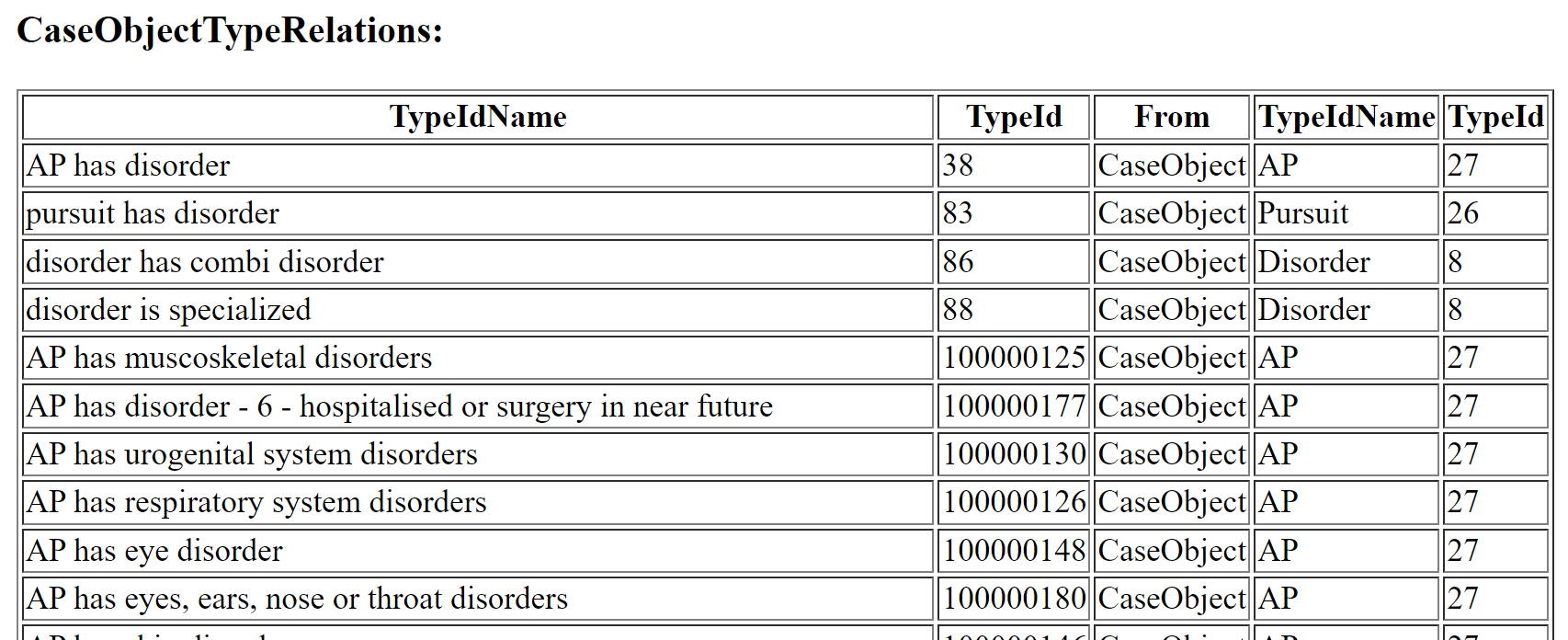
One table lists all CaseAttributeTypes with their name, ID, datatype, CaseObjectType, etc. And a second table listing all the CaseObjectTypeRelations with their related CaseObjectTypes, and the name of the CaseObjectRelationType and its ID:
Print Used CaseAttributeTypes (CATYs) per SourceType
This utility creates an overview of all used CaseAttributeTypes per SourceType.
To use this utility the main method of the class com.cr.compass.util.UsedCATYForSourceTypeInSystem has to be called. This method requires five arguments, of which the last one is optional. The first is the name of the system, the second the ID of the SourceType to be analysed, the third is the locale to be used for the display of names (Pass the locale in the form like en for English, or de for German according to ISO 639-1), while the fourth and fifth argument contain the user and its password to connect to the database. The utility will create a file called print/xxx.html , where xxx stands for the name of the SourceType. Use a browser to visualise this file.
The file lists the used CaseObjectTypes on the left (name and ID), and on the right the corresponding CaseAttributeTypes:

A batch file UsedCATYForSourceTypeInSystem.bat for the Windows environment is included in the bin directory of the standard delivery. Update the arguments before execution.
java com.cr.compass.launcher.CompassLauncher com.cr.compass.util.UsedCATYForSourceTypeInSystem [SYSTEM_ID] [SOURCETYPE-ID] [LOCALE] [USER] [PASSWORD]
Setting the Client-Version-String within the Knowledge Data
COMPASS customers can set a version string in the data.
This is done via a utility that
-
will capture a name for the version string (a name in each available language) and a description (if only one argument is passed).
-
Will use the second passed argument as the name (for all available languages) and the description (if two arguments are passed)
The name of this client-version is displayed by COMPASS RuleManager on its INFO-page, and it is also written to the logging files when starting COMPASS.
To use this utility the main method of the class com.cr.compass.maintenance.util.plugin.SetPatch has to be called. This method requires one argument, which is the name of the system as specified in config/server/compass.properties, and a second optional parameter, that will become the name of the version. This second parameter should only contain alphanumeric symbols plus “_”.
If only one parameter is passed, two dialogue windows appear asking for the name, and a description.
The utility is part of the standard Windows-deployment. Run bin\SetClientVersion.bat to start this utility.
java com.cr.compass.launcher.CompassLauncher com.cr.compass.maintenance.util.plugin.SetPatch [SYSTEM_ID] [PATCH-ID]
Utility POSTouchErrors
The Screenbuilder 2 protocol cannot cope with
-
Questionsthat have not exactly oneUILabelattached -
UILabelsthat contain a line break (/n) -
UIRelationsandUIGroupswith a border text.
When defining a new SourceType according to Screenbuilder 2 - protocol, it is important to avoid the before mentioned situations. This is not necessarily the case with the POS-Modules, as a revision of all of them is a long task, and it is not possible to identify attached UILabels for a question.
The utility is part of the standard Windows delivery. Run bin\PosTouchErrors.bat to start this utility and adapt its three parameters [SYSTEM-ID] = name of the COMPASS-system as specified in compass.properties, [LOCALE] = the locale according to ISO 639-1 to be used, [USER] = your database-userID, [PASSWORD] = your database-password.
The output of this utility specifies all violations in the file print\PosTouchErrors.txt
java com.cr.compass.launcher.CompassLauncher com.cr.compass.util.POSTouchErrors [SYSTEM_ID] [LOCALE] [USER] [PASSWORD]
Use of CaseAttributeTypes
Often users need to know where a certain CaseAttributeType is being used, e.g. in which SourceType, or by which rules.
The utility UseOfCATYs produces a table in a HTML-file, which lists for each CaseAttributeType all its occurrences. Certain occurrences are self-explaining, while others are only for internal use. Latter ones are marked by “internal” in the comment column.
You can copy/paste the whole content of the HTML file from a browser into an Excel-sheet for further processing.
To use this utility, the main method of the class com.cr.compass.util.UseOfCATYs has to be called. This method requires at least 4 arguments, a 5th one is optional. The first is the name of the system, and the second is the locale to be used for the display of the names. Pass the locale in the form like en for English or de for German according to ISO-639-1. The third parameter has to be either Y or N. Y will analyse all standard or POS CaseAttributeTypes, while N will result in the analysis of the standard CaseAttributeTypes only. The fourth parameter is the user-ID which is required for the connection to the database, and the optional fifth parameter is the password for this user.
The utility will create the file print/UseOfCATYs.html. Use a browser to view this file.
A batch file UseOfCATYs.bat for the Windows environment is included in the bin directory of the standard delivery. Update the arguments before execution.
java com.cr.compass.launcher.CompassLauncher com.cr.compass.util.UseOfCATYs [SYSTEM-ID] [LOCALE] [STANDARD/POS]] [USER] [PASSWORD]
Repair Case- / Result-Data
The Cases and Results in the database tables C40_CaseData and C40_ResultData are stored with a unique identifier (column rex_CaseID). The table index makes sure that this identifier is unique for one Subsystem (column rex_SubID).
An additional application-identifier is stored in the XML-Case and/or the XML-Result. These two application identifiers can differ, as it is possible to store the Case X under the name Y in the database.
The following utility "corrects" the Case-XML by replacing the application-identifier in the Case/Result by the (i.e. X with Y). It does this for all Cases and Results of one Subsystem. To not overwrite existing applications, it writes the modified copies to another SubSystem. I.e. the Cases and Results from the original Subsystem are not modified.
While it is legal and possible to run all kind of Compass operations with applications that are stored under a different ID than their Case-ID, the one exception is when running StaR to investigate Cases and Results. StaR requires both identifiers for one Case/Result to be identical.
To run the utility execute the following command:
java com.cr.compass.launcher.CompassLauncher com.cr.compass.util.caserepair.RepairCaseResultData [SYSTEM] [SUBSYSTEM-SOURCE] [SUBSYSTEM-DEST]
| Parameter | Explanation |
|---|---|
SYSTEM |
The SystemID see Terminology |
SUBSYSTEM-SOURCE |
The SubSystem containing the Cases and Results to be "repaired" and copied |
SUBSYSTEM-DEST |
The destination SubSystem where the repaired Cases and Results are copied to. |
A batch file RepairCaseResultData.bat for the Windows environment is included in the bin directory of the standard delivery. Update the arguments before execution.
More explanations about the different identifiers of a Case
Let’s take a look at the tables C40_CaseData and C40_ResultData:
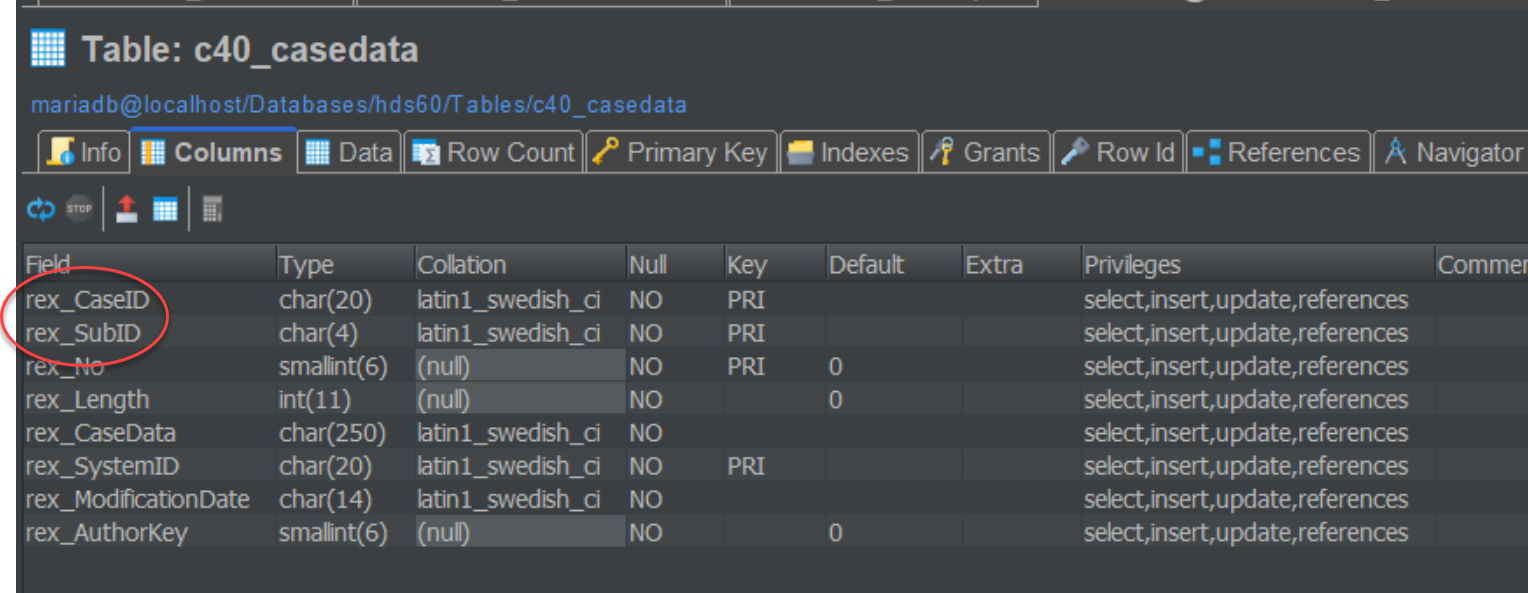
C40_CaseData:
In the table C40_CaseData, the CaseId("11") is stored in the column rex_CaseId. Please note that the SubID is stored in the columns rex_subID:
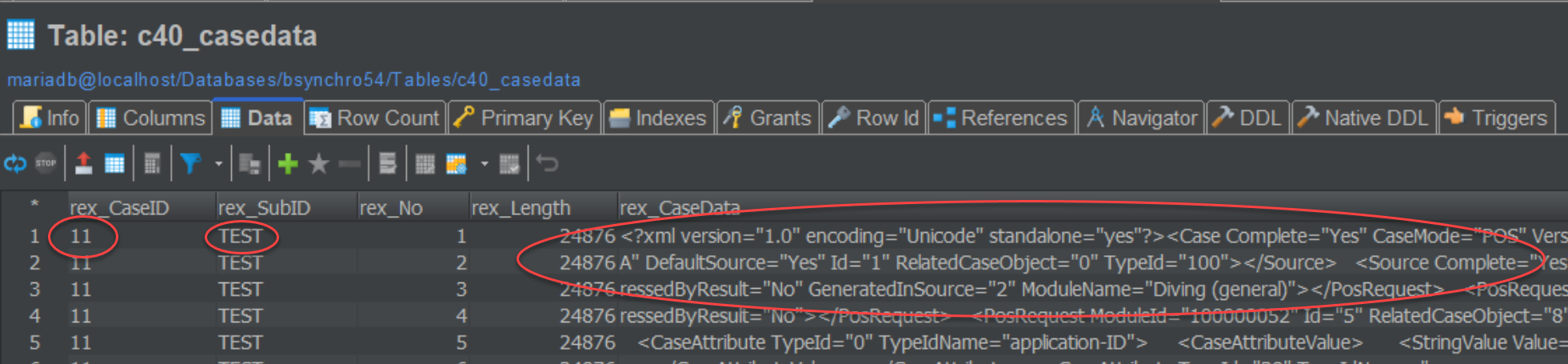
The CaseId ("11") is also stored in two places inside the XML-string which can be found in the column rex_CaseData. The XML of the Case is stored in chunks of 250 characters, which also contains the CaseId - have a look at the representation in the database:
However, the CaseId("11") is also stored in two places inside the XML-string which can be found in the column rex_ResultData : CaseId is also stored in the attributes "id" of element Case and the attribute Value of the CaseAttributeValue of the CaseAttribute of type "ApplicationId" with TypeId "0":
<?xml version="1.0" encoding="UTF-8" standalone="yes"?>
<Case Complete="Yes" CaseMode="POS" VersionName="GCR 6.0 2023/04/08" CSP="1" Id="11" VersionID="1057" Locale="en" NumberOfSourceChanges="4">
	<Source Complete="Yes" TypeIdName="TecDemo" DefaultSource="Yes" Id="1" RelatedCaseObject="0" TypeId="100"/>
	<CaseObject Locale="en" TypeIdName="Application" Id="0" TypeId="25">
		<CaseAttribute TypeId="0" TypeIdName="ApplicationId">
			<CaseAttributeValue>
				<StringValue Value="11"/>
			</CaseAttributeValue>
		</CaseAttribute>
		....
    </CaseObject>
</Case>
C40_ResultData:
The same holds true for the ResultData which are stored in table C40_ResultData:
In the table C40_ResultData, the CaseId("11") is stored in the column rex_CaseId. Please note that the SubID is stored in the columns rex_subID:
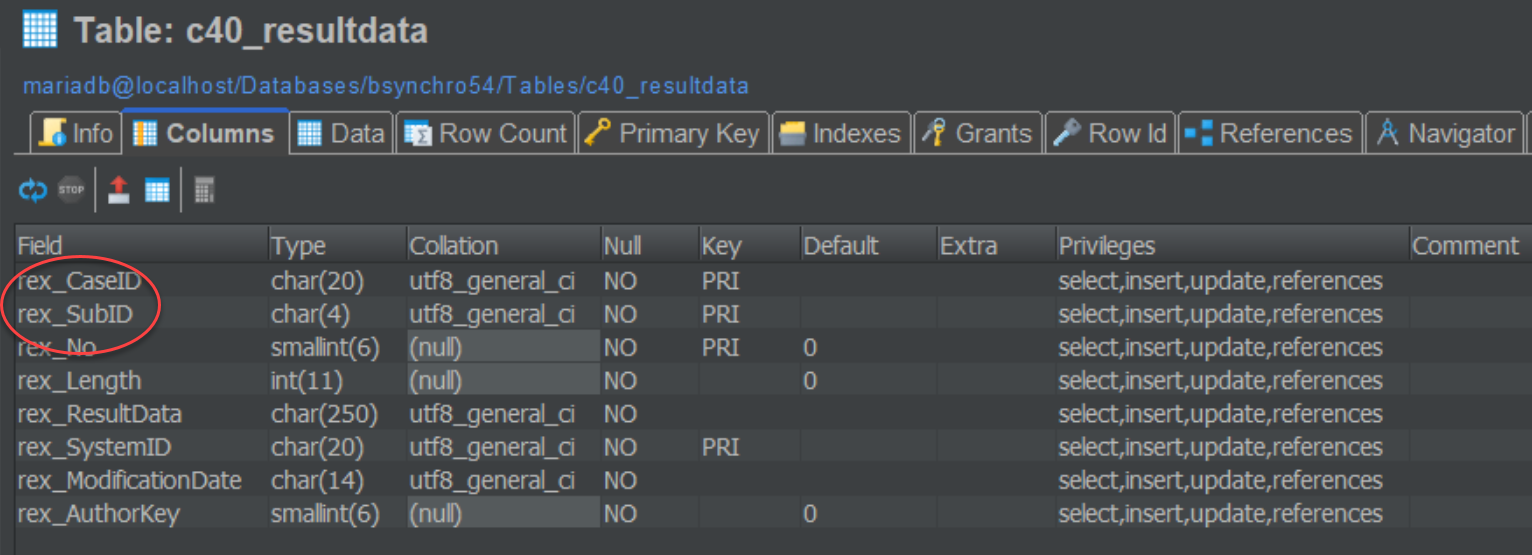
The CaseId("11") is also stored in two places inside the XML-string which can be found in the column rex_ResultDataData. The XML of the Result is also stored in chunks of 250 characters, which also contains the CaseId - have a look at the representation in the database:

The CaseId("11") is also stored in two places inside the XML-string which can be found in the column rex_ResultData : CaseId is also stored in the attributes "id" of element Result and the attribute Value of the CaseAttributeValue of the CaseAttribute of type "ApplicationId" with TypeId "0".
<?xml version="1.0" encoding="UTF-8" standalone="yes"?>
<Result ResultLevelIdName="standard" NumberOfChangeAssessCycles="1" PolicyCanBeIssued="Yes" VersionName="GCR 6.0 2023/04/08" CSP="1" AssessmentDate="20230409180810" Id="11" VersionID="1057" Locale="nl" ResultLevelId="1" NumberOfSourceChanges="2">
	<CaseObject Id="0" TypeId="25" TypeIdName="Application">
		<CaseAttribute TypeId="0" TypeIdName="ApplicationId">
			<CaseAttributeValue>
				<StringValue Value="11"/>
			</CaseAttributeValue>
		</CaseAttribute>
	</CaseObject>

		....
</Case>
Possible mitigation:
If the CaseId - for whatever reason - is not the same in all fields mentioned above, the Case and / or the Result can be repaired by this utility.
It creates a new Sub-System in the selected COMPASS-database, which will be a copy of the source-SubSystem.
For table C40_CaseData, the utility will then select the the CaseId from the column rex_CaseID of the table C40_CaseData and will update the faulty attributes with the contents of said column.
For table C40_ResultData, the utility will also select the the CaseId from the column rex_CaseID of the table C40_ResultData and will update the faulty attributes with the contents of said column.